
How to install the NVIDIA drivers on Ubuntu 18.04 Bionic Beaver Linux
Objective
The objective is to install the NVIDIA drivers on Ubuntu 18.04 Bionic Beaver Linux. This article will discuss three methods of Nvidia driver installation in the following order:
- Automatic Install using standard Ubuntu Repository
- Automatic Install using PPA repository to install Nvidia Beta drivers
- Manual Install using the Official nvidia.com driver
Operating System and Software Versions
- Operating System: - Ubuntu 18.04 Bionic Beaver Linux
Requirements
Privileged access to your Ubuntu 18.04 Bionic Beaver installation will be required.
Difficulty
EASY - MEDIUM
Conventions
- # - requires given linux commands to be executed with root privileges either directly as a root user or by use of
sudo command
- $ - requires given linux commands to be executed as a regular non-privileged user
Automatic Install using standard Ubuntu Repository
The first method is the easiest to perform and in most cases it is the recommended approach. First, detect the model of your nvidia graphic card and the recommended driver. To do so execute:
 $ ubuntu-drivers devices

== /sys/devices/pci0000:00/0000:00:01.0/0000:01:00.0 ==

modalias : pci:v000010DEd00001180sv00001458sd0000353Cbc03sc00i00

vendor   : NVIDIA Corporation

model    : GK104 [GeForce GTX 680]

driver   : nvidia-304 - distro non-free

driver   : nvidia-340 - distro non-free

driver   : nvidia-384 - distro non-free recommended

driver   : xserver-xorg-video-nouveau - distro free builtin

== cpu-microcode.py ==

driver   : intel-microcode - distro free
- Operating System: - Ubuntu 18.04 Bionic Beaver Linux
Requirements
Privileged access to your Ubuntu 18.04 Bionic Beaver installation will be required.
Difficulty
EASY - MEDIUM
Conventions
- # - requires given linux commands to be executed with root privileges either directly as a root user or by use of
sudo command
- $ - requires given linux commands to be executed as a regular non-privileged user
Automatic Install using standard Ubuntu Repository
The first method is the easiest to perform and in most cases it is the recommended approach. First, detect the model of your nvidia graphic card and the recommended driver. To do so execute:
$ ubuntu-drivers devices
== /sys/devices/pci0000:00/0000:00:01.0/0000:01:00.0 ==
modalias : pci:v000010DEd00001180sv00001458sd0000353Cbc03sc00i00
vendor : NVIDIA Corporation
model : GK104 [GeForce GTX 680]
driver : nvidia-304 - distro non-free
driver : nvidia-340 - distro non-free
driver : nvidia-384 - distro non-free recommended
driver : xserver-xorg-video-nouveau - distro free builtin
== cpu-microcode.py ==
driver : intel-microcode - distro free
Conventions
- # - requires given linux commands to be executed with root privileges either directly as a root user or by use of
sudo command
- $ - requires given linux commands to be executed as a regular non-privileged user
Automatic Install using standard Ubuntu Repository
The first method is the easiest to perform and in most cases it is the recommended approach. First, detect the model of your nvidia graphic card and the recommended driver. To do so execute:
$ ubuntu-drivers devices
== /sys/devices/pci0000:00/0000:00:01.0/0000:01:00.0 ==
modalias : pci:v000010DEd00001180sv00001458sd0000353Cbc03sc00i00
vendor : NVIDIA Corporation
model : GK104 [GeForce GTX 680]
driver : nvidia-304 - distro non-free
driver : nvidia-340 - distro non-free
driver : nvidia-384 - distro non-free recommended
driver : xserver-xorg-video-nouveau - distro free builtin
== cpu-microcode.py ==
driver : intel-microcode - distro free
sudo command$ ubuntu-drivers devices
== /sys/devices/pci0000:00/0000:00:01.0/0000:01:00.0 ==
modalias : pci:v000010DEd00001180sv00001458sd0000353Cbc03sc00i00
vendor : NVIDIA Corporation
model : GK104 [GeForce GTX 680]
driver : nvidia-304 - distro non-free
driver : nvidia-340 - distro non-free
driver : nvidia-384 - distro non-free recommended
driver : xserver-xorg-video-nouveau - distro free builtin == cpu-microcode.py ==
driver : intel-microcode - distro free
From the above output we can conclude that the current system has NVIDIA GeForce GTX 680graphic card installed and the recommend driver to install is nvidia-384. If you agree with the recommendation feel free to use ubuntu-drivers command again to install all recommended drivers:
$ sudo ubuntu-drivers autoinstall
Alternatively, install desired driver selectively using the apt command. For example:
$ sudo apt install nvidia-340
Once the installation is concluded, reboot your system and you are done.
Automatic Install using PPA repository to install Nvidia Beta drivers
Using graphics-drivers PPA repository allows us to install bleeding edge Nvidia beta drivers at the risk of unstable system. To proceed first add the ppa:graphics-drivers/ppa repository into your system:
$ sudo add-apt-repository ppa:graphics-drivers/ppa

$ sudo apt update
$ sudo apt update
Next, identify your graphic card model and recommended driver:
$ ubuntu-drivers devices

== /sys/devices/pci0000:00/0000:00:01.0/0000:01:00.0 ==

modalias : pci:v000010DEd00001180sv00001458sd0000353Cbc03sc00i00

vendor   : NVIDIA Corporation

model    : GK104 [GeForce GTX 680]

driver   : nvidia-340 - third-party free

driver   : nvidia-390 - third-party free recommended

driver   : nvidia-387 - third-party free

driver   : nvidia-304 - distro non-free

driver   : nvidia-384 - third-party free

driver   : xserver-xorg-video-nouveau - distro free builtin

== cpu-microcode.py ==

driver   : intel-microcode - distro free
Same as with the above standard Ubuntu repository example, either install all recommended drivers automatically:
$ sudo ubuntu-drivers autoinstall
or selectively using the apt command. Example:
$ sudo apt install nvidia-390
Once done, reboot your system.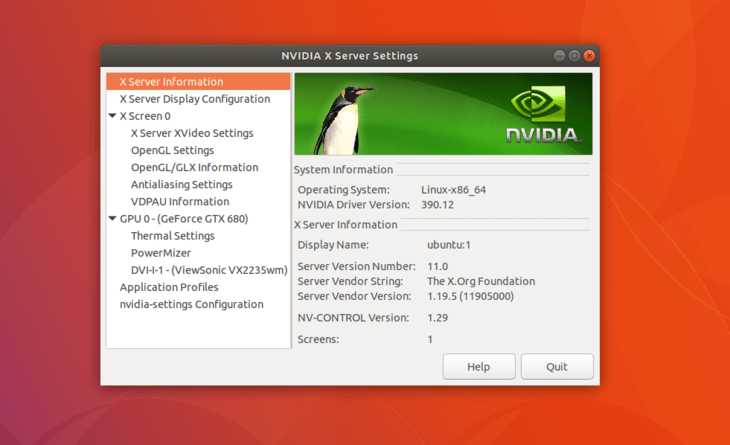
Manual Install using the Official Nvidia.com driver
Identify your NVIDIA VGA card
The below commands will allow you to identify your Nvidia card model:
$  lshw -numeric -C display

or

$ lspci -vnn | grep VGA
Download the Official Nvidia Driver
Using your web browser navigate to the official Nvidiawebsite and download an appropriate driver for your Nvidia graphic card. Save the file into your home directory. Example:
$ ls

NVIDIA-Linux-x86_64-384.111.bin
Install Prerequisites
The following prerequisites are required to compile and install Nvidia driver:
$ sudo dpkg --add-architecture i386

$ sudo apt update

$ sudo apt install build-essential libc6:i386
Disable Nouveau Nvidia driver
Next step is to disable the default nouveau Nvidia driver. Follow this guide on how to disable the default Nouveau Nvidia driver. Make sure you reboot your system before you proceed to the next step.
Stop Desktop Manager
In order to install new Nvidia driver we need to stop the current display server. The easiest way to do this is to change into runlevel 3 using the telinit command. After executing the following linux command the display server will stop, therefore make sure you save all your current work ( if any ) before you proceed:
$ sudo telinit 3
or
$ lspci -vnn | grep VGA
$ ls
NVIDIA-Linux-x86_64-384.111.bin
Install Prerequisites
The following prerequisites are required to compile and install Nvidia driver:
$ sudo dpkg --add-architecture i386
$ sudo apt update
$ sudo apt install build-essential libc6:i386
Disable Nouveau Nvidia driver
Next step is to disable the default nouveau Nvidia driver. Follow this guide on how to disable the default Nouveau Nvidia driver. Make sure you reboot your system before you proceed to the next step.
Stop Desktop Manager
In order to install new Nvidia driver we need to stop the current display server. The easiest way to do this is to change into runlevel 3 using the telinit command. After executing the following linux command the display server will stop, therefore make sure you save all your current work ( if any ) before you proceed:
$ sudo telinit 3
$ sudo apt update
$ sudo apt install build-essential libc6:i386
Stop Desktop Manager
In order to install new Nvidia driver we need to stop the current display server. The easiest way to do this is to change into runlevel 3 using the telinit command. After executing the following linux command the display server will stop, therefore make sure you save all your current work ( if any ) before you proceed:
$ sudo telinit 3
Hit CTRL+ALT+F1 and login with your username and password to open a new TTY1 session.
Install Nvidia Driver
To start installation of Nvidia driver execute the following linux command and follow the wizard:
$ bash NVIDIA-Linux-x86_64-384.111.bin
- Accept License
- The distribution-provided pre-install script failed! Are you sure you want to continue? -> CONTINUE INSTALLATION
- Would you like to run the nvidia-xconfig utility? -> YES
The Nvidia driver is now installed. Reboot your system:
$ sudo reboot
Configure NVIDIA X Server Settings
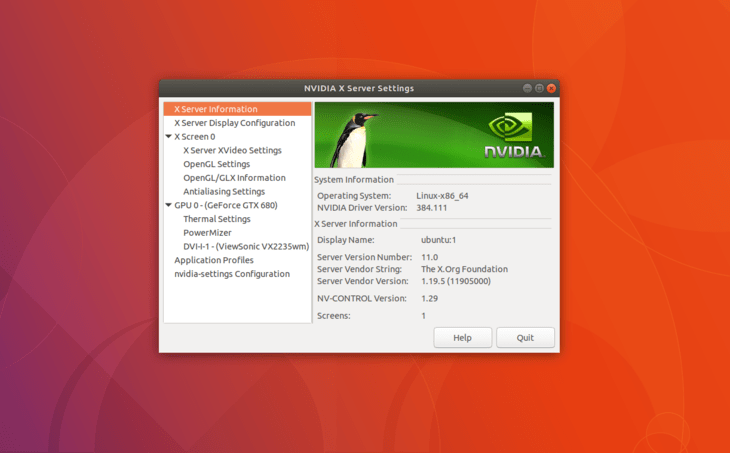
After reboot your should be able to start NVIDIA X Server Settings app from the Activities menu.
Appendix
Error message:
WARNING: Unable to find suitable destination to install 32-bit compatibility libraries
WARNING: Unable to find suitable destination to install 32-bit compatibility libraries
Depending on your needs, this can be safely ignored. However, if you wish to install steam game platform this issue cannot be ignored. To resolve execute:
$ sudo dpkg --add-architecture i386

$ sudo apt update

$ sudo apt install libc6:i386
and re-run the nvidia driver installation.
How to install the NVIDIA drivers on Ubuntu 18.04 Bionic Beaver Linux的更多相关文章
- How to Install Oracle Java 11 on Ubuntu 18.04 LTS (Bionic) Written by Rahul, Updated on April 3, 20
本文系转载备份 请阅读点击下面链接阅读原文以获取更佳地阅读体验.谢谢. How to Install Oracle Java 11 on Ubuntu 18.04 LTS (Bionic) Writt ...
- How to install tensorflow from source on ubuntu 18.04 64bit
1,install dependencies sudo apt-get install openjdk-8-jdk git python-dev python3-dev python-numpy py ...
- [转]How to Install Oracle Java 11 in Ubuntu 18.04/18.10
链接地址:http://ubuntuhandbook.org/index.php/2018/11/how-to-install-oracle-java-11-in-ubuntu-18-04-18-10 ...
- 如何在Ubuntu 18.04上安装和卸载TeamViewer
卸载命令:sudo apt --purge remove teamviewer 安装:https://www.linuxidc.com/Linux/2018-05/152282.htm 如何在Ubun ...
- How To Install Docker On Ubuntu 18.04
Docker is an increasingly popular software package that creates a container for application developm ...
- 升级Ubuntu 16.04 到 Ubuntu 18.04 的方法
特别注意,在进行升级前,请做好重要数据备份工作,防止升级失败或者其他奇怪原因,导致数据丢失或损坏 sudo vim /etc/apt/sources.list 将 http://archive.ubu ...
- Ubuntu 18.04编译AOSP源码
总结一下我从Ubuntu 18.04下编译成功AOSP的过程,以及遇到的坑 我的电脑配置: OS: Ubuntu 18.04 bionic Kernel: x86_64 Linux 4.18.0-17 ...
- Ubuntu 18.04及Snap体验——让Linux入门更简单(转))
https://www.linuxidc.com/Linux/2018-06/152993.htm 初次听说过Linux的时候,是大一计算机课时候老师介绍说除了Windows还有Linux.Unix操 ...
- Ubuntu 18.04 安装、配置和美化
本文章修改自inkss的博文 为什么要修改原文? 本来我是想自己写这么一篇的,但是没想到在百度一搜,居然一篇好文.我之前没看到,真是可惜. 这篇文章主要是帮助我记录一些东西,如题. 原文虽然不错,但是 ...
随机推荐
- 基础篇:4.1)规范化:3d工程图纸出图步骤详解
本章目的:按照工程图出图步骤,更方便出具规范的工程图. 1.工程出图步骤 这是作者个人归纳的步骤,供同行业工程师参考完善. 以solidworks为例,工程出图步骤如下:1.1)打开绘制的3d零件图, ...
- [蓝桥杯][2015年第六届真题]机器人塔(dfs)
题目描述 X星球的机器人表演拉拉队有两种服装,A和B. 他们这次表演的是搭机器人塔. 类似: A B B A B A A A B B B B B A B A B A B ...
- 解决NTFS文件系统下的文件/文件夹属性中没有安全选项卡的问题
注册表项: HKEY_CURRENT_USER\Software\Microsoft\Windows\CurrentVersion\Policies\Explorer 键:NoSecurityTab ...
- js中自执行函数写法
//自执行写法1 (function T(){ alert(1) })() //自执行写法2 var T1=function(){ alert(1) }(); //传值 var para1={a:1; ...
- vue2.0修饰符sync用法
如果子组件是一个弹窗,我们想通过点击关闭按钮来关闭子组件弹窗,子组件弹窗的v-show由变量isVisible控制,这个变量通过props由父组件来注入, 而子组件无法改变props里面的变量的值,但 ...
- eclipse中点不出方法的解决办法
window-preferences-java-editor-Content Assist-Advanced 然后选中右上方的所有 右下方选中一个即可.
- clojure学习笔记(一)
下载地址 需要安装xmind打开 http://pan.baidu.com/s/1dDxKj1B
- 【Lua】遍历目录结果输出到页面中,刷新页面后出现500 Internal Server Error
在通过lua获取目录json字符串,然后作为数据源,通过Extjs生成树的过程中,发生了一个奇怪的问题,那就是获取目录json字符串然后传递给Extjs生成树的这个过程中,一开始都是很顺利的就生成了, ...
- js模块加载框架 sea.js学习笔记
seajs实现了JavaScript 的 模块开发及按模块加载.用来解决繁琐的js命名冲突,文件依赖等问题,其主要目的是令JavaScript开发模块化并可以轻松愉悦进行加载. 官方文档:http:/ ...
- FocusBI: SSIS体系结构(原创)
关注微信公众号:FocusBI 查看更多文章:加QQ群:808774277 获取学习资料和一起探讨问题. <商业智能教程>pdf下载地址 链接:https://pan.baidu.com/ ...