
pygame 笔记-7 生命值/血条处理
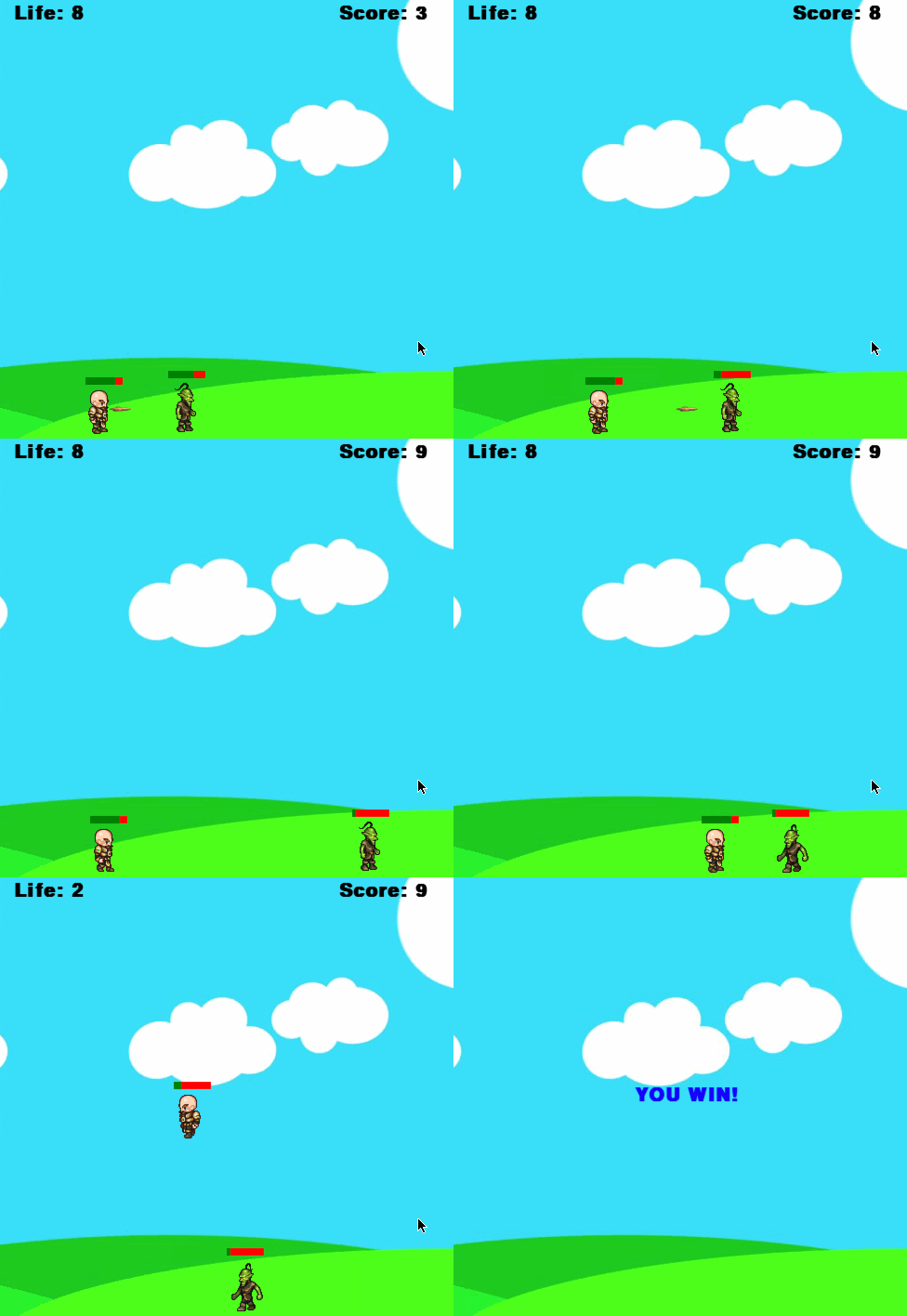
通常游戏中的角色都有所谓的生命值,而且头顶上会有一个血条显示。生命值无非就是一个属性而已,很容易在Player.py类中增加,头顶上的血条其实就是绘制二个矩形,叠加在一起。
以上节的Player.py为例:
import pygame

# 主角

class Player(object):

    def __init__(self, x, y, width, height, img_base_path):

        self.x = x

        self.y = y

        self.width = width

        self.height = height

        self.speed = 5

        self.left = False

        self.right = True

        self.isJump = False

        self.walkCount = 0

        self.t = 10

        self.speed = 5

        # 生命值

        self.life = 10

        self.char = pygame.image.load(img_base_path + 'standing.png')

        self.walkRight = [pygame.image.load(img_base_path + 'actor/R1.png'),

                          pygame.image.load(img_base_path + 'actor/R2.png'),

                          pygame.image.load(img_base_path + 'actor/R3.png'),

                          pygame.image.load(img_base_path + 'actor/R4.png'),

                          pygame.image.load(img_base_path + 'actor/R5.png'),

                          pygame.image.load(img_base_path + 'actor/R6.png'),

                          pygame.image.load(img_base_path + 'actor/R7.png'),

                          pygame.image.load(img_base_path + 'actor/R8.png'),

                          pygame.image.load(img_base_path + 'actor/R9.png')]

        self.walkLeft = [pygame.image.load(img_base_path + 'actor/L1.png'),

                         pygame.image.load(img_base_path + 'actor/L2.png'),

                         pygame.image.load(img_base_path + 'actor/L3.png'),

                         pygame.image.load(img_base_path + 'actor/L4.png'),

                         pygame.image.load(img_base_path + 'actor/L5.png'),

                         pygame.image.load(img_base_path + 'actor/L6.png'),

                         pygame.image.load(img_base_path + 'actor/L7.png'),

                         pygame.image.load(img_base_path + 'actor/L8.png'),

                         pygame.image.load(img_base_path + 'actor/L9.png')]

        self.hit_box = (self.x + 17, self.y + 11, 29, 52)

    def draw(self, win):

        if self.walkCount >= 9:

            self.walkCount = 0

        if self.left:

            win.blit(self.walkLeft[self.walkCount % 9], (self.x, self.y))

            self.walkCount += 1

        elif self.right:

            win.blit(self.walkRight[self.walkCount % 9], (self.x, self.y))

            self.walkCount += 1

        else:

            win.blit(self.char, (self.x, self.y))

        self.hit_box = (self.x + 17, self.y + 11, 29, 52)

        # 血条(头顶的绿色背景矩形)

        pygame.draw.rect(win, (0, 128, 0), (self.hit_box[0], self.hit_box[1] - 10, 40, 8))

        # 血条(头顶的红色背景矩形,即:消耗的血)

        pygame.draw.rect(win, (255, 0, 0),

                         (self.hit_box[0] + self.life * 4, self.hit_box[1] - 10, 40 - self.life * 4, 8))
敌人类Enemy.py也是类似处理:
import pygame

class Enemy(object):

    def __init__(self, x, y, width, height, end, img_base_path):

        self.x = x

        self.y = y

        self.width = width

        self.height = height

        self.path = [x, end]

        self.walkCount = 0

        self.vel = 3

        self.walkRight = [pygame.image.load(img_base_path + 'enemy/R1E.png'),

                          pygame.image.load(img_base_path + 'enemy/R2E.png'),

                          pygame.image.load(img_base_path + 'enemy/R3E.png'),

                          pygame.image.load(img_base_path + 'enemy/R4E.png'),

                          pygame.image.load(img_base_path + 'enemy/R5E.png'),

                          pygame.image.load(img_base_path + 'enemy/R6E.png'),

                          pygame.image.load(img_base_path + 'enemy/R7E.png'),

                          pygame.image.load(img_base_path + 'enemy/R8E.png'),

                          pygame.image.load(img_base_path + 'enemy/R9E.png'),

                          pygame.image.load(img_base_path + 'enemy/R10E.png'),

                          pygame.image.load(img_base_path + 'enemy/R11E.png')]

        self.walkLeft = [pygame.image.load(img_base_path + 'enemy/L1E.png'),

                         pygame.image.load(img_base_path + 'enemy/L2E.png'),

                         pygame.image.load(img_base_path + 'enemy/L3E.png'),

                         pygame.image.load(img_base_path + 'enemy/L4E.png'),

                         pygame.image.load(img_base_path + 'enemy/L5E.png'),

                         pygame.image.load(img_base_path + 'enemy/L6E.png'),

                         pygame.image.load(img_base_path + 'enemy/L7E.png'),

                         pygame.image.load(img_base_path + 'enemy/L8E.png'),

                         pygame.image.load(img_base_path + 'enemy/L9E.png'),

                         pygame.image.load(img_base_path + 'enemy/L10E.png'),

                         pygame.image.load(img_base_path + 'enemy/L11E.png')]

        self.hit_box = (self.x + 17, self.y + 2, 31, 57)

        #生命值

        self.life = 10

    def draw(self, win):

        if self.life > 0:

            self.move()

            if self.walkCount >= 11:

                self.walkCount = 0

            if self.vel > 0:

                win.blit(self.walkRight[self.walkCount % 11], (self.x, self.y))

                self.walkCount += 1

            else:

                win.blit(self.walkLeft[self.walkCount % 11], (self.x, self.y))

                self.walkCount += 1

            self.hit_box = (self.x + 17, self.y + 2, 31, 57)

            # 血条

            pygame.draw.rect(win, (0, 128, 0), (self.hit_box[0], self.hit_box[1] - 12, 40, 8))

            pygame.draw.rect(win, (255, 0, 0),

                             (self.hit_box[0] + self.life * 4, self.hit_box[1] - 12, 40 - self.life * 4, 8))

    def move(self):

        if self.vel > 0:

            if self.x < self.path[1] + self.vel:

                self.x += self.vel

            else:

                self.vel = self.vel * -1

                self.x += self.vel

                self.walkCount = 0

        else:

            if self.x > self.path[0] - self.vel:

                self.x += self.vel

            else:

                self.vel = self.vel * -1

                self.x += self.vel

                self.walkCount = 0
然后主类里,碰撞检测到后,将各自的生命值减1:
import os

from bullet import *

from player import *

from enemy import *

WIN_WIDTH, WIN_HEIGHT = 500, 500

pygame.init()

win = pygame.display.set_mode((WIN_WIDTH, WIN_HEIGHT))

pygame.display.set_caption("first game")

img_base_path = os.getcwd() + '/img/'

bg = pygame.image.load(img_base_path + 'bg.jpg')

clock = pygame.time.Clock()

def redraw_game_window():

    win.blit(bg, (0, 0))

    you_win = font.render('YOU WIN! ', 1, (0, 0, 255))

    you_lost = font.render('YOU LOST! ', 1, (255, 0, 0))

    # 敌人消灭,结束

    if enemy.life <= 0:

        win.blit(you_win, (200, 230))

        pygame.display.update()

        return

    # 主角被打死,结束

    if man.life <= 0:

        win.blit(you_lost, (200, 230))

        pygame.display.update()

        return

    # 主角的生命值

    life_text = font.render('Life: ' + str(man.life), 1, (0, 0, 0))

    win.blit(life_text, (20, 10))

    # 显示击中后的得分

    text = font.render('Score: ' + str(score), 1, (0, 0, 0))

    win.blit(text, (370, 10))

    man.draw(win)

    enemy.draw(win)

    for bullet in bullets:

        bullet.draw(win)

    pygame.display.update()

def collision_check(a, b):

    temp1 = (b.x <= a.x + a.width <= b.x + b.width)

    temp2 = (b.y <= a.y + a.height <= b.y + b.height)

    return temp1 and temp2

# main

font = pygame.font.SysFont('comicsans', 30, True)

man = Player(200, 410, 64, 64, img_base_path)

enemy = Enemy(100, 414, 64, 64, 400, img_base_path)

run = True

score = 0

bullets = []

while run:

    clock.tick(27)

    for event in pygame.event.get():

        if event.type == pygame.QUIT:

            run = False

    # 如果被敌人打到了,主角生命值-1

    if collision_check(man, enemy) or collision_check(enemy, man):

        man.life -= 1

        # 自动跳跃,防止血降得太快

        man.isJump = True

    for b in bullets:

        # 碰撞检测

        if collision_check(b, enemy) or collision_check(enemy, b):

            score += 1

            enemy.life -= 1

            bullets.pop(bullets.index(b))

        if WIN_WIDTH > b.x > 0:

            b.x += b.vel

        else:

            bullets.pop(bullets.index(b))

    keys = pygame.key.get_pressed()

    if keys[pygame.K_SPACE]:

        if man.left:

            direction = -1

        else:

            direction = 1

        if len(bullets) < 5:

            bullets.append(Bullet(man.x + man.width // 2, man.y + man.height // 2, direction, img_base_path))

    if keys[pygame.K_LEFT] and man.x > 0:

        man.x -= man.speed

        man.left = True

        man.right = False

    elif keys[pygame.K_RIGHT] and man.x < win.get_size()[0] - man.width:

        man.x += man.speed

        man.left = False

        man.right = True

    else:

        man.walkCount = 0

    if not man.isJump:

        if keys[pygame.K_UP]:

            man.isJump = True

            man.walkCount = 0

    else:

        if man.t >= -10:

            a = 1

            if man.t < 0:

                a = -1

            man.y -= 0.5 * a * (man.t ** 2)

            man.t -= 1

        else:

            man.isJump = False

            man.t = 10

    redraw_game_window()

pygame.quit()
源码下载: https://github.com/yjmyzz/pygame_tutorial
pygame 笔记-7 生命值/血条处理的更多相关文章
- 关于Unity中NGUI的3D角色血条的实现
首先要到Unity的Assets Store里面去下载一个扩展的Package叫NGUI HUD Text v1.13(81),注意如果没有安装NGUI就必须先安装NGUI插件,否则会用不了,因为HU ...
- unity3d-游戏实战突出重围,第二天 制作血条
using UnityEngine; using System.Collections; public class xt : MonoBehaviour { //红色血条 public Texture ...
- UI3D转2D平面显示UI3DTo2D血条显示
UI3D转2D平面显示UI3DTo2D血条显示: using UnityEngine; using System.Collections; public class UI3DTo2D : MonoBe ...
- Shader实例:NGUI制作网格样式血条
效果: 思路: 1.算出正确的uv去采样过滤图,上一篇文章说的很明白了.Shader实例:NGUI图集中的UISprite正确使用Shader的方法 2.用当前血量占总血量的百分比来设置shader中 ...
- UE4 使用UGM制作血条
声明:本文是自己做的项目,可能不是最好的方法,或有错误使用方式.各位不喜勿喷! HP进度 HP背景 将上面的资源拖到UE4中(使用UE4自带的颜色也可实现效果,具体参考官方教程 https://doc ...
- Unity3D人物头顶名称与血条更新与绘制
using UnityEngine; using System.Collections; public class NPC : MonoBehaviour { //主摄像机对象 private Cam ...
- unity如何显示血条(不使用NGUI)
用unity本身自带的功能,如何显示血条? 显示血条,从资源最小化的角度,只要把一个像素的色点放大成一个矩形就足够,三个不同颜色的矩形,分别显示前景色,背景色,填充色,这样会消耗最少的显存资源. un ...
- Unity UGUI HUD 怪物血条实现
首先做一个血条,创建一个名为Follow3DObject的脚本添加到血条控件上. Follow3DObject.cs的代码如下: using UnityEngine; using System.Col ...
- 使用 NGUI 实现头顶文字及血条
以下是 NGUI HUD Text 实现的: 基本原理: 1. 在角色头顶绑一个点 Pivot,用于对齐 2. 因为界面总是覆盖在人物头顶信息的上面,所以将 UIRoot 分为2个 Panel:1) ...
随机推荐
- raspberry pi恢复jessie镜像之后
1.更新源 nano /etc/apt/source.list deb http://mirrordirector.raspbian.org/raspbian/ jessie main contrib ...
- 记录一次惊心动魄的sql去重
)) )) url 为判重依据,保留最大id其他的数据状态改为删除状态. concat()函数,为字符串拼接函数 从外到内分析sql 第一层四个条件界定,第一个是source渠道,第二个是未删除状态, ...
- P1892 [BOI2003]团伙 并查集
题目描述 1920年的芝加哥,出现了一群强盗.如果两个强盗遇上了,那么他们要么是朋友,要么是敌人.而且有一点是肯定的,就是: 我朋友的朋友是我的朋友: 我敌人的敌人也是我的朋友. 两个强盗是同一团伙的 ...
- P2577 [ZJOI2005]午餐 状压DP
题目描述 上午的训练结束了,THU ACM小组集体去吃午餐,他们一行N人来到了著名的十食堂.这里有两个打饭的窗口,每个窗口同一时刻只能给一个人打饭.由于每个人的口味(以及胃口)不同,所以他们要吃的菜各 ...
- URL简介
一般来说,http请求都会和URL地址有关,那么今天就来说说URL的组成部分. 实例:http://192.168.1.12/phpwind/searcher.php?keyword=phpwind& ...
- gradle修改apk包名和apk文件名
需求1:根据渠道不同给包名添加不同的后缀名 方案: //先定义默认包名,用来复用 def packageName = "xxx.xxxx.xxxx" defaultConfig { ...
- Nowcoder contest 370B Rinne Loves Graph 【分层图最短路】
<题目链接> 题目大意: Island 是有一些奇怪的城镇和道路构成的(题目需要,游戏党勿喷),有些城镇之间用双向道路连接起来了,且每条道路有它自己的距离.但是有一些城镇已经被派兵戒严,虽 ...
- 使用Nginx+uwsgi在亚马逊云服务器上部署python+django项目完整版(二)——部署配置及相关知识
---恢复内容开始--- 一.前提: 1.django项目文件已放置在云服务器上,配置好运行环境,可正常运行 2.云服务器可正常连接 二.相关知识 1.python manage.py runserv ...
- kafka-manager配置和使用
kafka-manager配置 最主要配置就是用于kafka管理器状态的zookeeper主机.这可以在conf目录中的application.conf文件中找到. kafka-manager.zkh ...
- [MongoDB] MongoDB管理:使用killOp干掉Long Running Operation
http://www.mongoing.com/archives/2563 MongoDB提供了killOp请求,用于干掉运行时间很长的请求,killOp通常需要与currentOp组合起来使用:先根 ...