
Salesforce LWC学习(三十二)实现上传 Excel解析其内容
本篇参考:salesforce lightning零基础学习(十七) 实现上传 Excel解析其内容
上一篇我们写了aura方式上传excel解析其内容。lwc作为salesforce的新宠儿,逐渐的在去aura化,这种功能怎么能lwc不搞一份,所以本篇来了,直接上代码。
excelImportForLwc.html
<template>

    <lightning-input type="file" label="上传" onchange={excelFileToJson} disabled={disableButton} accept="xlsx" multiple="false"></lightning-input>

    <lightning-button label="打印结果" onclick={printResult} disabled={disableButton}></lightning-button>

</template>
excelImportForLwc.js:因为 loadScript是一个 Promise操作,不是瞬间同步的操作,所以初始化先给按钮disable掉,加载完js资源以后启用。
import { LightningElement,track } from 'lwc';

import sheetJS from '@salesforce/resourceUrl/sheetJS';

import {loadScript } from 'lightning/platformResourceLoader';

import { ShowToastEvent } from 'lightning/platformShowToastEvent';

export default class ExcelImportForLwc extends LightningElement {

    @track dataList = [];

    @track disableButton = true;

    connectedCallback() {

        loadScript(this, sheetJS).then(() => {

             console.log('加载 sheet JS完成');

             this.disableButton = false;

        });

    }

    excelFileToJson(event) {

        event.preventDefault();

        let files = event.target.files;

        const analysisExcel = (file) =>

        new Promise((resolve, reject) => {

            const reader = new FileReader();

            reader.readAsBinaryString(file);

            reader.onload = () => resolve(reader.result);

            reader.onerror = (error) => reject(error);

        });

        analysisExcel(files[0])

        .then((result) => {

            let datas = []; // 存储获取到的数据

            let XLSX = window.XLSX;

            let workbook = XLSX.read(result, {

                type: 'binary'

            });

            for (let sheet in workbook.Sheets) {

                if (workbook.Sheets.hasOwnProperty(sheet)) {

                    datas = datas.concat(XLSX.utils.sheet_to_json(workbook.Sheets[sheet]));

                }

            }

            this.dataList = datas;

            const toastEvent = new ShowToastEvent({

                variant: "success",

                message: '文件已经上传解析成功',

            });

            this.dispatchEvent(toastEvent);

        });

    }

    printResult() {

        console.log(JSON.stringify(this.dataList));

    }

}
效果展示:
1. 上传按钮点击上传成功以后展示 toast

2. 点击打印结果按钮console出来excel内容
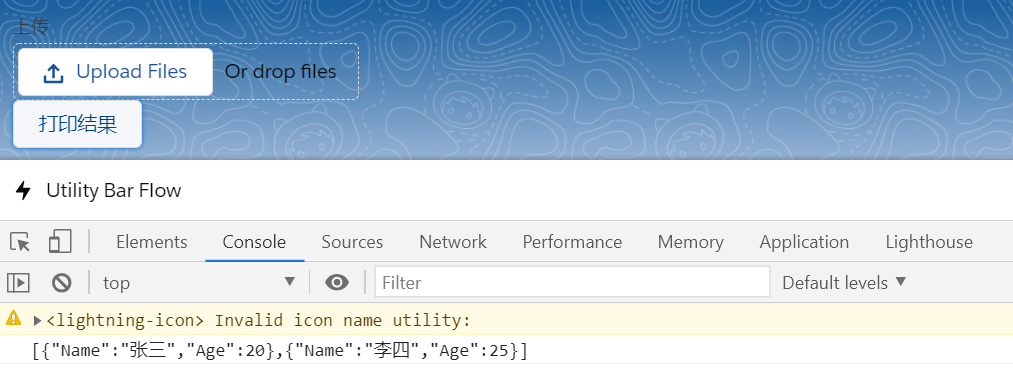
总结:lwc调用区别就是声明一个 Promise,在Promise里面通过 FileReader的onload去进行处理。处理方式和aura相同,只是部分写法区别。篇中仍然有很多没有优化,包括文件大小限制,error场景处理等等。感兴趣的自行完善。篇中有错误地方欢迎指出,有不懂欢迎留言。
Salesforce LWC学习(三十二)实现上传 Excel解析其内容的更多相关文章
- Salesforce LWC学习(三十九) lwc下quick action的recordId的问题和解决方案
本篇参考: https://developer.salesforce.com/docs/component-library/bundle/force:hasRecordId/documentation ...
- Salesforce LWC学习(三十) lwc superbadge项目实现
本篇参考:https://trailhead.salesforce.com/content/learn/superbadges/superbadge_lwc_specialist 我们做lwc的学习时 ...
- salesforce lightning零基础学习(十七) 实现上传 Excel解析其内容
本篇参考: https://developer.mozilla.org/zh-CN/docs/Web/API/FileReader https://github.com/SheetJS/sheetjs ...
- Salesforce LWC学习(三十四) 如何更改标准组件的相关属性信息
本篇参考: https://www.cnblogs.com/zero-zyq/p/14548676.html https://www.lightningdesignsystem.com/platfor ...
- Salesforce LWC学习(三十六) Quick Action 支持选择 LWC了
本篇参考: https://developer.salesforce.com/docs/component-library/documentation/en/lwc/lwc.use_quick_act ...
- Salesforce LWC学习(三十五) 使用 REST API实现不写Apex的批量创建/更新数据
本篇参考: https://developer.salesforce.com/docs/atlas.en-us.224.0.api_rest.meta/api_rest/resources_compo ...
- Salesforce LWC学习(三十八) lwc下如何更新超过1万的数据
背景: 今天项目组小伙伴问了一个问题,如果更新数据超过1万条的情况下,有什么好的方式来实现呢?我们都知道一个transaction只能做10000条DML数据操作,那客户的操作的数据就是超过10000 ...
- Salesforce LWC学习(四十) dynamic interaction 浅入浅出
本篇参考: Configure a Component for Dynamic Interactions in the Lightning App Builder - Salesforce Light ...
- springMVC3学习(十二)--文件上传优化CommonsMultipartResolver
基于上一篇文件上传发现效率很慢,我们应该对它进行优化 使用springMVC对文件上传的解析器 来处理文件上传的时候需要在spring的applicationContext里面加上springMVC ...
随机推荐
- 让你像黑客一样写代码(not really)
让你像黑客一样写代码(not really) http://poznan.tvp.pl 这是一个波兰的视频网站. poznan 波兹南(波兰城市 视屏链接 http://video.sina.com. ...
- vue template
vue template <template> <div class="custom-class"> ... </div> </templ ...
- Vue 组件之间通信 All in One
Vue 组件之间通信 All in One 组件间通信 1. 父子组件之间通信 https://stackblitz.com/edit/vue-parent-child-commutation?fil ...
- 如何用 js 实现一个 bind 函数
如何用 js 实现一个 bind 函数 原理 实现方式 总结 refs https://developer.mozilla.org/en-US/docs/Web/JavaScript/Referenc ...
- CSS transition & shorthand property order
CSS transition & shorthand property order shorthand property https://developer.mozilla.org/en-US ...
- http cache & 浏览器缓存,存储位置的优先级,条件?
http cache & 浏览器缓存,存储位置的优先级,条件? memory cache disk cache 浏览器缓存,存储位置的优先级,条件, 机制,原理是什么? from memory ...
- NGK公链脱颖而出,成为值得期待的项目!
当下2020年是动荡的一年,全世界经济危机汲汲可危,在这个特殊的时刻,有人抱怨说这是最坏的年代,也有人庆幸说这是最好的年代,历史不会重演,但总是惊人的相似,首先带你回顾一下上一次金融危机出现的2008 ...
- 瞧一瞧React Fiber
啥是React Fiber? React Fiber,简单来说就是一个从React v16开始引入的新协调引擎,用来实现Virtual DOM的增量渲染. 说人话:就是一种能让React视图更新过程变 ...
- ELK的一点认识
为什么需要ELK: 一般大型系统是一个分布式部署的架构,不同的服务模块部署在不同的服务器上,问题出现时,大部分情况需要根据问题暴露的关键信息,定位到具体的服务器和服务模块,构建一套集中式日志系统,可以 ...
- Dyno-queues 分布式延迟队列 之 辅助功能
Dyno-queues 分布式延迟队列 之 辅助功能 目录 Dyno-queues 分布式延迟队列 之 辅助功能 0x00 摘要 0x01 前文回顾 0x2 Ack机制 2.1 加入Un-ack集合 ...