
WPF中ControlTemplate和DataTemplate的区别
下面代码很好的解释了它们之间的区别:
<Window x:Class="WPFTestMe.Window12"

        xmlns="http://schemas.microsoft.com/winfx/2006/xaml/presentation"

        xmlns:x="http://schemas.microsoft.com/winfx/2006/xaml"

        Title="Window12" Height="300" Width="300">

    <Window.Resources>

        <DataTemplate x:Key="ButtonContentTemplate">

            <StackPanel Orientation="Horizontal" Background="Red">

                <Grid Height="8" Width="8" >

                    <Path HorizontalAlignment="Stretch"

           Margin="0,0,1.8,1.8"

           VerticalAlignment="Stretch" Stretch="Fill" Stroke="#FF000000"

           Data="M0.5,5.7 L0.5,0.5 L5.7,0.5"/>

                    <Path HorizontalAlignment="Stretch"

           Margin="2,3,0,0"

           VerticalAlignment="Stretch" Stretch="Fill" Stroke="#FFFFFFFF"

           Data="M3.2,7.5 L7.5,7.5 L7.5,3.5"/>

                    <Path HorizontalAlignment="Stretch"

           Margin="1.2,1.4,0.7,0.7"

           VerticalAlignment="Stretch" Fill="#FFFFFFFF" Stretch="Fill" Stroke="#FF000000"

           Data="M2.5,2.5 L7.5,7.5"/>

                    <Path HorizontalAlignment="Stretch"

           Margin="1.7,2.0,1,1"

           VerticalAlignment="Stretch" Stretch="Fill" Stroke="#FF000000"

           Data="M3,7.5 L7.5,7.5 L7.5,3.5"/>

                    <Path HorizontalAlignment="Stretch"

           Margin="1,1,1,1"

           VerticalAlignment="Stretch" Stretch="Fill" Stroke="#FFFFFFFF"

           Data="M1.5,6.5 L1.5,1 L6.5,1.5"/>

                </Grid>

                <ContentPresenter Content="{Binding}"/>

            </StackPanel>

        </DataTemplate>

        <ControlTemplate TargetType="Button" x:Key="ButtonControlTemplate">

            <Grid>

                <Ellipse Fill="{TemplateBinding Background}"/>

                <ContentPresenter HorizontalAlignment="Center"

              VerticalAlignment="Center"/>

            </Grid>

        </ControlTemplate>

    </Window.Resources>

    <StackPanel>

        <Button ContentTemplate="{StaticResource ButtonContentTemplate}" Content="1"/>

        <Button Template="{StaticResource ButtonControlTemplate}" ContentTemplate="{StaticResource ButtonContentTemplate}" Content="2"/>

        <Button Template="{StaticResource ButtonControlTemplate}" ContentTemplate="{StaticResource ButtonContentTemplate}" Content="3"/>

    </StackPanel>

</Window>
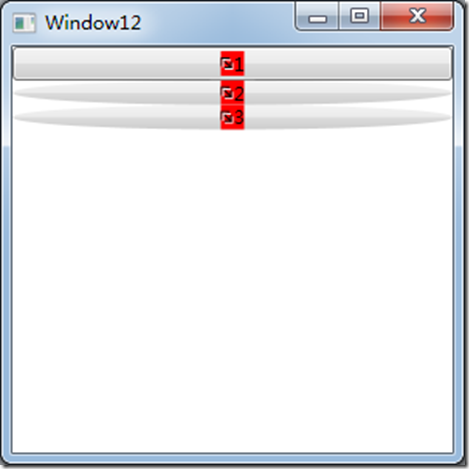
效果如下:
WPF中ControlTemplate和DataTemplate的区别的更多相关文章
- WPF中自定义的DataTemplate中的控件,在Window_Loaded事件中加载机制初探
原文:WPF中自定义的DataTemplate中的控件,在Window_Loaded事件中加载机制初探 最近因为项目需要,开始学习如何使用WPF开发桌面程序.使用WPF一段时间之后,感 ...
- WPF : ControlTemplate和DataTemplate的区别
ControlTemplate用于描述控件本身. 使用TemplateBinding来绑定控件自身的属性, 比如{TemplateBinding Background}DataTemplate用于描述 ...
- WPF中UserControl和DataTemplate
最新更新: http://denghejun.github.io 前言 前言总是留给我说一些无关主题的言论,WPF作为全新Microsoft桌面或web应用程序显示技术框架, 从08年开始,一直到现在 ...
- 从0 开始 WPF MVVM 企业级框架实现与说明 ---- 第四讲 WPF中 ControlTemplate
上讲我们介绍了DataTemplate,现在我们就介绍下ControlTemplate,可能后面大多在编码时候会出现一些英文,工作习惯,请见谅. ControlTemplate: 控件的外观,也就是控 ...
- WPF的ControlTemplate和DataTemplate简介
首先理清几个概念,Template.ControlTemplate.ContentTemplate.DataTemplate.ContentControl 这几个东西名字都差不多,意思感觉也接近,初次 ...
- wpf中在style的template寻找ControlTemplate和DataTemplate的控件
一.WPF中的两棵树 WPF中每个控件的Template都是由ControlTemplate构成,ControlTemplate包含了构成该控件的各种子控件,这些子控件就构成了VisualTree:而 ...
- ControlTemplate,ItemsPanelTemplate,DataTemplate(wpf)
在WPF中有三大模板ControlTemplate,ItemsPanelTemplate,DataTemplate.其中ControlTemplate和ItemsPanelTemplate是控件模板, ...
- [转]在WPF中区别TextBlock和Label
TextBlock和Label都是用来显示少量数据的.好多文章对Label存在的描述都是它允许使用"快速获取"."快速获取"就是允许你用Alt加上其它的按键快速 ...
- WPF Template模版之DataTemplate与ControlTemplate【一】
WPF Template模版之DataTemplate与ControlTemplate[一] 标签: Wpf模版 2015-04-19 11:52 510人阅读 评论(0) 收藏 举报 分类: -- ...
随机推荐
- NYOJ_37.回文字符串 (附滚动数组)
时间限制:3000 ms | 内存限制:65535 KB 难度:4 描述 所谓回文字符串,就是一个字符串,从左到右读和从右到左读是完全一样的,比如"aba".当然,我们给你的问 ...
- C#学习笔记-----C#枚举中的位运算权限分配
一.基础知识 什么是位运算? 用二进制来计算,1&2:这就是位运算,其实它是将0001与0010做位预算 得到的结果是 0011,也就是3 2.位预算有多少种?(我们就将几种我们权限中会 ...
- Dubbo超时和重连机制
dubbo启动时默认有重试机制和超时机制.超时机制的规则是如果在一定的时间内,provider没有返回,则认为本次调用失败,重试机制在出现调用失败时,会再次调用.如果在配置的调用次数内都失败,则认为此 ...
- 11g 使用rman duplicate复制数据库,创建辅助实例
一,创建所需目录 1)创建审计文件目录 PROD1@dbrac1 /dsg/oracle11$ cd $ORACLE_BASE/admin PROD1@dbrac1 /u01/app/oracle/a ...
- BI 项目管理之角色和职责
DW/BI 系统在生命周期中需要许多不同的角色和技能,它们来自业务和技术领域.本文将介绍创建DW/BI 系统所涉及的主要角色.角色和人之间很少是一对一关系.与我们合作的团队小到只有一人,大 ...
- C# 遍历指定目录下的所有文件及文件夹
// DirectoryInfo di = new DirectoryInfo(@"D:\Test"); // FindFile(di); static void FindFile ...
- linux下的c编程
linux下的c编程 Linux 系统上可用的 C 编译器是 GNU C 编译器, 它建立在自由软件基金会的编程许可证的基础上,因此可以自由发布.GNU C 对标准 C 进行一系列扩展,以增强标准 ...
- java-xml格式化
参考:http://www.oschina.net/code/snippet_17793_4733 package com.ddatsh; import java.io.IOException; ...
- MySQL5.5出面ERROR 1045 (28000): Access denied for user 'root'@'localhost' (using password: YES)问题的解决办法
问题描述 安装完MySQL5.5数据库,使用Navicat Premium以及命令窗口连接数据库都报以下错误: ERROR 1045 (28000): Access denied for user ' ...
- DOM对象与jquery对象的区别
jQuery对象和DOM对象使用说明,需要的朋友可以参考下. 1.jQuery对象和DOM对象 第一次学习jQuery,经常分辨不清哪些是jQuery对象,哪些是 DOM对象,因此需要重点了解jQue ...