
CentOS 6.6 安装 PHP Memcached 扩展
PHP 的 Memcached扩展使用了 libmemcached 库提供的 api 与 memcached 服务端进行交互。它同样提供了一个 session 处理器(memcached)。
PHP 的 Memcached 扩展支持 getMulti,setMulti 等方法,而 Memcache 扩展则不支持;
在安装 Memcached 扩展的时候需要先安装 libmemcached,libmemcached 是 Memcached 的 C 客户端,它具有的优点是低内存,线程安全等特点,在高并发下,稳定性果断提高。
首先安装 libmemcached 1.0.18
进入 /usr/local/src ,下载源码包:
[root@localhost src]# wget https://launchpad.net/libmemcached/1.0/1.0.18/+download/libmemcached-1.0.18.tar.gz
解压:
[root@localhost src]# tar -zxvf libmemcached-1.0.18.tar.gz
进入解压后文件夹:
[root@localhost libmemcached-1.0.18]# cd libmemcached-1.0.18
配置:
[root@localhost libmemcached-1.0.18]# ./configure --prefix=/usr/local/libmemcached --with-memcached
编译和安装:
[root@localhost libmemcached-1.0.18]# make && make install
PHP 的 Memcached 2.2.0 扩展的安装
进入 /usr/lcoal/src ,下载扩展的源码包:
[root@localhost src]# wget https://launchpad.net/libmemcached/+download/memcached-2.2.0.tgz
解压:
[root@localhost src]# tar -zxvf memcached-2.2.0.tgz
进入解压后目录:
[root@localhost src]# cd memcached-2.2.0
用 phpize 给 PHP 动态添加扩展:
[root@localhost memcached-2.2.0]# /usr/local/php/bin/phpize
配置:
[root@localhost memcached-2.2.0]#./configure --with-memcached -with-php-config=/usr/local/php/bin/php-config --with-libmemcached-dir=/usr/local/libmemcached --enable-memcached
如果报错:
configure: error: no, sasl.h is not available. Run configure with --disable-memcached-sasl to disable this check
那么配置改为:
[root@localhost memcached-2.2.0]# ./configure --with-memcached -with-php-config=/usr/local/php/bin/php-config --with-libmemcached-dir=/usr/local/libmemcached --enable-memcached --disable-memcached-sasl
编译和安装:
[root@localhost memcached-2.2.0]# make && make install
安装完成:

这时会生成一个 memcached.so 文件:
/usr/local/php/lib/php/extensions/no-debug-non-zts-20131226/
打开 php.ini 文件,添加一条"extension=/usr/local/php/lib/php/extensions/no-debug-non-zts-20131226/memcached.so"
重启 LNMP。
访问 phpinfo:
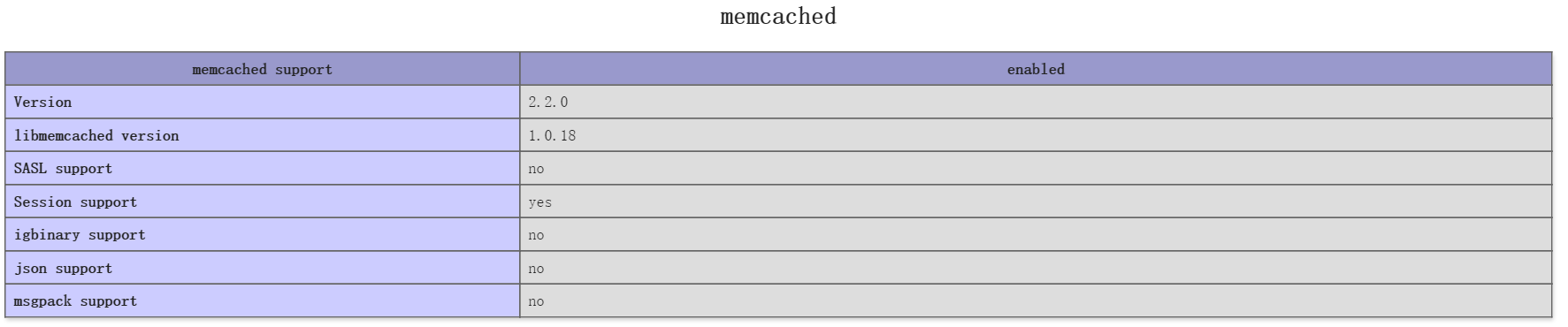
参考:
Linux基于libmemcached,php扩展memcached的安装
CentOS 6.6 安装 PHP Memcached 扩展的更多相关文章
- centos 安装php7 memcached扩展
在使用下面这种方式安装php7 memcached扩展时,先要安装好memcached服务器yum -y install php70w-pecl-memcached
- 安装PHP memcached扩展
引用 pecl.php.net有两个memcache扩展: memcache memcached extension memcached PHP extension for interfacing ...
- CentOS-6.4 安装 PHP Memcached 扩展
1.获取安装文件包 [root@phpdragon home]# wget https://launchpad.net/libmemcached/1.0/1.0.18/+download/libmem ...
- linux centos系统 php安装GD库扩展
yum --enablerepo=remi-php56 install php-gd php-mysql php-mbstring php-xml php-mcrypt //安装GD库扩展 servi ...
- Cent OS 6.5安装 php memcached扩展
首先查看memcache的依赖库是否有安装,如果对这个有疑问可以参考php手册的memcache的安装需求说明 命令如下: 查询: rpm -qa | grep libevent 安装:yum -y ...
- centos 6.5 安装php redis 扩展
一.安装: 其中,添加PHP扩展需要用到 phpize,所以我们需要安装 php-devel 这个包. #yum install php-devel 然后编译安装phpredis: #git clon ...
- Centos 下php安装配置xdebug扩展
2018年05月02日 19:54:42 杨汉松 阅读数:44 1.下载安装xdebug 获取xdebug wget http://www.xdebug.org/files/xdebug-2.3. ...
- (转发)centos,redhat 系统为php安装memcached扩展
转自:http://www.itnose.net/detail/6111623.html 1. 通过yum安装 yum -y install memcached #安装完成后执行: memcached ...
- centos系统为php安装memcached扩展
1. 通过yum安装 yum -y install memcached #安装完成后执行: memcached -h #出现memcached帮助信息说明安装成功 2. 加入启动服务 chkconfi ...
随机推荐
- JS实现类似网页的测试考卷
js实现table中获取不同td的值,并且md5加密,匹配md5的值(避免通过查看网页源代码可以看到正确答案),再用js前端判断输入与正确的值是否相同.最后再把错误的单词计数,并且输出,后端加入对应错 ...
- OpenCV(5) 对比度和亮度
公式: 两个参数 \alpha > 0 和 \beta 一般称作 增益 和 偏置 参数.我们往往用这两个参数来分别控制 对比度 和 亮度 . #include "stdafx. ...
- ASP.NET MVC中使用highcharts 生成简单的折线图
直接上步骤: 生成一个options,选项包含了一些基本的配置,如标题,坐标刻度,serial等: 配置X轴显示的Category数据,为一个数组: 配置Y轴显示的数据,也为一个数据: 用 ...
- Python学习笔记03
区间访问:[from:to:step] step默认是1:from表示起始索引(包括),to表示结束索引(不包括) step如果有符号,表示方向从右到左; from,to有符号,表示从倒数开始算, ...
- js点击a链接弹出alert对话框
代码 <html> <head> <meta charset="utf-8"> <meta name="generator&qu ...
- 【原】iOS学习42即时通信之XMPP(1)
1. 即时通信 1> 概述 即时通讯(Instant Messaging)是目前Internet上最为流行的通讯方式,各种各样的即时通讯软件也层出不穷,服务提供商也提供了越来越丰富的通讯服务功能 ...
- Visual Studio蛋疼问题解决
监视变量显示未定义标识符: VS2012在编译的时候采用了较快的编译模式,所以有些变量就显示未定义了. 解决方案: 项目->属性->c/c++->优化->改为禁用/OD ...
- BZOJ2629 : binomial
根据Lucas定理,等价于在$P$进制下每一位分别求组合数最后乘积模$P$. 因为答案为$0$的并不好算,所以可以考虑用$n+1$减去其它所有的答案. 那么每一位的组合数都不能是$0$,那么这就保证了 ...
- gulp下静态资源的合并、压缩、MD5后缀
var gulp = require('gulp'); var RevAll = require('gulp-rev-all'); var uglify = require('gulp-uglify' ...
- Codeforces Round #215 (Div. 2) C. Sereja and Algorithm
#include <iostream> #include <vector> #include <algorithm> #include <string> ...