
$Django 表设计,登陆图片验证
pip3 install pillow #PIL
登陆图片验证(未实现局部刷新)
详细:https://www.cnblogs.com/qiangyuge/p/8025168.html
def get_color():
    import random
    return (random.randint(0,255),random.randint(0,255),random.randint(0,255))
def get_text(request):
    import random
    a=str(random.randint(0,9))
    b=chr(random.randint(65,90))
    c=chr(random.randint(97,122))
    d=''
    for i in range(5):
        d+=random.choice([a,b,c])
    request.session['code']=d
    return d
def img_code(request):
    if request.method=='GET':
        from PIL import ImageDraw, Image,ImageFont
        from io import BytesIO
        img=Image.new('RGB',(320,30),color=get_color())
        #画字
        img_draw=ImageDraw.Draw(img)
        font=ImageFont.truetype('static/aa.TTF',size=25)
        img_draw.text((120,-5),get_text(request),get_color(),font=font,)
        f = BytesIO ()
        img.save (f, 'png')
        data = f.getvalue ()
        return HttpResponse(data)

**********************************************************************************
# 第一种方式
# with open('static/img/lhf.jpg','rb') as f:
# # 图片二进制
# data=f.read()
# return HttpResponse(data)
# 第二种方式:随机生成一张图片
# pip3 install Pillow
# pillow 是一个图形处理的模块,功能很强强大
# 生成一张图片,第一个参数是模式:RGB,第二个参数是图片大小,第三个参数是图片颜色
# img = Image.new('RGB', (320, 35), color=get_random_color())
# # 保存到本地
# with open('valid_code.png', 'wb') as f:
# # 直接用img的save方法,第一个参数是空文件,第二个参数图片格式
# img.save(f, 'png')
# # 打开文件,再返回
# with open('valid_code.png', 'rb') as f:
# data = f.read()
# return HttpResponse(data)
# 第三种方式
# 在内存中生成一个空文件(把它想象成 open('valid_code.png', 'wb') as f:)
# 一个是在硬盘上,一个是在内存中
# img = Image.new('RGB', (320, 35), color=get_random_color())
# f = BytesIO()
# # 把图片保存到f中
# # 放到内存中,存取比较快,而且有自动清理
# img.save(f, 'png')
#
# data = f.getvalue()
# return HttpResponse(data)
# 第四种方式,在图片上写文字
img = Image.new('RGB', (320, 35), color=get_random_color())
# 拿到画笔,把图片传入画笔
img_draw=ImageDraw.Draw(img)
# 生成一个字体对象,第一个参数是字体文件的路径,第二个参数是字体大小
font=ImageFont.truetype('static/font/ss.TTF',size=25)
# 不同的字体是不同的ttf文件
img_draw.text((0,0),'python',get_random_color(),font=font)
# 把图片保存到f中
# 放到内存中,存取比较快,而且有自动清理
img.save(f, 'png')
return HttpResponse(data)
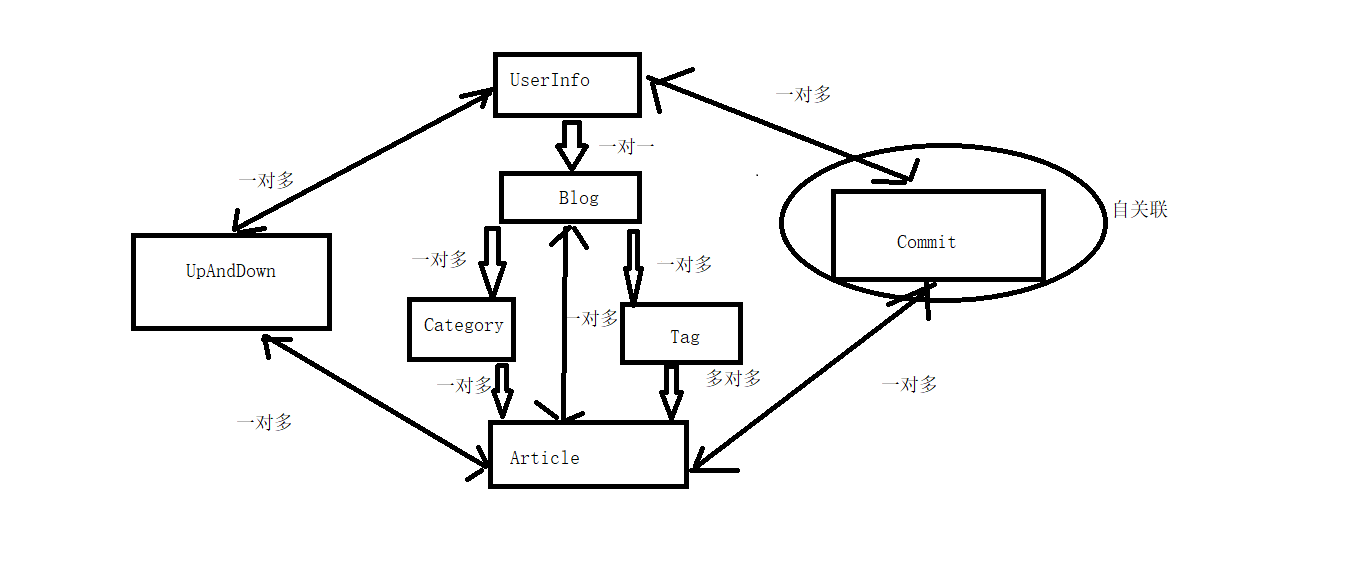
表设计
User 用户表
-nid
-name
-password
-phone
-avatar 用户头像
-create_date 用户注册时间
-blog
Blog 个人站点表
-nid
-title 标题
-site_name 站点url名
-theme 主题
category: 文章分类表
-nid
-title
-blog 跟blog一对多
tag:(文章关键字)
-nid
-title
-blog 跟blog一对多
article 文章表
-nid
-title
-desc 摘要
-create_time auto_add_now:当该条记录创建时,自动添加当前时间
-content 文章内容
-category 一对多
-tag 多对多
-blog 一对多
commit 评论表
-nid
-user 哪个用户
-article 对哪篇文章
-content 评论了什么内容
-commit_time 时间
-parent_id
如何实现根评论与子评论?
-有同学分析,要再建一张表,跟commit是一对多的关系(不好)
-如何用这一个表,表示出根评论和子评论?
-再加一个字段,标志,给那条评论,评论的
nid user article content parent_id
1 1 1 111 null
2 2 1 222 null
3 3 1 333 1
4 4 1 444 3
5 3 1 反弹 4
UpandDown 点赞表
-nid
-user 哪个用户
-article 对哪篇文章
-is_up 点赞还是点踩
随机推荐
- 让Windows Server 2008r2 IIS7.5 ASP.NET 支持10万并发请求
由于之前使用的是默认配置,服务器最多只能处理5000个同时请求,今天下午由于某种情况造成同时请求超过5000,从而出现了上面的错误. 为了避免这样的错误,我们根据相关文档调整了设置,让服务器从设置上支 ...
- oracle修改密码为永久不过期
sqlplus /as sysdba ALTER PROFILE DEFAULT LIMIT PASSWORD_LIFE_TIME UNLIMITED;
- 细说shiro之四:在web应用中使用shiro
官网:https://shiro.apache.org/ 1. 下载在Maven项目中的依赖配置如下: <!-- shiro配置 --> <dependency> <gr ...
- content-type: application/json没有设置导致的500错误
$.ajax({ url:'http://xxx.test', type: 'Post', data: JSON.stringify(model), dataType: 'json', content ...
- 【python小练】0002
第 0002 题:将 0001 题生成的 200 个激活码(或者优惠券)保存到 MySQL 关系型数据库中. . . .(一脸懵逼) Python访问数据库:(廖雪峰python教程) 1. SQLi ...
- faster rcnn 做识别
faster rcnn 主要分为四个部分: 1. convolutional part: 特征提取 可以使用vgg,resnet 等等 2.region proposal network: 生成 re ...
- Andrew NG 机器学习编程作业4 Octave
问题描述:利用BP神经网络对识别阿拉伯数字(0-9) 训练数据集(training set)如下:一共有5000个训练实例(training instance),每个训练实例是一个400维特征的列向量 ...
- oracle 启动em (使用浏览器打开)
在cmd命令中执行 emctl status dbconsole 如果报错,确实oracle_UNQNAME 这个时候需要设置变量 oracle_hostname 和oracle_unqname 执行 ...
- 查看 Centos 7 的MAC 地址
查看 Centos 7 的 MAC 地址 ens*** 网卡名称# cat /sys/class/net/eno16777736/address 查看内核版本 uname -a 查看系统版本 ca ...
- 结构体类型struct
教学视频 定义: struct student{CString name; int num; TCHAR sex; int age; }; //注意有个分号 student zansan = {_ ...