
TextView文字描边实现
TextView文字描边实现
需求描述
文字显示在图片的上面,图片的内容是不确定了,为了防止文字与图片的颜色相近导致用户看不到或者看不清文字的问题,所以显示文字描边,避免问题。
实现
实现思想
使用TextPaint绘制相同文字在TextView的底部,TextPaint的字显示要比原始的字大一些,这样看起来就像是有描边的文字。
代码
1.attrs.xml文件
<?xml version="1.0" encoding="utf-8"?>

<resources>

    <!-- 有描边的自定义TextView-->

    <declare-styleable name="StrokeTextView">

        <!--描边的颜色 -->

        <attr name="stroke_color" format="color" />

        <!-- 描边的宽度 -->

        <attr name="stroke_width" format="dimension" />

    </declare-styleable>

</resources>
2.StrokeTextView的实现
package com.zm.autostroketextview;

import android.content.Context;

import android.content.res.TypedArray;

import android.graphics.Canvas;

import android.graphics.Color;

import android.graphics.Paint;

import android.support.annotation.Nullable;

import android.text.TextPaint;

import android.util.AttributeSet;

import android.view.ViewGroup;

import android.widget.TextView;

/**

 * 文字内容有描边的TextView

 * Author: zhangmiao

 * Date: 2018/4/13

 */

public class StrokeTextView extends TextView {

    private TextView outlineTextView = null;

    public StrokeTextView(Context context) {

        this(context, null);

    }

    public StrokeTextView(Context context, @Nullable AttributeSet attrs) {

        this(context, attrs, 0);

    }

    public StrokeTextView(Context context, @Nullable AttributeSet attrs, int defStyleAttr) {

        super(context, attrs, defStyleAttr);

        outlineTextView = new TextView(context, attrs, defStyleAttr);

        init(attrs);

    }

    private void init(AttributeSet attrs) {

        //1.获取参数

        TypedArray ta = getContext().obtainStyledAttributes(attrs, R.styleable.StrokeTextView);

        int stroke_color = ta.getColor(R.styleable.StrokeTextView_stroke_color, Color.WHITE);

        float stroke_width = ta.getDimension(R.styleable.StrokeTextView_stroke_width, 2);

        //2.初始化TextPaint

        TextPaint paint = outlineTextView.getPaint();

        paint.setStrokeWidth(stroke_width);

        paint.setStyle(Paint.Style.STROKE);

        outlineTextView.setTextColor(stroke_color);

        outlineTextView.setGravity(getGravity());

    }

    @Override

    public void setLayoutParams(ViewGroup.LayoutParams params) {

        super.setLayoutParams(params);

        outlineTextView.setLayoutParams(params);

    }

    @Override

    protected void onMeasure(int widthMeasureSpec, int heightMeasureSpec) {

        super.onMeasure(widthMeasureSpec, heightMeasureSpec);

        //设置轮廓文字

        CharSequence outlineText = outlineTextView.getText();

        if (outlineText == null || !outlineText.equals(getText())) {

            outlineTextView.setText(getText());

            postInvalidate();

        }

        outlineTextView.measure(widthMeasureSpec, heightMeasureSpec);

    }

    @Override

    protected void onLayout(boolean changed, int left, int top, int right, int bottom) {

        super.onLayout(changed, left, top, right, bottom);

        outlineTextView.layout(left, top, right, bottom);

    }

    @Override

    protected void onDraw(Canvas canvas) {

        outlineTextView.draw(canvas);

        super.onDraw(canvas);

    }

}
3.布局文件中StrokeTextView的使用
<?xml version="1.0" encoding="utf-8"?>

<LinearLayout xmlns:android="http://schemas.android.com/apk/res/android"

    xmlns:app="http://schemas.android.com/apk/res-auto"

    android:layout_width="match_parent"

    android:layout_height="match_parent"

    android:background="@color/colorPrimary">

    <com.zm.autostroketextview.StrokeTextView

        android:layout_width="wrap_content"

        android:layout_height="wrap_content"

        android:text="Hello World!"

        app:stroke_color="@android:color/white"

        app:stroke_width="2dp" />

</LinearLayout>
4.结果显示
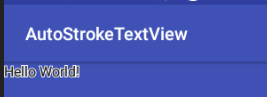
TextView文字描边实现的更多相关文章
- Android TextView文字描边的实现!!
Android开发:文字描边 转自:http://www.oschina.net/code/snippet_586849_37287 1. [代码][Java]代码 1 2 3 4 5 6 7 8 9 ...
- Android:TextView文字跑马灯的效果实现
解决TextView文字显示不全的问题. 简单设置跑马灯的效果: <TextView android:id="@+id/textView" android:layout_wi ...
- 用CSS3实现文字描边
CSS3作为新兴的前端技术可以实现很多复杂变化的效果,比如文字描边. 这里主要用到text-shadow属性,顾名思义就是为文字加上阴影效果.例: text-shadow:10px 5px 2px # ...
- cocos2d-x 利用CCLabelTTF制作文字描边与阴影效果的实现方法
// // myttf.h// // Created by 王天宇 on 14-6-12. // // #ifndef ____SLG__myttf__ #define ____SLG__myttf_ ...
- CSS3文字描边 CSS3字体外部描边
给需要实现文字描边的元素添加如下CSS3的属性 text-shadow:#000 1px 0 0,#000 0 1px 0,#000 -1px 0 0,#000 0 -1px 0; -webkit-t ...
- Android TextView 文字居中
有2种方法可以设置TextView文字居中: 一:在xml文件设置:android:gravity="center" 二:在程序中设置:m_TxtTitle.setGravity( ...
- 常用CSS3效果:用text-shadow做CSS3 文字描边
思路: 利用CSS3的text-shadow属性,对文字的四个边均用阴影. 最终效果: 单纯的为了实现效果.未作任何美化. 实现代码: HTML: <div>文字描边效果</div& ...
- ps怎么给文字描边
在设计的时候,单一的文字,往往对人没有多少的吸引力,这就需要我们在文字上加一些文字特效,比如说外发光,描边,投影,等等.在这里我们详细的介绍一下文字的输入,和文字描边的怎么增加,删除的经验.(这些方法 ...
- 设置TextView文字居中
有2种方法可以设置TextView文字居中: 一:在xml文件设置:android:gravity="center" 二:在程序中设置:m_TxtTitle.setGravity( ...
随机推荐
- vue动态绑定background:url绑不上的问题
场景: 利用swipper做轮播图,在联调的时候发现有些图片存在有些图片不存在 原因:图片路径中存在 (),和 background:url() 会冲突 解决方法: 一:oss图片路径避免出现括号 ( ...
- Webmagic 爬虫框架 爬取马蜂窝、携程旅游、汽车之家游记信息
WebMagic学习 遇到的问题 Log4j错误 解决:在src目录下添加配置文件 log4j.properties log4j.rootLogger=INFO, stdout, file log4j ...
- python psycopg2 连接pg 建立连接池
# -*- coding: utf-8 -*-from psycopg2.pool import ThreadedConnectionPool,SimpleConnectionPool,Persist ...
- 20165213 周启航Exp2 后门原理与实践
Exp2 后门原理与实践 实验内容 任务一 使用netcat获取主机操作Shell,cron启动 1.确认kali和主机的ip,关闭防火墙 (192.169.127.132) (10.1.1.197) ...
- hadoop_随笔二_参数
1) dfs.datanode.handler.count : datanode上用于处理RPC的线程数.默认为3,较大集群,可适当调大些,比如8.需要注意的是,每添加一个线程,需要的内存增加. 2) ...
- python 练习4
题目为信用卡消费管理系统: 主程序:main.py #!usr/bin/env python # encoding: utf-8 import conf,sys,time,re,os import j ...
- 将地图定位封装为ng指令
一.HTML结构<div tabindex="-1" class="modal fade in active modal-map" role=" ...
- oracle分区表的使用和查询
本文参考了 https://blog.csdn.net/mzglzzc/article/details/46300645 一 创建和使用分区表 1.范围分区(RANGE)范围分区将数据基于范围映射到 ...
- web安全系列3:http拦截
这是web安全系列第三篇,我们讲讲HTTP请求的拦截.关于http的内容请翻看我的上一篇文章. 首先,我们开始需要一个安装好的java环境,64位的.请自行安装和配置环境变量,如果遇到问题可以留言评论 ...
- 2019.03.25 bzoj4567: [Scoi2016]背单词(trie+贪心)
传送门 题意: 给你n个字符串,不同的排列有不同的代价,代价按照如下方式计算(字符串s的位置为x): 1.排在s后面的字符串有s的后缀,则代价为n^2: 2.排在s前面的字符串有s的后缀,且没有排在s ...