
task mysqld:26208 blocked for more than 120 seconds
早上10点左右,某台线上ECS服务器突然没响应。
查看日志,发现如下信息:
Aug 14 03:26:01 localhost rsyslogd: [origin software="rsyslogd" swVersion="5.8.10" x-pid="861" x-info="http://www.rsyslog.com"] rsyslogd was HUPed
Aug 16 09:54:19 localhost kernel: INFO: task mysqld:26208 blocked for more than 120 seconds.
Aug 16 09:54:29 localhost kernel: Not tainted 2.6.32-431.23.3.el6.x86_64 #1
Aug 16 09:54:29 localhost kernel: "echo 0 > /proc/sys/kernel/hung_task_timeout_secs" disables this message.
Aug 16 09:54:29 localhost kernel: mysqld D 0000000000000003 0 26208 25840 0x00000000
Aug 16 09:54:29 localhost kernel: ffff8802097d1cc8 0000000000000082 0000000000000000 ffffffff8114a2e9
Aug 16 09:54:29 localhost kernel: 00000001de00c025 0000000000000000 0000000000000000 ffffea00071a1df0
Aug 16 09:54:29 localhost kernel: ffff88020963daf8 ffff8802097d1fd8 000000000000fbc8 ffff88020963daf8
Aug 16 09:54:29 localhost kernel: Call Trace:
Aug 16 09:54:29 localhost kernel: [<ffffffff8114a2e9>] ? __do_fault+0x469/0x530
Aug 16 09:54:29 localhost kernel: [<ffffffff8111f7e0>] ? sync_page+0x0/0x50
Aug 16 09:54:29 localhost kernel: [<ffffffff81529393>] io_schedule+0x73/0xc0
Aug 16 09:54:29 localhost kernel: [<ffffffff8111f81d>] sync_page+0x3d/0x50
Aug 16 09:54:29 localhost kernel: [<ffffffff81529e5f>] __wait_on_bit+0x5f/0x90
经查,是linux自身的一个限制所致:
By default Linux uses up to 40% of the available memory for file system caching. After this mark has been reached the file system flushes all outstanding data to disk causing all following IOs going synchronous. For flushing out this data to disk this there is a time limit of 120 seconds by default. In the case here the IO subsystem is not fast enough to flush the data withing 120 seconds.
看了下sar -r内存历史,如下:
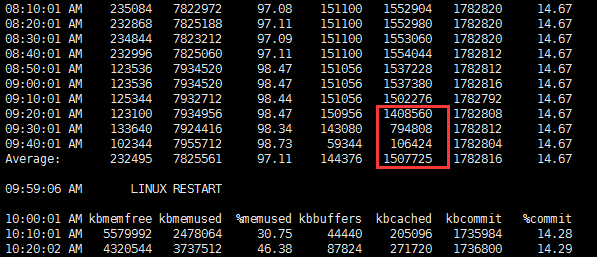
基本上可以认为确实为此问题导致。
缓解此问题的方法:
vim /etc/sysctrl.conf
vm.dirty_background_ratio = 5
vm.dirty_ratio = 10
因为是专用mysql服务器,故方法是适用的。
这个问题在实体机发生的概率应该是非常低的,在虚拟机中概率估计大大增加。
task mysqld:26208 blocked for more than 120 seconds的更多相关文章
- INFO: task java:27465 blocked for more than 120 seconds不一定是cache太大的问题
这几天,老有几个环境在中午收盘后者下午收盘后那一会儿,系统打不开,然后过了一会儿,进程就消失不见了,查看了下/var/log/message,有如下信息: Dec 12 11:35:38 iZ23nn ...
- kernel: INFO: task sadc:14833 blocked for more than 120 seconds.
早上一到,发现oracle连不上. 到主机上,发现只有oracleora11g一个进程,其他进程全没了. Nov 14 23:33:30 hs-test-10-20-30-15 kernel: INF ...
- linux 出错 “INFO: task xxxxxx: 634 blocked for more than 120 seconds.”的3种解决方案(转)
linux 出错 “INFO: task xxxxxx: 634 blocked for more than 120 seconds.”的3种解决方案 1 问题描述 服务器内存满了,ssh登录失败 , ...
- linux 出错 “INFO: task java: xxx blocked for more than 120 seconds.” 的3种解决方案
1 问题描述 最近搭建的一个linux最小系统在运行到241秒时在控制台自动打印如下图信息,并且以后每隔120秒打印一次. 仔细阅读打印信息发现关键信息是“hung_task_timeout_secs ...
- linux 出错 “INFO: task xxxxxx: 634 blocked for more than 120 seconds.”的3种解决方案
https://blog.csdn.net/electrocrazy/article/details/79377214
- Linux 日志报错 xxx blocked for more than 120 seconds
监控作业发现一台服务器(Red Hat Enterprise Linux Server release 5.7)从凌晨1:32开始,有一小段时间无法响应,数据库也连接不上,后面又正常了.早上检查了监听 ...
- Linux系统出现hung_task_timeout_secs和blocked for more than 120 seconds的解决方法
Linux系统出现系统没有响应. 在/var/log/message日志中出现大量的 “echo 0 > /proc/sys/kernel/hung_task_timeout_secs" ...
- 服务器卡死,重启报错: INFO: task blocked for more than 120 seconds
问题:服务器负载很高,但是CPU利用率不高.服务器经常夯住,网站打不开,SSH连接非常不稳定,输入命令夯住. 重启服务器报错: INFO: task blocked for more than 120 ...
- hung_task_timeout_secs 和 blocked for more than 120 seconds
https://help.aliyun.com/knowledge_detail/41544.html 问题现象 云服务器 ECS Linux 系统出现系统没有响应. 在/var/log/messag ...
随机推荐
- 再探 Ext JS 6 (sencha touch/ext升级版) 变化篇 (编译命令、滚动条、控制层、模型层、路由)
从sencha touch 2.4.2升级到ext js 6,cmd版本升级到6.0之后发生了很多变化 首先从cmd说起,cmd 6 中sencha app build package不能使用了,se ...
- 初探 Ext JS 6 (sencha touch/ext升级版)
Sencha Touch 现在已全面升级至Ext Js 6,那么我们如何使用他们呢? 首先去官网下载最新的sdk和帮助文档 sdk下载地址:https://www.sencha.com/product ...
- 本人第一个开源代码,NETSpider 网络蜘蛛采集工具
NETSpider网站数据采集软件是一款基于.Net平台的开源软件.软件部分功能是基本Soukey软件进行开发的.这个版本采用VS2010+.NET3.5进行开发的.NETSpider采摘当前提供的主 ...
- CM: 如何自己build一个官方版本出来,使用官方release中的manifests.xml
This can be accomplished in one of two ways: 1) Pull the file from your device:cd /your/repo/pathadb ...
- Qt Creator 黑色主题配置
可能是一个习惯了吧,我个人比较喜欢在黑色主题的环境下进行编程.黑色主题对眼睛稍微友好一点,看起来也不是那么low.这里给出QtCreator的黑色主题配置方案. 如果是最新的Creator3.3+的版 ...
- NSNotification Name 最佳写法
本文主要借探讨NSNotificationName的最佳写法的机会,学习下extern, static, const, #define 和常量指针与指针常量等的特性和用法. 1.NSNotificat ...
- 【JVM学习笔记一】JVM内存分布
Overview 学习JVM首先需要了解一下JVM管理的内存是如何分布的,在看了<深入理解Java虚拟机>和一些博文之后,我准备自己记录一下学习的过程. 下图是JVM中运行时数据区的大致示 ...
- sql server 查找包含字符串的对象
sql server 查找包含字符串的对象 SELECT sm.object_id, OBJECT_NAME(sm.object_id) AS object_name, o.type, o.type_ ...
- stl的优先级队列
#include <iostream> #include <vector> #include <queue> using namespace std; class ...
- 一个关于explain出来为all的说明及优化
explain sql语句一个语句,得到如下结果,为什么已经创建了t_bill_invests.bid_id的索引,但却没有显示using index,而是显示all扫描方式呢,原来这还与select ...