
Android 长按Listview显示CheckBox,实现批量删除。
ListView实现的列表,如果是可编辑,可删除的,一般都要提供批量删除功能,否则的话,一项一项的删除体验很不好,也给用户带来了很大的麻烦。
实现效果图
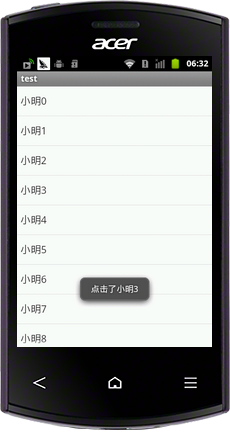
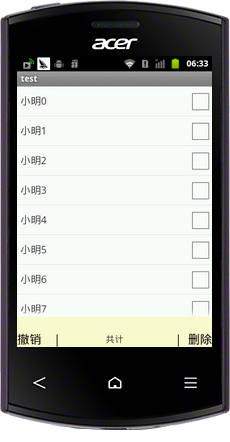
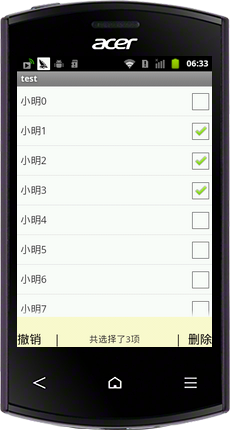
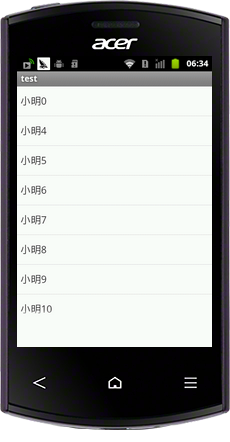
具体实现代码
select.xml
主布局文件包含一个ListView还有一个隐藏的布局,包含了两个Button一个TextView,默认布局为gone,当监听到长按响应事件时候显示。
 <?xml version="1.0" encoding="utf-8"?>

 <LinearLayout xmlns:android="http://schemas.android.com/apk/res/android"

     android:layout_width="match_parent"

     android:layout_height="match_parent"

     android:orientation="vertical" >

     <ListView

         android:id="@+id/list"

         android:layout_width="match_parent"

         android:layout_height="match_parent"

         android:layout_weight="1"

         android:cacheColorHint="#FFF" >

         </ListView>

     <RelativeLayout

         android:id="@+id/relative"

         android:layout_width="fill_parent"

         android:layout_height="50dp"

         android:gravity="bottom"

         android:background="@color/lemonchiffon"

         android:visibility="gone"

         >

         <Button

             android:id="@+id/cancle"

             android:layout_width="wrap_content"

             android:layout_height="wrap_content"

             android:text="撤销    |"

             android:textSize="20sp"

             android:background="@null"

             android:layout_centerVertical="true"

             />

         <TextView

             android:id="@+id/txtcount"

             android:layout_width="wrap_content"

             android:layout_height="wrap_content"

             android:text="共计"

             android:textSize="15sp"

             android:layout_centerInParent="true"

             />

         <Button

             android:id="@+id/delete"

             android:layout_width="wrap_content"

             android:layout_height="wrap_content"

             android:text="|  删除"

             android:textSize="20sp"

             android:background="@null"

             android:layout_alignParentRight="true"

             android:layout_centerVertical="true"

             />

     </RelativeLayout>

 </LinearLayout>
item.xml
包含一个TextView 一个CheckBox
 <?xml version="1.0" encoding="utf-8"?>

 <LinearLayout xmlns:android="http://schemas.android.com/apk/res/android"

     android:layout_width="match_parent"

     android:layout_height="match_parent"

     android:orientation="horizontal" >

     <TextView

         android:id="@+id/txtName"

         android:layout_width="match_parent"

         android:layout_height="wrap_content"

         android:layout_alignParentLeft="true"

         android:layout_centerVertical="true"

         android:layout_gravity="center_vertical"

         android:layout_marginLeft="5dp"

         android:layout_weight="1"

         android:text="444444444444"

         android:textSize="17sp"

         android:textColor="#333" />

     <CheckBox

         android:id="@+id/check"

         android:layout_width="wrap_content"

         android:layout_height="wrap_content"

         android:visibility="gone"

         android:clickable="false"

         />

 </LinearLayout>
通过自定义Adapter绑定ListView数据源,实现长按监听,在长按监听时候,切记将监听事件返回ture。
 /**

      * @author ieasy360_1

      * 自定义Adapter

      */

     class Adapter extends BaseAdapter{

         private Context context;

         private LayoutInflater inflater=null;

         private HashMap<Integer, View> mView ;

         public  HashMap<Integer, Integer> visiblecheck ;//用来记录是否显示checkBox

         public  HashMap<Integer, Boolean> ischeck;

         private TextView txtcount;

         public Adapter(Context context,TextView txtcount)

         {

             this.context = context;

             this.txtcount = txtcount;

             inflater = (LayoutInflater)context.getSystemService(Context.LAYOUT_INFLATER_SERVICE);

             mView = new HashMap<Integer, View>();

             visiblecheck = new HashMap<Integer, Integer>();

             ischeck      = new HashMap<Integer, Boolean>();

             if(isMulChoice){

                 for(int i=0;i<array.size();i++){

                     ischeck.put(i, false);

                     visiblecheck.put(i, CheckBox.VISIBLE);

                 }

             }else{

                 for(int i=0;i<array.size();i++)

                 {

                     ischeck.put(i, false);

                     visiblecheck.put(i, CheckBox.INVISIBLE);

                 }

             }

         }

         public int getCount() {

             // TODO Auto-generated method stub

             return array.size();

         }

         public Object getItem(int position) {

             // TODO Auto-generated method stub

             return array.get(position);

         }

         public long getItemId(int position) {

             // TODO Auto-generated method stub

             return 0;

         }

         public View getView(final int position, View convertView, ViewGroup parent) {

             // TODO Auto-generated method stub

             View view = mView.get(position);

             if(view==null)

             {

                 view = inflater.inflate(R.layout.item, null);

                 TextView txt = (TextView)view.findViewById(R.id.txtName);

                 final CheckBox ceb = (CheckBox)view.findViewById(R.id.check);

                 txt.setText(array.get(position));

                 ceb.setChecked(ischeck.get(position));

                 ceb.setVisibility(visiblecheck.get(position));

                 view.setOnLongClickListener(new Onlongclick());

                 view.setOnClickListener(new OnClickListener() {

                     public void onClick(View v) {

                         // TODO Auto-generated method stub

                         if(isMulChoice){

                             if(ceb.isChecked()){

                                 ceb.setChecked(false);

                                 selectid.remove(array.get(position));

                             }else{

                                 ceb.setChecked(true);

                                 selectid.add(array.get(position));

                             }

                             txtcount.setText("共选择了"+selectid.size()+"项");

                         }else {

                             Toast.makeText(context, "点击了"+array.get(position), Toast.LENGTH_LONG).show();

                         }

                     }

                 });

                 mView.put(position, view);

             }

             return view;

         }

         class Onlongclick implements OnLongClickListener{

             public boolean onLongClick(View v) {

                 // TODO Auto-generated method stub

                 isMulChoice = true;

                 selectid.clear();

                 layout.setVisibility(View.VISIBLE);

                 for(int i=0;i<array.size();i++)

                 {

                     adapter.visiblecheck.put(i, CheckBox.VISIBLE);

                 }

                 adapter = new Adapter(context,txtcount);

                 listview.setAdapter(adapter);

                 return true;

             }

         }

     }
全部实现代码
 package com.example.test;

 import java.util.ArrayList;

 import java.util.HashMap;

 import java.util.List;

 import android.app.Activity;

 import android.content.Context;

 import android.os.Bundle;

 import android.view.ContextMenu;

 import android.view.ContextMenu.ContextMenuInfo;

 import android.view.LayoutInflater;

 import android.view.View;

 import android.view.View.OnClickListener;

 import android.view.View.OnLongClickListener;

 import android.view.ViewGroup;

 import android.widget.BaseAdapter;

 import android.widget.Button;

 import android.widget.CheckBox;

 import android.widget.ListView;

 import android.widget.RelativeLayout;

 import android.widget.TextView;

 import android.widget.Toast;

 /**

  * @author ieasy360_1

  *

  */

 public class MulSelect extends Activity implements OnClickListener {

     private ListView listview;

     private Context  context;

     private List<String> array = new ArrayList<String>();

     private List<String> selectid = new ArrayList<String>();

     private boolean isMulChoice = false; //是否多选

     private Adapter  adapter;

     private RelativeLayout layout;

     private Button cancle,delete;

     private TextView txtcount;

     @Override

     protected void onCreate(Bundle savedInstanceState) {

         // TODO Auto-generated method stub

         super.onCreate(savedInstanceState);

         setContentView(R.layout.select);

         context = this;

         listview = (ListView)findViewById(R.id.list);

         layout = (RelativeLayout)findViewById(R.id.relative);

         txtcount = (TextView)findViewById(R.id.txtcount);

         cancle   = (Button)findViewById(R.id.cancle);

         delete   = (Button)findViewById(R.id.delete);

         cancle.setOnClickListener(this);

         delete.setOnClickListener(this);

         init();

         adapter = new Adapter(context,txtcount);

         listview.setAdapter(adapter);

     }

     void init()

     {

         for(int i=0;i<20;i++)

         {

             array.add("小明"+i);

         }

     }

     public void onClick(View v) {

         // TODO Auto-generated method stub

         switch (v.getId()) {

         case R.id.cancle:

             isMulChoice = false;

             selectid.clear();

             adapter = new Adapter(context,txtcount);

             listview.setAdapter(adapter);

             layout.setVisibility(View.INVISIBLE);

             break;

         case R.id.delete:

             isMulChoice =false;

             for(int i=0;i<selectid.size();i++){

                 for(int j=0;j<array.size();j++){

                     if(selectid.get(i).equals(array.get(j))){

                         array.remove(j);

                     }

                 }

             }

             selectid.clear();

             adapter = new Adapter(context,txtcount);

             listview.setAdapter(adapter);

             layout.setVisibility(View.INVISIBLE);

             break;

         default:

             break;

         }

     }

     @Override

     public void onCreateContextMenu(ContextMenu menu, View v,

             ContextMenuInfo menuInfo) {

         // TODO Auto-generated method stub

         super.onCreateContextMenu(menu, v, menuInfo);

         menu.setHeaderTitle("操作");

     }

     /**

      * @author ieasy360_1

      * 自定义Adapter

      */

     class Adapter extends BaseAdapter{

         private Context context;

         private LayoutInflater inflater=null;

         private HashMap<Integer, View> mView ;

         public  HashMap<Integer, Integer> visiblecheck ;//用来记录是否显示checkBox

         public  HashMap<Integer, Boolean> ischeck;

         private TextView txtcount;

         public Adapter(Context context,TextView txtcount)

         {

             this.context = context;

             this.txtcount = txtcount;

             inflater = (LayoutInflater)context.getSystemService(Context.LAYOUT_INFLATER_SERVICE);

             mView = new HashMap<Integer, View>();

             visiblecheck = new HashMap<Integer, Integer>();

             ischeck      = new HashMap<Integer, Boolean>();

             if(isMulChoice){

                 for(int i=0;i<array.size();i++){

                     ischeck.put(i, false);

                     visiblecheck.put(i, CheckBox.VISIBLE);

                 }

             }else{

                 for(int i=0;i<array.size();i++)

                 {

                     ischeck.put(i, false);

                     visiblecheck.put(i, CheckBox.INVISIBLE);

                 }

             }

         }

         public int getCount() {

             // TODO Auto-generated method stub

             return array.size();

         }

         public Object getItem(int position) {

             // TODO Auto-generated method stub

             return array.get(position);

         }

         public long getItemId(int position) {

             // TODO Auto-generated method stub

             return 0;

         }

         public View getView(final int position, View convertView, ViewGroup parent) {

             // TODO Auto-generated method stub

             View view = mView.get(position);

             if(view==null)

             {

                 view = inflater.inflate(R.layout.item, null);

                 TextView txt = (TextView)view.findViewById(R.id.txtName);

                 final CheckBox ceb = (CheckBox)view.findViewById(R.id.check);

                 txt.setText(array.get(position));

                 ceb.setChecked(ischeck.get(position));

                 ceb.setVisibility(visiblecheck.get(position));

                 view.setOnLongClickListener(new Onlongclick());

                 view.setOnClickListener(new OnClickListener() {

                     public void onClick(View v) {

                         // TODO Auto-generated method stub

                         if(isMulChoice){

                             if(ceb.isChecked()){

                                 ceb.setChecked(false);

                                 selectid.remove(array.get(position));

                             }else{

                                 ceb.setChecked(true);

                                 selectid.add(array.get(position));

                             }

                             txtcount.setText("共选择了"+selectid.size()+"项");

                         }else {

                             Toast.makeText(context, "点击了"+array.get(position), Toast.LENGTH_LONG).show();

                         }

                     }

                 });

                 mView.put(position, view);

             }

             return view;

         }

         class Onlongclick implements OnLongClickListener{

             public boolean onLongClick(View v) {

                 // TODO Auto-generated method stub

                 isMulChoice = true;

                 selectid.clear();

                 layout.setVisibility(View.VISIBLE);

                 for(int i=0;i<array.size();i++)

                 {

                     adapter.visiblecheck.put(i, CheckBox.VISIBLE);

                 }

                 adapter = new Adapter(context,txtcount);

                 listview.setAdapter(adapter);

                 return true;

             }

         }

     }

 }
Android 长按Listview显示CheckBox,实现批量删除。的更多相关文章
- Android — 长按ListView 利用上下文菜单(ActionMode) 进行批量事件处理
好久没写博客拉``````` 近期最终略微闲一点了``````` 无聊拿手机清理短信.发现批量事件的处理还是挺管用的`````` 那么自己也来山寨一记看看效果吧````` 闲话少说,首先,我们来看下手 ...
- 作业:汽车查询--弹窗显示详情,批量删除 ajax做法(0521)
作业:显示以下界面: 作业要求: 1.查看详细信息,以弹窗的形式显示,使用ajax2.批量删除 一.主页面 <!DOCTYPE html PUBLIC "-//W3C//DTD XHT ...
- 作业:汽车查询--弹窗显示详情,批量删除 php做法(0521)
作业:显示以下界面: 作业要求: 1.查看详细信息,以弹窗的形式显示,使用ajax2.批量删除 一.主页面: <!DOCTYPE html PUBLIC "-//W3C//DTD XH ...
- 完整地mybatis + springmvc用checkbox实现批量删除
因为自己在网上找了半天,都找不到完整地代码(脑袋笨,不会变通到自己项目里),所以在这里记下了近乎完整的代码 前端代码 <span style="cursor:pointer;" ...
- jsp中利用checkbox进行批量删除
一.将前台jsp页面中的所有你要用到checkbox的name值设为相同,如 <input type="checkbox" name="userid"&g ...
- Android开发之ListView条目批量选择删除
ListView实现的列表,假设是可编辑,可删除的,一般都要提供批量删除功能,否则的话,一项一项的删除体验非常不好,也给用户带来了非常大的麻烦. 实现效果图 详细实现代码 select.xml 主布局 ...
- Android在listview添加checkbox实现单选多选操作问题(转)
转自:http://yangshen998.iteye.com/blog/1310183 在Android某些开发需求当中,有时候需要在listveiw中加入checkbox实现单选,多选操作.表面上 ...
- android UI进阶之实现listview中checkbox的多选与记录
今天继续和大家分享涉及到listview的内容.在很多时候,我们会用到listview和checkbox配合来提供给用户一些选择操作.比如在一个 清单页面,我们需要记录用户勾选了哪些条目.这个的实现并 ...
- 【转】android UI进阶之实现listview中checkbox的多选与记录--不错
原文网址:http://www.cnblogs.com/notice520/archive/2012/02/17/2355415.html 今天继续和大家分享涉及到listview的内容.在很多时候, ...
随机推荐
- 我已看过的TVB剧集目录(陆续更新)
2016年度TVB剧集 <一屋老友记> 主演:欧阳震华,胡定欣,滕丽名,罗兰 <纯熟意外> 主演:吴启华,蔡思贝,李施嬅,黎诺懿 <廉政行动2016> 主演:陈展鹏 ...
- 使用网站processon在线作图
网站:https://www.processon.com/ 该网站提供多种图形的在线制作,并支持多人协作. 目前提供以下图形的制作: 个人管理界面:
- PHP错误日志控制(display_errors和error_reporting)
display_errors和error_reporting是php程序调试过程中两个非常重要的参数,下面就来介绍一下这两个错误日志的配置如何开启和关闭: 我们知道在产品的生产环境肯定是不能够显示错误 ...
- java Hello 出现以下结果:Bad command or the file name 可能是什么原因
没有这个命令或文件名 原因可能是没有成功安装jdk或者没有配置好jdk 的环境变量,或者没有编译相应的文件. 2. 出现以下结果:Exception in thread “main” java.lan ...
- Google Guava之--cache
一.简介 Google Guava包含了Google的Java项目许多依赖的库,如:集合 [collections] .缓存 [caching] .原生类型支持 [primitives support ...
- getBoundingClientRect在IE9/10里的bug
getBoundingClientRect可以获得页面中某个元素的左,上,右和下分别相对浏览器视窗的位置,最早在IE中实现,后其它浏览器均已实现. 但它在IE9,10中有个bug,当出现垂直滚动条时, ...
- nyoj 230/poj 2513 彩色棒 并查集+字典树+欧拉回路
题目链接:http://acm.nyist.net/JudgeOnline/problem.php?pid=230 题意:给你许许多多的木棍,没条木棍两端有两种颜色,问你在将木棍相连时,接触的端点颜色 ...
- hdu 4607 Park Visit 求树的直径
题目链接:http://acm.hdu.edu.cn/showproblem.php?pid=4607 题目大意:给你n个点,n-1条边,将图连成一棵生成树,问你从任意点为起点,走k(k<=n) ...
- 17110 Divisible(basic)
17110 Divisible 时间限制:1000MS 内存限制:65535K 题型: 编程题 语言: 无限制 Description Given n + m integers, I1,I2,. ...
- Azure CDN 启用HTTPS
默认情况下,订阅里的CDN不支持HTTPS 需要联系21v,提交工单告知订阅号,由后台为订阅启用CDN的HTTPS功能. 然后就可以在创建CDN时选到HTTPS的选项了.