
Installing OpenCV 2.4.10 in Ubuntu 12.04 LTS
转自 http://www.samontab.com/web/2012/06/installing-opencv-2-4-1-ubuntu-12-04-lts/
EDIT: I published a new guide using Ubuntu 14.04 LTS and OpenCV 2.4.10 here.
The latest Long Term Support version of Ubuntu(12.04 LTS) is out and a new version of OpenCV was released as well. This means that now is a great opportunity to update my OpenCV installation guide to the latest versions, Ubuntu 12.04 LTS and OpenCV 2.4.10.
We are going to setup OpenCV to use the new Qt highgui interface, which is much better than the simple highgui interface. Also, we will install OpenCV with support for OpenGL, as well as reading and writing videos, access to a webcam, Python, C and C++ interfaces, and Intel Threading Building Blocks (TBB).
OK, so the first step is to make sure that everything in the system is updated and upgraded:
sudo apt-get update

sudo apt-get upgrade
Now, you need to install many dependencies, such as support for reading and writing image files, drawing on the screen, some needed tools, etc… This step is very easy, you only need to write the following command in the Terminal:
sudo apt-get install build-essential libgtk2.-dev libjpeg-dev libtiff5-dev libjasper-dev libopenexr-dev cmake python-dev python-numpy python-tk libtbb-dev libeigen2-dev yasm libfaac-dev libopencore-amrnb-dev libopencore-amrwb-dev libtheora-dev libvorbis-dev libxvidcore-dev libx264-dev libqt4-dev libqt4-opengl-dev sphinx-common texlive-latex-extra libtiff5-dev libdc1394--dev libavcodec-dev libavformat-dev libswscale-dev
download opencv2.4.10
tar -xjvf opencv-2.4..tar.bz2

cd opencv-2.4.
Now we have to generate the Makefile by using cmake. In here we can define which parts of OpenCV we want to compile. Since we want to use Python, TBB, OpenGL, Qt, work with videos, etc, here is where we need to set that. Just execute the following line at the terminal to create the appropriate Makefile. Note that there are two dots at the end of the line, it is an argument for the cmake program and it means the parent directory (because we are inside the build directory, and we want to refer to the OpenCV directory, which is its parent).
mkdir build

cd build

cmake -D WITH_TBB=ON -D BUILD_NEW_PYTHON_SUPPORT=ON -D WITH_V4L=ON -D INSTALL_C_EXAMPLES=ON -D INSTALL_PYTHON_EXAMPLES=ON -D BUILD_EXAMPLES=ON -D WITH_QT=ON -D WITH_OPENGL=ON -D WITH_FFMPEG=OFF ..
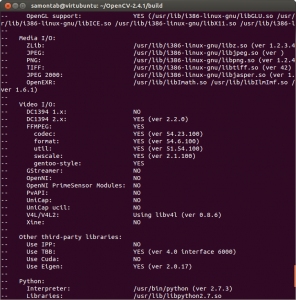
Check that the above command produces no error and that in particular it reports FFMPEG as YES. If this is not the case you will not be able to read or write videos. Also, check that Python, TBB, OpenGL, V4L, OpenGL and Qt are detected.
If anything is wrong, go back, correct the errors by maybe installing extra packages and then run cmake again. You should see something similar to this:
Now, you are ready to compile and install OpenCV 2.4.10:
make

sudo make install
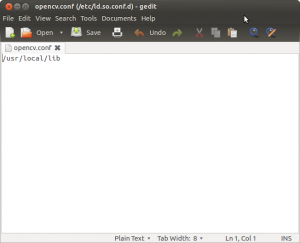
Now you have to configure OpenCV. First, open the opencv.conf file with the following code:
sudo gedit /etc/ld.so.conf.d/opencv.conf
Add the following line at the end of the file(it may be an empty file, that is ok) and then save it:
/usr/local/lib
Run the following code to configure the library:
sudo ldconfig
Now you have to open another file:
sudo gedit /etc/bash.bashrc
Add these two lines at the end of the file and save it:
PKG_CONFIG_PATH=$PKG_CONFIG_PATH:/usr/local/lib/pkgconfig

export PKG_CONFIG_PATH
Finally, close the console and open a new one, restart the computer or logout and then login again.
Now let’s build some samples included in OpenCV:
cd ~/opencv-2.4./samples/c

chmod +x build_all.sh

./build_all.sh
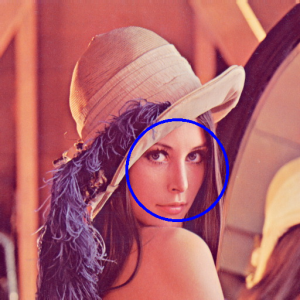
./facedetect --cascade="/usr/local/share/OpenCV/haarcascades/haarcascade_frontalface_alt.xml" --scale=1.5 lena.jpg
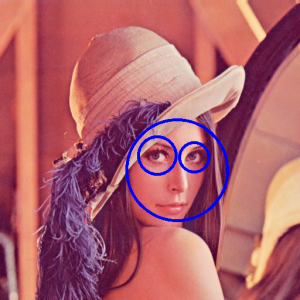
./facedetect --cascade="/usr/local/share/OpenCV/haarcascades/haarcascade_frontalface_alt.xml" --nested-cascade="/usr/local/share/OpenCV/haarcascades/haarcascade_eye.xml" --scale=1.5 lena.jpg
Installing OpenCV 2.4.10 in Ubuntu 12.04 LTS的更多相关文章
- (转)Ubuntu 12.04 LTS 构建高可用分布式 MySQL 集群
本文的英文版本链接是 http://www.mrxuri.com/index.php/2013/11/20/install-mysql-cluster-on-ubuntu-12-04-lts.html ...
- Ubuntu 12.04 LTS 构建高可用分布式 MySQL 集群
本文的英文版本链接是 http://xuri.me/2013/11/20/install-mysql-cluster-on-ubuntu-12-04-lts.html MySQL Cluster 是 ...
- 如何让Ubuntu 12.04 LTS更炫更具吸引力
Ubuntu 12.04 LTS震撼发布 适逢七周岁生日之际,Ubuntu正式推出了第四个LTS长期支持版本,开发代号Precise Pangolin的Ubuntu 12.04在2012年4月26 ...
- Ubuntu 12.04 LTS(64 bit) + RTL8188CU无线网卡驱动
. . . . . 之前家里台式机上安装的是win7+CentOS双系统,但是CentOs的无线网卡驱动不知为何无论如何都安装不上,再加上这段时间一直很忙,所以一直使用着win.这几天事情忙得差不多了 ...
- Compile Linux Kernel on Ubuntu 12.04 LTS (Detailed)
This tutorial will outline the process to compile your own kernel for Ubuntu. It will demonstrate bo ...
- Lamp(Ubuntu 12.04 LTS) 之 htaccess的使用
环境说明:Ubuntu 12.04 LTS Lamp (以apt方式分别安装) 一.明确目标:要确保.htaccess文件起作用,只需要三个重要点: 1.开启apache rewrite模块: (1) ...
- MOUNT MACBOOK DISK (OSX / HFS+) ON UBUNTU 12.04 LTS WITH READ/WRITE
MOUNT MACBOOK DISK (OSX / HFS+) ON UBUNTU 12.04 LTS WITH READ/WRITE So you want to mount your HFS+ ( ...
- 【转】ubuntu 12.04 LTS将关闭最大化最小化移动到右上角
原文网址:http://www.4byte.cn/learning/114801.html ubuntu 12.04 LTS将关闭最大化最小化移动到右上角 还是按下“ALT +F2”组合键,输入g ...
- ubuntu 12.04 LTS server 中文乱码【转】
ubuntu 12.04 LTS server 中文乱码 最近装了一台ubuntu 12.04 server装完后是没有桌面的,后来又手动安装了桌面,但进行后发现桌面是乱码,应该是缺少字体在googl ...
随机推荐
- ext4 文件系统的一些记录
https://www.kernel.org/doc/Documentation/filesystems/ext4.txt ext4 权威说明 http://computer-forensics.sa ...
- js控制页面的全屏展示和退出全屏显示
<!DOCTYPE html> <html> <meta http-equiv="Content-Type" content="text/h ...
- 如何获取checkboxlist的多个选中项
string[] array = dt.Rows[0]["s_type"].ToString().Split('|'); foreach (ListI ...
- OpenCV show two cameras 同时显示两个摄像头
用OpenCV同时显示两个摄像头的内容的代码如下: #include <iostream> #include <stdio.h> #include <tchar.h> ...
- 浅谈WPF页间导航
浅谈WPF页间导航 使用导航的目的是从一个页面进入到另一个页面.无论是预先决定的线性顺序(向导)还是基于层次的用户驱动程序(大部分网站的形式),或者动态生成的路径,主要有3种方法实现:调用Naviga ...
- 用户提交的cookie提交时为什么传不到服务器
cookie与session跨域登陆代码(ie6,ie7,firefox)frameset里面,也就是里面的frame是来自第三方站点(不同ip或不同域名),那么默认情况下ie会自动禁用这些站点的co ...
- SVN配置管理(trunk、branches、tags)
利用SVN的分支,合理地管理项目代码 由于SVN固有的特点,目录在SVN中并没有特别的意义,但是这三个目录却在大多数开源项目中存在,这是因为这三个目录反映了软件开发的通常模式. trunk是主分支,是 ...
- laravel url() 和 asset() 的区别
asset()方法用于引入 CSS/JavaScript/images 等文件,文件必须存放在public文件目录下.url()方法生成一个完整的网址.
- PHP 设计模式 笔记与总结(4)PHP 链式操作的实现
PHP 链式操作的实现 $db->where()->limit()->order(); 在 Common 下创建 Database.php. 链式操作最核心的地方在于:在方法的最后 ...
- jquery格式化时间戳 2011-01-01
/* * 时间戳转换日期 * @param <int> unixTime 待时间戳(秒) ...