
获取系统相关信息 (CPU使用率 内存使用率 系统磁盘大小)
引言
在软件开个过程中,对于软件的稳定性和使用率也是我们需要关注的 。
使用sigar来监控,简单方便!
 package com.thinkgem.jeesite.common.utils;

 import java.io.File;

 import java.io.InputStreamReader;

 import java.io.LineNumberReader;

 import java.text.DecimalFormat;

 import javax.swing.filechooser.FileSystemView;

 import org.hyperic.sigar.Mem;

 import org.hyperic.sigar.Sigar;

 import org.hyperic.sigar.SigarException;

 /**

  *

  *@description:功能说明:获取系统相关信息 (内存使用率 cpu使用率 磁盘大小及使用率)

  *@author:zsq

  *Creation date:2019年6月28日 下午3:24:39

  */

 public class SystemRelatedInfoUtils

 {

     private static final int CPUTIME=500;

     private static final int PERCENT=100;

     private static final int FAULTLENGTH=10;

     /**

      * 获得系统时间.

      * @return 获得系统时间.

      * @author zsq

      * Creation date: 2019年6月28日 下午3:30:39

      */

     public static String getSystemDate(){

       String date=DateUtils.getDate();

       return "报告日期:"+date;

     }

     /**

      * 获得CPU使用率.

      * @return 返回cpu使用率

      * @author amg

      * Creation date: 2019年6月28日 下午3:35:39

      */

     public static  String  getCpuRatioForWindows() {

         try {

             String procCmd = System.getenv("windir")

               + "//system32//wbem//wmic.exe process get Caption,CommandLine,KernelModeTime,ReadOperationCount,ThreadCount,UserModeTime,WriteOperationCount";

             // 取进程信息

             long[] c0 = readCpu(Runtime.getRuntime().exec(procCmd));

             Thread.sleep(CPUTIME);

             long[] c1 = readCpu(Runtime.getRuntime().exec(procCmd));

             if (c0 != null && c1 != null) {

              long idletime = c1[0] - c0[0];

              long busytime = c1[1] - c0[1];

              return "CPU使用率:"

                + Double.valueOf(

                  PERCENT * (busytime) * 1.0

                    / (busytime + idletime)).intValue()

                + "%";

             } else {

              return "CPU使用率:" + 0 + "%";

             }

            } catch (Exception ex) {

             ex.printStackTrace();

             return "CPU使用率:" + 0 + "%";

            }

     }

     /**

      * 读取CPU信息.

      * @param proc

      * @return

      * @author amg

      * Creation date: 2019年6月28日 下午3:40:39

      */

     private static long[] readCpu(final Process proc) {

         long[] retn = new long[2];

         try {

          proc.getOutputStream().close();

          InputStreamReader ir = new InputStreamReader(proc.getInputStream());

          LineNumberReader input = new LineNumberReader(ir);

          String line = input.readLine();

          if (line == null || line.length() < FAULTLENGTH) {

           return null;

          }

          int capidx = line.indexOf("Caption");

          int cmdidx = line.indexOf("CommandLine");

          int rocidx = line.indexOf("ReadOperationCount");

          int umtidx = line.indexOf("UserModeTime");

          int kmtidx = line.indexOf("KernelModeTime");

          int wocidx = line.indexOf("WriteOperationCount");

          long idletime = 0;

          long kneltime = 0;

          long usertime = 0;

          while ((line = input.readLine()) != null) {

           if (line.length() < wocidx) {

            continue;

           }

           // 字段出现顺序:Caption,CommandLine,KernelModeTime,ReadOperationCount,

           // ThreadCount,UserModeTime,WriteOperation

           String caption = substring(line, capidx, cmdidx - 1).trim();

           String cmd = substring(line, cmdidx, kmtidx - 1).trim();

           if (cmd.indexOf("wmic.exe") >= 0) {

            continue;

           }

           String s1 = substring(line, kmtidx, rocidx - 1).trim();

           String s2 = substring(line, umtidx, wocidx - 1).trim();

           if (caption.equals("System Idle Process")

             || caption.equals("System")) {

            if (s1.length() > 0)

             idletime += Long.valueOf(s1).longValue();

            if (s2.length() > 0)

             idletime += Long.valueOf(s2).longValue();

            continue;

           }

           if (s1.length() > 0)

            kneltime += Long.valueOf(s1).longValue();

           if (s2.length() > 0)

            usertime += Long.valueOf(s2).longValue();

          }

          retn[0] = idletime;

          retn[1] = kneltime + usertime;

          return retn;

         } catch (Exception ex) {

          ex.printStackTrace();

         } finally {

          try {

           proc.getInputStream().close();

          } catch (Exception e) {

           e.printStackTrace();

          }

         }

         return null;

     }

      /**

      * 由于String.subString对汉字处理存在问题(把一个汉字视为一个字节),因此在

      * 包含汉字的字符串时存在隐患,现调整如下:

      * @param src 要截取的字符串

      * @param start_idx 开始坐标(包括该坐标)

      * @param end_idx   截止坐标(包括该坐标)

      * @return

      */

     public static String substring(String src, int start_idx, int end_idx){

         byte[] b = src.getBytes();

         String tgt = "";

         for (int i = start_idx; i <= end_idx; i++) {

          tgt += (char) b[i];

         }

         return tgt;

     }

     /**

      * 获取内存使用率.

      * @return 获得内存使用率.

      * @author amg

      * Creation date: 2019年6月28日 下午4:30:39

      */

     @SuppressWarnings("unused")

     public static  String  getMemory() {

         Sigar sigar=new Sigar();

         Mem men;

         String string="";

         try

         {

             men = sigar.getMem();

             double total=men.getTotal()/1024;

             double use=men.getUsed()/1024;

             //double free=men.getFree()/1024;

             double rs=(use/total)*100;

             //内存总量

            // System.out.println("内存总量: "+total+" k av");

             //当前内存使用量

            // System.out.println("当前内存使用量:  "+use+" k use");

             // 当前内存剩余量

            // System.err.println("当前内存剩余量: "+free+" k free");

            // System.err.println("*****内存使用率: "+String.format("%.2f", rs)+"%");

            string="内存使用率: "+String.format("%.2f", rs)+"%";

         } catch (SigarException e)

         {

             e.printStackTrace();

         }

         return string;

     }

      /**

      * 获取磁盘信息.

      * @return 获取磁盘信息.

      * @author amg

      * Creation date: 2019年6月28日 下午4:40:39

      */

     public static String  getDisk(){

         // 当前文件系统类

         FileSystemView fsv = FileSystemView.getFileSystemView();

         // 列出所有windows 磁盘

         File[] fs = File.listRoots();

         double totalSpace=0f;

         double freeSpace=0f;

         // 显示磁盘卷标

         for (int i = 0; i < fs.length; i++) {

             //System.out.println(fsv.getSystemDisplayName(fs[i]));

            // System.out.print("总大小" + FormetFileSize(fs[i].getTotalSpace()));

            // System.out.println("剩余" + FormetFileSize(fs[i].getFreeSpace()));

             totalSpace+=Double.valueOf(FormetFileSize(fs[i].getTotalSpace()));

             freeSpace+=Double.valueOf(FormetFileSize(fs[i].getFreeSpace()));

         }

        // System.err.println("*****磁盘总大小: "+String.format("%.0f",totalSpace)+"G");

        // System.err.println("*****磁盘剩余: "+String.format("%.0f",freeSpace)+"G");

        String  totalSpaceStr="";

        String  freeSpaceStr="";

        //空间大于1024G就用T

         if(totalSpace>1024){

             totalSpace= totalSpace/1024;

             totalSpaceStr=String.format("%.2f",totalSpace)+"T";

         }else{

             totalSpaceStr=String.format("%.0f",totalSpace)+"G";

         }

         if(freeSpace>1024){

             freeSpace= freeSpace/1024;

             freeSpaceStr=String.format("%.2f",freeSpace)+"T";

         }else{

             freeSpaceStr=String.format("%.2f",freeSpace)+"G";

         }

         double rs=((totalSpace-freeSpace)/totalSpace)*100;

         String message="磁盘空间: 总大小"+totalSpaceStr+", 已用 "+String.format("%.2f",rs)+"%"+", 剩余:"+freeSpaceStr;

         return message;

     }

      /*

      * 格式化 计算出 M G T(磁盘大小)

      */

     public static String FormetFileSize(long fileS) {

         DecimalFormat df = new DecimalFormat("#.00");

         String fileSizeString = "";

         if (fileS < 1024) {

             fileSizeString = df.format((double) fileS);//B

         } else if (fileS < 1048576) {

             fileSizeString = df.format((double) fileS / 1024) ;//K

         } else if (fileS < 1073741824) {

             fileSizeString = df.format((double) fileS / 1048576);//M

         }else {

             fileSizeString = df.format((double) fileS / 1073741824);//G

         }

         return fileSizeString;

     }

     public static void main(String[] args)

     {

         SystemRelatedInfoUtils srf=new SystemRelatedInfoUtils();

         long start=System.currentTimeMillis();

         System.out.println(getSystemDate());

         System.out.println(getCpuRatioForWindows());

         long end=System.currentTimeMillis();

         //System.out.println("用时:"+(end-start)/1000+"s");

         System.err.println(getMemory());

         System.err.println(getDisk());

     }

 }
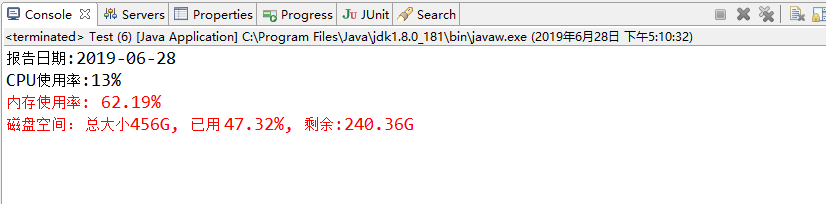
运行效果:
获取系统相关信息 (CPU使用率 内存使用率 系统磁盘大小)的更多相关文章
- C#获取CPU和内存使用率
获取内存使用率 方式1: using System; using System.Runtime.InteropServices; namespace ConsoleApp1 { public clas ...
- Linux下使用java获取cpu、内存使用率
原文地址:http://www.voidcn.com/article/p-yehrvmep-uo.html 思路如下:Linux系统中可以用top命令查看进程使用CPU和内存情况,通过Runtime类 ...
- C#获取特定进程CPU和内存使用率
首先是获取特定进程对象,可以使用Process.GetProcesses()方法来获取系统中运行的所有进程,或者使用Process.GetCurrentProcess()方法来获取当前程序所对应的进程 ...
- Python获取CPU、内存使用率以及网络使用状态代码
Python获取CPU.内存使用率以及网络使用状态代码_python_脚本之家 http://www.jb51.net/article/134714.htm
- Ubuntu 16.04 标题栏实时显示上下行网速、CPU及内存使用率--indicator-sysmonitor
---------------------------------------------------------------------------- 原文地址:http://blog.csdn.N ...
- DSAPI 获取实时统计信息CPU/内存/硬盘/网络
有时,我们需要获取当前计算机中CPU.内存.硬盘.网络等实时信息,如下图:\ 要实现上述几项信息的获取,通常需要使用Timer控件来间隔获取,以便刷新最新的数据. 本示例中,放一个Timer控件,放一 ...
- Ubuntu 16.04 标题栏实时显示上下行网速、CPU及内存使用率
有时感觉网络失去响应,就通过Ubuntu 14.04自带的系统监视器程序来查看当前网速,但是这样很不方便,遂打算让网速显示在标题栏,那样就随时可直观的看到.一番搜索尝试后,成功实现!同时也实现了CPU ...
- 转:ZABBIX监控H3C设备的CPU和内存使用率
由于最近监控的H3C路由器经常出现死机现象,SNMP获取不到数据,后面检查发现是CPU使用率过高,直接导致无法处理SNMP请求,所以需求来了,怎样通过SNMP监控H3C路由器的CPU和内存使用率? ...
- Linux sysinfo获取系统相关信息
Linux中,可以用sysinfo来获取系统相关信息. #include <stdio.h> #include <stdlib.h> #include <errno.h& ...
随机推荐
- LeetCode刷题-最长公共前缀(简单)
题目描述 编写一个函数来查找字符串数组中的最长公共前缀. 如果不存在公共前缀,返回空字符串 "". 示例 1: 输入: ["flower","flow ...
- 生成对抗性网络GAN
同VAE模型类似,GAN模型也包含了一对子模型.GAN的名字中包含一个对抗的概念,为了体现对抗这个概念,除了生成模型,其中还有另外一个模型帮助生成模型更好地学习观测数据的条件分布.这个模型可以称作判别 ...
- mysql数据库创建用户、赋权、修改用户密码
创建新用户 create user lisi identified by '123456'; 查看创建结果: 授权 命令格式:grant privilegesCode on dbName.tableN ...
- 2019年全国高校计算机能力挑战赛初赛C++语言解答
1; 题目一 16.电商促销某种商品时,希望通过打折鼓励消费者组团消费.已知,团队消费金额=该团的人数和*商品单价.打折规则如下:当组团消费者数量不满50人时,商品消费金额没有折扣:消费者数量大于等于 ...
- windowsServer---- 在iis 上安装网站
1.找到信息服务IIS 管理器如图: 2.进入后进行配置 3.添加本地网站 配置网站 如果域名没有解析的话,可以在添加一个 端口用于测试 点击浏览就行查看 如果报错 解决:找到目录浏览,并启动 点击 ...
- Docker 零碎
Delete none tag docker image: $ docker stop $(docker ps -a | grep "Exited" | awk '{print $ ...
- 使用session存储,购物车结算add_to_order.php(学生笔记)
<?php session_start(); include_once("DB.class.php"); //接受并解析前端传过来的json,转换成数组. $goods_li ...
- 2018简约商务工作汇报工作总结公司培训团队介绍PPT模
这几款ppt模板都是简约大气类型的,32页足够丰富,有完整结构框架,可以修改文字图片直接套用模板,是通用的商务ppt模板. 模版来源:http://ppt.dede58.com/gongzuohuib ...
- RabbitMQ的第一次亲密接触
企业应用系统,如果系统之间的通信.集成与整合,尤其当面临异构系统时,那么需要分布式的调用与通信.系统中一般会有很多对实时性要求不高但零零碎碎且耗时的地方,比如发送短信,邮件提醒,记录用户操作日志等,在 ...
- iOS---------开发中 weak和assign的区别
weak和assign的区别-正确使用weak.assign 一.区别 1.修饰变量类型的区别weak只可以修饰对象.如果修饰基本数据类型,编译器会报错-“Property with ‘weak’ a ...