
python语法(二)— 判断
昨天简单的学习了一些python的一些简单的语句与python的数据类型,今天继续学习python的基础语句 if 语句。
一、if 语句
- if 语句语法
if expression:

    ifSuite

else:

    elseSuite
如果表达式expression的值为非0或者为True,则代码组ifSuite将会被执行,否则执行elseSuite代码组。其实这里跟java的语法差不多,但是这里expression可以直接写数据类型。
- 数字,只要是非0,则会被认为是True。
- 字符串 只要是非“”, 都会被认为是True。
- 列表 只要非[], 都会被认为是True。
- 元组 只要非(), 都会被认为是True。
- 字典 只要非{}, 都会被认为是True。
- None 也为假
# -*- coding: utf-8 -*-

'''

Created on 2018年12月17日

@author: Herrt灬凌夜

'''

if 0.1 :

    print("真");

if 0 :

    print("真");

else :

    print("假");

if "" :

    print("真");

else :

    print("假");

if " " :

    print("真");

else :

    print("假");

if [] :

    print("真");

else :

    print("假");

if () :

    print("真");

else :

    print("假");

if {} :

    print("真");

else :

    print("假");

if None :

    print("真");

else :

    print("假");

if "s" in "sdas" :

    print("真");
以下为上述if语句的执行结果:
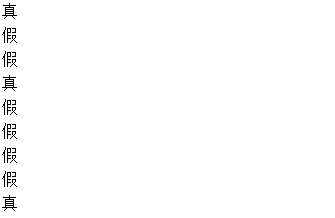
最后写一个简单的例子:
1.提示用户输入用户名密码
2.若用户名为"tom",密码为123456则返回Login否则返回error
# -*- coding: utf-8 -*-

'''

Created on 2018年12月17日

1.提示用户输入用户名密码

2.若用户名为"tom",密码为123456则返回Login否则返回error

@author: Herrt灬凌夜

'''

userName = input("请输入用户名:");

passWord = input("请输入密码:");

if userName == "tom" and passWord == "":

    print("Login");

else :

    print("error");
二、if elif 语句
- if elif 语句语法
if expression1 :

    ifSuite

elif expression2 :

    elifSuite

else :

    elseSuite
if elif 语句就相当于java语言中if else 语句一样,主要是用于多条件判断语句。我们以一个简单的实例来看这个语句。
1.输入一个数字,如果这个数字大于0,输出正数,如果小于0,输出负数,如果等于0则输出0
# -*- coding: utf-8 -*-

'''

Created on 2018年12月17日

输入一个数字,如果这个数字大于0,输出正数,如果小于0,输出负数,如果等于0则输出0

@author: Herrt灬凌夜

'''

numStr = int(input("请输入一个数字:"));

if numStr > 0 :

    print("正数");

elif numStr < 0 :

    print("负数");

else :

    print("");
三、一些简单的例子
- 根据用户输入的成绩,输出,如果大于60则输出“及格”,如果大于70则输出“良好”,如果大于80则输出“好”, 如果大于90则输出优秀,否则输出“不及格”
# -*- coding: utf-8 -*-

'''

Created on 2018年12月17日

根据用户输入的成绩,输出,如果大于60则输出“及格”,如果大于70则输出“良好”,如果大于80则输出“好”, 如果大于90则输出优秀,否则输出“不及格”

@author: Herrt灬凌夜

'''

grade = int(input("请输入成绩"));

if grade < 0 or grade > 100 :

    print("输入成绩有误!");

elif grade > 60 and grade <= 70 :

    print("及格");

elif grade > 70 and grade <= 80 :

    print("良好");

elif grade > 80 and grade <= 90 :

    print("好");

elif grade > 90 :

    print("优秀");

else :

    print("不及格");
- 写一个人机交互的猜拳游戏
# -*- coding: utf-8 -*-

'''

Created on 2018年12月17日

猜拳游戏

@author: Herrt灬凌夜

'''

import random;

computer = random.choice(["石头", "剪刀", "布"]);

person = input("请出拳(石头,剪刀,布):");

if person == "石头" and computer == "石头" :

    print("平局");

elif person == "剪刀" and computer == "剪刀" :

    print("平局");

elif person == "布" and computer == "布" :

    print("平局");

elif person == "石头" and computer == "剪刀" :

    print("你赢了");

elif person == "剪刀" and computer == "布" :

    print("你赢了");

elif person == "布" and computer == "石头" :

    print("你赢了");

elif person == "石头" and computer == "剪刀" :

    print("你输了");

elif person == "剪刀" and computer == "布" :

    print("你输了");

elif person == "布" and computer == "石头" :

    print("你输了");
上述代码虽然可以实现猜拳游戏,但是显得非常的啰嗦,我们对上述代码进行优化,并且可以让用户有更好的体验。
# -*- coding: utf-8 -*-

'''

Created on 2018年12月17日

猜拳游戏

@author: Herrt灬凌夜

'''

import random;

computer = random.choice(["石头", "剪刀", "布"]);

winList = [["石头", "剪刀"], ["剪刀", "布"], ["布", "石头"]];

personList = ["石头", "剪刀", "布"];

hint = """

请出拳:

(0)石头

(1)剪刀

(3)布

""";

#获取下标

person = int(input(hint));

#字符串输出格式化

print("你出了%s,电脑出了%s" % (personList[person], computer));

if personList[person] == computer :

    #\033[32;1m 开启颜色   \033[0m 关闭颜色

    print("\033[32;1m平局\033[0m");

elif [personList[person], computer] in winList :

    print("\033[31;1m你赢了\033[0m");

else :

    print("\033[31;1m你输了\033[0m");
下面的代码明显就简洁了许多,而且可读性也强了许多。
今天主要学习了python的if 判断语句,在开发过程中判断语句还是比较常用的语句,所以要加强练习,毕竟学习一门新的语言,练习是必不可少的。
-------------------- END ---------------------
最后附上作者的微信公众号地址和博客地址
公众号:wuyouxin_gzh

Herrt灬凌夜:https://www.cnblogs.com/wuyx/
python语法(二)— 判断的更多相关文章
- Python语法二
1.raw_input 输入 2.如果想查看某个关键字的用法,可以在命令行输入pydoc raw_input. 如果是windows,那么试一下 python -m pydoc raw_input 3 ...
- python语法_if判断
age_of_princal = 56 guess_age = int(input("e guess a age:")) if guess_age == age_of_princa ...
- Python 基础语法(二)
Python 基础语法(二) --------------------------------------------接 Python 基础语法(一) ------------------------ ...
- python学习第四讲,python基础语法之判断语句,循环语句
目录 python学习第四讲,python基础语法之判断语句,选择语句,循环语句 一丶判断语句 if 1.if 语法 2. if else 语法 3. if 进阶 if elif else 二丶运算符 ...
- web前端学习python之第一章_基础语法(二)
web前端学习python之第一章_基础语法(二) 前言:最近新做了一个管理系统,前端已经基本完成, 但是后端人手不足没人给我写接口,自力更生丰衣足食, 所以决定自学python自己给自己写接口哈哈哈 ...
- [python语法]python中如何判断一个集合是另一个集合的子集?
问:python中如何判断一个集合是另一个集合的子集? 答:用issubset()方法 语法: A.issubset(B) 返回: True 如果A是B的子集. False 如果A不是B的子集. 样例 ...
- 【阿K学Python系列】一Python基础语法(二)
前言 通过上一章的学习[阿k学Python]一Python入门(一),我们已经初步了解到Python是一种解释型.面向对象.动态数据类型的高级程序设计语言,当然也是一门脚本语言,像前端需要学习的Jav ...
- Python startswith() 函数 判断字符串开头
Python startswith() 函数 判断字符串开头 函数:startswith() 作用:判断字符串是否以指定字符或子字符串开头 一.函数说明语法:string.startswith(str ...
- Python语法详解
python语法解析 目录 python语法解析 一.顺序结构 二.分支结构 2.1 if 的基本语法 2.2 if 的基本应用 三.循环结构 3.1 while 语法 3.1.1 语法结束条件 3. ...
随机推荐
- shell操作典型案例--FTP操作
从FTP服务器上下载文件或上传文件到FTP服务器是生产环境中比较常见的场景之一. shell操作FTP的方式整理如下: 思路一:使用shell调用ftp等客户端 使用FTP方式,通过shell调用ft ...
- InnoDB 引擎独立表空间
InnoDB 引擎独立表空间 使用过MySQL的同学,刚开始接触最多的莫过于MyISAM表引擎了,这种引擎的数据库会分别创建三个文件:表结构.表索引.表数据空间.我们可以将某个数据库目录直接迁移到 ...
- js鼠标自定移入输入框文本框光标自动定位到文本框
1.干货直接上 选中输入框设置如下: document.getElementById("Text1").focus();
- Spring4笔记3--Bean的装配
Bean的装配: Bean 的装配,即 Bean 对象的创建.容器根据代码要求创建 Bean 对象后再传递给代码的过程,称为 Bean 的装配. 1. 创建Bean对象的方式: 1. 通过 getBe ...
- 記一次undo問題
記一次undo問題 參考:http://www.linuxidc.com/Linux/2014-06/103780.htm ORA-00376: 無法於此時讀取檔案 3 ORA-01110: 資料檔 ...
- css给表格每一列设置不同的样式
第一列#id table tr td:first-child{ overflow: visible; }第二列table tr td:first-child+td{color:#666;}第三列tab ...
- torch.normal(means, std, out=None)
返回满足正态分布的张量 means和std分别给出均值和标准差
- JavaScript 金额、数字、千分位、千分位、保留几位小数、舍入舍去、支持负数
JavaScript 金额.数字 千分位格式化.保留指定位数小数.支持四舍五入.进一法.去尾法 字段说明: number:需要处理的数字: decimals:保留几位小数,默认两位,可不传: dec_ ...
- 通过PDB文件实现非嵌入式的c++反射
上一篇blog我阐述了一种实现非嵌入式的反射的基本思路.相比于通过宏和模板实现,这种非嵌入的反射的优点是不需要写额外的代码来记录meta信息. 首先,为了在c++中实现反射系统,我认为需要解决以下两个 ...
- 安装Visual Studio Scrum 1.0过程模板
近几年里,Scrum变成了相当流行的软件开发方法学.因为它轻量.可迭代且快速等优点,以致于在敏捷开发中极受欢迎.微软甚至将TFS2010自带的MSF Agile5.0过程模板做得像Scrum,开发者们 ...