
vue.js生成横向拓扑图
1.前端代码
<link href="https://magicbox.bk.tencent.com/static_api/v3/assets/bootstrap-3.3.4/css/bootstrap.min.css" rel="stylesheet">

<link href="https://magicbox.bk.tencent.com/static_api/v3/assets/bkTopology-1.1/css/bkTopology.css" rel="stylesheet">

<script src="https://magicbox.bk.tencent.com/static_api/v3/assets/js/jquery-1.10.2.min.js"></script>

<script src="https://magicbox.bk.tencent.com/static_api/v3/assets/bootstrap-3.3.4/js/bootstrap.min.js"></script>

<script src="https://magicbox.bk.tencent.com/static_api/v3/assets/bkTopology-1.2/js/bkTopology.js"></script>

<div id="app" style="margin-top: 60px;">

    <el-row :gutter="40">

        <el-col :span="16" :offset="4">

            <div class="none node" id="node-templates" data-container="body" data-placement="top" data-html="true" data-trigger="hover">

                <div class="node-container"><span class="node-text"></span></div>

            </div>

            <div class="bktopo-container">

                <div class="bktopo_demo" id="bktopo_demo2">

                    <div class="none node" id="node-templates" data-container="body" data-placement="top" data-html="true" data-trigger="hover">

                        <div class="node-container"><span class="node-text"></span></div></div>

                    <div class="bktopo_box" style="height:350px;"></div>

                </div>

            </div>

        </el-col>

    </el-row>

</div>
<script type="text/javascript">

    new Vue({

        el: '#app',

        data: {

        },

        mounted() {

            this.init()

        },

        methods: {

            init() {

                axios.get(site_url + "topo/").then(res => {

                    if (res.data.result){

                        $('#bktopo_demo2 .bktopo_box').bkTopology({

                            data: res.data.data, //配置数据源

                            lineType: [ //配置线条的类型

                                {type: 'success', lineColor: '#46C37B'},

                                {type: 'info', lineColor: '#4A9BFF'},

                                {type: 'warning', lineColor: '#f0a63a'},

                                {type: 'danger', lineColor: '#c94d3c'},

                                {type: 'default', lineColor: '#aaa'}

                            ]

                        });

                    }else{

                        this.$message.error('获取拓朴数据失败');

                    }

                },'json');

            }

        }

    })

</script>
2.后端代码
def topo(request):

    data = {

        "nodes": [

            {"id": "root", "x": 10, "y": 152, "height": 50, "width": 120, "text": "卡机健康度", "className": "info"},

            {"id": "child1", "x": 200, "y": 30, "height": 50, "width": 120, "text": "进程CPU监控", "className": "info"},

            {"id": "child2", "x": 200, "y": 90, "height": 50, "width": 120, "text": "网管网络故障监控", "className": "info"},

            {"id": "child3", "x": 200, "y": 150, "height": 50, "width": 120, "text": "进程内在泄露监控", "className": "info"},

            {"id": "child4", "x": 200, "y": 210, "height": 50, "width": 120, "text": "进程存活监控", "className": "info"},

            {"id": "child5", "x": 200, "y": 270, "height": 50, "width": 120, "text": "用户内在使用监控", "className": "info"},

            {"id": "child1_1", "x": 380, "y": 30, "height": 50, "width": 120, "text": "监控正常无触发自愈","className": "success"},

            {"id": "child2_1", "x": 380, "y": 90, "height": 50, "width": 120, "text": "监控正常无触发自愈","className": "success"},

            {"id": "child3_1", "x": 380, "y": 150, "height": 50, "width": 120, "text": "发现异常触发自愈","className": "danger"},

            {"id": "child3_2", "x": 560, "y": 150, "height": 50, "width": 120, "text": "重启进程正常", "className": "success"},

            {"id": "child4_1", "x": 380, "y": 210, "height": 50, "width": 120, "text": "发现异常触发自愈","className": "danger"},

            {"id": "child4_2", "x": 560, "y": 210, "height": 50, "width": 120, "text": "重启进程正常","className": "success"},

            {"id": "child5_1", "x": 380, "y": 270, "height": 50, "width": 120, "text": "发现异常触发自愈","className": "success"},

        ],

        "edges": [

            {"source": "root", "sDirection": 'right', "target": "child1", "tDirection": 'left', "edgesType": "info"},

            {"source": "root", "sDirection": 'right', "target": "child2", "tDirection": 'left', "edgesType": "info"},

            {"source": "root", "sDirection": 'right', "target": "child3", "tDirection": 'left', "edgesType": "info"},

            {"source": "root", "sDirection": 'right', "target": "child4", "tDirection": 'left', "edgesType": "info"},

            {"source": "root", "sDirection": 'right', "target": "child5", "tDirection": 'left', "edgesType": "info"},

            {"source": "child1","sDirection":'right',"target":"child1_1","tDirection":'left',"edgesType": "success"},

            {"source": "child2","sDirection": 'right', "target": "child2_1", "tDirection": 'left',"edgesType": "success"},

            {"source": "child3","sDirection": 'right', "target": "child3_1", "tDirection": 'left',"edgesType": "danger"},

            {"source": "child3_1","sDirection": 'right', "target": "child3_2", "tDirection": 'left',"edgesType": "success"},

            {"source": "child4","sDirection": 'right', "target": "child4_1", "tDirection": 'left',"edgesType": "danger"},

            {"source": "child4_1","sDirection": 'right', "target": "child4_2", "tDirection": 'left',"edgesType": "success"},

            {"source": "child5","sDirection": 'right', "target": "child5_1", "tDirection": 'left',"edgesType": "success"}

        ]

    }

    return JsonResponse({"result": True, "data": data})
显示效果
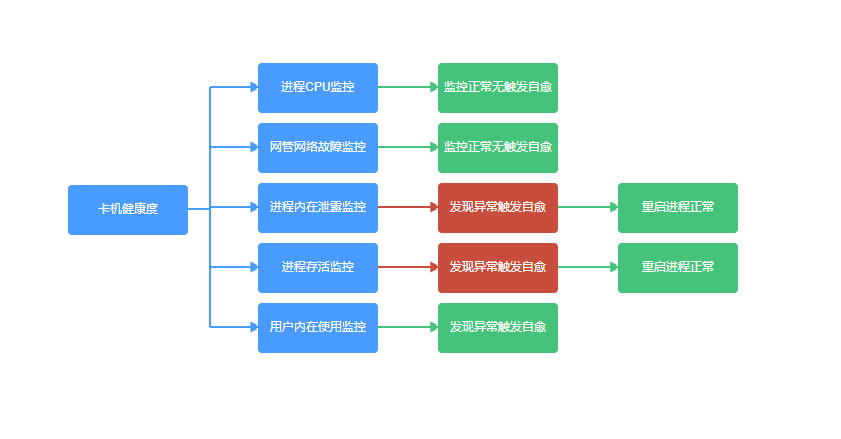
vue.js生成横向拓扑图的更多相关文章
- vue.js生成纵向拓扑图
1.前端代码 <link href="https://magicbox.bk.tencent.com/static_api/v3/assets/bootstrap-3.3.4/css/ ...
- vue.js生成S型拓扑图
1.前端代码 <link href="https://magicbox.bk.tencent.com/static_api/v3/assets/bootstrap-3.3.4/css/ ...
- vue.js 二维码生成组件
安装 通过NPM安装 npm install vue-qart --save 插件应用 将vue-qart引入你的应用 import VueQArt from 'vue-qart' new Vue({ ...
- 基于 Vue.js 之 iView UI 框架非工程化实践记要 使用 Newtonsoft.Json 操作 JSON 字符串 基于.net core实现项目自动编译、并生成nuget包 webpack + vue 在dev和production模式下的小小区别 这样入门asp.net core 之 静态文件 这样入门asp.net core,如何
基于 Vue.js 之 iView UI 框架非工程化实践记要 像我们平日里做惯了 Java 或者 .NET 这种后端程序员,对于前端的认识还常常停留在 jQuery 时代,包括其插件在需要时就引 ...
- 在Vue&Element前端项目中,使用FastReport + pdf.js生成并展示自定义报表
在我的<FastReport报表随笔>介绍过各种FastReport的报表设计和使用,FastReport报表可以弹性的独立设计格式,并可以在Asp.net网站上.Winform端上使用, ...
- 用Vue.js开发微信小程序:开源框架mpvue解析
前言 mpvue 是一款使用 Vue.js 开发微信小程序的前端框架.使用此框架,开发者将得到完整的 Vue.js 开发体验,同时为 H5 和小程序提供了代码复用的能力.如果想将 H5 项目改造为小程 ...
- npm安装教程(vue.js)
https://www.cnblogs.com/goldlong/p/8027997.html 首先理清nodejs和npm的关系: node.js是javascript的一种运行环境,是对Googl ...
- (GoRails )使用Vue.js制作拖拉list功能(v5-8)
视频5 改进视觉效果,让list看起来更舒服.新增横向滚动功能. 参考我的trello:https://trello.com/b/BYvCBpyZ/%E6%AF%8F%E6%97%A5%E8%AE%B ...
- Vue.js高效前端开发 • 【Ant Design of Vue框架进阶】
全部章节 >>>> 文章目录 一.栅格组件 1.栅格组件介绍 2.栅格组件使用 3.实践练习 二.输入组件 1.输入框组件使用 2.选择器组件使用 3.单选框组件使用 4.实践 ...
随机推荐
- Solr7.x学习(4)-导入数据
导入配置可参考官网:http://lucene.apache.org/solr/guide,http://lucene.apache.org/solr/guide/7_7/ 1.数据准备(MySQL8 ...
- ASP.NET Core消息队列RabbitMQ基础入门实战演练
一.课程介绍 人生苦短,我用.NET Core!消息队列RabbitMQ大家相比都不陌生,本次分享课程阿笨将给大家分享一下在一般项目中99%都会用到的消息队列MQ的一个实战业务运用场景.本次分享课程不 ...
- Python OpenCV4获取轮廓最大内切圆和外接圆
为了方便讲解,我们先来创建一个多边形做演示 第一步:创建图像,并绘制一个六边形.代码和生成图像如下: # Create an image r = 100 src = np.zeros((4*r, 4* ...
- 用eclipse开发需要准备什么?
1.到eclipse的官网上,https://www.eclipse.org/ 下载好eclipse,安装好eclipse,修改eclipse.ini文件,把内存改大点,避免出现内存溢出的情况. [ ...
- Django 定义视图函数
Django 定义视图函数 一.接收内容及文件处理 1.接收分类 # 获取数据 request.GET # 提交数据 request.POST # 获取文件 request.FILES 2.check ...
- C# 练习题 利用条件运算符的嵌套来完成分数等级划分
题目:利用条件运算符的嵌套来完成此题:学习成绩>=90分的同学用A表示,60-89分之间的用B表示,60分以下的用C表示.1.程序分析:(a>b)?a:b这是条件运算符的基本例子. cla ...
- C#写入Excel文件方式
由于在工作中经常要把数据库的统计数据导入Excel文件,进行IO磁盘操作,所以在这里记录下. 首先创建默认文件夹,并返回文件夹路径. private static string CPath(strin ...
- Tigase XMPP Server
Tigase XMPP Server是我们的旗舰服务器端软件,提供XMPP服务或实例通信(IC)服务.最基本的解释是Tigase是一个聊天服务器,但它远不止于此.聊天是其可能的应用程序之一,但任何类型 ...
- ASP.NET 异步编程之Async await
本文重点介绍的是.NET Framework4.5 推出的异步编程方案 async await 请先看个5分钟的微软演示的视频:视频地址: https://channel9.msdn.com/Blo ...
- POI SXSSF API 导出1000万数据示例
SXSSF是XSSF API的兼容流式扩展,在必须生成非常大的电子表格.并且堆空间有限时使用. SXSSF通过限制对滑动窗口内数据的访问实现低内存占用,而XSSF允许访问文档中的所有行. 不在窗口中的 ...