
WPF ListView控件设置奇偶行背景色交替变换以及ListViewItem鼠标悬停动画
原文:WPF ListView控件设置奇偶行背景色交替变换以及ListViewItem鼠标悬停动画
利用WPF的ListView控件实现类似于Winform中DataGrid行背景色交替变换的效果,同时增加鼠标的悬停效果。
1.本文实现的效果如下:
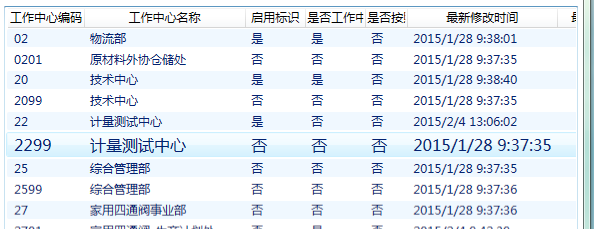
2.所有的效果,我通过C#代码实现。代码如下:
using System;

using System.Collections.Generic;

using System.Linq;

using System.Text;

using System.Windows.Controls;

using System.Windows;

using System.Windows.Media;

using System.ComponentModel;

using System.Windows.Media.Animation;

namespace BarCodeSystem

{

    public class ListViewItemStyleSelector:StyleSelector

    {

        private Dictionary> storyboards = new Dictionary>();

        ///

        /// 下面的示例演示如何定义一个为行定义 Style 的 StyleSelector。

        /// 此示例依据行索引定义 Background 颜色,为每行定义ListViewItem的动画板(Storyboard)。

        ///ListView控件在初始化的时候,每初始化一行ListViewItem的时候都会进入该函数

        ///

        ///

        ///

        ///

        public override Style SelectStyle(object item, DependencyObject container)

        {

            Style st = new Style();

            st.TargetType=typeof(ListViewItem);

            Setter backGroundSetter = new Setter();

            backGroundSetter.Property = ListViewItem.BackgroundProperty;

            ListView listview =

                ItemsControl.ItemsControlFromItemContainer(container)

                as ListView;//获得当前ListView

            int index =

                listview.ItemContainerGenerator.IndexFromContainer(container);//行索引

            if (index % 2 == 0)

            {

                backGroundSetter.Value = Brushes.AliceBlue;

            }

            else

            {

                backGroundSetter.Value = Brushes.Transparent;

            }

            st.Setters.Add(backGroundSetter);

            //获得当前ListViewItem

            ListViewItem iteml = (ListViewItem)listview.ItemContainerGenerator.ContainerFromIndex(index);

            //故事板列表,用来存放1.鼠标进入故事板2.鼠标离开故事板

            List sbl = new List();

            //声明故事板

            Storyboard storyboard = new Storyboard();

            //1.鼠标进入故事板

            //声明动画

            DoubleAnimation fontEnterAnimation = new DoubleAnimation();

            //动画的目标值

            fontEnterAnimation.To = 16;

            //开始之前的等待时间,设置0.5s的等待时间是为了模拟“悬停时间”

            fontEnterAnimation.BeginTime = TimeSpan.FromSeconds(0.5);

            //动画持续时间

            fontEnterAnimation.Duration = TimeSpan.FromSeconds(1);

            //动画缓动,可要可不要

            fontEnterAnimation.EasingFunction = new ElasticEase() { EasingMode=EasingMode.EaseOut};

            //绑定动画目标控件

            Storyboard.SetTarget(fontEnterAnimation, iteml);

            //绑定动画目标属性

            Storyboard.SetTargetProperty(fontEnterAnimation, new PropertyPath("FontSize"));

            //将动画板添加到故事板中

            storyboard.Children.Add(fontEnterAnimation);

            sbl.Add(storyboard);

            //2.鼠标离开故事板

            storyboard = new Storyboard();

            DoubleAnimation fontLeaveAnimation = new DoubleAnimation();

            fontLeaveAnimation.BeginTime = TimeSpan.FromSeconds(0);

            fontLeaveAnimation.Duration = TimeSpan.FromSeconds(0.5);

            Storyboard.SetTarget(fontLeaveAnimation, iteml);

            Storyboard.SetTargetProperty(fontLeaveAnimation, new PropertyPath("FontSize"));

            storyboard.Children.Add(fontLeaveAnimation);

            sbl.Add(storyboard);

            storyboards.Add(iteml, sbl);

            //绑定鼠标进入事件

            iteml.MouseEnter += new System.Windows.Input.MouseEventHandler(iteml_MouseEnter);

            //绑定鼠标离开事件

            iteml.MouseLeave += new System.Windows.Input.MouseEventHandler(iteml_MouseLeave);

            return st;

        }

        ///

        /// 鼠标进入事件

        ///

        ///

        ///

        private void iteml_MouseEnter(object sender, RoutedEventArgs e)

        {

            ListViewItem item=(ListViewItem)sender;

            List storyboard = storyboards[item];

            storyboard[0].Begin();

        }

        private void iteml_MouseLeave(object sender, RoutedEventArgs e)

        {

            ListViewItem item = (ListViewItem)sender;

            List storyboard = storyboards[item];

            storyboard[1].Begin();

        }

    }

}
3.Xaml文件中代码如下:
4.完成。
WPF ListView控件设置奇偶行背景色交替变换以及ListViewItem鼠标悬停动画的更多相关文章
- WPF常用控件应用demo
WPF常用控件应用demo 一.Demo 1.Demo截图如下: 2.demo实现过程 总体布局:因放大缩小窗体,控件很根据空间是否足够改变布局,故用WrapPanel布局. <ScrollVi ...
- C# winfrom ListView控件实现自由设置每一行字体及背景色等
背景:公司经常会需要将日志信息,输出到一个对话框中显示出来.之前一直采用的listbox控件,操作简单,使用方便,但是遗憾的是,不能自由控制每一行的状态. 于是想了如下几个方案: (1)重绘listb ...
- Android Material适配 为控件设置指定背景色和点击波纹效果
Android Material适配 为控件设置指定背景色和点击波纹效果,有需要的朋友可以参考下. 大部分时候,我们都需要为控件设置指定背景色和点击效果 4.x以下可以使用selector,5.0以上 ...
- 深入探讨WPF的ListView控件
接上一篇博客初步探讨WPF的ListView控件(涉及模板.查找子控件) 我们继续探讨ListView的用法 一.实现排序功能 需求是这样的:假如我们把学生的分数放入ListView,当我 ...
- C#中如何让ListView控件点击选中整行
将Listview控件的FullRowSelect属性置为True,当然Listview的View属性应该是Details. 2017年6月25日17:15:55
- 初步探讨WPF的ListView控件(涉及模板、查找子控件) - GavinJun
本文结合模板的应用初步介绍ListView的应用 一.Xaml中如何建立数据资源 大部分数据都会来自于后台代码,如何Xaml同样的建立数据源呢?比如建立一个学生List: 首先引入命名空间: xmln ...
- ListView控件--2016年12月9日
ListView属性 ListView 名称 说明 AccessKey 重写 WebControl.AccessKey 属性. 不支持将此属性设置 ListView 控件.(覆盖 WebContr ...
- ListView控件
打气筒工具:将R.layout.item_listview布局添加到相应的view控件里面 View view=LayoutInflater.from(ScondPro.this).inflate ...
- 创建 WPF 工具箱控件
创建 WPF 工具箱控件 WPF (Windows Presentation Framework) 工具箱控件模板允许您创建 WPF 控件,会自动添加到 工具箱 安装扩展的安装. 本主题演示如何使用模 ...
随机推荐
- hdu 2577 How to Type(DP)
How to Type Time Limit: 2000/1000 MS (Java/Others) Memory Limit: 32768/32768 K (Java/Others) Tota ...
- ios开发网络学习四:NSURLConnection大文件断点下载
#import "ViewController.h" @interface ViewController ()<NSURLConnectionDataDelegate> ...
- 【u120】红牌
Time Limit: 1 second Memory Limit: 128 MB [问题描述] 某地临时居民想获得长期居住权就必须申请拿到红牌.获得红牌的过程是相当复杂 ,一共包括N个步骤.每一步骤 ...
- 百度消息推送SDK探究(并附上最简推送Demo)
上一篇<百度消息推送REST API探究>中了解了如何使用REST API推送消息,这一篇我们来看一下百度消息推送为我们提供的SDK. 帮助文档:http://developer.baid ...
- [Angular] Content Projection with ng-content
For example there is tow form compoennts on the page, and what we want to do is reusing the form com ...
- 我的Java开发学习之旅------>Java经典排序算法之归并排序
一.归并排序 归并排序是建立在归并操作上的一种有效的排序算法,该算法是採用分治法(Divide and Conquer)的一个很典型的应用.将已有序的子序列合并,得到全然有序的序列.即先使每一个子序列 ...
- [WebGL入门]十三,minMatrix.js和坐标变换矩阵
注:文章译自http://wgld.org/,原作者杉本雅広(doxas),文章中假设有我的额外说明,我会加上[lufy:],另外,鄙人webgl研究还不够深入,一些专业词语,假设翻译有误,欢迎大家指 ...
- js进阶 9-14 js如何实现下拉列表多选移除
js进阶 9-14 js如何实现下拉列表多选移除 一.总结 一句话总结: 1.js如何实现下拉列表多选移除? 把这个下拉列表中的option移除,然后加到另外一个下拉列表(文字)中去.remove方法 ...
- MAC 安装下载好的.gz包(不像.dmg直接双击就行了)
下载之后解压,然后在terminal里敲命令吧: 复制文件:蓝色部分为你解压文件的路径,直接拖到这里就行了$ sudo mv mysql-5.1.45-osx10.6-x86_64文件路径 /usr/ ...
- unityd 公布android apk相关
http://game.ceeger.com/forum/read.php?tid=5918&ds=1 相关的文章非常多,我仅仅记录自己遇到的一些关键点. 1.jdk android SDK ...