
git push上传代码到gitlab上,报错401/403(或需要输入用户名和密码)
之前部署的gitlab,采用ssh方式连接gitlab,在客户机上产生公钥上传到gitlab的SSH-Keys里,git clone下载和git push上传都没问题,这种方式很安全。
后来应开发同事要求采用http方式连接gitlab,那么首先将project工程的“Visibility Level”改为“Public”公开模式,要保证gitlab的http端口已对客户机开放。
后面发现了一个问题:
http方式连接gitlab后,git clone下载没有问题,但是git push上传有报错:
error: The requested URL returned error: 401 Unauthorized while accessing http://git.xqshijie.net:8081/weixin/weixin.git/info/refs
fatal: HTTP request failed
或者
The requested URL returned error: 403 Forbidden while accessing
实例如下:
假设git的url为http://git.wangshibo.net
[root@test-huanqiu ~]# mkdir /root/git
[root@test-huanqiu ~]# cd /root/git
[root@test-huanqiu git]# git init .
[root@test-huanqiu git]# git clone http://git.wangshibo.net:8081/weixin/weixin.git
Initialized empty Git repository in /root/git/weixin/.git/
remote: Counting objects: 10, done.
remote: Compressing objects: 100% (6/6), done.
remote: Total 10 (delta 0), reused 0 (delta 0)
Unpacking objects: 100% (10/10), done.
上面可以看出,已经能成功git clone下代码
[root@test-huanqiu git]# ll
total 4
drwxr-xr-x. 3 root root 4096 Nov 30 15:58 weixin
[root@test-huanqiu git]# cd weixin/
[root@test-huanqiu weixin]# ll
total 8
-rw-r--r--. 1 root root 15 Nov 30 15:58 heihei
-rw-r--r--. 1 root root 1 Nov 30 15:38 README.md
现在测试下git push
[root@test-huanqiu weixin]# git rm heihei
[root@test-huanqiu weixin]# touch test.file
[root@test-huanqiu weixin]# echo "123456" > test.file
[root@test-huanqiu weixin]# git add .
[root@test-huanqiu weixin]# git commit -m "this is a test"
[root@test-huanqiu weixin]# git push //或者git push -u origin master
error: The requested URL returned error: 401 Unauthorized while accessing http://git.wangshibo.net:8081/weixin/weixin.git/info/refs
fatal: HTTP request failed
解决办法:
在代码的.git/config文件内[remote "origin"]的url的gitlab域名前添加gitlab注册时的“用户名:密码@”
另外发现这个用户要在对应项目下的角色是Owner或Master才行,如果是Guest、Reporter、Developer,则如下操作后也是不行。
如下,gitlab的用户名是wangshibo,假设密码是HU@wew12378!h8
查看gitlab界面里的登陆用户名:
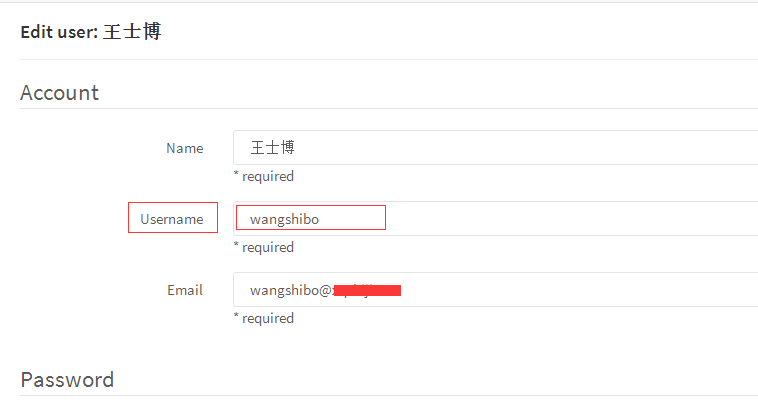
然后修改代码里的.git/config文件
[root@test-huanqiu weixin]# cd .git
[root@test-huanqiu .git]# cat config
[core]
repositoryformatversion = 0
filemode = true
bare = false
logallrefupdates = true
[remote "origin"]
fetch = +refs/heads/*:refs/remotes/origin/*
url = http://git.wangshibo.net:8081/weixin/weixin.git
[branch "master"]
remote = origin
merge = refs/heads/master
修改如下:
[root@test-huanqiu .git]# cat config
[core]
repositoryformatversion = 0
filemode = true
bare = false
logallrefupdates = true
[remote "origin"]
fetch = +refs/heads/*:refs/remotes/origin/*
url = http://wangshibo:HU@wew12378!h8@git.wangshibo.net:8081/weixin/weixin.git
[branch "master"]
remote = origin
merge = refs/heads/master
然后再次git push,发现可以正常提交了!
[root@test-huanqiu weixin]# git push
Counting objects: 4, done.
Delta compression using up to 8 threads.
Compressing objects: 100% (2/2), done.
Writing objects: 100% (3/3), 297 bytes, done.
Total 3 (delta 0), reused 0 (delta 0)
To http://wangshibo:HUIhui1987521@git.xqshijie.net:8081/weixin/weixin.git
8fcb559..6c97b56 master -> master
------------------------------------------------------------------------------------------------------------------------------------
可以创建一个用户名作为admin管理员,然后将这个用户名和密码添加到项目代码的.git/config里面,如上操作!
如果不是管理员,则至少对当前代码具有owner或master权限。
这样,在.git/config文件里添加这个用户名和密码权限,然后其他人在git push的时时候都使用这个文件进行覆盖。
其他人在首次git clone下载代码的时候,需要进行--global全局配置,然后就可以在gitweb控制台里追踪到每个操作者的提交记录了!
git push上传代码到gitlab上,报错401/403(或需要输入用户名和密码)的更多相关文章
- git push上传代码到gitlab上,报错401或403
之前部署的gitlab代码托管平台,采用ssh方式连接gitlab,在客户机上产生公钥上传到gitlab的SSH-Keys里,则git clone下载和git push上传都没问题,这种方式很安全. ...
- [Jenkins Git] 在Jenkins上拉代码总是失败,跑去本地看,提示输入用户名和密码,但是Jenkins上已经配置了正确的用户名和密码
git config --global credential.helper manager
- MAC使用pycharm上传代码到Github上
本人的电脑已经在GitHub中添加成功了SSH keys! 以下为在pycharm中上传代码到Github的步骤. Step1:打开pycharm,preferences---plugins(插件)选 ...
- react-native 在Xcode上传到iTunes Connect里报错
在xcode里面点击“upload to app store”的时候,提示“the session's status is FAILED and the error description is 'C ...
- webstorm 上传代码到gitlab
1. 2. 3.push 4.填写上传url
- 上传代码到github上
初始化 git init 添加远程仓库 git remote add origin[仓库名] 仓库地址 添加文件 git add . 本地提交 git commit -m 'message' 拉去远程 ...
- maven tomcat插件上传项目到tomcat服务器报错SEVERE: One or more listeners failed to start.
以前觉了maven依赖设置很简单,就是将手动导入jar包转化为自动下载导入 但发现的一个问题, 在使用maven插件tomcat打包上传工具时 tomcat-maven-plugin <buil ...
- 批量上传文件或者上传大文件时 gateWay报错DataBufferLimitException: Exceeded limit on max bytes to buffer : 262144
一.描述 最近在批量上传文件时网关出现了异常,后面发现上传大文件也会出现文件超过256发生异常,异常信息如下: org.springframework.core.io.buffer.DataBuffe ...
- springMVC:为MultipartFilte配置了上传文件解析器,报错或不能使用
一.问题描述为支持restful风格请求,并且应对可能上传文件的情况,需要在配置hiddenHttpMethodFilter过滤器之前配置MultipartFilter.目的是让MultipartFi ...
随机推荐
- sql语句进阶教程
转载自:http://blog.csdn.net/u011001084/article/details/51318434 最近从图书馆借了本介绍SQL的书,打算复习一下基本语法,记录一下笔记,整理一下 ...
- linux E325: 注意 发现交换文件 "*.swp" 解决方法
今天在linux里修改脚本文件时,不小心非正常关闭了脚本文件,再次编辑时,每次都提示 如下错误: E325: 注意发现交换文件 ".bqh.sh.swp" 所有者: root 日期 ...
- [MapReduce_8] MapReduce 中的自定义分区实现
0. 说明 设置分区数量 && 编写自定义分区代码 1. 设置分区数量 分区(Partition) 分区决定了指定的 Key 进入到哪个 Reduce 中 分区目的:把相同的 Key ...
- python基本数据类型 数字 和 字符串
一.数字 int type可以查看数据类型 将字符串转换为数字: a=" b=int(a) print(type(a)) 以十六进制或者八进制或者二进制的形式转换为十进制: num ...
- linux系统日志自动切割工具----logrotate
参考资料 :https://www.cnblogs.com/kevingrace/p/6307298.html 对于Linux系统安全来说,日志文件是极其重要的工具.不知为何,我发现很多运维同学的服务 ...
- yii2 下拉菜单
model public static function getCatlist(){ $cat = ['0' => '暂无分类']; $res = self::find()->asArra ...
- Guide to Porting MetaMask to a New Environment
https://github.com/MetaMask/metamask-extension/blob/develop/docs/porting_to_new_environment.md MetaM ...
- oracle 索引扫描类型的分类与构造
1. INDEX RANGE SCAN--请记住这个INDEX RANGE SCAN扫描方式drop table t purge;create table t as select * from dba ...
- JavaScript高级程序设计学习(六)之设计模式
每种编程语言都有其自己的设计模式.不禁让人疑惑设计模式是用来做什么?有什么用? 简单的说,设计模式是为了让代码更简洁,更优雅,更完美. 同时设计模式也会让软件的性能更好,同时也会让程序员们更轻松.设计 ...
- Reflections - Java 8 - invalid constant type
异常说明 使用Reflections扫描的时候出现could not create class file from, 原因是invalid constant type: 18 异常堆栈: org.re ...