
spring cloud config服务器
Spring Cloud Config提供了一种在分布式系统中外部化配置服务器和客户端的支持。配置服务器有一个中心位置,管理所有环境下的应用的外部属性。客户端和服务器映射到相同Spring Eventment 和 PropertySrouce抽象的概念,所以非常适合Spring应用,但也可以在任何语言开发的任何应用中使用。在一个应用从开发、测试到生产的过程中,你可以分别地管理开发、测试、生产环境的配置,并且在迁移的时候获取相应的配置来运行。
准备工作
准备几个配置文件,命名规范为 项目名称-环境名称.yml。本文在git仓库:https://github.com/xuwenjin中,新建目录config-repo-xwj,创建以下几个文件:

每个文件内容如下:
application.yml
profile: profile-default
config-client.yml
profile: config-client
config-client-dev.yml
profile: dev
config-client-test.yml
profile: test
代码示例
创建一个Maven项目,在pom.xml文件中添加如下内容:
   <dependencyManagement>

        <dependencies>

            <dependency>

                <groupId>org.springframework.cloud</groupId>

                <artifactId>spring-cloud-dependencies</artifactId>

                <version>Edgware.SR4</version>

                <type>pom</type>

                <scope>import</scope>

            </dependency>

        </dependencies>

    </dependencyManagement>

    <dependencies>

        <dependency>

            <groupId>org.springframework.cloud</groupId>

            <artifactId>spring-cloud-config-server</artifactId>

        </dependency>

        <dependency>

            <!-- 解决启动报Caused by: java.lang.ClassNotFoundException: org.eclipse.jgit.api.TransportConfigCallback -->

            <groupId>org.eclipse.jgit</groupId>

            <artifactId>org.eclipse.jgit</artifactId>

            <version>4.9.0.201710071750-r</version>

        </dependency>

    </dependencies>
启动类:
@SpringBootApplication

@EnableConfigServer // 通过@EnableConfigServer注解激活配置服务

public class ConfigServerApplication {

    public static void main(String[] args) {

        SpringApplication.run(ConfigServerApplication.class, args);

    }

}
配置文件:application.yml
server:

  port:

spring:

  application:

    name: config-server #应用程序名称

  cloud:

    config:

      server:

        git:

          uri: https://github.com/xuwenjin/config-repo-xwj #git上,配置文件地址
这样,一个Config Server就完成了。
测试工作
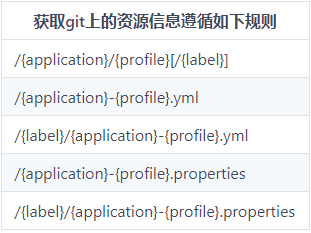
规则中的参数含义如下:
{application}映射到客户端的“spring.application.name”(项目名称){profile}映射到客户端上的“spring.profiles.active”(环境名称){label}这是一个服务器端功能,标记“版本”的配置文件集(在git中,相当于分支名)
启动服务,也可以看到匹配规则:
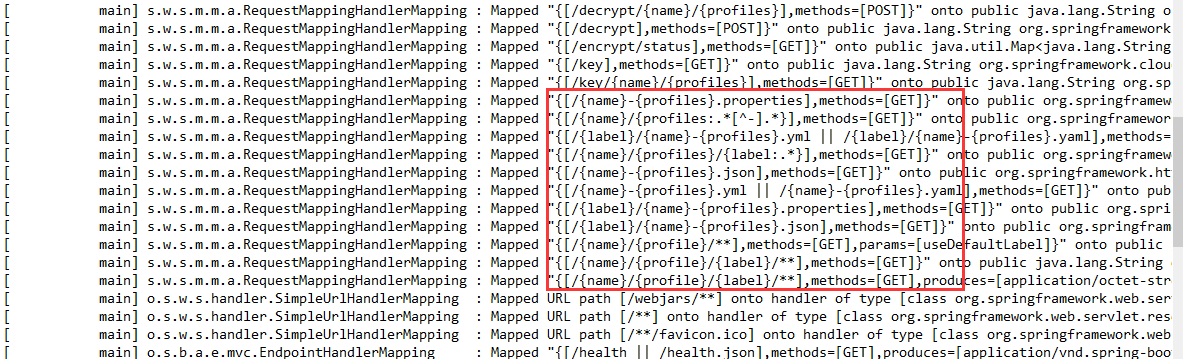
先试下 {application}/{profile}[/{label}] 这个规则,请求路径是 http://localhost:18083/config-client/dev/master,返回了所有配置文件信息:

另外四种规则差不多,可使用以下路径来访问config-client-dev.yml文件,并直接返回其中的内容:
http://localhost:18083/config-client-dev.yml
http://localhost:18083/master/config-client-dev.yml
http://localhost:18083/config-client-dev.properties
http://localhost:18083/master/config-client-dev.properties

如果想要访问config-client-test.yml文件,只需要将上面的 dev 换成 test 就行。
但是如果匹配不上呢?结果如下:

可以看到,当匹配不上时,会默认读取application.yml文件。
Config Server服务端是支持热加载的,即不重启服务的情况下更改配置文件信息,是可以直接读取的
源码分析
当发送请求时(如:http://localhost:18083/master/config-client-dev.yml ),会在 EnvironmentController 中进行匹配。如下:
@RestController

@RequestMapping(method = RequestMethod.GET, path = "${spring.cloud.config.server.prefix:}")

public class EnvironmentController {

    private EnvironmentRepository repository;

    // ...

    @RequestMapping({ "/{label}/{name}-{profiles}.yml", "/{label}/{name}-{profiles}.yaml" })

    public ResponseEntity<String> labelledYaml(@PathVariable String name, @PathVariable String profiles,

            @PathVariable String label, @RequestParam(defaultValue = "true") boolean resolvePlaceholders)

            throws Exception {

        // 校验profiles是否含义"-",如果有则抛出异常

        validateProfiles(profiles);

        // 获取环境信息,即远程配置文件数据

        Environment environment = labelled(name, profiles, label);

        // 将environment对象转为Map

        Map<String, Object> result = convertToMap(environment);

        if (this.stripDocument && result.size() ==  && result.keySet().iterator().next().equals("document")) {

            Object value = result.get("document");

            if (value instanceof Collection) {

                return getSuccess(new Yaml().dumpAs(value, Tag.SEQ, FlowStyle.BLOCK));

            } else {

                return getSuccess(new Yaml().dumpAs(value, Tag.STR, FlowStyle.BLOCK));

            }

        }

        String yaml = new Yaml().dumpAsMap(result);

        if (resolvePlaceholders) {

            yaml = resolvePlaceholders(prepareEnvironment(environment), yaml);

        }

        return getSuccess(yaml);

    }

    // ...

}
核心方法 labelled 中,会调用最核心的类 NativeEnvironmentRepositor 的 findOne 方法:
@RequestMapping("/{name}/{profiles}/{label:.*}")

public Environment labelled(@PathVariable String name, @PathVariable String profiles,

        @PathVariable String label) {

    if (name != null && name.contains("(_)")) {

        // "(_)" is uncommon in a git repo name, but "/" cannot be matched

        // by Spring MVC

        name = name.replace("(_)", "/");

    }

    if (label != null && label.contains("(_)")) {

        // "(_)" is uncommon in a git branch name, but "/" cannot be matched

        // by Spring MVC

        label = label.replace("(_)", "/");

    }

    Environment environment = this.repository.findOne(name, profiles, label);

    return environment;

}
findOne方法会从远程git仓库中获取配置文件数据:
@Override

public Environment findOne(String config, String profile, String label) {

    SpringApplicationBuilder builder = new SpringApplicationBuilder(

            PropertyPlaceholderAutoConfiguration.class);

    ConfigurableEnvironment environment = getEnvironment(profile);

    builder.environment(environment);

    builder.web(false).bannerMode(Mode.OFF);

    if (!logger.isDebugEnabled()) {

        builder.logStartupInfo(false);

    }

    String[] args = getArgs(config, profile, label);

    // 设置监听器

    builder.application()

            .setListeners(Arrays.asList(new ConfigFileApplicationListener()));

    ConfigurableApplicationContext context = builder.run(args);

    environment.getPropertySources().remove("profiles");

    try {

        return clean(new PassthruEnvironmentRepository(environment).findOne(config,

                profile, label));

    }

    finally {

        context.close();

    }

}
获取的Environment对象,数据结构如下:
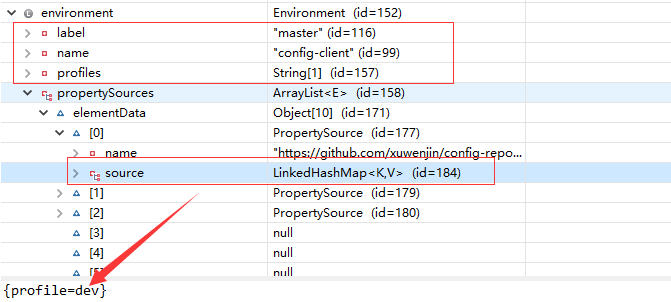
可以看到,配置文件信息,会放在 PropertySources 对象中~
spring cloud config服务器的更多相关文章
- Spring Cloud官方文档中文版-Spring Cloud Config(上)
官方文档地址为:http://cloud.spring.io/spring-cloud-static/Dalston.SR2/#spring-cloud-feign 文中例子我做了一些测试在:http ...
- 介绍一下Spring Cloud Config
Spring Cloud Config为分布式系统中的外部配置提供服务器和客户端支持.使用Config Server,您可以在所有环境中管理应用程序的外部属性.客户端和服务器上的概念映射与Spring ...
- spring cloud config客户端
上篇介绍了spring cloud config服务器,本篇介绍客户端.客户端主要是从config服务器获取配置信息. 代码示例 首先创建一个Maven项目,在pom.xml文件中添加依赖: < ...
- Spring Cloud Config中文文档
https://springcloud.cc/spring-cloud-config.html 目录 快速开始 客户端使用 Spring Cloud Config服务器 环境库 健康指标 安全 加密和 ...
- Spring Cloud官方文档中文版-Spring Cloud Config(上)-服务端(配置中心)
官方文档地址为:http://cloud.spring.io/spring-cloud-static/Dalston.SR2/#spring-cloud-feign 文中例子我做了一些测试在:http ...
- 9.Spring Cloud Config统一管理微服务配置
Spring Cloud Config统一管理微服务配置 9.1. 为什么要统一管理微服务配置 9.2. Spring Cloud Config简介 Spring Cloud Config为分布式系统 ...
- Spring Cloud Config教程(四)快速开始
Spring Cloud Config为分布式系统中的外部配置提供服务器和客户端支持.使用Config Server,您可以在所有环境中管理应用程序的外部属性.客户端和服务器上的概念映射与Spring ...
- Spring Cloud官方文档中文版-Spring Cloud Config(下)-客户端等
官方文档地址为:http://cloud.spring.io/spring-cloud-static/Dalston.SR2/#_serving_alternative_formats 文中例子我做了 ...
- 搭建spring cloud config
很久没更新了,因为不是专职研究spring cloud,因此更新速度得看工作强度大不大,每天能抽出的时间不多,如果更新太慢了,并且有小伙伴看的话,请见谅了. Spring Cloud简介 Spring ...
随机推荐
- vue中遇到的一个点击展开或收起并且改变背景颜色的问题。
<template> <div class="expense-center"> <div class="fl expense-left&qu ...
- javascript 错误监控
一.错误分类 1,即使运行错误:代码错误, 2.资源加载错误 二. 错误的捕获方式 1.即使运行错误的捕获方式 a. try catch b.window.onerror 2.资源加载错误 ...
- Codeforces 1077C Good Array 坑 C
Codeforces 1077C Good Array https://vjudge.net/problem/CodeForces-1077C 题目: Let's call an array good ...
- DOM追加笔记
根据 W3C 的 HTML DOM 标准,HTML 文档中的所有内容都是节点: 整个文档是一个文档节点 每个 HTML 元素是元素节点 HTML 元素内的文本是文本节点 每个 HTML 属性是属性节点 ...
- ASM的一些小坑
变量必需放到数据段,才有直接对地址赋值的访问权限 segment .data n1 dw 55h segment .text global _nasm_function _nasm_function: ...
- 第34章:MongoDB-索引--用户管理
①用户管理 在MongoDB里面默认情况下只要是进行连接都可以不使用用户名与密码,因为要想让其起作用,则必须具备以下两个条件: ·条件一:服务器启动的时候打开授权认证: ·条件二:需要配置用户名和密码 ...
- shell解析my.cnf配置文件
my.cnf配置格式如下 vi my.cnf[client]port=3306socket=/tmp/mysql.socket [mysqld]port=3306server-id=1datadir= ...
- DDD简明入门之道 - 开篇
DDD简明入门之道 - 开篇 犹豫了很久才写下此文,一怕自己对DDD的理解和实践方式有偏差,二怕误人子弟被贻笑大方,所以纰漏之处还望各位谅解.不啰嗦,马上进入正题,如果你觉得此文不错就点个赞吧. 概述 ...
- git 中Pull/Request 的初步
1. 目的: pull/request (简称PR) 是 项目管理者(管理者)和项目开发者(开发者)之间提交和确认工作成果的机制. 2. 流程: 开发者: 在本地创建特性分支. > git ch ...
- [CocoaPods]CocoaPods安装详解
安装CocoaPods之前先安装ruby: 1.安装ruby ruby官网rubygems.org已被屏蔽,替换当前镜像是否为国内镜像. $gem sources --add https://gems ...