
阿里云kafka使用记录(python版本)
import socket

from kafka import KafkaConsumer

from kafka.errors import KafkaError

# context.check_hostname = True

consumer = KafkaConsumer(bootstrap_servers=['192.168.xx.xx:9092'],

                        group_id='xx',

                        api_version = (0,10)

                        )

print('consumer start to consuming...')

consumer.subscribe(('xx',))

for message in consumer:

    print(message.topic)

    print(message.offset)

    print(message.key)

    print(message.value)

    print(message.partition)
producer vpc版代码
#!/usr/bin/env python

# encoding: utf-8

import socket

from kafka import KafkaProducer

from kafka.errors import KafkaError

producer = KafkaProducer(bootstrap_servers=['192.168.xx.xx:9092'],

                        api_version = (0,10),

                        retries=5)

partitions = producer.partitions_for('xx')

print('Topic下分区: %s' % partitions)

try:

    future = producer.send(topic='xx', value=b'hello aliyun-kafka!')

    future.get()

    print('send message succeed.')

except KafkaError as e:

    print('send message failed.')

    print(e)
consumer公网版代码
import ssl

import socket

from kafka import KafkaConsumer

from kafka.errors import KafkaError

context = ssl.create_default_context()

context = ssl.SSLContext(ssl.PROTOCOL_SSLv23)

context.verify_mode = ssl.CERT_REQUIRED

# context.check_hostname = True

context.load_verify_locations("/tmp/ca-cert")

consumer = KafkaConsumer(bootstrap_servers=['kafka-ons-internet.aliyun.com:8080'],

                        group_id='xxx',

                        sasl_mechanism="PLAIN",

                        ssl_context=context,

                        security_protocol='SASL_SSL',

                        api_version = (0,10),

                        sasl_plain_username='xxx',

                        sasl_plain_password='1234567890')

print('consumer start to consuming...')

consumer.subscribe(('xxx', ))

for message in consumer:

    print(message.topic)

    print(message.offset)

    print(message.value)

    break
#!/usr/bin/env python

# encoding: utf-8

import ssl

import socket

from kafka import KafkaProducer

from kafka.errors import KafkaError

context = ssl.create_default_context()

context = ssl.SSLContext(ssl.PROTOCOL_SSLv23)

context.verify_mode = ssl.CERT_REQUIRED

# context.check_hostname = True

context.load_verify_locations("/tmp/ca-cert")

#这个文件参考https://github.com/AliwareMQ/aliware-kafka-demos/tree/master/kafka-python-demo

producer = KafkaProducer(bootstrap_servers=['kafka-ons-internet.aliyun.com:8080'],

                        sasl_mechanism="PLAIN",

                        ssl_context=context,

                        security_protocol='SASL_SSL',

                        api_version = (0,10),

                        retries=5,

                        sasl_plain_username='xx',

                        sasl_plain_password='1234567890'#注意是access-key的最后十位)

partitions = producer.partitions_for('xxx')

print ('Topic下分区: %s' % partitions)

try:

    future = producer.send('xxx', b'hello aliyun-kafka!')

    future.get()

    print('send message succeed.')

except KafkaError as e:

    print('send message failed.')

    print(e)
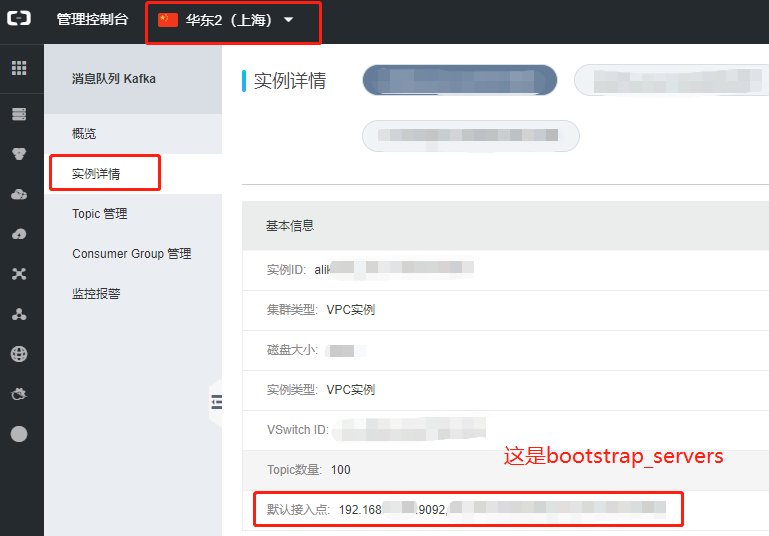
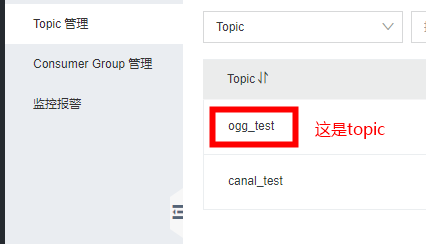
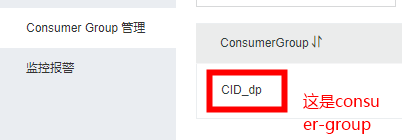
从阿里云控台获得连接信息
阿里云kafka使用记录(python版本)的更多相关文章
- 阿里云短信接口python版本
# -*- coding: utf-8 -*- #!/usr/bin/python #encoding=utf-8 import sys from aliyunsdkdysmsapi.request. ...
- 阿里云ESC服务器配置记录
购买服务器 上周赶着活动购买了一年阿里云服务器,记录一下配置过程: 选择服务器类型: linux服务器,网上说一般都用centOS的"比较新"的版本: 重置密码: 重置密码之后一定 ...
- 阿里云+django实战记录
2013年7月13日10:36:53:接上篇,bae部署django没成功,转战阿里云.. 阿里云服务器最便宜69/月,现在有个活动,新用户送20元现金券,我就花了RMB 49买了一个,操作系统选的是 ...
- 基于freescale i.Mx6(ARM)的阿里云oss调试记录
交叉编译阿里OSS调试记录 1.1 开通oss服务 具体参考以下链接: https://help.aliyun.com/document_detail/31884.html?spm=a2c4g.111 ...
- laravel项目使用appnode部署linux系统到阿里云服务器流程记录(待补充)
使用 SSH 连接工具,如 PuTTY.XShell.SecureCRT 等,连接 Linux 服务器后(阿里云服务器命令行内直接输入appnode安装命令,版本:mysql选5.7.php选7.2) ...
- 阿里云nas使用记录
公司买了阿里云的nas服务用来共享存储,多个web服务器共同挂载同一个nas服务.挂载过程中出现如下报错 NAS报错: [root@BJ-SBC fs]# mount -t nfs 10.10.8.1 ...
- 基于阿里云平台的使用python脚本发送短信
第一步:点击短信服务下的帮助文档 第二步:安装python的SDK:点击安装python sdk 第三步:直接通过python的pip工具安装即可,方便快捷: 第四步:点击红框进行测试: 第五步:测试 ...
- python 阿里云短信群发推送
本篇文章是使用Python的Web框架Django提供发送短信接口供前端调用,Python版本2.7 阿里云入驻.申请短信服务.创建应用和模板等步骤请参考:阿里云短信服务入门 1.下载sdk 阿里云短 ...
- Python实现阿里云短信推送
本篇文章是使用Python的Web框架Django提供发送短信接口供前端调用,Python版本2.7 阿里云入驻.申请短信服务.创建应用和模板等步骤请参考:阿里云短信服务入门 1.下载sdk 阿里云短 ...
随机推荐
- 基于LZO的高性能无损数据解压缩IP
LZOAccel-D LZO Data Decompression Core/无损数据解压缩IP Core LZOAccel-D是一个无损数据解压缩引擎的FPGA硬件实现,兼容LZO 2.10标准. ...
- django-environ学习
官方说明:https://django-environ.readthedocs.io/en/latest/index.html install pip install django-environ q ...
- FastApi学习1
先写路由文件: 其次通过ORM操作数据库相关:
- 嵌入式-C语言基础:通过结构体指针访问结构体数组
#include<stdio.h> #include<string.h> struct Student { char name[32]; int age; int height ...
- 6、将两个字符串连接起来,不使用strcat函数
/* 将两个字符串连接起来,不使用strcat函数 */ #include <stdio.h> #include <stdlib.h> void strCat(char *pS ...
- Pycharm下载与使用及python的基础数据类型
1.Pycharm编辑器 1.1.下载地址 https://www.jetbrains.com/pycharm/ 1.2.Pycharm编辑器下载 1.根据自己的操作系统选择相对应的下载方式 2.尽量 ...
- 解决PyQt5报错defaultServiceProvider::requestService(): no service found for..
简述 之前因为这个报错解决了很长时间,因为我之前一直是用 pip3 工具安装的 PyQt5 ,但是用 pip3 工具安装 PyQt5 后, 自己写的音乐播放器一直没有声音,而且还有不能调用 fcitx ...
- table 动态隐藏tr行
table: <table style="width:100%" class="table01" cellspacing="1" ce ...
- 移除元素-LeetCode27 双指针
力扣链接:https://leetcode.cn/problems/remove-element/ 题目 给你一个数组 nums 和一个值 val,你需要 原地 移除所有数值等于 val 的元素,并返 ...
- Ubuntu20.04创建快捷方式(CLion)
打开命令行,创建在桌面上xxx.desktop文件 touch ~/Desktop/Clion.desktop 编辑desktop文件 [Desktop Entry] Encoding=UTF-8 N ...