
Navisworks 2014 Api 简单的使用
初次接触Navisworks Api .NET 的二次开发.主要是研究了一下。关于NavisWorks 结构树的加载.
     void LoadModel()

        {

            //清空当前的结构树信息

            treeView1.Nodes.Clear();

            //当前加载的模型

            Document doc = Autodesk.Navisworks.Api.Application.ActiveDocument;

            //循环现有模型

            foreach (var documentModel in doc.Models)

            {

                var modelItemList = documentModel.RootItem.Descendants;

                Model model = documentModel;

                var modelItems = modelItemList.Where(o => o.Parent == model.RootItem);

                if (modelItems.Any())

                {

                    TreeNode cNode;

                    foreach (var quItem in modelItems)

                    {

                         cNode = new TreeNode(quItem.DisplayName);

                        cNode.Tag = quItem;

                       // cNode.Text = quItem.DisplayName;//判断名称

                        treeView1.Nodes.Add(cNode);

                        if (quItem.Children.Any())

                        {

                            LoadChild(quItem.Children, quItem, cNode);

                        }

                    }

                }

            }

        }

        /// <summary>

        /// 递归判断结构树信息

        /// </summary>

        /// <param name="modelItemEnumerableCollection">数据源信息</param>

        /// <param name="parentItem">父级节点信息</param>

        /// <param name="pNode">子节点信息</param>

        private void LoadChild(IEnumerable<ModelItem> modelItemEnumerableCollection, ModelItem parentItem, TreeNode pNode)

        {

            var query = modelItemEnumerableCollection.Where(o => o.Parent == parentItem);

            if (query.Count()>)

            {

                foreach (var quItem in query)

                {

                    TreeNode chNode = new TreeNode(quItem.DisplayName);

                    chNode.Tag = quItem;

                    pNode.Nodes.Add(chNode);

                    if (quItem.Children.Any())

                    {

                        LoadChild(quItem.Children, quItem, chNode);

                    }

                }

            }

        }
TreeView Node 选中事件
       void treeView1_NodeMouseClick(object sender, TreeNodeMouseClickEventArgs e)

        {

            TreeNode node = e.Node;

            if (node != null)

            {

                ModelItem oCurrentNode = (ModelItem)node.Tag;

                propertyGrid1.SelectedObject = oCurrentNode;

                if (oCurrentNode != null)

                {

                    //设置选择集合

                    ModelItemCollection oMC = new ModelItemCollection();

                    oMC.Add(oCurrentNode);

                    Document oDoc = view.ViewControl.DocumentControl.Document;

                    //设置选中

                    oDoc.CurrentSelection.CopyFrom(oMC);

                }

          }

        }
模型加载窗口:
    public partial class FrmModelView : DevExpress.XtraEditors.XtraForm

    {

        public ViewControl ViewControl;

        public FrmModelView()

        {

            InitializeComponent();

            if (this.components == null)

                this.components = new Container();

            //初始化Document控件

            DocumentControl document = new DocumentControl(this.components);

            document.Document.SetGraduatedBackground(Autodesk.Navisworks.Api.Color.FromByteRGB(,,),Autodesk.Navisworks.Api.Color.FromByteRGB(,,));

            //初始化View控件  并添加Document控件

            ViewControl = new ViewControl();

            ViewControl.DocumentControl = document;

            ViewControl.BackColor = System.Drawing.Color.LightSteelBlue;

            ViewControl.Dock = DockStyle.Fill;

            ViewControl.Name = "viewControl";

            this.Controls.Add(ViewControl);

        }

    }
模型选择事件:
        #region 模型选择事件

        private void CurrentSelection_Changed(object sender, EventArgs e)

        {

            try

            {

                Document doc = (Document)sender;

                if (doc != null)

                {

                    var item = doc.CurrentSelection.SelectedItems[];

                    if (item != null)

                    {

                        TreeNode tnRet = null;

                        foreach (TreeNode tn in treeView1.Nodes)

                        {

                            tnRet = FindNode(tn, item.DisplayName);

                            if (tnRet != null)

                                break;

                        }

                        if (tnRet != null)

                        {

                            if (oldNode != null)

                                oldNode.BackColor = Color.White;

                            tnRet.BackColor = Color.YellowGreen;

                            treeView1.SelectedNode = tnRet;

                            oldNode = tnRet;

                            GetProperty();

                        }

                    }

                }

            }

            catch (Exception exception)

            {

                Console.WriteLine(exception);

            }

        }

        #endregion
模型的属性加载:
  #region 属性信息加载

        void GetProperty()

        {

            //验证模型

            if (Autodesk.Navisworks.Api.Application.ActiveDocument != null &&

                !Autodesk.Navisworks.Api.Application.ActiveDocument.IsClear)

            {

                this.vGridControl1.Rows.Clear();

                // 获取选中的相关的模型信息

                foreach (ModelItem item in Autodesk.Navisworks.Api.Application.ActiveDocument.CurrentSelection.SelectedItems)

                {

                    //获取想的模型属性信息

                    foreach (PropertyCategory category in item.PropertyCategories)

                    {

                        CategoryRow  categoryRow=new CategoryRow(category.DisplayName);

                        foreach (var control in category.Properties)

                        {

                            EditorRow row1 = new EditorRow();

                            row1.Properties.FieldName = "Value";

                            row1.Properties.Caption = control.DisplayName;

                            var itemValue = control.Value;

                            string valueInfo;

                            switch (itemValue.DataType)

                            {

                                case VariantDataType.Boolean:

                                    valueInfo = itemValue.ToBoolean().ToString();

                                    break;

                                case VariantDataType.DateTime:

                                    valueInfo = itemValue.ToDateTime().ToString(CultureInfo.InvariantCulture);

                                    break;

                                case VariantDataType.DisplayString:

                                    valueInfo = itemValue.ToDisplayString();

                                    break;

                                case VariantDataType.Double:

                                    valueInfo = itemValue.ToDouble().ToString();

                                    break;

                                case VariantDataType.DoubleAngle:

                                    valueInfo = itemValue.ToDoubleAngle().ToString();

                                    break;

                                case VariantDataType.DoubleArea:

                                    valueInfo = itemValue.ToDoubleArea().ToString();

                                    break;

                                case VariantDataType.DoubleLength:

                                    valueInfo = itemValue.ToDoubleLength().ToString();

                                    break;

                                case VariantDataType.DoubleVolume:

                                    valueInfo = itemValue.ToDoubleVolume().ToString();

                                    break;

                                case VariantDataType.IdentifierString:

                                    valueInfo = itemValue.ToIdentifierString();

                                    break;

                                case VariantDataType.Int32:

                                    valueInfo = itemValue.ToInt32().ToString();

                                    break;

                                default:

                                    valueInfo = itemValue.ToString();

                                    break;

                            }

                            row1.Properties.Value = valueInfo;

                            categoryRow.ChildRows.Add(row1);

                        }

                        this.vGridControl1.Rows.Add(categoryRow);

                    }

                }

            }

        }

        #endregion
最终效果:
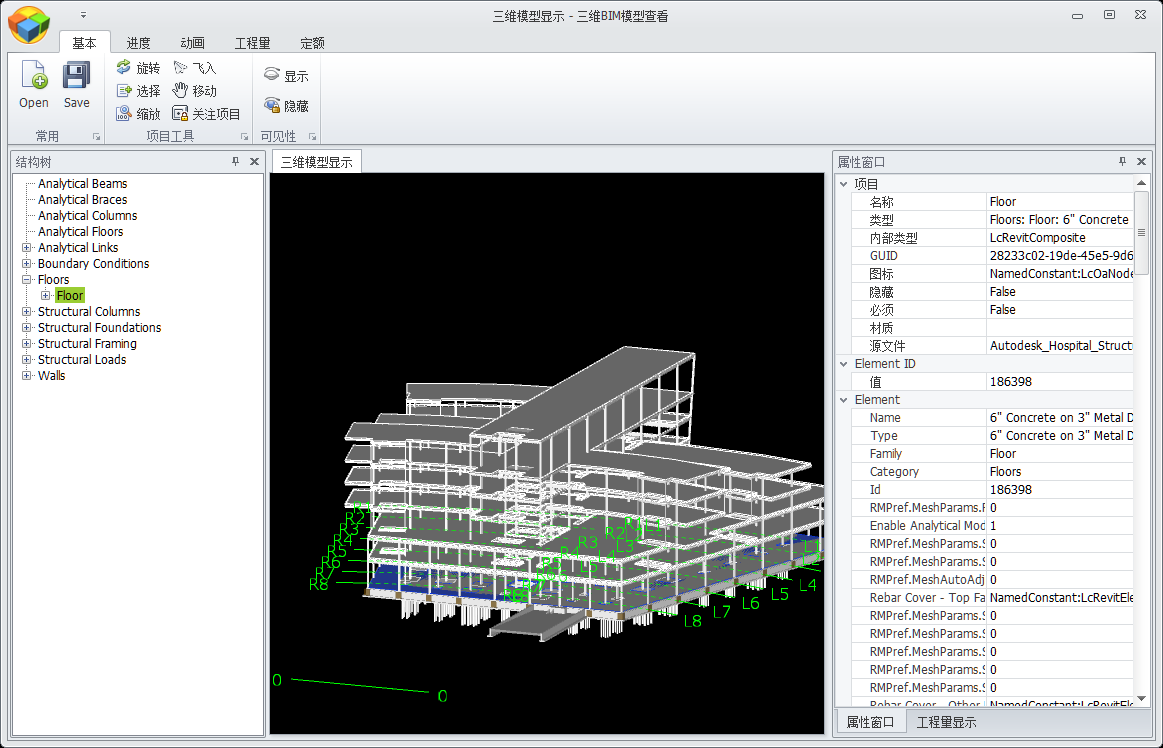
主要是刚接触这个.不懂 只是自己在这写的。如果那位网友有更好的解决方案。请告诉我.谢谢哈。
源代码 下载。
Navisworks 2014 Api 简单的使用的更多相关文章
- Libvlc API 简单说明 [转]
Libvlc API 简单说明 原文来自http://www.xuebuyuan.com/1519616.html libvlc_instance_t* libvlc_new(int argc, co ...
- salesforce零基础学习(八十五)streaming api 简单使用(接近实时获取你需要跟踪的数据的更新消息状态)
Streaming API参考链接: https://trailhead.salesforce.com/en/modules/api_basics/units/api_basics_streaming ...
- 基于C语言libvirt API简单小程序
libvirt API简单小程序 1.程序代码如下 #include<stdio.h> #include<libvirt/libvirt.h> int getDomainInf ...
- 常用函数式接口与Stream API简单讲解
常用函数式接口与Stream API简单讲解 Stream简直不要太好使啊!!! 常用函数式接口 Supplier<T>,主要方法:T get(),这是一个生产者,可以提供一个T对象. C ...
- Navisworks API 简单二次开发 (自定义工具条)
在Navisworks软件运行的时候界面右侧有个工具条.比较方便.但是在二次开发的时候我不知道在Api那里调用.如果有网友知道请告诉我.谢谢. 我用就自己设置一个工具.界面比较丑!没有美工. 代码: ...
- NavisWorks Api 简单使用与Gantt
相信很多朋友在做BIM项目的时候.都有客户会提出项目计划,形象进度 等需求. 那么当前最主要的问题就是计划与BIM模型的关联问题.那么我在项目中是用户用Project软件编辑计划然后手动跟三维模型关联 ...
- 百度地图API简单应用
在做移动端应用时经常用到百度地图API,百度API有强大的示例和文档,开发之前去百度相关网站注册密钥,很块博主只花了几分钟 百度地图API范例 百度地图API文档说明 例子1:输入特定关键字绘制地图标 ...
- 百度地图api简单使用方法
百度地图API的使用方法 百度地图API 开始学习百度地图API最简单的方式是看一个简单的示例.以下代码创建了一个520x340大小的地图区域并以天安门作为地图的中心: 1. <html&g ...
- Web API 简单示例
一.RESTful和Web API Representational State Transfer (REST) is a software architecture style consisting ...
随机推荐
- LINQ to SQL Select查询
1. 查询所有字段 using (NorthwindEntities context = new NorthwindEntities()) { var order = from n in contex ...
- 2016/12/31_Python
今天学习主要内容: Python: 1.with语句(补充昨天的文件操作) 用with打开的文件在脚本结束会自动关闭,以防普通打开方式忘记关闭文件连接 语法: with open("demo ...
- FineBI:一个简单易用的自助BI工具
过去,有关企业数据分析的重担都压在IT部门,传统BI分析更多面向的是具有IT背景的人员.但随着业务分析需求的增加,很多公司都希望为业务用户提供自助分析服务,将分析工作落实到业务人员手中.但同时,分析工 ...
- SharePoint 2013管理中心里【管理服务器上的服务】不见了
打开管理中心,准备配置Managed Metadata Service,发现"管理服务器上的服务"不见了 那我自己拼url直接访问:http://xxxx/_admin/Serve ...
- SMBus set up a 2-byte EEPROM address for read/write
Sequencer Engine spec: http://www.analog.com/media/en/technical-documentation/data-sheets/ADM1260.pd ...
- 在redis中使用lua脚本让你的灵活性提高5个逼格
在redis的官网上洋洋洒洒的大概提供了200多个命令,貌似看起来很多,但是这些都是别人预先给你定义好的,但你却不能按照自己的意图进行定制, 所以是不是感觉自己还是有一种被束缚的感觉,有这个感觉就对了 ...
- windows 7(32/64位)GHO安装指南(U盘引导篇)~
上一篇我们说了怎么制作U盘启动盘,那么这一篇让我们来看看如何进行正确的U盘引导启动. 现在的个人计算机一般分为台式机和笔记本,由于各厂商的喜好不同(开玩笑的啦),所以对于主板的BIOS设置各所不同.进 ...
- logstash服务启动脚本
logstash服务启动脚本 最近在弄ELK,发现logstash没有sysv类型的服务启动脚本,于是按照网上一个老外提供的模板自己进行修改 #添加用户 useradd logstash -M -s ...
- 自动添加Linux登录账户,并授予sudo权限
#!/bin/bash USER=test PASS=$USER GROUP=root HOME=/data/home/$USER # if user not exist if [[ $(cat /e ...
- ASP.NET MVC Model元数据(四)
ASP.NET MVC Model元数据(四) 前言 前面的篇幅讲解了Model元数据生成的过程,并没有对Model元数据生成过程的内部和Model元数据结构的详细解释.看完本篇后将会对Model元数 ...