
pos 访问超时 windows连接超时 497 天后未关闭 TIME_WAIT
问题描述:
nginx连接后台tomcat程序 一直报错
nginx的error日志如下
// :: [error] #: * upstream timed out (: A connection attempt failed because the connected party did not properly respond after a period of time, or established connection failed because connected host has failed to respond) while connecting to upstream, client: 42.234.50.129, server: localhost, request: "POST ……", upstream: "http://10.10.:8103/JWebService/JService", host: ""

// :: [error] #: * upstream timed out (: A connection attempt failed because the connected party did not properly respond after a period of time, or established connection failed because connected host has failed to respond) while connecting to upstream, client: 125.45.125.107, server: localhost, request: "", upstream: "http://10.10.:8202/JWebService/JService", host: ""

// :: [error] #: * upstream timed out (: A connection attempt failed because the connected party did not properly respond after a period of time, or established connection failed because connected host has failed to respond) while connecting to upstream, client: 42.233.94.168, server: localhost, request: "", upstream: "http://10.10.:8201/JWebService/JService", host: ""

// :: [error] #: * upstream timed out (: A connection attempt failed because the connected party did not properly respond after a period of time, or established connection failed because connected host has failed to respond) while connecting to upstream, client: 125.46.40.38, server: localhost, request: "", upstream: "http://10.10.:8202/JWebService/JService", host: ""

// :: [error] #: * upstream timed out (: A connection attempt failed because the connected party did not properly respond after a period of time, or established connection failed because connected host has failed to respond) while connecting to upstream, client: 219.154.200.226, server: localhost, request: "", upstream: "http://10.10.:8203/JWebService/JService", host: ""
可以看到 用户访问nginx后,nginx将请求转发给 后端tomcat服务器,一直报超时
tomcat无返回数据。
初步判断是tomcat的问题,重启tomcat后问题依旧存在
通过查询得知,服务器使用的windows版本是
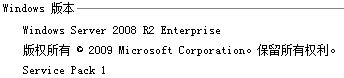
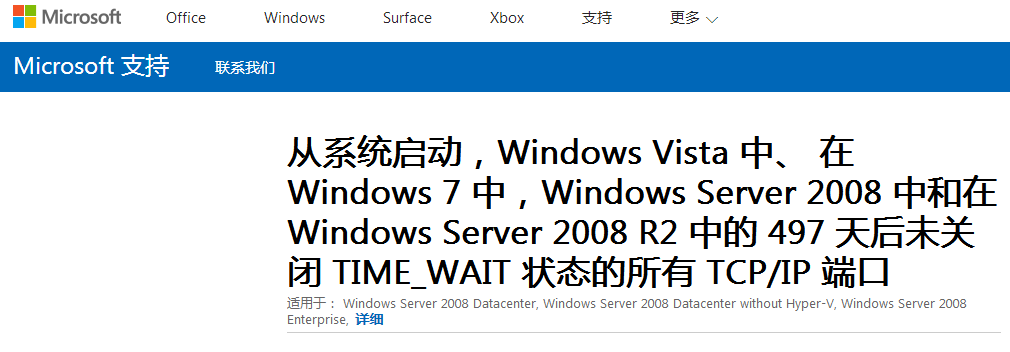
通过各种渠道询问后得知,微软官网的一个公告
从系统启动,Windows Vista 中、 在 Windows  中,Windows Server  中和在 Windows Server  R2 中的  天后未关闭 TIME_WAIT 状态的所有 TCP/IP 端口

症状

在计算机上运行的 Windows Vista,Windows ,Windows Server  中,还是 Windows Server  R2,您遇到以下问题。

问题

在系统启动时从  天后所有在TIME_WAIT状态的 TCP/IP 端口都不会被关闭。因此, TCP/IP 端口可能会被用光,并且可能不会创建新的 TCP/IP 会话。

注意:这台计算机某些与网络相关的操作可能受此问题。例如,您试图使用某些远程管理工具来管理已超过  天运行的基于 Windows Server  的域控制器。在此示例中,远程管理工具无法连接到域控制器。

查看服务器的开机时间

开机了499天,问题正好是在两天前出现的,正是公告中所说的497天后
确定问题!!!
微软官网公告地址:
https://support.microsoft.com/zh-cn/help/2553549/all-the-tcp-ip-ports-that-are-in-a-time-wait-status-are-not-closed-aft?tdsourcetag=s_pctim_aiomsg
解决方法:
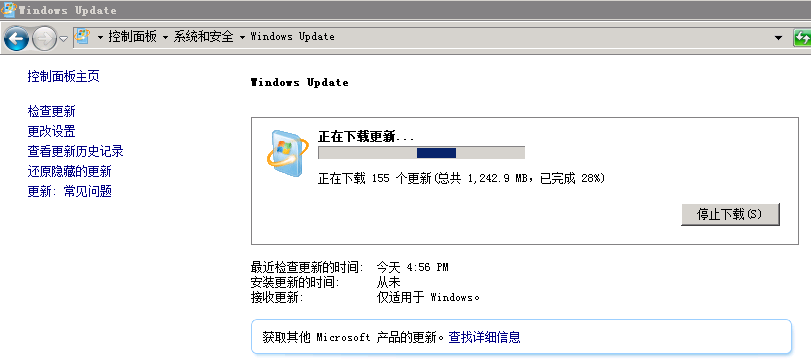
补丁包已经无法下载了,所有直接使用微软官方的更新程序
pos 访问超时 windows连接超时 497 天后未关闭 TIME_WAIT的更多相关文章
- 在系统启动时,Windows Vista 中、 在 Windows 7 中,Windows Server 2008 中和在 Windows Server 2008 R2 中的 497 天后未关闭 TIME_WAIT 状态的所有 TCP/IP 端口
在系统启动时,Windows Vista 中. 在 Windows 7 中,Windows Server 2008 中和在 Windows Server 2008 R2 中的 497 天后未关闭 TI ...
- (五)HttpClient 连接超时及读取超时
第一节: HttpClient 连接超时及读取超时 HttpClient连接超时及读取超时 httpClient在执行具体http请求时候 有一个连接的时间和读取内容的时间: HttpClient连接 ...
- [PHP]socket的连接超时 与 读取/写入超时
socket处理时有两种超时 , 分为连接超时 和 读取/写入数据超时 1. stream_socket_client 函数中的超时时间是连接超时 , 默认是php.ini中的default_sock ...
- HttpClient(二)HttpClient使用Ip代理与处理连接超时
前言 其实前面写的那一点点东西都是轻轻点水,其实HttpClient还有很多强大的功能: (1)实现了所有 HTTP 的方法(GET,POST,PUT,HEAD 等) (2)支持自动转向 (3)支持 ...
- java连接redis5.0单机版报连接超时错误
使用java代码测试redis5.0单机版时,报redis连接超时异常,而linux上的redis能正常访问: redis.clients.jedis.exceptions.JedisConnecti ...
- 关于MySQL的wait_timeout连接超时问题报错解决方案
bug回顾 : 想必大家在用MySQL时都会遇到连接超时的问题,如下图所示: ### Cause: com.mysql.jdbc.exceptions.jdbc4.CommunicationsExce ...
- SSRS报表连接超时的问题
这段时间遇到一个问题就是ReportService 中采用了远程连接的报表偶尔会断开连接,导致报表导出异常,查阅了很多资料,几天来就是断断续续的终于解决了这个问题,下面把一些解决的点一一展示出来,便于 ...
- 谈MongoDB读取连接超时的异常
今天在现场的哥们发来异常,让我解决,错误信息如下: HTTP Status 500 - Read operation to server 192.168.1.110:20001 failed on d ...
- ORA-12170: TNS: 连接超时
ORA-12170: TNS: 连接超时 如果在本机可以正常使用,可是到局域网中的其他机器就出现“ORA-12170:TNS:连接超时 解决方法: 1.cmd-----ping ip地址 查看网络问题 ...
随机推荐
- 云原生 - 体验Istio的完美入门之旅(一)
作者:justmine 头条号:大数据达摩院 微信公众号:大数据处理系统 创作不易,在满足创作共用版权协议的基础上可以转载,但请以超链接形式注明出处. 为了方便大家阅读,可以关注头条号或微信公众号,后 ...
- 一个命令解决linux重启nginx就丢失pid文件问题
sudo nginx -c /etc/nginx/nginx.conf
- 替代not in 和 in 的办法
在程序中,我们经常会习惯性的使用in和not in,在访问量比较小的时候是可以的,但是一旦数据量大了,我们就推荐使用not exists或者外连接来代替了.如果要实现一张表有而另外一张表没有的数据时, ...
- 关于爬虫的日常复习(10)—— 实战:使用selenium模拟浏览器爬取淘宝美食
- 【Four-Week-Task】四周学习CTF之第一周【寒假更新】
写在最前:为了更好地系统学习CTF(楞头冲很惨 别问我怎么知道的 除非你是天才),决定先看再学,先正向再逆向. /* 出版排版规范中,标题序号等级为:第一级,一.二.三.(用顿号):第二级,(一).( ...
- IO系统-文件与目录操作
1.文件内核数据结构 一个打开的文件在内核中使用三种数据结构表示: (1)文件描述符表 文件描述符标志 文件表项指针 (2)文件表项: 文件状态标志:读.写.追加.同步和非阻塞等状态标志 当前文件偏移 ...
- python GUI测试自动化
#! /usr/bin/env python#coding=GB18030'''GUI测试自动化 语言:python模块:pywinauto环境:windows7中文.python-2.6_32bit ...
- 20200102模拟赛 问题A 排列
先说句新年好哈哈哈 今年又是颓废的一年呢... (开始就满满负能量真好) 分析: 真是有趣的数学递推找规律问题呢... 考场上没想出来,然后n2^n的状压也想不到 索性20*20直接打表2333... ...
- 分布式缓存Redis的持久化方式RDB和AOF
一.前言 Redis支持两种方式的持久化,RDB和AOF.RDB会根据指定的规则“定时”将内存中的数据存储到硬盘上,AOF会在每次执行命令后将命令本身记录下来.两种持久化方式可以单独使用其中一种,但更 ...
- VLC for CentOS7
https://blog.csdn.net/qiuyoujie/article/details/78486947 http://elearning.wsldp.com/pcmagazine/insta ...