
Fish Shell使用心得
Fish的官网宣传语是 Finally, a command line shell for the 90s。 翻译过来就是 Fish shell 是一个为90后准备的 shell。
有人说:“二逼青年用bash,普通青年用zsh,文艺青年用fish。”[4]
其次由于zsh 的速度实在是太慢,所以决定换用fish,fish速度快,智能提示强大。
本文的亮点在于三点:
1、Fish的入门使用
2、与bash兼容性的方案
3、一个属于自己的Fish主题
Fish配置请参考:https://github.com/iceqing/linux-template-setting/blob/master/fish/config.fish
下面分别介绍
一、fish 入门使用
1 、ubuntu 安装fish
apt-get install software-properties-common

sudo apt-add-repository ppa:fish-shell/release-2

sudo apt-get update

sudo apt-get install fish

#切换到fish

echo /usr/bin/fish | sudo tee -a /etc/shells

sudo chsh -s /usr/bin/fish && fish
其他平台类似,可以根据官网说明来 [1]
fish的鲜明特征在于安装时已经默认集成了很多需要的功能。
比如:
- 命令行语法高亮,错误会显示红色
- 智能提示
- 可以使用web网页的进行终端配置
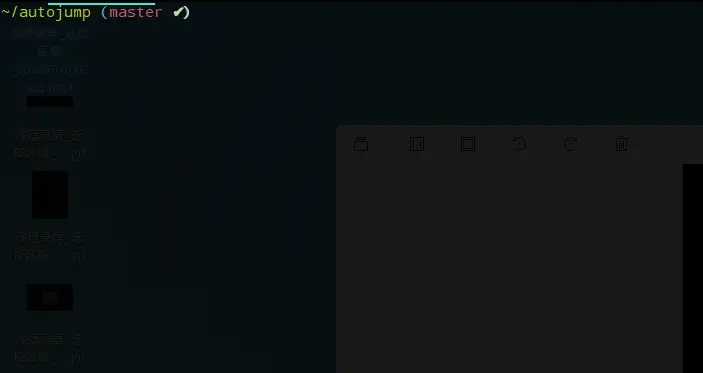
fish 有智能提示,一个命令一旦输入过一次,会自动显示上一次的全部命令,细心一点会发现会有一层灰色的字体表示上一次的命令,按Ctrl+F或者 右方向键→, 即可自动补全,如下图:
2、 安装autojump
git clone https://github.com/wting/autojump.git

cd autojump

./install.py

vim ~/.config/fish/config.fish


按照install.py 命令给出的提示来修改config.fish, 添加


if test -f /home/ice/.autojump/share/autojump/autojump.fish; . /home/ice/.autojump/share/autojump/autojump.fish; end
3、网页配置fish
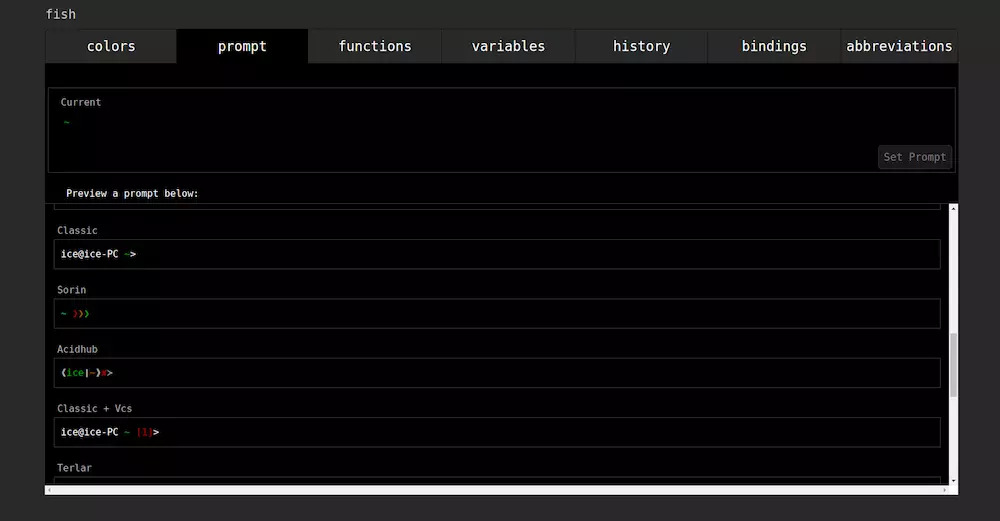
fish_config 可以直接跳出网页版本配置fish的界面。
web版本可以设置主题, 推荐其中的"Tomorrow Night"主题颜色。

选择想要的主题,然后点击set theme即可设置主题。
在命令里按enter 即可退出web版本的界面。
在prompt里面可以自己选择fish终端的主题。
4、插件管理
https://github.com/oh-my-fish/oh-my-fish
omf install thefuck
虽然有fisher这个管理工具,但是目前还不稳定。
5、git 配置
我们只需要配置alias 既可以满足日常git命令的使用。对于终端主题样式,我们可以自行进行配置。(后边有介绍)
# git 相关的配置

alias g "git"

alias gst "git status"

alias grs "git reset --soft"

alias grh "git reset --hard"

alias gb "git branch"

alias gba "git branch -a"

alias gl "git pull"
二、兼容bash脚本
由于fish 很多不兼容bash的功能导致了很多脚本无法运行,这一点是很多人吐槽fish的地方,我们需要一种方式来运行bash脚本。
比如
arc land --onto `git rev-parse --abbrev-ref HEAD`
这条命令在fish里无法执行。
我们只需要在前面添加一个bash -c 命令即可,如下所示。
bash -c "arc land --onto `git rev-parse --abbrev-ref HEAD`"
顺手加个alias就更方便了,可以直接在命令行里使用命令arcl。
alias arcl bash -c "arc land --onto `git rev-parse --abbrev-ref HEAD`"
对于脚本文件,比如我将需要执行的命令或文件放到repomerge.sh
在~/.config/fish/config.fish添加
alias up "bash -c /usr/bin/repomerge.sh"
然后就可以自由的使用up命令了
配置自己的终端
样式显示如下:

其中function fish_prompt 函数用于定义fish终端的显示样式。
我们只需要写一个fish_prompt函数即可。集成了git的分支名称以及当前的变化。
显示的样式如下:

说明:
✔代表当前git项目是干净的。
%1 表示有一个文件未追踪
+1 表示一个文件已暂存
# 终端显示样式的配置

function fish_prompt --description 'Write out the prompt'

    if not set -q __fish_prompt_normal

        set -g __fish_prompt_normal (set_color normal)

    end
__fish_git_prompt >/dev/null 2>&1

<span class="hljs-keyword">if</span> git_is_repo

    <span class="hljs-keyword">if</span> not <span class="hljs-built_in">set</span> -q __git_cb

        <span class="hljs-built_in">set</span> __git_cb (set_color blue)<span class="hljs-string">" ("</span>(set_color brred)(git branch | grep \* | sed <span class="hljs-string">'s/* //'</span>) (set_color -o bryellow)(__fish_git_prompt_informative_status)(set_color blue)<span class="hljs-string">")"</span>

    end

end

<span class="hljs-keyword">if</span> not <span class="hljs-built_in">set</span> -q __fish_prompt_cwd

    <span class="hljs-built_in">set</span> -g __fish_prompt_cwd (set_color <span class="hljs-variable">$fish_color_cwd</span>)

end

<span class="hljs-built_in">printf</span> <span class="hljs-string">'%s%s%s%s '</span> <span class="hljs-string">"<span class="hljs-variable">$__fish_prompt_cwd</span>"</span> (prompt_pwd) <span class="hljs-string">"<span class="hljs-variable">$__fish_prompt_normal</span>"</span> <span class="hljs-variable">$__git_cb</span>


end
隐藏欢迎语
在confin.sh文件里添加如下函数即可
function fish_greeting

end
其他配置
alias l "ll"

alias dir "dde-file-manager . &"

alias docker "sudo docker"

alias apt "sudo apt"
参考:
- 官网
- fish 安装 https://launchpad.net/~fish-shell/+archive/ubuntu/release-2
- Fish shell 入门教程 (阮一峰) http://www.ruanyifeng.com/blog/2017/05/fish_shell.html
- 宇宙第一shell——fish入门 https://www.jianshu.com/p/7ffd9d1af788
全部配置如下
# git配置
alias g "git"
alias gst "git status"
alias grs "git reset --soft"
alias grh "git reset --hard"
alias gb "git branch"
alias gba "git branch -a"
alias gl "git pull"
# 系统相关配置
alias l "ll"
alias dir "dde-file-manager . &"
alias docker "sudo docker"
alias apt "sudo apt"
# 终端显示样式的配置
function fish_prompt --description 'Write out the prompt'
if not set -q __fish_prompt_normal
set -g __fish_prompt_normal (set_color normal)
end
__fish_git_prompt ><span class="hljs-regexp">/dev/null</span> <span class="hljs-number">2</span>>&<span class="hljs-number">1</span>
<span class="hljs-keyword">if</span> git_is_repo
<span class="hljs-keyword">if</span> <span class="hljs-keyword">not</span> set -q __git_cb
set __git_cb (set_color blue)<span class="hljs-string">" ("</span>(set_color brred)(git branch <span class="hljs-params">| grep \* |</span> sed <span class="hljs-string">'s/* //'</span>) (set_color -o bryellow)(__fish_git_prompt_informative_status)(set_color blue)<span class="hljs-string">")"</span>
<span class="hljs-keyword">end</span>
<span class="hljs-keyword">end</span>
<span class="hljs-keyword">if</span> <span class="hljs-keyword">not</span> set -q __fish_prompt_cwd
set -g __fish_prompt_cwd (set_color $fish_color_cwd)
<span class="hljs-keyword">end</span>
printf <span class="hljs-string">'%s%s%s%s '</span> <span class="hljs-string">"$__fish_prompt_cwd"</span> (prompt_pwd) <span class="hljs-string">"$__fish_prompt_normal"</span> $__git_cb
end
# 终端提示语配置
function fish_greeting
end
# 判断是否是git仓库的工具函数
function git_is_repo --description 'Check if directory is a repository'
test -d .git
or command git rev-parse --git-dir >/dev/null ^/dev/null
end
如果你喜欢在前面加上用户名称可以使用
printf '%s %s%s%s%s ' "$USER" "$__fish_prompt_cwd" (prompt_pwd) "$__fish_prompt_normal" $__git_cb
替换掉上面的
printf '%s%s%s%s ' "$__fish_prompt_cwd" (prompt_pwd) "$__fish_prompt_normal" $__git_cb
本文采用署名-相同方式共享 4.0 国际 (CC BY-SA 4.0),转载请注明出处。
系列文章
1. Fish Shell使用心得
2. Fish Shell 3.0 新功能
原文地址:https://www.jianshu.com/p/bf03bce60987
Fish Shell使用心得的更多相关文章
- Fish Shell
今天看到阮一峰同学的一篇博客(Fish shell 入门教程),讲述的非常详细.清楚,有兴趣的可以直接转去查看此文,本文仅提供一下个人使用心得. 一.fish shell 想必接触过类unix(包括w ...
- anaconda的fish shell支持
最近在用fish shell,但是无法使用conda的activate命令来激活环境.官方给的有解决方案 https://github.com/conda/conda/blob/5b97a96d78e ...
- fish shell 下gopath的设置问题
GOPATH可以设置多个工程目录,linux下用冒号分隔(必须用冒号,fish shell的空格分割会出错),windows下用分号分隔,但是go get 只会下载pkg到第一个目录,但是编译的时候会 ...
- fish shell version
如果你使用 fish shell, 想要自己定义变量,或者函数,或者alias, 不要使用 version 这个名字, 因为,version 这个名字 被 fish 本身占了.... ...
- Mac开发必备工具(三)—— Fish shell
Fish shell 简介 fish 可以根据输入自动匹配历史命令.它的一大特点是开箱即用,没有zsh那些繁琐的配置.官网:http://www.fishshell.com/. 安装与配置 在终端里使 ...
- fish shell 自动补全子命令
之前在 「创建 fish shell 自动补全文件」 中介绍了如何创建 fish 的补全文件,实现对命令的友好补全提示.通过形如 complete -c <command> -a [&qu ...
- Mac安装fish shell
1.brew update 2.brew install fish 3.sudo vi /etc/shells 增加内容:/usr/local/bin/fish ##增加fish到shell环境变 ...
- linux工具————fish shell
1.说明 fish is a fully-equipped command line shell (like bash or zsh) that is smart and user-friendly. ...
- fish 设置环境变量;fish shell 相关使用说明记录;
最近使用 fish进行工作,发现环境变量忘记如何设置: fish 环境变量保存在两个地方: ~ 目录下,.config/fish 目录下: /etc/fish/ 目录下 如果配置所有用户都能用的环境变 ...
随机推荐
- 【模板】tyvjP1520 树的直径 [2017年5月计划 清北学堂51精英班Day3]
P1520 树的直径 时间: 1000ms / 空间: 131072KiB / Java类名: Main 描述 树的直径,即这棵树中距离最远的两个结点的距离.每两个相邻的结点的距离为1,即父亲结点与儿 ...
- nginx源码分析线程池详解
nginx源码分析线程池详解 一.前言 nginx是采用多进程模型,master和worker之间主要通过pipe管道的方式进行通信,多进程的优势就在于各个进程互不影响.但是经常会有人问道,n ...
- 用js控制video的src_百度知道
代码如下 <section id="player"> <video id="media" width="100%" hei ...
- 清除SQL数据库文本字段中的回车、换行符的方法
清除SQL数据库中文本字段的回车.换行符的方法 清除回车符: update tableName set columnName = rtrim(ltrim(replace(columnName ,cha ...
- 从零开始写一个npm包,一键生成react组件(偷懒==提高效率)
前言 最近写项目开发新模块的时候,每次写新模块的时候需要创建一个组件的时候(包含组件css,index.js,组件js),就只能会拷贝其他组件修改名称 ,但是写了1-2个后发现效率太低了,而且极容易出 ...
- AC自动机fail树小结
建议大家学过AC自动机之后再来看这篇小结 fail树就是讲fail指针看做一条边连成的树形结构 fail指针在AC自动机中的含义是指以x为结尾的后缀在其他模式串中所能匹配的最长前缀的长度 所以在模式串 ...
- jenkins执行selenium自动化测试浏览器不显示解决方法
因为jenkins是用windows installer 安装成 windows的服务了,那么jenkins是一个后台服务,所以跑selium cases 的时候不显示浏览器 解决办法:Step 1. ...
- python 正则表达式简介
- USACO93网络流入门Drainage Ditches 排水渠(DCOJ 5130)
题目描述 (传送门:http://poj.org/problem?id=1273翻译 by sxy(AFO的蒟蒻)) 每次约翰的农场下雨,Bessie的水池里的四叶草就会被弄破.这就意味着,这些四叶草 ...
- 用dreamweaver查找页面位置
复制页面的一段代码,然后用Dreamweaver在整个项目中查找代码. 找不到的原因:1.查找的内容是从数据库中读出来的.连数据库文件一起查便知. 2.查找的代码是某个函数生成的.