
Pandas之Series+DataFrame
Series是带有标签的一维数组,可以保存任何数据类型(整数,字符串,浮点数,python对象)
index查看series索引,values查看series值
series相比于ndarray,是一个自带索引index的数组--> 一维数组 + 对应索引
series和dict相比,series更像是一个有顺序的字典
创建方法
1.由字典创建,字典的key就是index,values就是values
dic = {'a':1 ,'b':2 , 'c':3, '4':4, '5':5}

s = pd.Series(dic)

print(s)
4    4

5    5

a    1

b    2

c    3

dtype: int64
2.由数组创建(一维数组)
arr = np.random.randn(5)

s = pd.Series(arr)

print(arr)

print(s)

# 默认index是从0开始,步长为1的数字

s = pd.Series(arr, index = ['a','b','c','d','e'],dtype = np.object)

print(s)

# index参数:设置index,长度保持一致

# dtype参数:设置数值类型
[ 0.11206121  0.1324684   0.59930544  0.34707543 -0.15652941]

0    0.112061

1    0.132468

2    0.599305

3    0.347075

4   -0.156529

dtype: float64

a    0.112061

b    0.132468

c    0.599305

d    0.347075

e   -0.156529

dtype: object
3. 由标量创建
s = pd.Series(10, index = range(4))

print(s)

# 如果data是标量值,则必须提供索引。该值会重复,来匹配索引的长度
0    10

1    10

2    10

3    10

dtype: int64
Pandas
1.由数组/list组成的字典
# 创建方法:pandas.Dataframe()

data1 = {'a':[1,2,3],

        'b':[3,4,5],

        'c':[5,6,7]}

data2 = {'one':np.random.rand(3),

        'two':np.random.rand(3)}   # 这里如果尝试  'two':np.random.rand(4) 会怎么样?

print(data1)

print(data2)

df1 = pd.DataFrame(data1)

df2 = pd.DataFrame(data2)

print(df1)

print(df2)

# 由数组/list组成的字典 创建Dataframe,columns为字典key,index为默认数字标签

# 字典的值的长度必须保持一致!

df1 = pd.DataFrame(data1, columns = ['b','c','a','d'])

print(df1)

df1 = pd.DataFrame(data1, columns = ['b','c'])

print(df1)

# columns参数:可以重新指定列的顺序,格式为list,如果现有数据中没有该列(比如'd'),则产生NaN值

# 如果columns重新指定时候,列的数量可以少于原数据

df2 = pd.DataFrame(data2, index = ['f1','f2','f3'])  # 这里如果尝试  index = ['f1','f2','f3','f4'] 会怎么样?

print(df2)

# index参数:重新定义index,格式为list,长度必须保持一致
{'a': [1, 2, 3], 'c': [5, 6, 7], 'b': [3, 4, 5]}

{'one': array([ 0.00101091,  0.08807153,  0.58345056]), 'two': array([ 0.49774634,  0.16782565,  0.76443489])}

   a  b  c

0  1  3  5

1  2  4  6

2  3  5  7

        one       two

0  0.001011  0.497746

1  0.088072  0.167826

2  0.583451  0.764435

   b  c  a    d

0  3  5  1  NaN

1  4  6  2  NaN

2  5  7  3  NaN

   b  c

0  3  5

1  4  6

2  5  7

         one       two

f1  0.001011  0.497746

f2  0.088072  0.167826

f3  0.583451  0.764435
2.由Series组成的字典
data1 = {'one':pd.Series(np.random.rand(2)),

        'two':pd.Series(np.random.rand(3))}  # 没有设置index的Series

data2 = {'one':pd.Series(np.random.rand(2), index = ['a','b']),

        'two':pd.Series(np.random.rand(3),index = ['a','b','c'])}  # 设置了index的Series

print(data1)

print(data2)

df1 = pd.DataFrame(data1)

df2 = pd.DataFrame(data2)

print(df1)

print(df2)

# 由Seris组成的字典 创建Dataframe,columns为字典key,index为Series的标签(如果Series没有指定标签,则是默认数字标签)

# Series可以长度不一样,生成的Dataframe会出现NaN值
{'one': 0    0.892580

1    0.834076

dtype: float64, 'two': 0    0.301309

1    0.977709

2    0.489000

dtype: float64}

{'one': a    0.470947

b    0.584577

dtype: float64, 'two': a    0.122659

b    0.136429

c    0.396825

dtype: float64}

        one       two

0  0.892580  0.301309

1  0.834076  0.977709

2       NaN  0.489000

        one       two

a  0.470947  0.122659

b  0.584577  0.136429

c       NaN  0.396825
3.通过二维数组直接创建
import numpy as np

import pandas as pd

ar = np.random.rand(9).reshape(3,3)

print(ar)

df1 = pd.DataFrame(ar)

df2 = pd.DataFrame(ar, index = ['a', 'b', 'c'], columns = ['one','two','three'])  # 可以尝试一下index或columns长度不等于已有数组的情况

print(df1)

print(df2)

# 通过二维数组直接创建Dataframe,得到一样形状的结果数据,如果不指定index和columns,两者均返回默认数字格式

# index和colunms指定长度与原数组保持一致
[[0.10240097 0.64014438 0.35406434]

 [0.17617253 0.48451747 0.76316397]

 [0.47298642 0.51552541 0.8175865 ]]

          0         1         2

0  0.102401  0.640144  0.354064

1  0.176173  0.484517  0.763164

2  0.472986  0.515525  0.817586

        one       two     three

a  0.102401  0.640144  0.354064

b  0.176173  0.484517  0.763164

c  0.472986  0.515525  0.817586
4.由字典组成的列表
data = [{'one': 1, 'two': 2}, {'one': 5, 'two': 10, 'three': 20}]

print(data)

df1 = pd.DataFrame(data)

df2 = pd.DataFrame(data, index = ['a','b'])

df3 = pd.DataFrame(data, columns = ['one','two'])

print(df1)

print(df2)

print(df3)

# 由字典组成的列表创建Dataframe,columns为字典的key,index不做指定则为默认数组标签

# colunms和index参数分别重新指定相应列及行标签
[{'one': 1, 'two': 2}, {'one': 5, 'three': 20, 'two': 10}]

   one  three  two

0    1    NaN    2

1    5   20.0   10

   one  three  two

a    1    NaN    2

b    5   20.0   10

   one  two

0    1    2

1    5   10
5.由字典组成的字典
data = {'Jack':{'math':90,'english':89,'art':78},

       'Marry':{'math':82,'english':95,'art':92},

       'Tom':{'math':78,'english':67}}

df1 = pd.DataFrame(data)

print(df1)

# 由字典组成的字典创建Dataframe,columns为字典的key,index为子字典的key

df2 = pd.DataFrame(data, columns = ['Jack','Tom','Bob'])

df3 = pd.DataFrame(data, index = ['a','b','c'])

print(df2)

print(df3)

# columns参数可以增加和减少现有列,如出现新的列,值为NaN

# index在这里和之前不同,并不能改变原有index,如果指向新的标签,值为NaN (非常重要!)
      Jack  Marry   Tom

art        78     92   NaN

english    89     95  67.0

math       90     82  78.0

         Jack   Tom  Bob

art        78   NaN  NaN

english    89  67.0  NaN

math       90  78.0  NaN

   Jack  Marry  Tom

a   NaN    NaN  NaN

b   NaN    NaN  NaN

c   NaN    NaN  NaN
核心笔记:df.loc[label]主要针对index选择行,同时支持指定index,及默认数字index
dataframe选择行
data3 = df.loc['one']

data4 = df.loc[['one','two']]

print(data2,type(data3))

print(data3,type(data4))

# 按照index选择行,只选择一行输出Series,选择多行输出Dataframe
               a          c

one    72.615321  57.485645

two    46.295674  92.267989

three  14.699591  39.683577 <class 'pandas.core.series.Series'>

a    72.615321

b    49.816987

c    57.485645

d    84.226944

Name: one, dtype: float64 <class 'pandas.core.frame.DataFrame'>
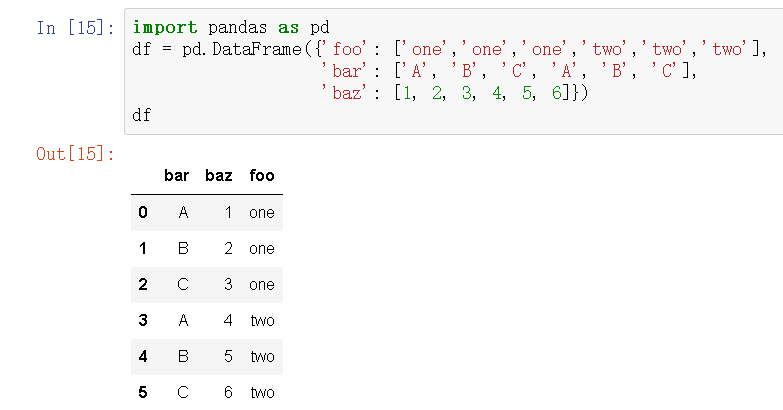
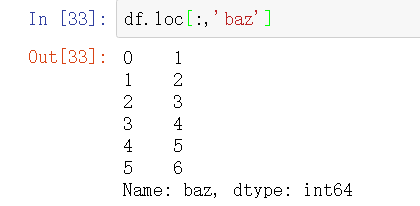
df.loc[:,'baz']
# df.iloc[] - 按照整数位置(从轴的0到length-1)选择行

# 类似list的索引,其顺序就是dataframe的整数位置,从0开始计

df = pd.DataFrame(np.random.rand(16).reshape(4,4)*100,

                   index = ['one','two','three','four'],

                   columns = ['a','b','c','d'])

print(df)

print('------')

print(df.iloc[0])

print(df.iloc[-1])

#print(df.iloc[4])

print('单位置索引\n-----')

# 单位置索引

# 和loc索引不同,不能索引超出数据行数的整数位置

print(df.iloc[[0,2]])

print(df.iloc[[3,2,1]])

print('多位置索引\n-----')

# 多位置索引

# 顺序可变

print(df.iloc[1:3])

print(df.iloc[::2])

print('切片索引')

# 切片索引

# 末端不包含
  a          b          c          d

one    21.848926   2.482328  17.338355  73.014166

two    99.092794   0.601173  18.598736  61.166478

three  87.183015  85.973426  48.839267  99.930097

four   75.007726  84.208576  69.445779  75.546038

------

a    21.848926

b     2.482328

c    17.338355

d    73.014166

Name: one, dtype: float64

a    75.007726

b    84.208576

c    69.445779

d    75.546038

Name: four, dtype: float64

单位置索引

-----

               a          b          c          d

one    21.848926   2.482328  17.338355  73.014166

three  87.183015  85.973426  48.839267  99.930097

               a          b          c          d

four   75.007726  84.208576  69.445779  75.546038

three  87.183015  85.973426  48.839267  99.930097

two    99.092794   0.601173  18.598736  61.166478

多位置索引

-----

               a          b          c          d

two    99.092794   0.601173  18.598736  61.166478

three  87.183015  85.973426  48.839267  99.930097

               a          b          c          d

one    21.848926   2.482328  17.338355  73.014166

three  87.183015  85.973426  48.839267  99.930097

切片索引
dataframe选择列
df = pd.DataFrame(np.random.rand(12).reshape(3,4)*100,

                   index = ['one','two','three'],

                   columns = ['a','b','c','d'])

print(df)

data1 = df['a']

data2 = df[['a','c']]

print(data1,type(data1))

print(data2,type(data2))

print('-----')

# 按照列名选择列,只选择一列输出Series,选择多列输出Dataframe
              a          b          c          d

one    72.615321  49.816987  57.485645  84.226944

two    46.295674  34.480439  92.267989  17.111412

three  14.699591  92.754997  39.683577  93.255880

one      72.615321

two      46.295674

three    14.699591

Name: a, dtype: float64 <class 'pandas.core.series.Series'>

               a          c

one    72.615321  57.485645

two    46.295674  92.267989

three  14.699591  39.683577 <class 'pandas.core.frame.DataFrame'>
# 布尔型索引

# 和Series原理相同

df = pd.DataFrame(np.random.rand(16).reshape(4,4)*100,

                   index = ['one','two','three','four'],

                   columns = ['a','b','c','d'])

print(df)

print('------')

b1 = df < 20

print(b1,type(b1))

print(df[b1])  # 也可以书写为 df[df < 20]

print('------')

# 不做索引则会对数据每个值进行判断

# 索引结果保留 所有数据:True返回原数据,False返回值为NaN

b2 = df['a'] > 50

print(b2,type(b2))

print(df[b2])  # 也可以书写为 df[df['a'] > 50]

print('------')

# 单列做判断

# 索引结果保留 单列判断为True的行数据,包括其他列

b3 = df[['a','b']] > 50

print(b3,type(b3))

print(df[b3])  # 也可以书写为 df[df[['a','b']] > 50]

print('------')

# 多列做判断

# 索引结果保留 所有数据:True返回原数据,False返回值为NaN

b4 = df.loc[['one','three']] < 50

print(b4,type(b4))

print(df[b4])  # 也可以书写为 df[df.loc[['one','three']] < 50]

print('------')

# 多行做判断

# 索引结果保留 所有数据:True返回原数据,False返回值为NaN
  a          b          c          d

one    19.185849  20.303217  21.800384  45.189534

two    50.105112  28.478878  93.669529  90.029489

three  35.496053  19.248457  74.811841  20.711431

four   24.604478  57.731456  49.682717  82.132866

------

           a      b      c      d

one     True  False  False  False

two    False  False  False  False

three  False   True  False  False

four   False  False  False  False <class 'pandas.core.frame.DataFrame'>

               a          b   c   d

one    19.185849        NaN NaN NaN

two          NaN        NaN NaN NaN

three        NaN  19.248457 NaN NaN

four         NaN        NaN NaN NaN

------

one      False

two       True

three    False

four     False

Name: a, dtype: bool <class 'pandas.core.series.Series'>

             a          b          c          d

two  50.105112  28.478878  93.669529  90.029489

------

           a      b

one    False  False

two     True  False

three  False  False

four   False   True <class 'pandas.core.frame.DataFrame'>

               a          b   c   d

one          NaN        NaN NaN NaN

two    50.105112        NaN NaN NaN

three        NaN        NaN NaN NaN

four         NaN  57.731456 NaN NaN

------

          a     b      c     d

one    True  True   True  True

three  True  True  False  True <class 'pandas.core.frame.DataFrame'>

               a          b          c          d

one    19.185849  20.303217  21.800384  45.189534

two          NaN        NaN        NaN        NaN

three  35.496053  19.248457        NaN  20.711431

four         NaN        NaN        NaN        NaN

------
# 多重索引:比如同时索引行和列

# 先选择列再选择行 —— 相当于对于一个数据,先筛选字段,再选择数据量

df = pd.DataFrame(np.random.rand(16).reshape(4,4)*100,

                   index = ['one','two','three','four'],

                   columns = ['a','b','c','d'])

print(df)

print('------')

print(df['a'].loc[['one','three']])   # 选择a列的one,three行

print(df[['b','c','d']].iloc[::2])   # 选择b,c,d列的one,three行

print(df[df['a'] < 50].iloc[:2])   # 选择满足判断索引的前两行数据
              a          b          c          d

one    50.660904  89.827374  51.096827   3.844736

two    70.699721  78.750014  52.988276  48.833037

three  33.653032  27.225202  24.864712  29.662736

four   21.792339  26.450939   6.122134  52.323963

------

one      50.660904

three    33.653032

Name: a, dtype: float64

               b          c          d

one    89.827374  51.096827   3.844736

three  27.225202  24.864712  29.662736

               a          b          c          d

three  33.653032  27.225202  24.864712  29.662736

four   21.792339  26.450939   6.122134  52.323963
添加与修改
df = pd.DataFrame(np.random.rand(16).reshape(4,4)*100,

                   columns = ['a','b','c','d'])

print(df)

df['e'] = 10

df.loc[4] = 20

print(df)

# 新增列/行并赋值

df['e'] = 20

df[['a','c']] = 100

print(df)

# 索引后直接修改值
         a          b          c          d

0  17.148791  73.833921  39.069417   5.675815

1  91.572695  66.851601  60.320698  92.071097

2  79.377105  24.314520  44.406357  57.313429

3  84.599206  61.310945   3.916679  30.076458

           a          b          c          d   e

0  17.148791  73.833921  39.069417   5.675815  10

1  91.572695  66.851601  60.320698  92.071097  10

2  79.377105  24.314520  44.406357  57.313429  10

3  84.599206  61.310945   3.916679  30.076458  10

4  20.000000  20.000000  20.000000  20.000000  20

     a          b    c          d   e

0  100  73.833921  100   5.675815  20

1  100  66.851601  100  92.071097  20

2  100  24.314520  100  57.313429  20

3  100  61.310945  100  30.076458  20

4  100  20.000000  100  20.000000  20
# 删除  del / drop()

df = pd.DataFrame(np.random.rand(16).reshape(4,4)*100,

                   columns = ['a','b','c','d'])

print(df)

del df['a']

print(df)

print('-----')

# del语句 - 删除列

print(df.drop(0))

print(df.drop([1,2]))

print(df)

print('-----')

# drop()删除行,inplace=False → 删除后生成新的数据,不改变原数据

print(df.drop(['d'], axis = 1))

print(df)

# drop()删除列,需要加上axis = 1,inplace=False → 删除后生成新的数据,不改变原数据
  a          b          c          d

0  91.866806  88.753655  18.469852  71.651277

1  64.835568  33.844967   6.391246  54.916094

2  75.930985  19.169862  91.042457  43.648258

3  15.863853  24.788866  10.625684  82.135316

           b          c          d

0  88.753655  18.469852  71.651277

1  33.844967   6.391246  54.916094

2  19.169862  91.042457  43.648258

3  24.788866  10.625684  82.135316

-----

           b          c          d

1  33.844967   6.391246  54.916094

2  19.169862  91.042457  43.648258

3  24.788866  10.625684  82.135316

           b          c          d

0  88.753655  18.469852  71.651277

3  24.788866  10.625684  82.135316

           b          c          d

0  88.753655  18.469852  71.651277

1  33.844967   6.391246  54.916094

2  19.169862  91.042457  43.648258

3  24.788866  10.625684  82.135316

-----

           b          c

0  88.753655  18.469852

1  33.844967   6.391246

2  19.169862  91.042457

3  24.788866  10.625684

           b          c          d

0  88.753655  18.469852  71.651277

1  33.844967   6.391246  54.916094

2  19.169862  91.042457  43.648258

3  24.788866  10.625684  82.135316
删除重复的值
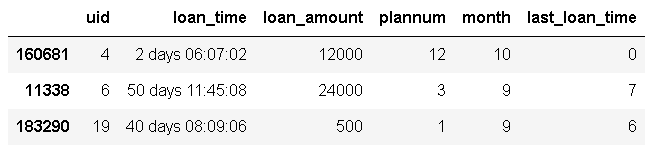
本来uid列有多个重复的id,drop_duplicates()可以删除重复的uid,并保留第一个或最后一个uid
last_loan_time.drop_duplicates(subset='uid', keep='last', inplace=True)
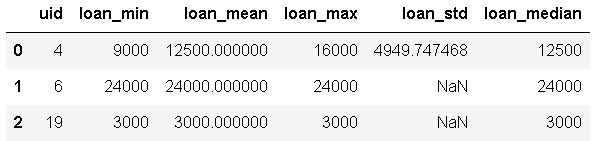
agg()对一张表同时做多个操作,并生成多个新列
stat_feat = ['min','mean','max','std','median']

        statistic_df = statistic_df.groupby('uid')['loan_amount'].agg(stat_feat).reset_index()

        statistic_df.columns = ['uid'] + ['loan_' + col for col in stat_feat]
# 对齐

df1 = pd.DataFrame(np.random.randn(10, 4), columns=['A', 'B', 'C', 'D'])

df2 = pd.DataFrame(np.random.randn(7, 3), columns=['A', 'B', 'C'])

print(df1 + df2)

# DataFrame对象之间的数据自动按照列和索引(行标签)对齐
A         B         C   D

0 -0.281123 -2.529461  1.325663 NaN

1 -0.310514 -0.408225 -0.760986 NaN

2 -0.172169 -2.355042  1.521342 NaN

3  1.113505  0.325933  3.689586 NaN

4  0.107513 -0.503907 -1.010349 NaN

5 -0.845676 -2.410537 -1.406071 NaN

6  1.682854 -0.576620 -0.981622 NaN

7       NaN       NaN       NaN NaN

8       NaN       NaN       NaN NaN

9       NaN       NaN       NaN NaN
排序
# 排序1 - 按值排序 .sort_values

# 同样适用于Series

df1 = pd.DataFrame(np.random.rand(16).reshape(4,4)*100,

                   columns = ['a','b','c','d'])

print(df1)

print(df1.sort_values(['a'], ascending = True))  # 升序

print(df1.sort_values(['a'], ascending = False))  # 降序

print('------')

# ascending参数:设置升序降序,默认升序

# 单列排序

df2 = pd.DataFrame({'a':[1,1,1,1,2,2,2,2],

                  'b':list(range(8)),

                  'c':list(range(8,0,-1))})

print(df2)

print(df2.sort_values(['a','c']))

# 多列排序,按列顺序排序
   a          b          c          d

0  16.519099  19.601879  35.464189  58.866972

1  34.506472  97.106578  96.308244  54.049359

2  87.177828  47.253416  92.098847  19.672678

3  66.673226  51.969534  71.789055  14.504191

           a          b          c          d

0  16.519099  19.601879  35.464189  58.866972

1  34.506472  97.106578  96.308244  54.049359

3  66.673226  51.969534  71.789055  14.504191

2  87.177828  47.253416  92.098847  19.672678

           a          b          c          d

2  87.177828  47.253416  92.098847  19.672678

3  66.673226  51.969534  71.789055  14.504191

1  34.506472  97.106578  96.308244  54.049359

0  16.519099  19.601879  35.464189  58.866972

------

   a  b  c

0  1  0  8

1  1  1  7

2  1  2  6

3  1  3  5

4  2  4  4

5  2  5  3

6  2  6  2

7  2  7  1

   a  b  c

3  1  3  5

2  1  2  6

1  1  1  7

0  1  0  8

7  2  7  1

6  2  6  2

5  2  5  3

4  2  4  4
# 排序2 - 索引排序 .sort_index

df1 = pd.DataFrame(np.random.rand(16).reshape(4,4)*100,

                  index = [5,4,3,2],

                   columns = ['a','b','c','d'])

df2 = pd.DataFrame(np.random.rand(16).reshape(4,4)*100,

                  index = ['h','s','x','g'],

                   columns = ['a','b','c','d'])

print(df1)

print(df1.sort_index())

print(df2)

print(df2.sort_index())

# 按照index排序

# 默认 ascending=True, inplace=False
  a          b          c          d

5  57.327269  87.623119  93.655538   5.859571

4  69.739134  80.084366  89.005538  56.825475

3  88.148296   6.211556  68.938504  41.542563

2  29.248036  72.005306  57.855365  45.931715

           a          b          c          d

2  29.248036  72.005306  57.855365  45.931715

3  88.148296   6.211556  68.938504  41.542563

4  69.739134  80.084366  89.005538  56.825475

5  57.327269  87.623119  93.655538   5.859571

           a          b          c          d

h  50.579469  80.239138  24.085110  39.443600

s  30.906725  39.175302  11.161542  81.010205

x  19.900056  18.421110   4.995141  12.605395

g  67.760755  72.573568  33.507090  69.854906

           a          b          c          d

g  67.760755  72.573568  33.507090  69.854906

h  50.579469  80.239138  24.085110  39.443600

s  30.906725  39.175302  11.161542  81.010205

x  19.900056  18.421110   4.995141  12.605395
Pandas之Series+DataFrame的更多相关文章
- Pandas 之 Series / DataFrame 初识
import numpy as np import pandas as pd Pandas will be a major tool of interest throughout(贯穿) much o ...
- python pandas ---Series,DataFrame 创建方法,操作运算操作(赋值,sort,get,del,pop,insert,+,-,*,/)
pandas 是基于 Numpy 构建的含有更高级数据结构和工具的数据分析包 pandas 也是围绕着 Series 和 DataFrame 两个核心数据结构展开的, 导入如下: from panda ...
- pandas数据结构:Series/DataFrame;python函数:range/arange
1. Series Series 是一个类数组的数据结构,同时带有标签(lable)或者说索引(index). 1.1 下边生成一个最简单的Series对象,因为没有给Series指定索引,所以此时会 ...
- pandas 学习(2): pandas 数据结构之DataFrame
DataFrame 类型类似于数据库表结构的数据结构,其含有行索引和列索引,可以将DataFrame 想成是由相同索引的Series组成的Dict类型.在其底层是通过二维以及一维的数据块实现. 1. ...
- [转]python中pandas库中DataFrame对行和列的操作使用方法
转自:http://blog.csdn.net/u011089523/article/details/60341016 用pandas中的DataFrame时选取行或列: import numpy a ...
- 数据分析入门——pandas之Series
一.介绍 Pandas是一个开源的,BSD许可的库(基于numpy),为Python编程语言提供高性能,易于使用的数据结构和数据分析工具. 官方中文文档:https://www.pypandas.cn ...
- python中pandas库中DataFrame对行和列的操作使用方法
用pandas中的DataFrame时选取行或列: import numpy as np import pandas as pd from pandas import Sereis, DataFram ...
- 读书笔记一、pandas之series
转自 # 直接传入一组数据 from pandas import Series, DataFrame obj = Series([4, 2, 3]) obj 0 4 1 2 2 3 dtype: in ...
- 利用Python进行数据分析(7) pandas基础: Series和DataFrame的简单介绍
一.pandas 是什么 pandas 是基于 NumPy 的一个 Python 数据分析包,主要目的是为了数据分析.它提供了大量高级的数据结构和对数据处理的方法. pandas 有两个主要的数据结构 ...
随机推荐
- Win7/Win8/IIS7/IIS8配置ASP/ACCESS
1.在IIS信息服务管理器配置好站点后,配置ASP属性: a.IIS启用ASP 1.打开控制面板>>程序和功能>>“打开或关闭windows功能”,见下图 2.稍等片刻,出现一 ...
- python中的list和array的不同之处
原文地址: http://blog.csdn.net/liyaohhh/article/details/51055147#reply python中的list是python的内置数据类型,list中 ...
- adb 查看内存信息的命令
meminfo: basic memory status-adb shell cat proc/meminfo -- 内存系统信息-adb shell cat proc/pid/maps -- 指 ...
- WPS 2019 去除自动升级 和 广告、及优化的点
搜狗输入法 里面的快捷键会影响wps的快捷键功能,需要关掉"搜狗输入法"里面的快捷键 1. 2.去除自动升级功能 3.去除 广告 WPS 2019 流程图(断网): 思维导图: 流 ...
- Sencha Touch 实战开发培训 视频教程 第二期 第一节
经过忙碌的准备,终于在2014.4.7晚上8:10分开课. 本来预定在8点开课的,不过电脑出了点问题,推迟了. 本期培训一共八节,前两节免费,后面的课程需要付费才可以观看. 本节内容: 了解Sench ...
- Linux的账号口令机制及其爆破
账号保存 谈到linux的账号认证,其实就是如何保存于通过口令(password)鉴别,这里首先要将两个文件,一个是/etc/passwd,另外一个是/etc/shadow. /etc/passwd文 ...
- thinkCMF----增删改查操作
thinkCMF的增删改查基本操作: 一.增加数据 $res = Db::name('form')->insert($data); 示例代码: public function index(){ ...
- 远程服务器git搭建
在远程服务器如:/var/www下创建hello.git 然后git init --bare hello.git cd hello.git会看到下面的目录和文件 然后创建可以访问git的用户 git ...
- jsp页面中引入文件路径问题的解决方案(使用request获取项目路径)【原创】
在项目页面中,总会引入一些js和css,相对路径or绝对路径的选择就显得至关重要了!下面是项目中遇到的问题和解决方案,做一下记录! 环境: myEclipse创建工程,使用jsp+css+js,项目目 ...
- 火狐浏览器adobe flash player
最近Firefox火狐浏览器已停止Flash Player 18.0.0.203运行 在Mozilla官方公告中,该公司提到Flash Player 18.0.0.203插件存在已知安全漏洞,建议用户 ...