
cocos2dx-是男人就坚持20s 练手项目
前言
前段时间心血来潮看了下app游戏方面的东西
,对比了下各种技术和市场招聘情况,赶脚cocos2dx在2D游戏方向还算是大有所为,遂找了几个基础教程看看了解了解。并附上一个简单demo作为成果
准备工作
环境搭建倒是重头戏,相关教程也比较多,我直接转个给大家参考吧(安装教程戳这里)。
开始游戏
找了个经典游戏是男人就坚持20秒,相信大家都接触过,游戏逻辑比较简单不外乎控制飞机躲避子弹,这里就山寨它吧
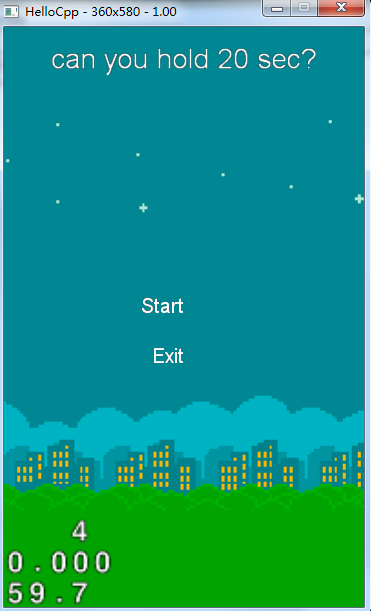
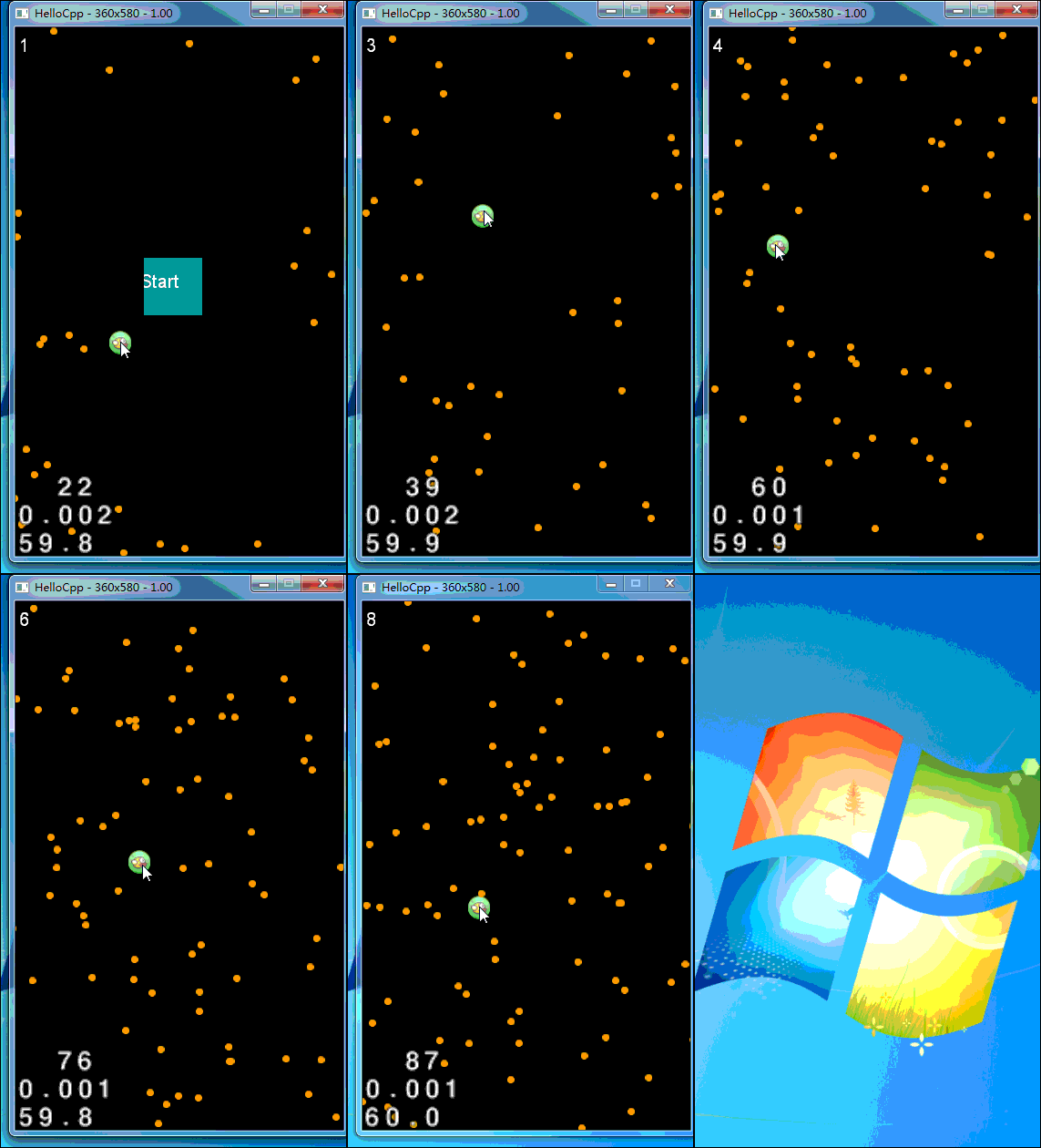
可以看到组成部分只有计时器,子弹和小鸟(为什么选小鸟呢,因为圆形图标做碰撞检测比较简单,本来用飞机的,但是飞机的空白地方不好处理,简单实例就用简单的方法吧)
1、计时器
int time=;

CCLabelTTF* timelb;//文本框

schedule(schedule_selector(manfor20s::timecount), 1.0f);//每秒执行的计时器

//每秒累加

void  manfor20s::timecount(float dt)

{

    time= time+;

    CCString* ns=CCString::createWithFormat("%d", manfor20s::time);

    timelb->setString(ns->getCString()  );

}
计时器逻辑
2、子弹的生成和碰撞检测
CCArray* listSpirit;//获取页面上所有元素的容器

CCSprite* plane;//小鸟

schedule(schedule_selector(manfor20s::update));//每一帧执行

void  manfor20s::update(float dt)

{

    CCSprite *pl =  plane ;

    CCRect targetRect = CCRectMake(

        pl->getPosition().x - (pl->getContentSize().width/),

        pl->getPosition().y - (pl->getContentSize().height/),

        pl->getContentSize().width,

        pl->getContentSize().height);

    CCRect win=CCRectMake(,,visibleSize.width,visibleSize.height);

    listSpirit=this->getChildren();//获取所有元素

    for (int i=listSpirit->count()-;i>=;i--)

    {

        CCSprite* it=(CCSprite*)listSpirit->objectAtIndex(i);

        if(it->getTag()==)//tag为2则为子弹

        {

      /*

            CCSprite *sp = dynamic_cast<CCSprite*>(it);  */

            CCRect projectileRect = CCRectMake( it->getPosition().x - (it->getContentSize().width/),

                it->getPosition().y - (it->getContentSize().height/),

                it->getContentSize().width,

                it->getContentSize().height);

            if ( ccpDistance(it->getPosition(),plane->getPosition())<)  //子弹和小鸟圆心点相距小于15则认为碰撞了

            {

                CCMessageBox("被击中了","alert");

                menuCloseCallback();//关闭

                break;

            }

             if(!win.intersectsRect(projectileRect))//如果子弹超出窗体则删除             {

                this->removeChild(it);

             }

        }

    }

    #pragma region 产生弹道 随机生成各个方向的子弹

    if(getRand(,)>)//随机因子

    {

        //get directer

        int di =getRand(,);

        CCSprite * pu =CCSprite::create("p.png");

        pu->setTag();

        CCPoint from;

        CCPoint to;

        switch(di)

        {

            case ://up to down

                {

                    from=ccp(getRand(,visibleSize.width),visibleSize.height);

                    to=ccp(getRand(-visibleSize.width,visibleSize.width*),-);

                }

                break;

            case ://down to up

                {

                    from=ccp(getRand(,visibleSize.width),);

                    to=ccp(getRand(-visibleSize.width,visibleSize.width*),visibleSize.height+);

                }

                break;

            case ://left to right

                {

                    from=ccp(,getRand(,visibleSize.height));

                    to=ccp(visibleSize.width+,getRand(-visibleSize.height,visibleSize.height*));

                }

                break;

            case ://right to left

                {

                    from=ccp(visibleSize.width,getRand(,visibleSize.height));

                    to=ccp(-,getRand(-visibleSize.height,visibleSize.height*));

                }

                break;

            default:break;

        }

        pu->setPosition(from);

        this->addChild(pu);

        int distance=cocos2d::ccpDistance(from,to);

        CCActionInterval *forward = CCMoveTo::create(distance/,to);  //moveto 速度控制

        pu->runAction(forward);

    }

    #pragma endregion

}

//random

int manfor20s::getRand(int start,int end)

{

    float i = CCRANDOM_0_1()*(end-start+)+start;  //get random from start to end

    return (int)i;

}
子弹的生成和碰撞检测
3、小鸟的移动
bool manfor20s::ccTouchBegan(CCTouch * touch,CCEvent* event)

{

    CCPoint heropos = plane->getPosition();

    CCPoint location = touch->getLocationInView();

    location = CCDirector::sharedDirector()->convertToGL(location);

    if (location.x > heropos.x -  && location.x < heropos.x +  && location.y > heropos.y -  && location.y < heropos.y + )

    {

        isControl = true;

        deltax = location.x - heropos.x;

        deltay = location.y - heropos.y;

    }

    return true;

}

void manfor20s::ccTouchMoved(CCTouch * touch,CCEvent* event)

{

    if (isControl)

    {

        CCPoint location = touch->getLocationInView();

        location = CCDirector::sharedDirector()->convertToGL(location);

        float x = location.x - deltax;

        float y = location.y - deltay;

        plane->setPosition(ccp(x,y));

    }

}

void manfor20s::ccTouchEnded(CCTouch * touch, CCEvent * event)

{

    isControl = false;

}
小鸟的移动
大体逻辑就是这样,第一次做c++项目,分不清:: . ->的概念,幸好项目比较小问题不大,希望有机会能接触高大上一点的项目做做,哈哈,不知道怎么传代码,就吧.h文件和.cpp文件都贴上来吧
#ifndef __manfor20s_SCENE_H__

#define __manfor20s_SCENE_H__

#include "cocos2d.h"

class manfor20s:public cocos2d::CCLayer

{

public:

    virtual bool init();

    // there's no 'id' in cpp, so we recommend returning the class instance pointer

    static cocos2d::CCScene* scene();

    // a selector callback

    void menuCloseCallback();

    // implement the "static node()" method manually

    CREATE_FUNC(manfor20s);

    void  timecount(float dt);

    void update(float dt);

    int getRand(int start,int end) ;

    int time;

    bool isControl;

    int deltax;

    int deltay;

    //触屏响应重写这三个方法

    virtual bool ccTouchBegan(cocos2d::CCTouch* touch, cocos2d::CCEvent* event);//按下

    virtual void ccTouchMoved(cocos2d::CCTouch* touch, cocos2d::CCEvent* event);//拖动

    virtual void ccTouchEnded(cocos2d::CCTouch* touch, cocos2d::CCEvent* event);//松开

};

#endif
游戏页.h
#include "manfor20s.h"

#include "MainPage.h"

USING_NS_CC;

CCLabelTTF* timelb;

CCSize visibleSize;

CCArray* listSpirit;

CCSprite* plane;

CCScene* manfor20s::scene(){

    CCScene *scene = CCScene::create();

    manfor20s *layer = manfor20s::create();

    scene->addChild(layer);

    return scene;

}

bool manfor20s::init()

{

    if ( !CCLayer::init() )

    {

        return false;

    }

    this->setTouchEnabled(true);

     CCDirector::sharedDirector()->getTouchDispatcher()->addTargetedDelegate(this,,true);

    visibleSize = CCDirector::sharedDirector()->getVisibleSize();

    CCPoint origin = CCDirector::sharedDirector()->getVisibleOrigin();

    timelb=CCLabelTTF::create("",  "Arial", );

    timelb->setPosition(ccp(origin.x+,origin.y +visibleSize.height-));

    this->addChild(timelb);

    manfor20s::time=;

    plane=CCSprite::create("bird.png");

    plane->setTag();

    plane->setPosition(ccp(origin.x+visibleSize.width/,origin.y + visibleSize.height/));

    this->addChild(plane);

    schedule(schedule_selector(manfor20s::update));

    schedule(schedule_selector(manfor20s::timecount), 1.0f);

    return true;

}

void  manfor20s::update(float dt)

{

    CCSprite *pl =  plane ;

    CCRect targetRect = CCRectMake(

        pl->getPosition().x - (pl->getContentSize().width/),

        pl->getPosition().y - (pl->getContentSize().height/),

        pl->getContentSize().width,

        pl->getContentSize().height);

    CCRect win=CCRectMake(,,visibleSize.width,visibleSize.height);

    listSpirit=this->getChildren();

    for (int i=listSpirit->count()-;i>=;i--)

    {

        CCSprite* it=(CCSprite*)listSpirit->objectAtIndex(i);

        if(it->getTag()==)

        {

      /*

            CCSprite *sp = dynamic_cast<CCSprite*>(it);  */

            CCRect projectileRect = CCRectMake( it->getPosition().x - (it->getContentSize().width/),

                it->getPosition().y - (it->getContentSize().height/),

                it->getContentSize().width,

                it->getContentSize().height);

            if ( ccpDistance(it->getPosition(),plane->getPosition())<)

            {

                CCMessageBox("被击中了","alert");

                menuCloseCallback();

                break;

            }

             if(!win.intersectsRect(projectileRect))//delete if over the windows

             {

                this->removeChild(it);

             }

        }

    }

    #pragma region 产生弹道

    if(getRand(,)>)//随机因子

    {

        //get directer

        int di =getRand(,);

        CCSprite * pu =CCSprite::create("p.png");

        pu->setTag();

        CCPoint from;

        CCPoint to;

        switch(di)

        {

            case ://up to down

                {

                    from=ccp(getRand(,visibleSize.width),visibleSize.height);

                    to=ccp(getRand(-visibleSize.width,visibleSize.width*),-);

                }

                break;

            case ://down to up

                {

                    from=ccp(getRand(,visibleSize.width),);

                    to=ccp(getRand(-visibleSize.width,visibleSize.width*),visibleSize.height+);

                }

                break;

            case ://left to right

                {

                    from=ccp(,getRand(,visibleSize.height));

                    to=ccp(visibleSize.width+,getRand(-visibleSize.height,visibleSize.height*));

                }

                break;

            case ://right to left

                {

                    from=ccp(visibleSize.width,getRand(,visibleSize.height));

                    to=ccp(-,getRand(-visibleSize.height,visibleSize.height*));

                }

                break;

            default:break;

        }

        pu->setPosition(from);

        this->addChild(pu);

        int distance=cocos2d::ccpDistance(from,to);

        CCActionInterval *forward = CCMoveTo::create(distance/,to);  //moveto 速度控制

        pu->runAction(forward);

    }

    #pragma endregion

}

void  manfor20s::timecount(float dt)

{

    manfor20s::time= manfor20s::time+;

    CCString* ns=CCString::createWithFormat("%d", manfor20s::time);

    timelb->setString(ns->getCString()  );

}

int manfor20s::getRand(int start,int end)

{

    float i = CCRANDOM_0_1()*(end-start+)+start;  //get random from start to end

    return (int)i;

}

//close button

void manfor20s::menuCloseCallback()

{

    this->removeAllChildren();

    this->unscheduleAllSelectors();

    CCDirector* pDirector = CCDirector::sharedDirector();

    CCEGLView* pEGLView = CCEGLView::sharedOpenGLView();

    pDirector->setOpenGLView(pEGLView);

    // turn on display FPS

    pDirector->setDisplayStats(true);

    // set FPS. the default value is 1.0/60 if you don't call this

    pDirector->setAnimationInterval(1.0 / );

    // create a scene. it's an autorelease object

    CCScene *pScene = MainPage::scene();

    pDirector->replaceScene(pScene);

}

bool manfor20s::ccTouchBegan(CCTouch * touch,CCEvent* event)

{

    CCPoint heropos = plane->getPosition();

    CCPoint location = touch->getLocationInView();

    location = CCDirector::sharedDirector()->convertToGL(location);

    if (location.x > heropos.x -  && location.x < heropos.x +  && location.y > heropos.y -  && location.y < heropos.y + )

    {

        isControl = true;

        deltax = location.x - heropos.x;

        deltay = location.y - heropos.y;

    }

    return true;

}

void manfor20s::ccTouchMoved(CCTouch * touch,CCEvent* event)

{

    if (isControl)

    {

        CCPoint location = touch->getLocationInView();

        location = CCDirector::sharedDirector()->convertToGL(location);

        float x = location.x - deltax;

        float y = location.y - deltay;

        plane->setPosition(ccp(x,y));

    }

}

void manfor20s::ccTouchEnded(CCTouch * touch, CCEvent * event)

{

    isControl = false;

}
游戏页.cpp
#ifndef __MainPage_SCENE_H__

#define __MainPage_SCENE_H__

#include "cocos2d.h"

class MainPage : public cocos2d::CCLayer

{

public:

    // Here's a difference. Method 'init' in cocos2d-x returns bool, instead of returning 'id' in cocos2d-iphone

    virtual bool init();

    // there's no 'id' in cpp, so we recommend returning the class instance pointer

    static cocos2d::CCScene* scene();

    // a selector callback

    void menuCloseCallback(CCObject* pSender);

    // a selector callback

    void menustartGame(CCObject* pSender);

    // implement the "static node()" method manually

    CREATE_FUNC(MainPage);

};

#endif // __HELLOWORLD_SCENE_H__
菜单页.h
#include "MainPage.h"

#include "manfor20s.h"

USING_NS_CC;

CCScene* MainPage::scene()

{

    // 'scene' is an autorelease object

    CCScene *scene = CCScene::create();

    // 'layer' is an autorelease object

    MainPage *layer = MainPage::create();

    // add layer as a child to scene

    scene->addChild(layer);

    // return the scene

    return scene;

}

// on "init" you need to initialize your instance

bool MainPage::init()

{

    //////////////////////////////

    // 1. super init first

    if ( !CCLayer::init() )

    {

        return false;

    }

    //获取原始尺寸

    CCSize visibleSize = CCDirector::sharedDirector()->getVisibleSize();

    CCPoint origin = CCDirector::sharedDirector()->getVisibleOrigin();

    //开始和退出按钮

    CCLabelTTF *label1 = CCLabelTTF::create("Start",  "Arial", ); // create a exit botton

    CCMenuItemLabel *start_game = CCMenuItemLabel::create(label1, this, menu_selector(MainPage::menustartGame) );

    CCLabelTTF *label2 = CCLabelTTF::create("Exit",  "Arial", ); // create a exit botton

    CCMenuItemLabel *exit_game = CCMenuItemLabel::create(label2, this, menu_selector(MainPage::menuCloseCallback) );

    start_game->setPosition(ccp((origin.x + visibleSize.width - start_game->getContentSize().width)/ ,

        origin.y+visibleSize.height/ + start_game->getContentSize().height/));

    exit_game->setPosition(ccp((origin.x + visibleSize.width - exit_game->getContentSize().width)/ ,

                                origin.y+visibleSize.height/ + exit_game->getContentSize().height/-));

    // create menu, it's an autorelease object

    CCMenu* pMenu = CCMenu::create(start_game,exit_game, NULL);

    pMenu->setPosition(CCPointZero);

    this->addChild(pMenu, );

    //标题

    CCLabelTTF* pLabel = CCLabelTTF::create("can you hold 20 sec?", "Arial", );

    // position the label on the center of the screen

    pLabel->setPosition(ccp(origin.x + visibleSize.width/,

                            origin.y + visibleSize.height - pLabel->getContentSize().height));

    // add the label as a child to this layer

    this->addChild(pLabel, );

   //背景图片

    CCSprite* pSprite = CCSprite::create("background.jpg");

    pSprite->setPosition(ccp(visibleSize.width/ + origin.x, visibleSize.height/ + origin.y));

    this->addChild(pSprite, );

    return true;

}

void MainPage::menuCloseCallback(CCObject* pSender)

{

#if (CC_TARGET_PLATFORM == CC_PLATFORM_WINRT) || (CC_TARGET_PLATFORM == CC_PLATFORM_WP8)

    CCMessageBox("You pressed the close button. Windows Store Apps do not implement a close button.","Alert");

#else

    CCDirector::sharedDirector()->end();

#if (CC_TARGET_PLATFORM == CC_PLATFORM_IOS)

    exit();

#endif

#endif

}

void MainPage::menustartGame(CCObject* psender)

{

    CCDirector* pDirector = CCDirector::sharedDirector();

    CCEGLView* pEGLView = CCEGLView::sharedOpenGLView();

    pDirector->setOpenGLView(pEGLView);

    // turn on display FPS

    pDirector->setDisplayStats(true);

    // set FPS. the default value is 1.0/60 if you don't call this

    pDirector->setAnimationInterval(1.0 / );

    // create a scene. it's an autorelease object

    CCScene *pScene = manfor20s::scene();

    pDirector->replaceScene(pScene);

}
菜单页.cpp
下载代码戳这里
cocos2dx-是男人就坚持20s 练手项目的更多相关文章
- Python学习路径及练手项目合集
Python学习路径及练手项目合集 https://zhuanlan.zhihu.com/p/23561159
- web前端学习部落22群分享给需要前端练手项目
前端学习还是很有趣的,可以较快的上手然后自己开发一些好玩的项目来练手,网上也可以一抓一大把关于前端开发的小项目,可是还是有新手在学习的时候不知道可以做什么,以及怎么做,因此,就整理了一些前端项目教程, ...
- webpack练手项目之easySlide(三):commonChunks(转)
Hello,大家好. 在之前两篇文章中: webpack练手项目之easySlide(一):初探webpack webpack练手项目之easySlide(二):代码分割 与大家分享了webpack的 ...
- webpack练手项目之easySlide(二):代码分割(转)
在上一篇 webpack练手项目之easySlide(一):初探webpack 中我们一起为大家介绍了webpack的基本用法,使用webpack对前端代码进行模块化打包. 但是乍一看webpack ...
- Python之路【第二十四篇】:Python学习路径及练手项目合集
Python学习路径及练手项目合集 Wayne Shi· 2 个月前 参照:https://zhuanlan.zhihu.com/p/23561159 更多文章欢迎关注专栏:学习编程. 本系列Py ...
- 练手项目:利用pygame库编写射击游戏
本项目使用pygame模块编写了射击游戏,目的在于训练自己的Python基本功.了解中小型程序框架以及学习代码重构等.游戏具有一定的可玩性,感兴趣的可以试一下. 项目说明:出自<Python编程 ...
- Vue练手项目(包含typescript版本)
本项目的git仓库https://github.com/lznism/xiachufang-vue 对应的使用typescript实现的版本地址https://github.com/lznism/xi ...
- 适合Python的5大练手项目, 你练了么?
在练手项目的选择上,还存在疑问?不知道要从哪种项目先下手? 首先有两点建议: 最好不要写太应用的程序练手,要思考什么更像是知识,老只会写写爬虫是无用的,但是完全不写也不行. 对于练手的程序,要注意简化 ...
- 适合Python 新手的5大练手项目,你练了么?
接下来就给大家介绍几种适合新手的练手项目. 0.算法系列-排序与查找 Python写swap很方便,就一句话(a, b = b, a),于是写基于比较的排序能短小精悍.刚上手一门新语言练算法最合适不过 ...
随机推荐
- 【翻译自mos文章】在11gR2 rac环境中,文件系统使用率紧张,而且lsof显示有非常多oraagent_oracle.l10 (deleted)
在11gR2 rac环境中,文件系统使用率紧张.而且lsof显示有非常多oraagent_oracle.l10 (deleted) 參考原文: High Space Usage and "l ...
- 一般源码安装添加的GD库 是不支持 jpeg 格式的图片的
一般源码安装添加的GD库 是不支持 jpeg 格式的图片的,只支持如下格式 GD Support enabled GD Version bundled (2.0.34 compatible) GIF ...
- Mybatis使用Redis二级缓存
在Mybatis中允许开发者自定义自己的缓存,本文将使用Redis作为Mybatis的二级缓存.在Mybatis中定义二级缓存,需要如下配置: 1. MyBatis支持二级缓存的总开关:全局配置变量参 ...
- 虚拟机快照,克隆,静态ip地址的设置(centos 6.5)
一.快照 例如,当我们在虚拟机上做实验或是作测试时,难免碰到一些不熟悉的地方,此时做个快照,备份一下当前的系统状态,一旦操作错误,可以很快还原到出错前的状态,完成实验,最终避免一步的失误导致重新开始整 ...
- .htaccess 文件中详细介绍
#如果存在rewrite_module 模块则执行里面的代码 <IfModule rewrite_module> #开启重写机制 RewriteEngine On #告诉apache这里不 ...
- java集成jpush实现客户端推送
代码地址如下:http://www.demodashi.com/demo/13700.html 前言 java 集成jpush 实现客户端推送 一.准备工作 开发环境: jdk1.6 Eclipse ...
- jBoss设置jvm参数
jBoss版本: jboss-5.1.0.GA jboss-6.0.0.Final jboss-5.1.0.GA和jboss-6.0.0.Final修改方法: 打开%JBOSS_HOME%\bin ...
- js检测回车符
在说检测回车符之前,需要了解keydown和keypress的区别 比如你可以将检测事件绑定在input上,如下所示: <input name="remark" id=&qu ...
- Shell编程二
告警系统需求分析 1.(虽然之前我们学习了zabbix,但有时候也不能满足我们的需求,比如比较冷门的监控项目需要写自定义脚本,或者服务器网络有问题,没有办法将客户端的数据发送到服务端.) 程序架构: ...
- 查询MySql数据库架构信息:数据库,表,表字段
/*1.查询所有数据库*/ show databases; /*2.查询所有数据表*/ select * from information_schema.tables where table_sch ...