
poi的合并单元格和冻结行列
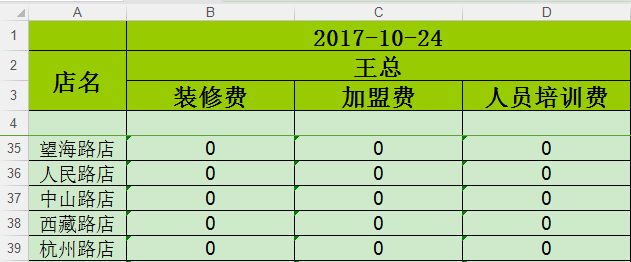
         //创建工作薄(excel)

         Workbook wb = new HSSFWorkbook();

         //创建sheet

         Sheet createSheet = wb.createSheet("sheet1");

         //设置标题字体

         Font fontTitle = wb.createFont();

         fontTitle.setFontHeightInPoints((short) 18); //字体大小

         fontTitle.setColor(HSSFColor.BLACK.index); //字体颜色

         fontTitle.setFontName("宋体"); //字体

         fontTitle.setBoldweight(Font.BOLDWEIGHT_BOLD); //粗体显示

         //font.setItalic(true); //是否使用斜体

         //font.setStrikeout(true); //是否使用划线

         //设置标题单元格类型

         CellStyle cellStyleTitle = wb.createCellStyle();

         cellStyleTitle.setFont(fontTitle);

         cellStyleTitle.setFillForegroundColor(IndexedColors.LIME.getIndex());

         cellStyleTitle.setFillPattern(CellStyle.SOLID_FOREGROUND);

         cellStyleTitle.setAlignment(CellStyle.ALIGN_CENTER); //水平布局:居中

         cellStyleTitle.setVerticalAlignment(CellStyle.VERTICAL_CENTER);

         cellStyleTitle.setWrapText(true);//设置自动换行

         cellStyleTitle.setBorderBottom(CellStyle.BORDER_THIN); //下边框

         cellStyleTitle.setBorderLeft(CellStyle.BORDER_THIN);//左边框

         cellStyleTitle.setBorderTop(CellStyle.BORDER_THIN);//上边框

         cellStyleTitle.setBorderRight(CellStyle.BORDER_THIN);//右边框

         cellStyleTitle.setBottomBorderColor(IndexedColors.BLACK.getIndex());

         cellStyleTitle.setLeftBorderColor(IndexedColors.BLACK.getIndex());

         cellStyleTitle.setTopBorderColor(IndexedColors.BLACK.getIndex());

         cellStyleTitle.setRightBorderColor(IndexedColors.BLACK.getIndex());

         //创建合并单元格  ---begin

         CellRangeAddress region = new CellRangeAddress(0, 0, 1, 3);// 下标从0开始 起始行号,终止行号, 起始列号,终止列号

         CellRangeAddress region2 = new CellRangeAddress(1, 2, 0, 0);// 起始行号,终止行号, 起始列号,终止列号

         CellRangeAddress region3 = new CellRangeAddress(1, 1, 1, 3);// 起始行号,终止行号, 起始列号,终止列号

         //在sheet里增加合并单元格

         createSheet.addMergedRegion(region);

         createSheet.addMergedRegion(region2);

         createSheet.addMergedRegion(region3);

         // -----------填充第一行数据-------------

         Row rowTitle = createSheet.createRow(0);

         Cell cellTitle = rowTitle.createCell(0);

         cellTitle.setCellStyle(cellStyleTitle);

         cellTitle.setCellValue("");// 设置标题内容

         Cell cellTitle1_1 = rowTitle.createCell(1);

         cellTitle1_1.setCellStyle(cellStyleTitle);

         cellTitle1_1.setCellValue(dateStr);// 设置标题内容

         // -----------填充第二行数据-------------

         Row rowTitle1 = createSheet.createRow(1);

         Cell cellTitle1 = rowTitle1.createCell(0);

         cellTitle1.setCellStyle(cellStyleTitle);

         cellTitle1.setCellValue("店名");//  设置内容

         Cell cellTitle11 = rowTitle1.createCell(1);

         cellTitle11.setCellStyle(cellStyleTitle);

         cellTitle11.setCellValue("王总");//

         Cell cellTitle111 = rowTitle1.createCell(2);

         cellTitle111.setCellStyle(cellStyleTitle);

         cellTitle111.setCellValue("");// 虽然这个单元格不可以不设置,但是要给它设置样式,所以也写了

         Cell cellTitle1111 = rowTitle1.createCell(3);

         cellTitle1111.setCellStyle(cellStyleTitle);

         cellTitle1111.setCellValue("");// 虽然这个单元格不可以不设置,但是要给它设置样式,所以也写了

         // -----------填充第三行数据-------------

         Row rowTitle2 = createSheet.createRow(2);

         Cell cellTitle2 = rowTitle2.createCell(1);

         cellTitle2.setCellStyle(cellStyleTitle);

         cellTitle2.setCellValue("装修费");//  设置内容

         Cell cellTitle22 = rowTitle2.createCell(2);

         cellTitle22.setCellStyle(cellStyleTitle);

         cellTitle22.setCellValue("加盟费");//  设置内容

         Cell cellTitle222 = rowTitle2.createCell(3);

         cellTitle222.setCellStyle(cellStyleTitle);

         cellTitle222.setCellValue("人员培训费");//  设置内容

         // 合并单元格 ----end

         // 第四行数据留着下面写

         //设置表头字体

         Font fontHead = wb.createFont();

         fontHead.setFontHeightInPoints((short) 14); //字体大小

         fontHead.setColor(Font.COLOR_NORMAL); //字体颜色

         fontHead.setFontName("Microsoft Sans Serif"); //字体

         fontHead.setBoldweight(Font.BOLDWEIGHT_BOLD); //粗体显示

         //font.setItalic(true); //是否使用斜体

         //font.setStrikeout(true); //是否使用划线

         //设置表头单元格类型

         CellStyle cellStyleHead = wb.createCellStyle();

         cellStyleHead.setFont(fontHead);

         cellStyleHead.setAlignment(CellStyle.ALIGN_CENTER); //水平布局:居中

         cellStyleHead.setFillForegroundColor(IndexedColors.LIME.getIndex());

         cellStyleHead.setVerticalAlignment(CellStyle.VERTICAL_CENTER);

         cellStyleHead.setWrapText(true);//设置自动换行

         cellStyleHead.setBorderBottom(CellStyle.BORDER_THIN); //下边框

         cellStyleHead.setBorderLeft(CellStyle.BORDER_THIN);//左边框

         cellStyleHead.setBorderTop(CellStyle.BORDER_THIN);//上边框

         cellStyleHead.setBorderRight(CellStyle.BORDER_THIN);//右边框

         cellStyleHead.setBottomBorderColor(IndexedColors.BLACK.getIndex());

         cellStyleHead.setLeftBorderColor(IndexedColors.BLACK.getIndex());

         cellStyleHead.setTopBorderColor(IndexedColors.BLACK.getIndex());

         cellStyleHead.setRightBorderColor(IndexedColors.BLACK.getIndex());

         //创建第一行,标题

         Row row = createSheet.createRow(3);

         String[] cellHead = {"", "","", ""};

         // 设置列宽

         double[] titleWidth = {10, 24, 24, 24};

         for (int i = 0; i < cellHead.length; i++) {

             Cell createCell = row.createCell(i);

             createCell.setCellValue(cellHead[i]);

             createCell.setCellStyle(cellStyleHead);

         }

         //设置内容字体

         Font fontData = wb.createFont();

         fontData.setFontHeightInPoints((short) 14); //字体大小

         fontData.setColor(Font.COLOR_NORMAL); //字体颜色

         fontData.setFontName("Microsoft Sans Serif"); //字体

         //font.setBoldweight(Font.BOLDWEIGHT_BOLD); //粗体显示

         //font.setItalic(true); //是否使用斜体

         //font.setStrikeout(true); //是否使用划线

         //设置内容单元格类型

         CellStyle cellStyleDataOdd = wb.createCellStyle();

         cellStyleDataOdd.setFont(fontData);

         cellStyleDataOdd.setFillPattern(CellStyle.SOLID_FOREGROUND);

         cellStyleDataOdd.setAlignment(CellStyle.ALIGN_CENTER); //水平布局:居中

         cellStyleDataOdd.setWrapText(true);

         cellStyleDataOdd.setBorderBottom(CellStyle.BORDER_THIN); //下边框

         cellStyleDataOdd.setBorderLeft(CellStyle.BORDER_THIN);//左边框

         cellStyleDataOdd.setBorderTop(CellStyle.BORDER_THIN);//上边框

         cellStyleDataOdd.setBorderRight(CellStyle.BORDER_THIN);//右边框

         cellStyleDataOdd.setBottomBorderColor(IndexedColors.BLACK.getIndex());

         cellStyleDataOdd.setLeftBorderColor(IndexedColors.BLACK.getIndex());

         cellStyleDataOdd.setTopBorderColor(IndexedColors.BLACK.getIndex());

         cellStyleDataOdd.setRightBorderColor(IndexedColors.BLACK.getIndex());

         try {

             int no = 1;

             for (int i = 0; i < datas.length(); i++) {

                 JSONObject dayData = datas.getJSONObject(i);

                 String date = dayData.optString("date");

                 JSONArray detail = dayData.getJSONArray("detail");

                 for (int k = 0; k < detail.length(); k++) {

                     JSONObject ss = detail.getJSONObject(k);

                     row = createSheet.createRow(k + 4);

                     int j = 0;

                     // 店名

                     Cell cell1 = row.createCell(j++);

                     cell1.setCellValue(ss.optString("xxxxx"));

                     cell1.setCellStyle(cellStyleDataOdd);

                     // 装修费

                     Cell cell2 = row.createCell(j++);

                     cell2.setCellValue(ss.optString("xxxxx"));

                     cell2.setCellStyle(cellStyleDataOdd);

                     // 加盟费

                     Cell cell7 = row.createCell(j++);

                     cell7.setCellValue(ss.optString("xxxxxx"));

                     cell7.setCellStyle(cellStyleDataOdd);

                     // 人员培训费

                     Cell cellH = row.createCell(j++);

                     cellH.setCellValue(ss.optString("xxxxxx"));

                     cellH.setCellStyle(cellStyleDataOdd);

                 }

             }

         } catch (JSONException e) {

             e.printStackTrace();

         }

         // 设置列宽

         for (int i = 0; i < titleWidth.length; i++) {

              createSheet.setColumnWidth((short) i, (short) titleWidth[i] * 256);

         }

         // 设置上面四行冻结

         createSheet.createFreezePane( 0, 4, 1, 4); // 前两个参数是你要用来拆分的列数和行数。后两个参数是下面窗口的可见象限,其中第三个参数是右边区域可见的左边列数,第四个参数是下面区域可见的首行
poi的合并单元格和冻结行列的更多相关文章
- poi读取合并单元格
poi读取合并单元格 学习了:http://blog.csdn.net/ycb1689/article/details/9764191 进行了列合并单元格的修正:原来是我自己找错了地方: import ...
- poi excel 合并单元格
结论:final CellRangeAddress cra = new CellRangeAddress(rowId, rowId + rowSkip, colId, colId + c ...
- poi获取合并单元格内的第一行第一列的值
当读取如图所示的excel时,显示为第1行 第1列 的内容是:合并单元格 其它在合并单元格区域内的单元格不显示 示例代码如下: import java.io.FileInputStream; impo ...
- Java导出Excel表,POI 实现合并单元格以及列自适应宽度(转载)
POI是apache提供的一个读写Excel文档的开源组件,在操作excel时常要合并单元格,合并单元格的方法是: sheet.addMergedRegion(new CellRangeAddress ...
- POI 实现合并单元格以及列自适应宽度
POI是apache提供的一个读写Excel文档的开源组件,在操作excel时常要合并单元格,合并单元格的方法是: sheet.addMergedRegion(new CellRangeAddress ...
- POI 简单合并单元格
public class MergedCells { /** 测试使用的POI版本是3.1 * @param args */ public static void main(String[] args ...
- poi导出Excel报表多表头双层表头、合并单元格
效果图: controller层方法: /** * * 导出Excel报表 * @param request * @return * */ @ ...
- java poi 合并单元格后边框问题
在项目中用poi合并单元格,但发现边框会有不显示的问题. 在网上搜集了答案,来记录一下. 解决方法: 将每个没用到的单元格都设空值. 例如: HSSFCell cell = row.createCel ...
- poi 合并单元格、设置边框
HSSFWorkbook wb = new HSSFWorkbook(); HSSFSheet sheet = wb.createSheet(); //创建一个样式 HSSFCellStyle sty ...
随机推荐
- 【翻译】在Ext JS应用程序中使用自定义图标
原文:Using Custom Icons in Your Ext JS App 作者:Lee BoonstraLee is a technical trainer at Sencha. She's ...
- 总结C语言在嵌入式开发中应用的知识点(文件数据的加密与解密)
<span style="font-family: Arial, Helvetica, sans-serif; background-color: rgb(255, 255, 255) ...
- 三消游戏FSM状态机设计图
三消游戏FSM状态机设计图 1) 设计FSM图 2) smc配置文件 ///////////////////////////////////////////////////////////////// ...
- 关于Service中bindService注意的几个问题
最近有用到Activity需要不断的从Service中获取数据,第一个想法肯定就是通过bind回调机制了,有几点概念模糊特此记录下: 单独使用bindService(),unbindService() ...
- "《算法导论》之‘图’":深度优先搜索、宽度优先搜索(无向图、有向图)
本文兼参考自<算法导论>及<算法>. 以前一直不能够理解深度优先搜索和广度优先搜索,总是很怕去碰它们,但经过阅读上边提到的两本书,豁然开朗,马上就能理解得更进一步. 下文将会用 ...
- Linux文件与目录管理 - ls, cp, mv
[root@www ~]# ls [-aAdfFhilnrRSt] 目录名称 [root@www ~]# ls [--color={never,auto,always}] 目录名称 [root@www ...
- C++语言之动态内存分配
在C语言中,我们熟悉的内存分配与释放的最常用的接口分别是malloc , free .在C++中: 存在着更加方便的动态存储分配: 1.new 和delete 机制,new 它能更可靠控制存储区的分配 ...
- leetcode之旅(8)-Contains Duplicate
题目: Given an array of integers, find if the array contains any duplicates. Your function should retu ...
- Oracle 内连接和外连接
内连接用于返回满足连接条件的记录:而外连接则是内连接的扩展,它不仅会返回满足连接条件的所有记录,而且还会返回满足不满足连接条件的记录!从Oracle9i开始,可以在From 子句中指定连接语法.语法如 ...
- (python3爬虫实战-第一篇)利用requests+正则抓取猫眼电影热映口碑榜
今天是个值得纪念了日子,我终于在博客园上发表自己的第一篇博文了.作为一名刚刚开始学习python网络爬虫的爱好者,后期本人会定期发布自己学习过程中的经验与心得,希望各位技术大佬批评指正.以下是我自己做 ...