
Android物联网应用程序开发(智慧城市)—— 摄像头监控界面开发
效果:
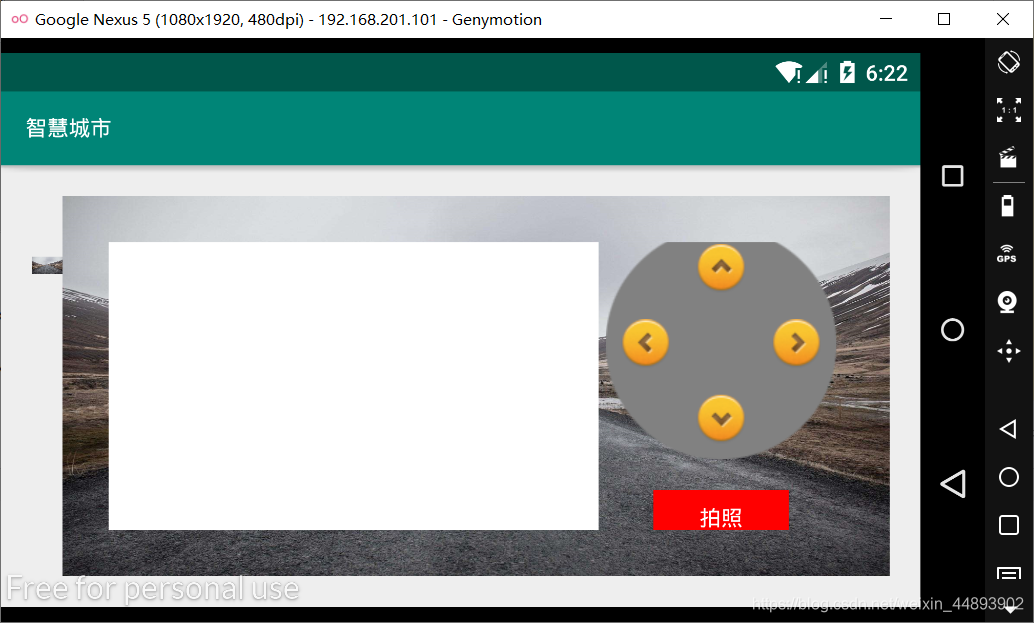
布局代码:
<?xml version="1.0" encoding="utf-8"?>

<RelativeLayout xmlns:android="http://schemas.android.com/apk/res/android"

    xmlns:app="http://schemas.android.com/apk/res-auto"

    xmlns:tools="http://schemas.android.com/tools"

    android:layout_width="fill_parent"

    android:layout_height="fill_parent"

    tools:context=".CameraMonitoring">

    <!--视频监视文字图片-->

    <ImageView

        android:id="@+id/imageView1"

        android:layout_width="20dp"

        android:layout_height="70dp"

        android:layout_marginLeft="20dp"

        android:layout_marginTop="30dp"

        android:src="@drawable/bg_environment"/>

    <!--总体布局-->

    <LinearLayout

        android:layout_width="match_parent"

        android:layout_height="match_parent"

        android:background="@drawable/bg_environment"

        android:padding="30dp"

        android:layout_marginTop="20dp"

        android:layout_marginRight="20dp"

        android:layout_marginBottom="20dp"

        android:layout_toRightOf="@+id/imageView1"

        android:orientation="horizontal">

        <!--两个线性布局管理器中的左边一个-->

        <LinearLayout

            android:layout_width="0.0dp"

            android:layout_height="fill_parent"

            android:layout_weight="2">

            <!--WebView控件-->

            <WebView

                android:id="@+id/webView1"

                android:layout_width="match_parent"

                android:layout_height="match_parent">

            </WebView>

        </LinearLayout>

        <!--两个线性布局管理器中的右边一个-->

        <LinearLayout

            android:layout_width="0.0dp"

            android:layout_height="fill_parent"

            android:layout_weight="1"

            android:orientation="vertical"

            android:gravity="center">

            <!--相对布局管理器,添加4个ImageView控制上下左右-->

            <RelativeLayout

                android:layout_width="150dp"

                android:layout_height="150dp"

                android:background="@drawable/btn__presss_bg">

                <!--右-->

                <ImageView

                    android:layout_width="32dp"

                    android:layout_height="32dp"

                    android:layout_alignParentLeft="true"

                    android:layout_centerVertical="true"

                    android:layout_marginLeft="10dp"

                    android:src="@drawable/btn_left_direction"/>

                <!--下-->

                <ImageView

                    android:layout_width="32dp"

                    android:layout_height="32dp"

                    android:layout_alignParentBottom="true"

                    android:layout_centerHorizontal="true"

                    android:layout_marginBottom="10dp"

                    android:src="@drawable/btn_down_presss"/>

                <!--上-->

                <ImageView

                    android:layout_width="32dp"

                    android:layout_height="32dp"

                    android:layout_alignParentTop="true"

                    android:layout_centerHorizontal="true"

                    android:layout_marginTop="10dp"

                    android:src="@drawable/btn_up_press"/>

                <!--左-->

                <ImageView

                    android:layout_width="32dp"

                    android:layout_height="32dp"

                    android:layout_alignParentRight="true"

                    android:layout_centerVertical="true"

                    android:layout_marginRight="10dp"

                    android:src="@drawable/btn_right_presss"/>

            </RelativeLayout>

            <!--拍照按钮-->

            <Button

                android:layout_width="wrap_content"

                android:layout_height="35dp"

                android:background="@color/red"

                android:textColor="@color/white"

                android:layout_marginTop="20dp"

                android:text="拍照"/>

        </LinearLayout>

    </LinearLayout>

</RelativeLayout>
Android物联网应用程序开发(智慧城市)—— 摄像头监控界面开发的更多相关文章
- Android物联网应用程序开发(智慧城市)—— 用户注册界面开发
效果: 布局代码: <?xml version="1.0" encoding="utf-8"?> <RelativeLayout xmlns: ...
- 【可视化大屏教程】用Python开发智慧城市数据分析大屏!
目录 一.开发背景 二.讲解代码 2.1 大标题+背景图 2.2 各区县交通事故统计图-系列柱形图 2.3 图书馆建设率-水球图 2.4 当年城市空气质量aqi指数-面积图 2.5 近7年人均生产总值 ...
- Android物联网应用程序开发(智慧城市)—— 查询购物信息界面开发
效果: 布局代码: <RelativeLayout xmlns:android="http://schemas.android.com/apk/res/android" xm ...
- Android物联网应用程序开发(智慧城市)—— 火焰监控界面开发
效果: 布局代码: <?xml version="1.0" encoding="utf-8"?> <RelativeLayout xmlns: ...
- Android物联网应用程序开发(智慧城市)—— 购物信息的存储界面开发
效果: 布局代码: <?xml version="1.0" encoding="utf-8"?> <LinearLayout xmlns:an ...
- Android物联网应用程序开发(智慧城市)—— 环境状态值范围设置界面开发
效果图: 代码: 布局: <?xml version="1.0" encoding="utf-8"?> <LinearLayout xmlns ...
- Android物联网应用程序开发(智慧园区)—— 图片预览界面
效果图: 实现步骤: 1.首先在 build.gradle 文件中引入 RecycleView implementation 'com.android.support:recyclerview-v7: ...
- Android物联网应用程序开发(智慧园区)—— 设置传感器阈值对话框界面
效果图: 自定义对话框布局: <?xml version="1.0" encoding="utf-8"?> <LinearLayout xml ...
- Android物联网应用程序开发(智慧园区)—— 园区监控系统界面
效果图: 布局代码: <?xml version="1.0" encoding="utf-8"?> <LinearLayout xmlns:a ...
随机推荐
- 爬虫系列:使用 MySQL 存储数据
上一篇文章我们讲解了爬虫如何存储 CSV 文件,这篇文章,我们讲解如何将采集到的数据保存到 MySQL 数据库中. MySQL 是目前最受欢迎的开源关系型数据库管理系统.一个开源项目具有如此之竞争力实 ...
- STM32代码常见的坑
1 混淆换行符\和除号/造成的坑 入坑代码: GPIO_InitStructure.GPIO_Pin = GPIO_Pin_0 | GPIO_Pin_1 | GPIO_Pin_2 | GPIO_Pin ...
- Insert into select语句引发的生产事故
前言 Insert into select请慎用.这天xxx接到一个需求,需要将表A的数据迁移到表B中去做一个备份.本想通过程序先查询查出来然后批量插入.但xxx觉得这样有点慢,需要耗费大量的网络 ...
- _BSMachError: (os/kern) invalid capability (20) _BSMachError: (os/kern) invalid name (15) 问题的解决
在项目中突然遇到一个问题,也就是_BSMachError: (os/kern) invalid capability (20) _BSMachError: (os/kern) invalid name ...
- 用oracle中的Row_Number实现分页
Row_Number实现分页 1:首先是 select ROW_NUMBER() over(order by id asc) as 'rowNumber', * from table1 生成带序号 ...
- 【Linux】【Basis】磁盘分区
1. Linux磁盘及文件系统管理 1.1. 基本概念: 1.1.1. 磁盘接口类型: IDE(ata):并口,133MB/s,设备/dev/hd[a-z] SCSI:并口,Ultrascsi320, ...
- web端 - 返回上一步,点击返回,跳转上个页面 JS
1.方法一: <script language="javascript" type="text/javascript"> window.locati ...
- MyBatis一对多映射简单查询案例(嵌套Mapper映射文件中的sql语句)
一.案例描述 书本类别表和书本信息表,查询书本类别表中的某一记录,连带查询出所有该类别书本的信息. 二.数据库表格 书本类别表(booktypeid,booktypename) 书本信息表(booki ...
- Log4j 被曝核弹级漏洞,开发者炸锅了!
大家好,我是鱼皮,开门见山,知名的开源项目 Apache Log4j 出事了! 2021 年 12 月 9 日,该项目被曝存在 严重安全漏洞 ,攻击者只需要向目标机传入一段特殊代码,就能触发漏洞,自由 ...
- shell脚本 微信/钉钉验证登录服务器
一.简介 登录用户需要二次验证码进行验证 可以配合 监控用户登录,发送通知给企业微信/钉钉 来使用 脚本放到/etc/profile.d/ 目录,登录的时候自动触发 二.微信脚本 1.需要修改Crop ...