
简单实现UITableView索引功能(中英文首字母索引)(一) ByH罗
UITableView索引功能是常见的,主要是获取中英文的首字母并排序,系统自带获取首字母
//系统获取首字母

- (NSString *) pinyinFirstLetter:(NSString*)sourceString {

    NSMutableString *source = [sourceString mutableCopy];

    CFStringTransform((__bridge CFMutableStringRef)source, NULL, kCFStringTransformMandarinLatin, NO);

    CFStringTransform((__bridge CFMutableStringRef)source, NULL, kCFStringTransformStripDiacritics, NO);//这一行是去声调的

    return source;

}
PinYin.h文件是网上比较常用的获取中英文首字母方法,NSString+PinYin.h是别人写的获取首字母并对首字母进行字典分类的NSString Categrory,这样大大简化了ViewContorl里的代码量
在只需一行就能获得首字母分类排序后的数组
参考:http://rainbownight.blog.51cto.com/1336585/1368730
//导入 #import "NSString+PinYin.h"

//索引数组

NSArray  *indexArray= [array arrayWithPinYinFirstLetterFormat];
主要代码
#import "ViewController.h"

#import "NSString+PinYin.h"

@interface ViewController ()<UITableViewDelegate,UITableViewDataSource,UISearchBarDelegate>

@property(nonatomic,strong)  UITableView     *myTableView;

@property(nonatomic,strong)  NSMutableArray  *dataArray;

@end

@implementation ViewController

- (void)viewDidLoad {

    [super viewDidLoad];

    // Do any additional setup after loading the view, typically from a nib.

    [self initDataSource];

    [self createTableView];

}
UI及数据源
#pragma mark----CreatMyCustomTablevIew-----

- (void)createTableView

{

    self.myTableView = [[UITableView  alloc] initWithFrame:CGRectMake(0,20,self.view.frame.size.width, self.view.frame.size.height) style:UITableViewStylePlain];

    self.myTableView.delegate = self;

    self.myTableView.dataSource = self;

    [self.myTableView registerClass:[UITableViewCell class] forCellReuseIdentifier:@"REUSE_CELLID"];

    self.myTableView.contentSize=CGSizeMake(self.view.frame.size.width, self.view.frame.size.height*2);

    [self.view  addSubview:self.myTableView];

     self.myTableView.sectionIndexColor =[UIColor colorWithRed:0.10 green:0.68 blue:0.94 alpha:1.0];    self.myTableView.sectionIndexBackgroundColor=[UIColor clearColor];

    [self.myTableView registerClass:[UITableViewCell class] forCellReuseIdentifier:@"cellID"];

    UISearchBar  *mSearchBar = [[UISearchBar alloc] init];

    mSearchBar.delegate = self;

    mSearchBar.placeholder = @"搜索";

    [mSearchBar setAutocapitalizationType:UITextAutocapitalizationTypeNone];

    [mSearchBar sizeToFit];

    self.myTableView.tableHeaderView=mSearchBar;

}

- (void)initDataSource

{

    NSArray *array = @[@"登记", @"大奔", @"周傅", @"爱德华",@"((((", @"啦文琪羊", @"   s文强", @"过段时间", @"等等", @"各个", @"宵夜**", @"***", @"贝尔",@"*而结婚*", @"返回***", @"你还", @"与非门*", @"是的", @"*模块*", @"*没做*",@"俄文", @"   *#咳嗽", @"6",@"fh",@"C罗",@"邓肯"];

   self.dataArray =[NSMutableArray arrayWithArray:indexArray];

    [self.myTableView reloadData];

}
TableView相关代理
#pragma mark--- UITableViewDataSource and UITableViewDelegate Methods---

- (NSInteger)numberOfSectionsInTableView:(UITableView *)tableView

{

    return [self.dataArray count];

}

- (NSInteger)tableView:(UITableView *)tableView numberOfRowsInSection:(NSInteger)section

{

    if(section == 0)

    {

        return 1;

    }else{

        NSDictionary *dict = self.dataArray[section];

        NSMutableArray *array = dict[@"content"];

        return [array count];

    }

}

- (UITableViewCell *)tableView:(UITableView *)tableView cellForRowAtIndexPath:(NSIndexPath *)indexPath

{

    UITableViewCell  *cell = [tableView dequeueReusableCellWithIdentifier:@"cellID"];

    NSDictionary *dict = self.dataArray[indexPath.section];

    NSMutableArray *array = dict[@"content"];

    cell.textLabel.text = array[indexPath.row];

    cell.textLabel.textColor = [UIColor colorWithRed:0.10 green:0.68 blue:0.94 alpha:1.0];

    return cell;

}

- (UIView *) tableView:(UITableView *)tableView viewForHeaderInSection:(NSInteger)section

{

    //自定义Header标题

    UIView* myView = [[UIView alloc] init];

    myView.backgroundColor = [UIColor colorWithRed:0.10 green:0.68 blue:0.94 alpha:0.7];

    UILabel *titleLabel = [[UILabel alloc] initWithFrame:CGRectMake(10, 0, 90, 22)];

    titleLabel.textColor=[UIColor whiteColor];

    NSString *title = self.dataArray[section][@"firstLetter"];

    titleLabel.text=title;

    [myView  addSubview:titleLabel];

    return myView;

}
TableView索引栏相关设置
#pragma mark---tableView索引相关设置----

//添加TableView头视图标题

- (NSString *)tableView:(UITableView *)tableView titleForHeaderInSection:(NSInteger)section

{

    NSDictionary *dict = self.dataArray[section];

    NSString *title = dict[@"firstLetter"];

    return title;

}

//添加索引栏标题数组

- (NSArray *)sectionIndexTitlesForTableView:(UITableView *)tableView

{

    NSMutableArray *resultArray =[NSMutableArray arrayWithObject:UITableViewIndexSearch];

    for (NSDictionary *dict in self.dataArray) {

        NSString *title = dict[@"firstLetter"];

        [resultArray addObject:title];

    }

    return resultArray;

}

//点击索引栏标题时执行

- (NSInteger)tableView:(UITableView *)tableView sectionForSectionIndexTitle:(NSString *)title atIndex:(NSInteger)index

{

    //这里是为了指定索引index对应的是哪个section的,默认的话直接返回index就好。其他需要定制的就针对性处理

    if ([title isEqualToString:UITableViewIndexSearch])

    {

        [tableView setContentOffset:CGPointZero animated:NO];//tabview移至顶部

        return NSNotFound;

    }

    else

    {

        return [[UILocalizedIndexedCollation currentCollation] sectionForSectionIndexTitleAtIndex:index] - 1; // -1 添加了搜索标识

    }

}
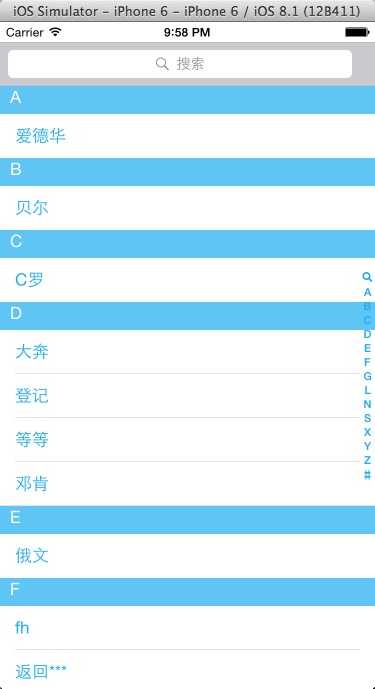
Demo 下载 https://files.cnblogs.com/files/sixindev/PinyinIndexTableview.zip
简单实现UITableView索引功能(中英文首字母索引)(一) ByH罗的更多相关文章
- 简单实现UITableView索引功能(中英文首字母索引) (二) By HL
简单实现UITableView索引功能(中英文首字母索引)(一) ByH罗 相关类: NSString+PinYing(获取中英文首字母) 参考上面链接 #import "ViewCon ...
- HBuilder+eclipse开发:使用ajax异步传值生成首字母索引
使用ajax异步传值生成首字母索引大致有以下几个步骤: 1.服务器端使用servlet提取出数据库里的数据; 2.使用首字母工具类对数据进处理得到首字母; 3.再将首字母和数据一一对应存入json数组 ...
- 分享一份550多个Linux命令的文档,按照命令首字母索引排序
输入一个命令,让我给你一个关于它的完美解释! 众所周知,Linux命令是IT人必须掌握的一个技能,有了它,我们可以部署和维护各种各样的服务和应用.但是,大部分的Linux命令我们不一定记得住,而别是各 ...
- PHP提取中英文首字母的方法(首字母索引)
function Getzimu($str) { $str= iconv("UTF-8","gb2312", $str);//如果程序是gbk的,此行就要注释掉 ...
- 微信小程序通讯录首字母索引效果,车辆品牌选择列表
效果图: wxml代码: <block wx:for="{{list}}"> <view class='letter' id="letter{{inde ...
- 做个简单的Android列表字母索引控件
相信大家在许多App中都见到过带字母索引的界面,比如我最近看到的这个开源控件: WaveSideBar 很酷是不是?!!!如果加在例如联系人列表界面上,大大提升了用户体验. 那么这个索引控件要怎么做呢 ...
- iOS开发——UI_swift篇&UITableView实现索引功能
UITableView实现索引功能 关于UItableView的索引在平时项目中所见不多,最多的就是跟联系人有关的界面,虽然如此,但是作为一个swift开发的程序必须知道的一个技术点,所以今天 ...
- IOS开发中实现UITableView按照首字母将集合进行检索分组
在开发公司项目中遇到了将图书目录进行按照首字母分组排序的问题 1.在项目添加解析汉字拼音的Pinyin.h文件 /* * pinyin.c */ #define HANZI_START 19968 # ...
- 联系人的侧边字母索引ListView 将手机通讯录姓名通过首字母排序。
package com.lixu.letterlistview; import java.util.ArrayList; import java.util.List; import org.apa ...
随机推荐
- Java中关于super关键字的作用
在子类继承父类中,一般有一行super的语句,需要记住三种使用方法: 1.super.变量/对象名: 使用这种方法可以直接访问父类中的变量或对象,进行修改赋值等操作 2.super.方法名(): 直接 ...
- pytest 一个测试类怎样使用多种fixture前置方法
fixture()方法写在哪里? @pytest.fixture(scope="范围")写在conftest文件中,如下图 怎么使用fixture()呢?分为一个类中使用一个前置或 ...
- 初识python 之 取101到200之前的所有素数
素数:只能被1或本身整除 思路分析:这个数只有2个数据能整除 代码如下: n = 0 li = [] for i in range(101,200): m = 0 for j in range(1,2 ...
- CentOS7查询端口占用,清除端口占用的程序,开放端口,打开防火墙
1.根据端口号得到其占用的进程的详细信息 netstat -tlnp|grep 80tcp 0 0 192.168.33.10:80 0.0.0.0:* ...
- 你不得不了解的Python3.x新特性
从 3.0 到 3.8,Python 3 已经更新了一波又一波,但似乎我们用起来和 2.7 没有太大区别?以前该怎么写 2.7 的代码现在就怎么写,只不过少数表达方式变了而已.在这篇文章中,作者介绍了 ...
- Nginx日志通过Flume导入到HDFS中
关注公众号:分享电脑学习回复"百度云盘" 可以免费获取所有学习文档的代码(不定期更新) flume上传到hdfs: 当我们的数据量比较大时,比如每天的日志文件达到5G以上 使用ha ...
- 构造注入链:POP
1.POP链原理简介: 在反序列化中,我们能控制的数据就是对象中的属性值,所以在PHP反序列化中有一种 漏洞利用方法叫"面向属性编程",即POP( Property Oriente ...
- Selenium2+python自动化65-js定位几种方法总结
Selenium2+python自动化65-js定位几种方法总结 前言 本篇总结了几种js常用的定位元素方法,并用js点击按钮,对input输入框输入文本 一.以下总结了5种js定位的方法 除了i ...
- Discuz!X V3.4后台任意文件删除
Discuz!X V3.4后台任意文件删除 简述 该漏洞为后台任意文件删除,需要有管理员的权限,所以说危害非常小 复现环境 docker.vulhub-master 项目地址:https://gite ...
- NPOI导出例子
public static string ExportAOrder(ExportData data) { var cellHeard = new Dictionary<string, strin ...