
python_线程、进程和协程
线程
Threading用于提供线程相关的操作,线程是应用程序中工作的最小单元。
 #!/usr/bin/env python

 #coding=utf-8

 __author__ = 'yinjia'

 import threading,time

 def show(arg):

     time.sleep(2)

     print('线程: ' + str(arg))

 for i in range(5):

     t = threading.Thread(target=show,args=(i,))

     t.start()
如上述代码创建了5个线程,target指向函数,arges参数传递数值。
- 其它方法:
- start 线程准备就绪,等待CPU调度
- setName 为线程设置名称
- getName 获取线程名称
- setDaemon 设置为后台线程或前台线程(默认)。如果是后台线程,主线程执行过程中,后台线程也在进行,主线程执行完毕后,后台线程不论成功与否,均停止;如果是前台线程,主线程执行过程中,前台线程也在进行,主线程执行完毕后,等待前台线程也执行完成后,程序停止
- join 逐个执行每个线程,执行完毕后继续往下执行,该方法使得多线程变得无意义
- run 线程被cpu调度后自动执行线程对象的run方法
- setName\getName使用方法
 #!/usr/bin/env python

 #coding=utf-8

 __author__ = 'yinjia'

 import threading,time

 def test(i):

     print("线程:%s" %str(i))

     time.sleep(2)

 for i in range(2):

     t = threading.Thread(target=test,args=(i,))

     t.start()

     t.setName("我的线程: {0}".format(str(i)))

     print(t.getName())

 运行结果:

 线程:0

 我的线程: 0

 线程:1

 我的线程: 1
 #!/usr/bin/env python

 #coding=utf-8

 __author__ = 'yinjia'

 import threading,time

 class MyThread(threading.Thread):

     def __init__(self,num):

         threading.Thread.__init__(self)

         self.num = num

     def run(self):

         print("running thread:%s" % self.num)

         time.sleep(2)

 if __name__ == '__main__':

     for i in range(2):

         t1 = MyThread(i)

         t1.start()

         t1.setName("我的线程: {0}".format(str(i)))

         print(t1.getName())

 运行结果:

 running thread:0

 我的线程: 0

 running thread:1

 我的线程: 1
自定义线程类
- setDaemon方法使用
 #!/usr/bin/env python

 #coding=utf-8

 __author__ = 'yinjia'

 import threading,time

 def run(num):

     print("running thread %s" % str(num))

     time.sleep(2)

     print("OK! %s" % str(num))

 for i in range(2):

     t = threading.Thread(target=run,args=(i,))

     #未使用setDaemon时默认是前台线程

     #t.setDaemon(True)

     t.start()

     t.setName("MyThread_{0}".format(str(i)))

     print(t.getName())

 运行结果:

 running thread 0

 MyThread_0

 running thread 1

 MyThread_1

 OK! 1

 OK! 0
后台线程:
 #!/usr/bin/env python

 #coding=utf-8

 __author__ = 'yinjia'

 import threading,time

 def run(num):

     print("running thread %s" % str(num))

     time.sleep(2)
    #主线程执行结束后,不会执行以下语句

     print("OK! %s" % str(num))

 for i in range(2):

     t = threading.Thread(target=run,args=(i,))

     #使用setDaemon时是后台线程

     t.setDaemon(True)

     t.start()

     t.setName("MyThread_{0}".format(str(i)))

     print(t.getName())

 运行结果:

 running thread 0

 MyThread_0

 running thread 1

 MyThread_1
- join用法理解
当未使用join方法时候,先执行完主线程再根据超时决定等待子线程执行完才能程序结束;如果使用join方法,先执行子线程执行完后,才开始执行下一步主线程,此方法没有达到并行效果。
 #!/usr/bin/env python

 # _*_ coding:utf-8 _*_

 __author__ = 'yinjia'

 import time,threading

 def do_thread(num):

     time.sleep(3)

     print("this is thread %s" % str(num))

 for i in range(2):

     t = threading.Thread(target=do_thread, args=(i,))

     t.start()

     t.setName("Mythread_{0}".format(str(i)))

     print("print in main thread: thread name:", t.getName())

 运行效果:【#先同时执行两个主线程,等待3秒后再执行两个子线程】

 print in main thread: thread name: Mythread_0  #主线程

 print in main thread: thread name: Mythread_1  #主线程

 this is thread 0 #子线程

 this is thread 1 #子线程
使用join效果如下:
 #!/usr/bin/env python

 # _*_ coding:utf-8 _*_

 __author__ ='yinjia'

 import time,threading

 def do_thread(num):

     time.sleep(3)

     print("this is thread %s" % str(num))

 for i in range(2):

     t = threading.Thread(target=do_thread, args=(i,))

     t.start()

     t.join() #增加join

     t.setName("Mythread_{0}".format(str(i)))

     print("print in main thread: thread name:", t.getName())

 运行结果:【先执行子线程,然后再执行主线程,单一逐步执行】

 this is thread 0

 print in main thread: thread name: Mythread_0

 this is thread 1

 print in main thread: thread name: Mythread_1
- 线程锁(Lock、RLock)
线程是共享内存,当多个线程对一个公共变量修改数据,会导致线程争抢问题,为了解决此问题,采用线程锁。
 #!/usr/bin/env python

 # _*_ coding:utf-8 _*_

 __author__ = 'Administrator'

 import time,threading

 gl_num = 0

 lock = threading.RLock()

 def Func():

     global gl_num

     #加锁

     lock.acquire()

     gl_num += 1

     time.sleep(1)

     print(gl_num)

     #解锁

     lock.release()

 for i in range(10):

     t = threading.Thread(target=Func)

     t.start()
- 信号量(Semaphore)
信号量同时允许一定数量的线程更改数据 ,比如厕所有3个坑,那最多只允许3个人上厕所,后面的人只能等里面有人出来了才能再进去。
 #!/usr/bin/env python

 # _*_ coding:utf-8 _*_

 __author__ = 'yinjia'

 import time,threading

 def run(n):

     semaphore.acquire()

     time.sleep(1)

     print("run the thread: %s" % n)

     semaphore.release()

 if __name__ == '__main__':

     num = 0

     semaphore = threading.BoundedSemaphore(5)  # 最多允许5个线程同时运行

     for i in range(20):

         t = threading.Thread(target=run, args=(i,))

         t.start()
- 事件(event)
事件用于主线程控制其他线程的执行,事件主要提供了三个方法 set、wait、clear。
 #!/usr/bin/env python

 # _*_ coding:utf-8 _*_

 __author__ = 'Administrator'

 import time,threading

 def run(event):

     print("start")

     event.wait()

     print('END.....')

 event_obj = threading.Event()

 for i in range(2):

     t = threading.Thread(target=run,args=(event_obj,))

     t.start()

 event_obj.clear()

 inp = input("input: ")

 if inp == 'true':

     event_obj.set()

 #运行结果:

 start

 start

 input: true

 END.....

 END.....
- 条件(Condition)
满足条件,才能释放N个线程。
 #!/usr/bin/env python

 # _*_ coding:utf-8 _*_

 __author__ = 'Administrator'

 import time,threading

 def condition_func():

     ret = False

     inp = input('>>>')

     if inp == '':

         ret = True

     return ret

 def run(n):

     con.acquire()

     con.wait_for(condition_func)

     print("run the thread: %s" %n)

     con.release()

 if __name__ == '__main__':

     con = threading.Condition()

     for i in range(10):

         t = threading.Thread(target=run, args=(i,))

         t.start()

 #运行结果:

 >>>1

 run the thread: 0

 >>>1

 run the thread: 1

 >>>1

 run the thread: 2
- 定时器
 #!/usr/bin/env python

 # _*_ coding:utf-8 _*_

 __author__ = 'Administrator'

 from threading import Timer

 def hello():

     print("hello, world")

 t = Timer(1, hello)

 t.start()
进程
- 进程数据共享
方法一:Array
 #!/usr/bin/env python

 #coding=utf-8

 __author__ = 'yinjia'

 from multiprocessing import Process, Array, RLock

 def Foo(lock,temp,i):

     """

     将第0个数加100

     """

     lock.acquire()

     temp[0] = 100+i

     for item in temp:

         print(i,'----->',item)

     lock.release()

 lock = RLock()

 temp = Array('i', [11, 22, 33, 44])

 for i in range(20):

     p = Process(target=Foo,args=(lock,temp,i,))

     p.start()
方法二:manage.dict()共享数据
 #!/usr/bin/env python

 #coding=utf-8

 __author__ = 'yinjia'

 from multiprocessing import Process, Manager

 manage = Manager()

 dic = manage.dict()

 def Foo(i):

     dic[i] = 100 + i

     print(dic)

     print(dic.values())

 for i in range(2):

     p = Process(target=Foo, args=(i,))

     p.start()

     p.join()
- 进程池
进程池方法:
apply(func[, args[, kwds]]): 阻塞的执行,比如创建一个有3个线程的线程池,当执行时是创建完一个 执行完函数再创建另一个,变成一个线性的执行
apply_async(func[, args[, kwds[, callback]]]) : 它是非阻塞执行,同时创建3个线程的线程池,同时执行,只要有一个执行完立刻放回池子待下一个执行,并行的执行
close(): 关闭pool,使其不在接受新的任务。
terminate() : 结束工作进程,不在处理未完成的任务。
join() 主进程阻塞,等待子进程的退出, join方法要在close或terminate之后使用。
 #!/usr/bin/env python

 #coding=utf-8

 __author__ = 'yinjia'

 from multiprocessing import Pool

 import time

 def myFun(i):

     time.sleep(2)

     return i+100

 def end_call(arg):

     print("end_call",arg)

 p = Pool(5)

 #print(p.apply(myFun,(1,)))

 #print(p.apply_async(func =myFun, args=(1,)).get())

 print(p.map(myFun,range(10)))

 for i in range(10):

     p.apply_async(func=myFun,args=(i,),callback=end_call)

 print("end")

 p.close()

 p.join()
- 生产者&消费型
产生数据的模块,就形象地称为生产者;而处理数据的模块,就称为消费者。在生产者与消费者之间在加个缓冲区,我们形象的称之为仓库,生产者负责往仓库了进商 品,而消费者负责从仓库里拿商品,这就构成了生产者消费者模型。
 #!/usr/bin/env python

 #coding=utf-8

 __author__ = 'yinjia'

 import queue

 import threading,time

 message = queue.Queue(10)

 def producer():

     name = threading.current_thread().getName()

     print(name + "线程启动....")

     for i in range(10):

         time.sleep(1)

         print('\033[45m<%s> 生产了 [%s]个饺子\033[0m' % (name, i))

         message.put(name)

 def consumer():

     name = threading.current_thread().getName()

     print(name + "线程启动.....")

     for i in range(10):

         message.get()

         print('\033[43m<%s> 吃了 [%s]个饺子\033[0m' % (name, i))

 if __name__ == '__main__':

     p = threading.Thread(target=producer, name='东北饺子店')

     c = threading.Thread(target=consumer, name='消费者')

     p.start()

     c.start()
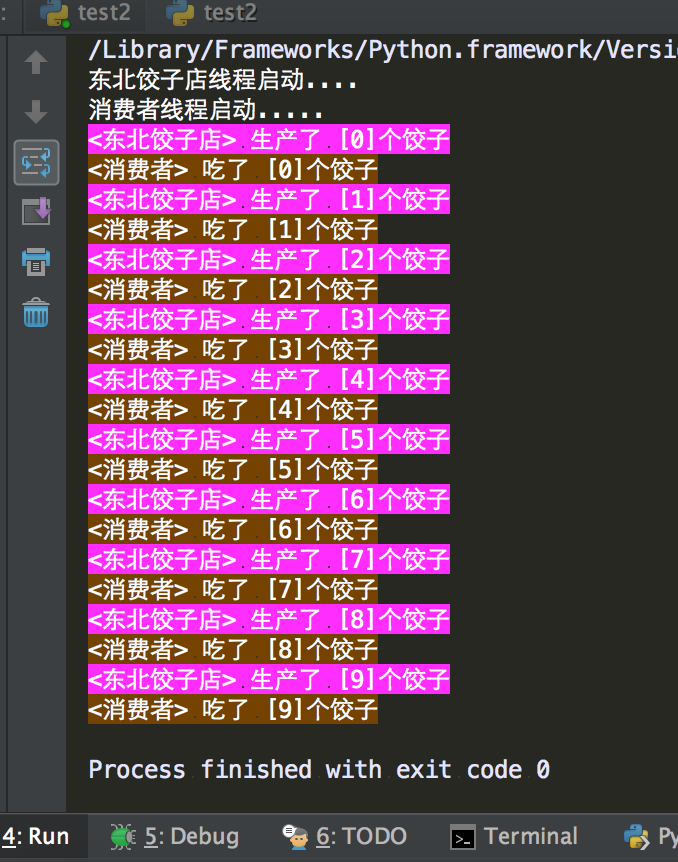
运行结果:
协程
协程存在的意义:对于多线程应用,CPU通过切片的方式来切换线程间的执行,线程切换时需要耗时(保存状态,下次继续)。协程,则只使用一个线程,在一个线程中规定某个代码块执行顺序。
协程的适用场景:当程序中存在大量不需要CPU的操作时(IO),适用于协程;
- gevent
 #!/usr/bin/env python

 # _*_ coding:utf-8 _*_

 __author__ = 'Administrator'

 import gevent

 def foo():

     print('Running in foo')

     gevent.sleep(0)

     print('Explicit context switch to foo again')

 def bar():

     print('Explicit context to bar')

     gevent.sleep(0)

     print('Implicit context switch back to bar')

 gevent.joinall([

     gevent.spawn(foo),

     gevent.spawn(bar),

 ])

 #运行结果:

 Running in foo

 Explicit context to bar

 Explicit context switch to foo again

 Implicit context switch back to bar
- 遇到IO操作自动切换
 #!/usr/bin/env python

 # _*_ coding:utf-8 _*_

 from gevent import monkey; monkey.patch_all()

 import gevent

 import urllib.request

 def f(url):

     print('GET: %s' % url)

     resp = urllib.request.urlopen(url)

     data = resp.read()

     print('%d bytes received from %s.' % (len(data), url))

 gevent.joinall([

         gevent.spawn(f, 'https://www.python.org/'),

         gevent.spawn(f, 'https://www.baidu.com/'),

         gevent.spawn(f, 'https://github.com/'),

 ])

 #运行结果:

 GET: https://www.python.org/

 GET: https://www.baidu.com/

 GET: https://github.com/

 227 bytes received from https://www.baidu.com/.

 49273 bytes received from https://www.python.org/.

 53756 bytes received from https://github.com/.
上下文管理
 #!/usr/bin/env python

 # _*_ coding:utf-8 _*_

 __author__ = 'Administrator'

 import contextlib

 @contextlib.contextmanager

 def tag(name):

     print("<%s>" % name)

     yield

     print("</%s>" % name)

 with tag("h1"):

     print("foo")

 #运行结果:

 <h1>

 foo

 </h1>
 #!/usr/bin/env python

 # _*_ coding:utf-8 _*_

 __author__ = 'Administrator'

 import contextlib

 @contextlib.contextmanager

 def myopen(file_path,mode):

     f = open(file_path,mode,encoding='utf-8')

     try:

         yield f

     finally:

         f.close()

 with myopen('index.html','r') as file_obj:

     for i in file_obj:

         print(i)
更多方法参见:https://docs.python.org/3.6/library/contextlib.html
python_线程、进程和协程的更多相关文章
- Python 线程&进程与协程
Python 的创始人为吉多·范罗苏姆(Guido van Rossum).1989年的圣诞节期间,吉多·范罗苏姆为了在阿姆斯特丹打发时间,决心开发一个新的脚本解释程序,作为ABC语言的一种继承.Py ...
- Python之线程、进程和协程
python之线程.进程和协程 目录: 引言 一.线程 1.1 普通的多线程 1.2 自定义线程类 1.3 线程锁 1.3.1 未使用锁 1.3.2 普通锁Lock和RLock 1.3.3 信号量(S ...
- 进程、线程、轻量级进程、协程与 go 的 goroutine【转载+整理】
本文内容 进程 线程 协程 Go 中的 goroutine 参考资料 最近,看一些文章,提到"协程"的概念,心想,进程,线程,协程,前两个很容易,任何一本关于操作系统的书都有说,开 ...
- Python之路【第七篇】:线程、进程和协程
Python之路[第七篇]:线程.进程和协程 Python线程 Threading用于提供线程相关的操作,线程是应用程序中工作的最小单元. 1 2 3 4 5 6 7 8 9 10 11 12 1 ...
- python运维开发(十一)----线程、进程、协程
内容目录: 线程 基本使用 线程锁 自定义线程池 进程 基本使用 进程锁 进程数据共享 进程池 协程 线程 线程使用的两种方式,一种为我们直接调用thread模块上的方法,另一种我们自定义方式 方式一 ...
- 进程、线程、轻量级进程、协程和go中的Goroutine
进程.线程.轻量级进程.协程和go中的Goroutine 那些事儿电话面试被问到go的协程,曾经的军伟也问到过我协程.虽然用python时候在Eurasia和eventlet里了解过协程,但自己对协程 ...
- Python 线程和进程和协程总结
Python 线程和进程和协程总结 线程和进程和协程 进程 进程是程序执行时的一个实例,是担当分配系统资源(CPU时间.内存等)的基本单位: 进程有独立的地址空间,一个进程崩溃后,在保护模式下不会对其 ...
- Python_oldboy_自动化运维之路_线程,进程,协程(十一)
本节内容: 线程 进程 协程 IO多路复用 自定义异步非阻塞的框架 线程和进程的介绍: 举个例子,拿甄嬛传举列线程和进程的关系: 总结:1.工作最小单元是线程,进程说白了就是提供资源的 2.一个应用程 ...
- python并发编程之Queue线程、进程、协程通信(五)
单线程.多线程之间.进程之间.协程之间很多时候需要协同完成工作,这个时候它们需要进行通讯.或者说为了解耦,普遍采用Queue,生产消费模式. 系列文章 python并发编程之threading线程(一 ...
- Python之路,Day9 - 线程、进程、协程和IO多路复用
参考博客: 线程.进程.协程: http://www.cnblogs.com/wupeiqi/articles/5040827.html http://www.cnblogs.com/alex3714 ...
随机推荐
- SC命令(windows服务开启/禁用)
原文链接地址:https://blog.csdn.net/cd520yy/article/details/30976131 sc.exe命令功能列表: 1.更改服务的启动状态(这是比较有用的一个功能) ...
- Linux内核分析8
周子轩 原创作品转载请注明出处 <Linux内核分析>MOOC课程http://mooc.study.163.com/course/USTC-1000029000 实验目的: 使用gdb ...
- 【arc068E】Snuke Line
Portal -->arc068E (温馨提示:那啥..因为各种奇怪的我也不知道的原因这题的题号在某度上面显示出来是agc007F...然而下面是arc068E的题解qwq给大家带来不便之处真是 ...
- poj1204 Word Puzzles
Word Puzzles Time Limit: 5000MS Memory Limit: 65536K Total Submissions: 12090 Accepted: 4547 S ...
- 图论&动态规划:虚树
虚树可以看做是对树形动态规划的一种求解优化 对于需要求答案的点p,只保留对答案有影响的节点,从而减少时间 BZOJ2286 dp[i]=min(val[i],Σdp[j](j为i的儿子)),val[i ...
- HDU 2138 Miller-Rabin 模板题
求素数个数. /** @Date : 2017-09-18 23:05:15 * @FileName: HDU 2138 miller-rabin 模板.cpp * @Platform: Window ...
- What are the advantages of different classification algorithms?
What are the advantages of different classification algorithms? For instance, if we have large train ...
- jieba文本分词,去除停用词,添加用户词
import jieba from collections import Counter from wordcloud import WordCloud import matplotlib.pyplo ...
- Scrollbar的样式
.test{ /*立体滚动条凸出部分的颜色*/ scrollbar-face-color:#FEFAF1; /*滚动条空白部分的颜色*/ scrollbar-highlight-color:#FEFA ...
- 移动Web界面样式-CSS3
CSS2.1发布至今已经有7年的历史,在这7年里,互联网的发展 已经发生了翻天覆地的变化.CSS2.1有时候难以满足快速提高性能.提升用户体验的Web应用的需求.CSS3标准的出现就是增强CSS2.1 ...