
【Html5】表单全选、全不选
以下为页面效果图 用HBuilder做 谷歌浏览器

index.html代码
<!DOCTYPE html>
<html>
<head>
<meta charset="utf-8" />
<title></title>
<link rel="stylesheet" href="bootstrap-3.3.7-dist/css/bootstrap.css" />
<script type="text/javascript" src="js/jquery-3.2.1.min.js" ></script>
<script type="text/javascript" src="bootstrap-3.3.7-dist/js/bootstrap.js" ></script>
<script>
function qx(){
//第一步我们要获取所有的复选框
var chk = document.getElementsByName("chk");
//alert(chk.length);
for (var i=0;i<chk.length;i++) {
//赋值
chk[i].checked=true;
}
}
function fx(){
//第一步我们要获取所有的复选框
var chk = document.getElementsByName("chk");
//alert(chk.length);
for (var i=0;i<chk.length;i++) {
//反选 加 非 !
chk[i].checked=!chk[i].checked;
}
}
function qbx(){
//第一步我们要获取所有的复选框
var chk = document.getElementsByName("chk");
//alert(chk.length);
for (var i=0;i<chk.length;i++) {
//赋值
chk[i].checked=false;
}
} </script>
</head>
<body>
<br /><br /><br /><br /> <table class="table table-striped table-hover table-bordered table-condensed table-responsive">
<thead>
<th>选择</th>
<th>账号</th>
<th>密码</th>
<th>年龄</th>
<th>删除</th>
</thead>
<tbody>
<tr>
<td><input type="checkbox" value="0" name="chk"></td>
<td><input type="text" value="" name="account" placeholder="请输入账号" class="form-control"></td>
<td><input type="password" value="" name="password" placeholder="请输入密码" class="form-control"></td>
<td><input type="number" value="" name="age" placeholder="请输入年龄" class="form-control"></td>
<td><button class="btn btn-danger" >删除</button></td>
</tr>
<tr>
<td><input type="checkbox" value="0" name="chk"></td>
<td><input type="text" value="" name="account" placeholder="请输入账号" class="form-control"></td>
<td><input type="password" value="" name="password" placeholder="请输入密码" class="form-control"></td>
<td><input type="number" value="" name="age" placeholder="请输入年龄" class="form-control"></td>
<td><button class="btn btn-danger" >删除</button></td>
</tr>
<tr>
<td><input type="checkbox" value="0" name="chk"></td>
<td><input type="text" value="" name="account" placeholder="请输入账号" class="form-control"></td>
<td><input type="password" value="" name="password" placeholder="请输入密码" class="form-control"></td>
<td><input type="number" value="" name="age" placeholder="请输入年龄" class="form-control"></td>
<td><button class="btn btn-danger" >删除</button></td>
</tr>
<tr>
<td><input type="checkbox" value="0" name="chk"></td>
<td><input type="text" value="" name="account" placeholder="请输入账号" class="form-control"></td>
<td><input type="password" value="" name="password" placeholder="请输入密码" class="form-control"></td>
<td><input type="number" value="" name="age" placeholder="请输入年龄" class="form-control"></td>
<td><button class="btn btn-danger" >删除</button></td>
</tr>
<tr>
<td><input type="checkbox" value="0" name="chk"></td>
<td><input type="text" value="" name="account" placeholder="请输入账号" class="form-control"></td>
<td><input type="password" value="" name="password" placeholder="请输入密码" class="form-control"></td>
<td><input type="number" value="" name="age" placeholder="请输入年龄" class="form-control"></td>
<td><button class="btn btn-danger" >删除</button></td>
</tr>
<tr>
<td><input type="checkbox" value="0" name="chk"></td>
<td><input type="text" value="" name="account" placeholder="请输入账号" class="form-control"></td>
<td><input type="password" value="" name="password" placeholder="请输入密码" class="form-control"></td>
<td><input type="number" value="" name="age" placeholder="请输入年龄" class="form-control"></td>
<td><button class="btn btn-danger" >删除</button></td>
</tr>
<tr>
<td><input type="checkbox" value="0" name="chk"></td>
<td><input type="text" value="" name="account" placeholder="请输入账号" class="form-control"></td>
<td><input type="password" value="" name="password" placeholder="请输入密码" class="form-control"></td>
<td><input type="number" value="" name="age" placeholder="请输入年龄" class="form-control"></td>
<td><button class="btn btn-danger" >删除</button></td>
</tr>
<tr>
<td><input type="checkbox" value="0" name="chk"></td>
<td><input type="text" value="" name="account" placeholder="请输入账号" class="form-control"></td>
<td><input type="password" value="" name="password" placeholder="请输入密码" class="form-control"></td>
<td><input type="number" value="" name="age" placeholder="请输入年龄" class="form-control"></td>
<td><button class="btn btn-danger" >删除</button></td>
</tr> </tbody>
<tfoot>
<tr>
<td colspan="5" align="center">
<button class="btn btn-success" onclick="qx()">全选</button>
<button class="btn btn-warning" onclick="fx()">反选</button>
<button class="btn btn-info" onclick="qbx()">全不选</button>
</td>
</tr> </tfoot>
</table>
<br /><br /><br />
 <form method="get" style="float: right;">

             <!--required必填             maxlength最大长度           min最小值           number只能填数字        autofocus光标自动对焦-->

             <input type="text" value="" name="name" required maxlength="6" autofocus placeholder="请输入姓名"/><br /><br />

             <input type="password" value="" name="password" required maxlength="12"placeholder="请输入密码"/><br /><br />

             <input type="number" value="" name="age" required min="18"  placeholder="请输入年龄"/><br /><br />

             <input type="submit" value="提交" />

</form> </body>
</html>
index.html
其中 全选和反选的思想就是把复选框的值赋值相反就行
全选:
chk[i].checked=true;
全不选:
chk[i].checked=false;
反选:(这个思想真的很好,就是与之前的相反就行)
chk[i].checked=!chk[i].checked;
<form method="get" style="float: right;">
<!--required必填 maxlength最大长度 min最小值 number只能填数字 autofocus光标自动对焦-->
<input type="text" value="" name="name" required maxlength="6" autofocus placeholder="请输入姓名"/><br /><br />
<input type="password" value="" name="password" required maxlength="12"placeholder="请输入密码"/><br /><br />
<input type="number" value="" name="age" required min="18" placeholder="请输入年龄"/><br /><br />
<input type="submit" value="提交" />
</form>
这段代码就是一个简单的表单验证
比再去单独写一段验证方法要来的简单便捷一些
效果的话可以网页上查看
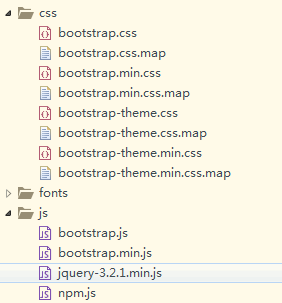
页面需要引用几个js和css文件
2017-08-31 18:56:39
【Html5】表单全选、全不选的更多相关文章
- jQuery html5Validate基于HTML5表单验证插件
更新于2016-02-25 前面提到的新版目前线上已经可以访问: http://mp.gtimg.cn/old_mp/assets/js/common/ui/Validate.js demo体验狠狠地 ...
- HTML5表单验证(4个实用的表单美化案例)
multipart/form-data 在使用包含文件上传控件的表单时,必须使用autocomplete="on" 自动补全功能novalidate 不验证 <form en ...
- Ideal Forms – 帮助你建立响应式 HTML5 表单
Ideal Forms 是建立和验证响应式 HTML5 表单的终极框架.它刚刚发布 V3 版本,更小,更快,更具可扩展性.它支持实时验证,完全自适应(适应容器,没有 CSS 媒体查询需要),键盘支持, ...
- HTML5表单及其验证
随笔- 15 文章- 1 评论- 115 HTML5表单及其验证 HTML表单一直都是Web的核心技术之一,有了它我们才能在Web上进行各种各样的应用.HTML5 Forms新增了许多新控件及其A ...
- HTML5表单新属性
HTML5表单新属性 autofocus 自动聚焦 <input type="text" autofocus> placeholder占位文本 tel ...
- HTML5 表单元素和属性
HTML5 表单元素和属性学习 版权声明:未经博主授权,内容严禁转载 ! 表单元素简介 无论实现提交功能还是展示页面功能,表单在HTML中的作用都十分重要. 在其他版本的HTML中,表单能够包含的元素 ...
- 完善:HTML5表单新特征简介与举例——张鑫旭
一.前言一撇 其实关于HTML5的表单特征早在去年“你必须知道的28个HTML5特征.窍门和技术”一文中就有所介绍(在第十一项),不过,有些遗憾的是,此部分的介绍是以视频形式展示的,其实,是视频还好啦 ...
- html5-5 HTML5表单元素和内嵌框架
html5-5 HTML5表单元素和内嵌框架 一.总结 一句话总结:单选框和多选框选的时候外面加label就可以实现选后面文字也可以选中了 1.html5如何实现文件上传? 必须加上enctype ...
- 实现跨浏览器html5表单验证
div:nth-of-type(odd){ float: left; clear: left; } .origin-effect > div:nth-of-type(even){ float: ...
- html5表单验证
表单验证为终端用户检测无效的数据并标记这些错误,是一种用户体验的优化. 下面展现浏览器自带的验证功能也可在移动端中查看: HTML部分: <!DOCTYPE html> <html ...
随机推荐
- 关闭mmu和cache
处理器内部寄存器,访问速度最快,但是数量少 TCM:紧耦合存储器(Cache.主存储器) 辅助存储器(Flash.SD等) Cache是一种容量小但是存取速度非常快的存储器 它保存最近用到的存储器中的 ...
- maven参数详解
setting.xml主要用于配置maven的运行环境等一系列通用的属性,是全局级别的配置文件:而pom.xml主要描述了项目的maven坐标,依赖关系,开发者需要遵循的规则,缺陷管理系统,组织和li ...
- python中导入from appium import webdriver时报错:ModuleNotFoundError: No module named 'appium'
1.检查一下有没有安装Appium-Python-Client,执行语句:pip install Appium-Python-Client进行安装 2.安装后,出现ModuleNotFoundErro ...
- 数据可视化--> numpy
一.NumPy 1.简介: 官网链接:http://www.numpy.org/ NumPy是Python语言的一个扩充程序库.支持高级大量的维度数组与矩阵运算,此外也针对数组运算提供大量的数学函数库 ...
- 使用XML的方式实现账户的CRUD
1 需求和技术要求 1.1 需求 实现账户的CRUD. 1.2 技术要求 使用Spring的IOC实现对象的管理. 使用QueryRunner作为持久层的解决方案. 使用C3p0作为数据源. 2 环境 ...
- 【新手】【十分钟上手系列-一】快速开发vue插件
2018.6.28 在这浮躁的前端娱乐圈,不会三两个新框架都觉得自己不是前端.哦,不是我说的.说到底.原生才是重中之重.加油. vue用了大半年多,一直在用ui库,插件等,没有自己的东西. 想想连个v ...
- 如何在生产环境下实现每天自动备份mysql数据库
1.描述 通"shell脚本+定时任务"的方式来实现自动备份mysql数据库. 2.环境 备份路径:/data/mysqlbak/ 备份脚本:/data/mysqlbak/mysq ...
- shiro框架学习-1-shiro基本概念
1. 什么是权限控制 基本上涉及到用户参与的系统都要进行权限管理,权限管理属于系统安全的范畴,权限管理实现对用户访问系统的控制,按照安全规则或者安全策略控制用户可以访问而且只能访问自己被授权的资源, ...
- form表单细节
一.表单 表单<form> 标签用于为用户输入创建 HTML 表单 表单能够包含 input 元素,比如文本字段.复选框.单选框.提交按钮等等. 表单还可以包含 menus.textare ...
- react项目导出数据怎么做?
做项目遇到导出数据,搜索了一个插件,简直太好用,几行代码就可以搞定. 插件是react-csv, 了解详细介绍大家可以去https://www.npmjs.com/package/react-csv