
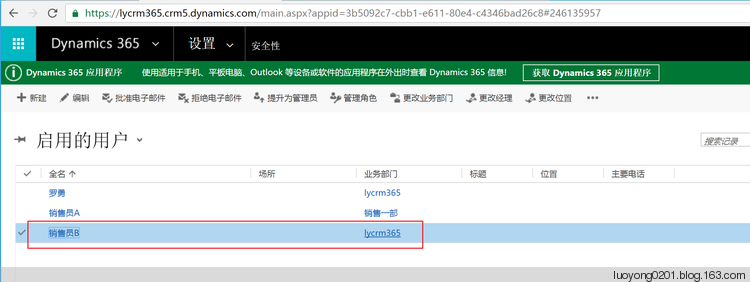
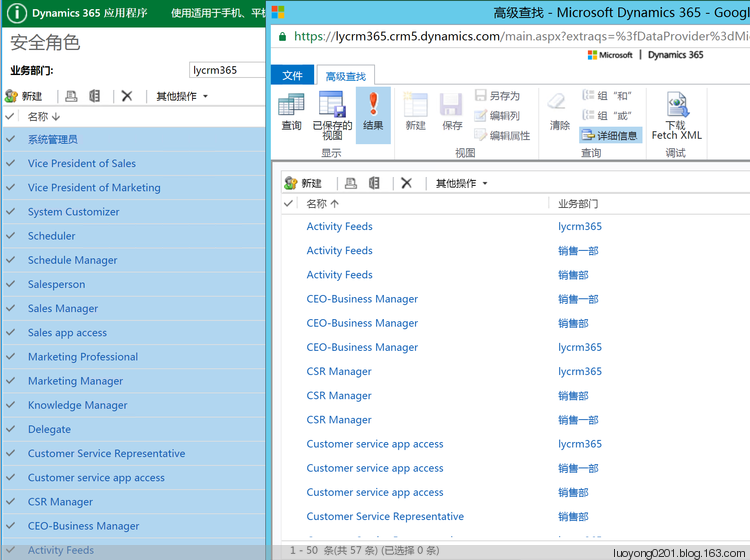
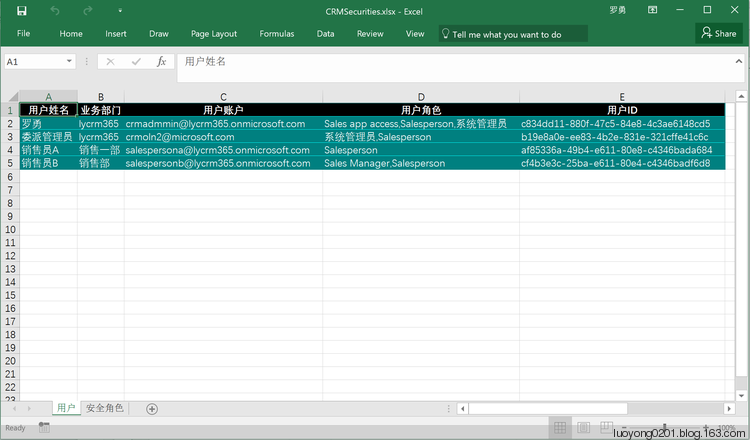
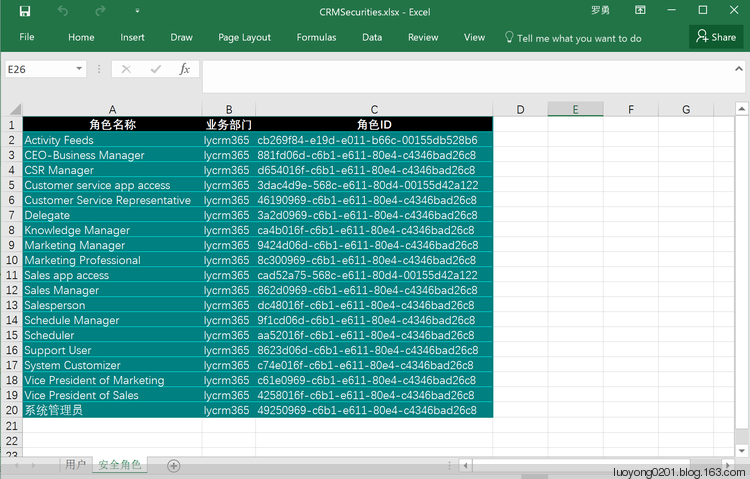
将Dynamics 365中的用户及其角色、角色导出到Excel中
关注本人微信和易信公众号: 微软动态CRM专家罗勇 ,回复240或者20161204可方便获取本文,同时可以在第一间得到我发布的最新的博文信息,follow me!我的网站是 www.luoyong.me 。


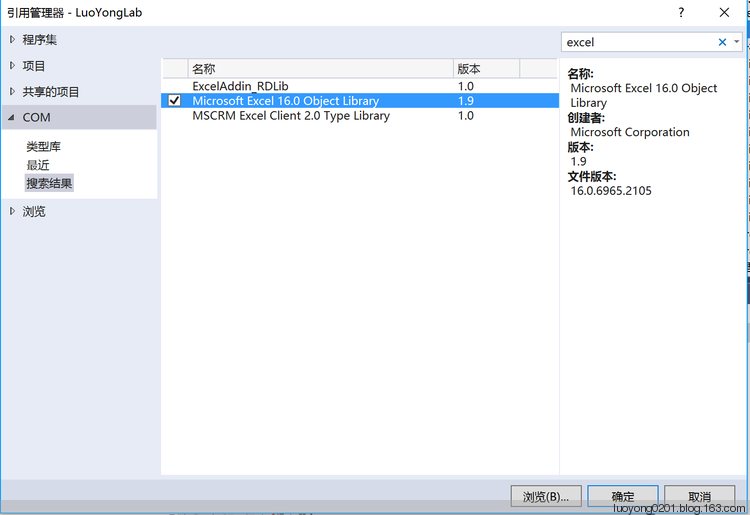
using Microsoft.Office.Interop.Excel;

using Microsoft.Xrm.Sdk;

using Microsoft.Xrm.Sdk.Client;

using Microsoft.Xrm.Sdk.Messages;

using Microsoft.Xrm.Sdk.Metadata;

using Microsoft.Xrm.Sdk.Query;

using Microsoft.Xrm.Tooling.Connector;

using System;

using System.Collections.Generic;

using System.Configuration;

using System.Drawing;

using System.IO;

using System.Linq;

using System.ServiceModel;

using System.ServiceModel.Description;

using System.Text;

using System.Xml;

namespace LuoYongLab

{

    class Program

    {

        static void Main(string[] args)

        {

            try

            {

                var crmSvc = new CrmServiceClient(ConfigurationManager.ConnectionStrings["CRM365"].ConnectionString);

                if (crmSvc.IsReady)

                {

                    Console.WriteLine("导出安全角色开始");

                    var fetchXml = string.Format(@"<fetch version='1.0' output-format='xml-platform' mapping='logical' distinct='false'>

<entity name='role'>

<attribute name='name' />

<attribute name='businessunitid' />

<attribute name='roleid' />

<order attribute='name' descending='false' />

<filter type='and'>

<condition attribute='parentroleid' operator='null' />

</filter>

</entity>

</fetch>");

                    EntityCollection ecRoles = crmSvc.RetrieveMultiple(new FetchExpression(fetchXml));

                    var excelApp = new Application();

                    excelApp.Visible = false;

                    Workbook securityWorkbook = excelApp.Workbooks.Add();

                    Worksheet rolesWorksheet = (Worksheet)excelApp.ActiveSheet;

                    rolesWorksheet.Name = "安全角色";

                    int row = ;

                    rolesWorksheet.Cells[, ] = "角色名称";

                    rolesWorksheet.Cells[, ] = "业务部门";

                    rolesWorksheet.Cells[, ] = "角色ID";

                    //rolesWorksheet.Rows[1].Font.Bold = true;//字体加粗

                    row++;

                    foreach (var roleEntity in ecRoles.Entities)

                    {

                        rolesWorksheet.Cells[row, ] = roleEntity.GetAttributeValue<string>("name");

                        rolesWorksheet.Cells[row, ] = roleEntity.GetAttributeValue<EntityReference>("businessunitid").Name;

                        rolesWorksheet.Cells[row, ] = roleEntity.GetAttributeValue<Guid>("roleid").ToString();

                        row++;

                    }

                    //rolesWorksheet.Columns[1].AutoFit();//自动列宽

                    rolesWorksheet.Range["A1", "C" + (row - )].AutoFormat(XlRangeAutoFormat.xlRangeAutoFormatColor1);

                    Console.WriteLine("导出用户及其安全角色开始");

                    fetchXml = @"<fetch version='1.0' output-format='xml-platform' mapping='logical' distinct='false'>

<entity name='systemuser'>

<attribute name='fullname' />

<attribute name='businessunitid' />

<attribute name='systemuserid' />

<attribute name='domainname' />

<order attribute='fullname' descending='false' />

<filter type='and'>

<condition attribute='isdisabled' operator='eq' value='0' />

<condition attribute='accessmode' operator='ne' value='3' />

</filter>

</entity>

</fetch>";

                    EntityCollection ecUsers = crmSvc.RetrieveMultiple(new FetchExpression(fetchXml));

                    Worksheet usersWorksheet = securityWorkbook.Worksheets.Add();

                    usersWorksheet.Name = "用户";

                    row = ;

                    usersWorksheet.Cells[, ] = "用户姓名";

                    usersWorksheet.Cells[, ] = "业务部门";

                    usersWorksheet.Cells[, ] = "用户账户";

                    usersWorksheet.Cells[, ] = "用户角色";

                    usersWorksheet.Cells[, ] = "用户ID";

                    row++;

                    foreach (var userEntity in ecUsers.Entities)

                    {

                        usersWorksheet.Cells[row, ] = userEntity.GetAttributeValue<string>("fullname");

                        usersWorksheet.Cells[row, ] = userEntity.GetAttributeValue<EntityReference>("businessunitid").Name;

                        usersWorksheet.Cells[row, ] = userEntity.GetAttributeValue<string>("domainname");

                        usersWorksheet.Cells[row, ] = string.Join(",", GetUserRoles(crmSvc.OrganizationServiceProxy, userEntity.GetAttributeValue<Guid>("systemuserid")).Distinct());

                        usersWorksheet.Cells[row, ] = userEntity.GetAttributeValue<Guid>("systemuserid").ToString();

                        row++;

                    }

                    usersWorksheet.Range["A1", "E" + (row - )].AutoFormat(XlRangeAutoFormat.xlRangeAutoFormatColor1);

                    securityWorkbook.SaveAs(Filename: "CRMSecurities.xlsx", FileFormat: XlFileFormat.xlWorkbookDefault);

                    securityWorkbook.Close();

                    excelApp.Quit();

                }

                else

                {

                    Console.WriteLine("连接CRM出错:" + crmSvc.LastCrmError);

                }

                Console.WriteLine("程序运行完成!");

                Console.ReadKey();

            }

            catch (FaultException ex)

            {

                Console.WriteLine("程序出现异常:ex.Message=" + ex.Message);

                Console.ReadKey();

            }

        }

        static IEnumerable<string> GetUserRoles(IOrganizationService service, Guid userId)

        {

            //首先获取用户直接授予的角色

            string fetchXml = string.Format(@"<fetch version='1.0' output-format='xml-platform' mapping='logical' distinct='true' no-lock='true'>

<entity name='role'>

<attribute name='name' />

<link-entity name='systemuserroles' from='roleid' to='roleid' visible='false' intersect='true'>

<link-entity name='systemuser' from='systemuserid' to='systemuserid' alias='ad'>

<filter type='and'>

<condition attribute='systemuserid' operator='eq' value='{0}' />

</filter>

</link-entity>

</link-entity>

</entity>

</fetch>", userId);

            var userRolesDirect = service.RetrieveMultiple(new FetchExpression(fetchXml)).Entities.Select(x => x.GetAttributeValue<string>("name"));

            //找出用户加入的所有负责人团队

            fetchXml = string.Format(@"<fetch version='1.0' output-format='xml-platform' mapping='logical' distinct='true'>

<entity name='team'>

<attribute name='teamid' />

<filter type='and'>

<condition attribute='teamtype' operator='eq' value='0' />

</filter>

<link-entity name='teammembership' from='teamid' to='teamid' visible='false' intersect='true'>

<link-entity name='systemuser' from='systemuserid' to='systemuserid' alias='ah'>

<filter type='and'>

<condition attribute='systemuserid' operator='eq' value='{0}' />

</filter>

</link-entity>

</link-entity>

</entity>

</fetch>", userId);

            var userTeams = service.RetrieveMultiple(new FetchExpression(fetchXml)).Entities.Select(x => x.GetAttributeValue<Guid>("teamid"));

            //团队拥有的角色也是这个团队所有用户拥有的角色,所以还要加上这部分角色

            var fetchXmlSb = new StringBuilder("<fetch version='1.0' output-format='xml-platform' mapping='logical' distinct='true'>");

            fetchXmlSb.Append("<entity name='role'>");

            fetchXmlSb.Append("<attribute name='name' />");

            fetchXmlSb.Append("<order attribute='name' descending='false' />");

            fetchXmlSb.Append("<link-entity name='teamroles' from='roleid' to='roleid' visible='false' intersect='true'>");

            fetchXmlSb.Append("<link-entity name='team' from='teamid' to='teamid' alias='ak'>");

            fetchXmlSb.Append("<filter type='or'>");

            foreach (var team in userTeams)

            {

                fetchXmlSb.Append(string.Format("<condition attribute='teamid' operator='eq' value='{0}' />", team));

            }

            fetchXmlSb.Append("</filter>");

            fetchXmlSb.Append("</link-entity>");

            fetchXmlSb.Append("</link-entity>");

            fetchXmlSb.Append("</entity>");

            fetchXmlSb.Append("</fetch>");

            var userRolesInTeam = service.RetrieveMultiple(new FetchExpression(fetchXmlSb.ToString())).Entities.Select(x => x.GetAttributeValue<string>("name"));

            return userRolesDirect.Concat(userRolesInTeam);

        }

    }

}
将Dynamics 365中的用户及其角色、角色导出到Excel中的更多相关文章
- html table表格导出excel的方法 html5 table导出Excel HTML用JS导出Excel的五种方法 html中table导出Excel 前端开发 将table内容导出到excel HTML table导出到Excel中的解决办法 js实现table导出Excel,保留table样式
先上代码 <script type="text/javascript" language="javascript"> var idTmr; ...
- 将datagrid中数据导出到excel中 -------<<工作日志2014-6-6>>
前台datagrid数据绑定 #region 导出到excel中 /// <summary> /// 2014-6-6 /// </summary> / ...
- 将Datagridview中的数据导出至Excel中
首先添加一个模块ImportToExcel,并添加引用 然后导入命名空间: Imports Microsoft.Office.Interop Imports System.Da ...
- Winform 中 dataGridView 导出到Excel中的方法总结
最近,在做CS端数据导出到Excel中时网上找了很多代码感觉都不是自己想要的,通过自己的整理归纳得到一个比较通用的方法,就给大家分享一下: 该方法需要用到两个参数(即对象),一个 DataGridV ...
- HTML table导出到Excel中的解决办法
第一部分:html+js 1.需要使用的表格数据(先不考虑动态生成的table) <table class="table tableStyles" id="tabl ...
- C# html的Table导出到Excel中
C#中导出Excel分为两大类.一类是Winform的,一类是Web.今天说的这一种是Web中的一种,把页面上的Table部分导出到Excel中. Table导出Excel,简单点说,分为以下几步: ...
- 把数据库里面的stu表中的数据,导出到excel中
# 2.写代码实现,把我的数据库里面的stu表中的数据,导出到excel中 #编号 名字 性别 # 需求分析:# 1.连接好数据库,写好SQL,查到数据 [[1,'name1','男'],[1,'na ...
- html table导出到Excel中,不走后台,js完成
静态表格table <table class="table tableStyles" id="tables"> <caption>不正经 ...
- JS将页面中表格,导出到Excel中(IE中)
原文地址:http://blog.csdn.net/sinat_15114467/article/details/51098522 var idTmr; function getExplorer() ...
随机推荐
- 四种常用的access连接方式
整理出四种常用的access连接方式,当然,第1种这是最常用的(推荐使用).1. set dbconnection=Server.CreateOBJECT("ADODB.CONNECTION ...
- QEMU KVM Libvirt手册(11): Managing Storage
When managing a VM Guest on the VM Host Server itself, it is possible to access the complete file sy ...
- 面试作业之浅析京东促销活动核心模型 - DDD
前言 京东作为中国最大的自营式B2C电商平台,提供一站式综合性购物,服务亿万家庭,涵盖3C.家电.消费品.服饰.家居家装.生鲜和新通路(B2B),满足了消费者的多元化需求.每天都会发布相关的促销活动, ...
- JNI实战(二):Java 调用 C
1. JNI Env 和 Java VM 关系说明 JNIEnv 是 Java的本地化环境,是Java与C的交互的重要桥梁. 在Android上,一个进程对应一个JavaVM,也就是一个app对应一个 ...
- 最小化JIT示例(仅限Intel x86+Windows)
#include <Windows.h> #include <cstdint> #include <cstring> #define BACK_FILL (0) i ...
- [Swift]LeetCode115. 不同的子序列 | Distinct Subsequences
Given a string S and a string T, count the number of distinct subsequences of S which equals T. A su ...
- mybatis 详解------动态SQL
mybatis 详解------动态SQL 目录 1.动态SQL:if 语句 2.动态SQL:if+where 语句 3.动态SQL:if+set 语句 4.动态SQL:choose(when,o ...
- Go使用Makefile构建
我们平常很多时候都是直接在命令行输入go build进行编译的: go build . 或者测试使用go run运行项目 go run main.go 我看有很多大型开源项目都是如下方式: mak ...
- Solr 03 - Solr的模式设计与优化 - 最详细的schema.xml模式文件解读
目录 1 关于schema.xml文件 2 解读schema.xml文件 2.1 field - 配置域 2.2 fieldType - 配置域类型 2.3 copyField - 配置复制域 2.4 ...
- .net core通过多路复用实现单服务百万级别RPS吞吐
多路复用其实并不是什么新技术,它的作用是在一个通讯连接的基础上可以同时进行多个请求响应处理.对于网络通讯来其实不存在这一说法,因为网络层面只负责数据传输:由于上层应用协议的制订问题,导致了很多传统服务 ...