
震惊!!!源程序特征统计程序——基于python getopt库
项目github地址:https://github.com/holidaysss/WC
|
PSP2.1 |
Personal Software Process Stages |
预估耗时(分钟) |
实际耗时(分钟) |
|
Planning |
计划 |
90 | 90 |
|
· Estimate |
· 估计这个任务需要多少时间 |
90 | 90 |
|
Development |
开发 |
365 | 385 |
|
· Analysis |
· 需求分析 (包括学习新技术) |
240 | 240 |
|
· Design Spec |
· 生成设计文档 |
20 | 20 |
|
· Design Review |
· 设计复审 (和同事审核设计文档) |
30 | 30 |
|
· Coding Standard |
· 代码规范 (为目前的开发制定合适的规范) |
15 | 15 |
|
· Design |
· 具体设计 |
180 | 180 |
|
· Coding |
· 具体编码 |
180 | 200 |
|
· Code Review |
· 代码复审 |
120 | 120 |
|
· Test |
· 测试(自我测试,修改代码,提交修改) |
180 | 180 |
|
Reporting |
报告 |
165 | 165 |
|
· Test Report |
· 测试报告 |
120 | 120 |
|
· Size Measurement |
· 计算工作量 |
15 | 15 |
|
· Postmortem & Process Improvement Plan |
· 事后总结, 并提出过程改进计划 |
30 | 30 |
|
合计 |
620 | 640 |
执行代码:
if __name__ == '__main__':

    opts, args = getopt.getopt(sys.argv[1:], "hc:w:l:s:a:")

    files_list = []  # 相应后缀文件列表

    main(opts)
主要函数:
count_word : 统计文件的词数(单词) (基本功能 -w)
def count_word(file):

    list = open(file, 'r', encoding='utf-8').read()

    word_list = []

    end = 0

    for i in range(len(list)):  # 遍历全文

        if list[i].isalpha() and i >= end:  # 词首(字母)

            for j in range(i, len(list)):

                if (list[j].isalpha() == 0) or (j == len(list)-1):  # 词尾(非字母)

                    word_list.append(list[i: j])  # 词

                    end = j

                    break

    word_list.pop(-1)

    for k, v in Counter(word_list).items():

        print('{}: {}'.format(k, v))

    num = len(word_list)

    print('总词数: {}'.format(num))
count_char, count_line :统计字符数和行数 (基本功能 -c, -l)
def count_char(file):

    num = len(open(file, 'r', encoding='ISO-8859-1').read())

    print("文件{}的字符数(包括换行符)为{}".format(file, num))

def count_line(file):

    print('文件{}的行数:'.format(file) +

          str(len(open(file, 'r', encoding='ISO-8859-1').readlines())))
down_find: 递归查询当前目录下相应后缀(hz)的文件, 返回文件列表files (拓展功能 -s)
recursion: 对文件列表进行第二选项串判断,执行相应处理
def down_find(dir, hz):

    dir_files = os.listdir(dir)  # 路径下的文件列表

    for i in dir_files:  # 生成子目录

        son_path = os.path.join(dir, i)

        if os.path.isdir(son_path):  # 如果是目录,递归操作

            down_find(son_path, hz)

        elif hz in son_path:

            files_list.append(son_path)

    return files_list

def recursion(value):

    op2 = value[0: 2]  # 第二选项串

    hz = args[0]  # 文件后缀参数

    dir = os.getcwd()  # 当前路径

    files = down_find(dir, hz)  # 返回相应后缀文件列表

    print("当前目录下符合后缀{}的文件有: {}".format(hz, files))

    for file in files:

        if op2 == "-c":  # 返回字符数

            count_char(file)

        elif op2 == "-w":  # 返回词的数目

            count_word(file)

        elif op2 == "-l":  # 返回行数

            count_line(file)

        elif op2 == '-a':

            more_data(file)
more_data: 返回文件空行,代码行,注释行数 (拓展功能 -a)
def more_data(value):

    code_line = blank_line = comment_line = 0

    end = -1

    lines = open(value, 'r', encoding='ISO-8859-1').readlines()

    for i in range(len(lines)):

        if '#' in lines[i] and (i > end):  # 单行注释

            comment_line += 1

        elif len(lines[i].strip()) <= 1:  # 空行

            blank_line += 1

        elif lines[i][0].isalpha() and (i > end) and ('#' not in lines[i]):  # 代码行

            code_line += 1

        elif lines[i].startswith('"""') and (i > end):  # 多行注释

            for j in range(i + 1, len(lines)):

                if lines[j].startswith('"""'):

                    comment_line += (j - i + 1)

                    end = j

        elif lines[i].startswith("'''") and (i > end):

            for j in range(i + 1, len(lines)):

                if lines[j].startswith("'''"):

                    comment_line += (j - i + 1)

                    end = j

    print('文件:{}\n代码行:{}\n空行:{}\n注释行:{}\n'.format(value,code_line, blank_line, comment_line))
main():
def main(opts):

    for op, value in opts:  # op为选项串,value为附加参数

        try:

            if op == "-c":  # 返回字符数

                count_char(value)

            elif op == "-w":  # 返回词的数目

                count_word(value)

            elif op == "-l":  # 返回行数

                count_line(value)

            elif op == "-s":  # 递归处理目录下符合条件的文件

                recursion(value)

            elif op == "-a":  # 返回代码行,空行,注释行数

                more_data(value)

            elif op == "-h":

                print('-c file  返回文件 file 的字符数\n'

                      '-w file  返回文件 file 的词的数目\n'

                      '-l file  返回文件 file 的行数\n'

                      '-a file  返回空行代码行注释行数\n'

                      '-s -*[后缀]  递归相应后缀文件再执行基本指令')

                sys.exit()

        except FileNotFoundError as e:

            print("{}\n输入 -h 查看帮助".format(e))
运行结果:
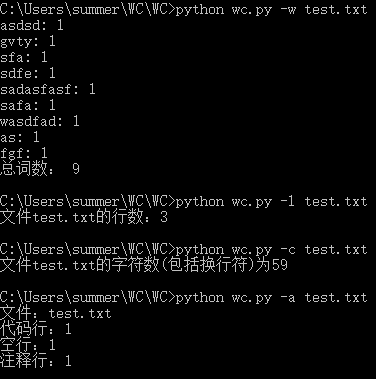
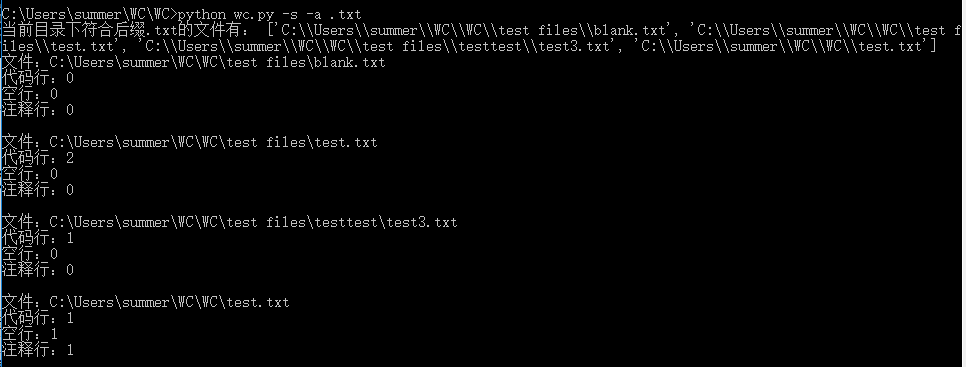
过程中遇到的问题:
1.打开文件的编码问题:刚开始默认gpk无法识别。后来换utf-8还不行,最后百度到转为
'ISO-8859-1',问题解决。

项目小结:
python 是当下比较流行的一种编译语言,学好python可以让一些让其他编译语言头疼的事变得轻松!
震惊!!!源程序特征统计程序——基于python getopt库的更多相关文章
- 个人项目 源程序特征统计程序(C++)
零.GitHub地址 https://github.com/King-Authur/Word-count 一.项目的相关要求 wc.exe 是一个常见的工具,它能统计文本文件的字符数.单词数和行数.这 ...
- 个人项目——wc源程序特征统计
这一次要做的项目是wc——统计程序文件特征的命令行程序. 根据需求需求得到的模式为:wc.exe [parameter][filename] 在[parameter]中,用户通过输入参数与程序交互,需 ...
- 【Python Deap库】遗传算法/遗传编程 进化算法基于python DEAP库深度解析讲解
目录 前言 概述 启发式的理解(重点) 优化问题的定义 个体编码 初始族群的创建 评价 配种选择 锦标赛 轮盘赌选择 随机普遍抽样选择 变异 单点交叉 两点交叉 均匀交叉 部分匹配交叉 突变 高斯突变 ...
- 基于Python Pillow库生成随机验证码
from PIL import Image from PIL import ImageDraw from PIL import ImageFont import random class ValidC ...
- 二维码生成器,基于python,segno库
import segno temp = input("Please enter value:") qr = segno.make(temp) qr.save("qrcod ...
- 【python(deap库)实现】GEAP 遗传算法/遗传编程 genetic programming +
目录 前言 1.优化问题的定义 单目标优化 多目标优化 2.个体编码 实数编码 二进制编码 序列编码(Permutation encoding) 粒子(Particles) 3 初始种群建立 一般族群 ...
- 基于Python实现的系统SLA可用性统计
基于Python实现的系统SLA可用性统计 1. 介绍 SLA是Service Level Agreement的英文缩写,也叫服务质量协议.根据SRE Google运维解密一书中的定义: SLA是服务 ...
- 基于Python的Web应用开发实战——2 程序的基本结构
2.1 初始化 所有Flaks程序都必须创建一个程序实例. Web服务器使用一种名为Web服务器网关接口(Web Server Gateway Interface,WSGI)的协议,把接收自客户端的所 ...
- selenium2自动化测试实战--基于Python语言
自动化测试基础 一. 软件测试分类 1.1 根据项目流程阶段划分软件测试 1.1.1 单元测试 单元测试(或模块测试)是对程序中的单个子程序或具有独立功能的代码段进行测试的过程. 1.1.2 集成测试 ...
随机推荐
- DataSet结果转模型类
引入命名空间: using System.Data; using System.Reflection; 类封装代码: public class ModelHelper { public T To< ...
- centos版本位数查看
查看版本 cat /etc/issue cat /etc/redhat-release 查看位数 uname -a cat /proc/version 1. getconf LONG_BIT or ...
- Hive 外部表的练习(多表关联查询,以及分组,子查询)
Hive 外部表的练习 hive创建库和表操作 hive加载数据,4种发放 1.数据放在Linux创建表结构 进行加载 2.先定义表结构.将一个查询select语句结果插入到表中 3.数据先放在hdf ...
- 【 P3952】 时间复杂度 大模拟题解
题目链接 完全模拟 1.模拟结果 当我们的模拟程序执行结束时,直接执行模拟结果函数,用于比对我们的结果和数据给出的结果. bool yes(char a[],char b[]) { ;i<=;+ ...
- 电磁波、无线电、802、WLAN及WiFi的区别与联系
一.电磁波.无线电.WLAN和WiFi的关系 电磁波 > 无线电 [+ 可见光] > WLAN [+ 电话 ]> WiFi [+蓝牙] 参考:https://zh.wikipedia ...
- python,pip环境变量设置
安装好python后,配置环境变量. 安装pygame需要先配置两个环境变量. 第一个是python的.先打开计算机,然后点击‘系统属性’然后点击‘高级系统设置’然后点击‘环境变量’在系统变量中找到p ...
- day42-python消息队列一
消息队列”是在消息的传输过程中保存消息的容器.消息队列最经典的用法就是消费者和生成者之间通过消息管道来传递消息,消费者和生成者是不通的进程.生产者往管道中写消息,消费者从管道中读消息.操作系统提供了很 ...
- Spring使用ioc注解方式配置bean
context层 : 上下文环境/容器环境 applicationContext.xml 具体示例: 现在ioc容器中添加context层支持: 包括添加xmlns:context.xsi:schem ...
- VM虚拟机拍摄快照时出错或者克隆失败解决办法
在换了固态硬盘后,下载好VM,装虚拟机,结果克隆虚拟机和拍摄快照时出问题了. 拍摄快照时出错或者隆失败出现参数错误如图: 所提供的参数中有一个无效参数 解决办法 出现这个问题一般是在机械硬盘的电脑上面 ...
- Exploit-Exercises nebule 旅行日志(四)
接着上次的路程继续在ubuntu下对漏洞的探索练习,这次是level03了 先看下level03的问题描述: 精炼下问题,在/home/flag03的目录下有个crontab的文件是每分钟都在执行 这 ...