
Windows 7环境下网站性能测试小工具 Apache Bench 和 Webbench使用和下载
1、简要说明:
Apache Bench 是Apache的网站性能测试小程序,Windows平台下的程序名简称ab.exe,要想获得这个80k的可执行程序,用户需要下载整个Apache Httpd软件包!还需要将其安装到电脑上,确实比较麻烦。
Webbench也是一款网站性能测试小程序,可以获得网站的吞吐率、传送速度等基本性能指标。该程序是在Linux下编程的,在Linux下编译安装使用都很方便,但在Windows 下的程序却没有。
为了方便起见,我将ab.exe 小程序单独拷贝出来,并且下载了webbench的源码,使用CodeBlocks程序和Cygwin64,将源码编译了一下,生成Windows7 环境下可执行的文件webbench.exe ,方便在一个平台下同时使用2个程序,进行网站性能测试。
2、下载地址:
Windows7 64位下的两个网站性能测试小工具下载地址:
链接:https://pan.baidu.com/s/1hDhBlNc4ss_sp-qPYk_kEQ
提取码:upas
3、运行截图:
01-Windows7 64位下webbench测试结果

02-Apache Bench 性能测试小工具-运行参数

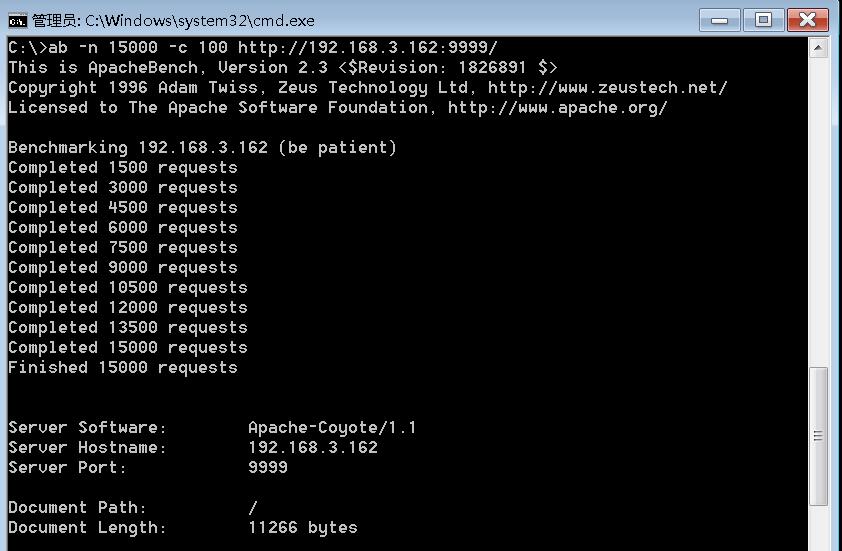
03-Apache Bench 性能测试小工具-测试结果1
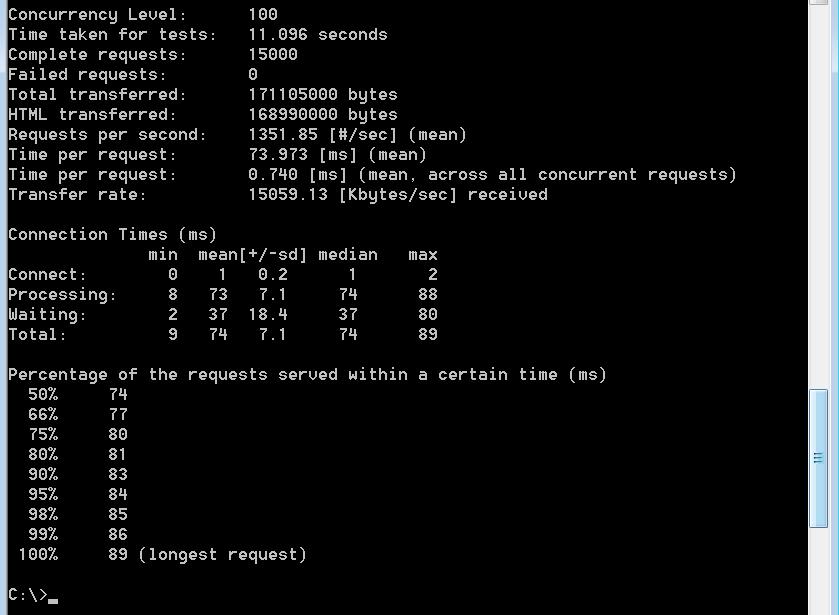
04-Apache Bench 性能测试小工具-测试结果2
4、测试命令及结果分析
ab.exe -n 15000 -c 100 http://www.abc.com/
# -n 15000总共发送的1.5万个访问请求N个
# -c 100模拟100个用户同时访问C个;
# 结果分析:
# Concurrency Level: 模拟并发用户数(命令行中输入的数据)C个
# Time taken for tests: 完成整个测试的时间T秒
# Requests per second: 服务器性能(在当前并发下每秒能处理的请求数)=N/T个
# Time per request: (mean)从用户的角度计算,每个请求平均花费时间=T/(N/C)
# 解释:每个用户发送N/C个请求,共花费T秒,每个请求平均花费时间=T/(N/C)
# Time per request:(mean, across all concurrent requests)从服务器角度计算,完成每个请求的平均花费时间=T/N
# Transfer rate: 传送速率
webbench.exe -c 100 -t 5 http://www.abc.com/
# -c 100模拟100个用户同时访问;
# -t 5 持续5秒钟测试时间
# 需要测试的网址 http://www.abc.com/ ,注意只测网站名时,结尾要加/
#
# Speed pages/min 每分钟多少个请求, Speed pages/sec 每秒钟多少个请求
# bytes/sec 传送速率
# Requests: 总共完成的请求数
5、注意事项
!!!不要对公共网址发送大量访问请求!!!可用于自己的网站上线前的性能测试。
6、使用帮助
C:\>ab --help
ab: wrong number of arguments
Usage: ab [options] [http://]hostname[:port]/path
Options are:
-n requests Number of requests to perform
-c concurrency Number of multiple requests to make at a time
-t timelimit Seconds to max. to spend on benchmarking
This implies -n 50000
-s timeout Seconds to max. wait for each response
Default is 30 seconds
-b windowsize Size of TCP send/receive buffer, in bytes
-B address Address to bind to when making outgoing connections
-p postfile File containing data to POST. Remember also to set -T
-u putfile File containing data to PUT. Remember also to set -T
-T content-type Content-type header to use for POST/PUT data, eg.
'application/x-www-form-urlencoded'
Default is 'text/plain'
-v verbosity How much troubleshooting info to print
-w Print out results in HTML tables
-i Use HEAD instead of GET
-x attributes String to insert as table attributes
-y attributes String to insert as tr attributes
-z attributes String to insert as td or th attributes
-C attribute Add cookie, eg. 'Apache=1234'. (repeatable)
-H attribute Add Arbitrary header line, eg. 'Accept-Encoding: gzip'
Inserted after all normal header lines. (repeatable)
-A attribute Add Basic WWW Authentication, the attributes
are a colon separated username and password.
-P attribute Add Basic Proxy Authentication, the attributes
are a colon separated username and password.
-X proxy:port Proxyserver and port number to use
-V Print version number and exit
-k Use HTTP KeepAlive feature
-d Do not show percentiles served table.
-S Do not show confidence estimators and warnings.
-q Do not show progress when doing more than 150 requests
-l Accept variable document length (use this for dynamic pages)
-g filename Output collected data to gnuplot format file.
-e filename Output CSV file with percentages served
-r Don't exit on socket receive errors.
-m method Method name
-h Display usage information (this message)
C:\>webbench --help
webbench [option]... URL
-f|--force Don't wait for reply from server.
-r|--reload Send reload request - Pragma: no-cache.
-t|--time <sec> Run benchmark for <sec> seconds. Default 30.
-p|--proxy <server:port> Use proxy server for request.
-c|--clients <n> Run <n> HTTP clients at once. Default one.
-9|--http09 Use HTTP/0.9 style requests.
-1|--http10 Use HTTP/1.0 protocol.
-2|--http11 Use HTTP/1.1 protocol.
--get Use GET request method.
--head Use HEAD request method.
--options Use OPTIONS request method.
--trace Use TRACE request method.
-?|-h|--help This information.
-V|--version Display program version.
Windows 7环境下网站性能测试小工具 Apache Bench 和 Webbench使用和下载的更多相关文章
- Windows XP环境下 搭建Android NDK环境
搭建Android NDK环境 Windows XP环境下 1 一些下载 ① NDK r7:http://developer.android.com/sdk/ndk/index.html ② cygw ...
- [原创]Linux下网络性能测试Netperf工具介绍及安装
[原创]Linux下网络性能测试Netperf工具介绍及安装 1 官方网站 http://www.netperf.org/netperf/ 2 Netperf介绍 Netperf是一种网络性能的测试工 ...
- iOS系统提供开发环境下命令行编译工具:xcodebuild
iOS系统提供开发环境下命令行编译工具:xcodebuild[3] xcodebuild 在介绍xcodebuild之前,需要先弄清楚一些在XCode环境下的一些概念[4]: Workspace:简单 ...
- WP8_(windows phone环境下)上传文件从C#到php接口
在windows phone环境下,将手机上的图片上传到服务端(php环境): 注意事项:在上传的地方,头文件中name,例如name= img,则在php服务端处理时 ,需要约定好 存取一致 php ...
- windows单机环境下配置tomcat集群
场景:我们在平常联系中,需要涉及到tomcat中,但是电脑不够怎么办,肯定是在自己的电脑上模拟集群,就是装多个tomcat,这时候需要稍微配置下.如果是多个服务器,那不用配置,直接怼!!! 这里介绍的 ...
- Android 性能测试小工具 Emmagee
Emmagee 是一个性能测试小工具 用来监控指定被测应用在使用过程中占用机器的CPU, 内存,流量资源的性能小工具 Emmagee 介绍 Emmagee是网易杭州研究院QA团队开发的一个简单易上手的 ...
- 解决Windows x64bit环境下无法使用PLSQL Developer连接到Oracle DB中的问题
本文是原创文章,转载请注明出处: http://blog.csdn.net/msdnchina/article/details/46416455 解决Windows x64bit环境下无法使用PLSQ ...
- [Docker] Windows 宿主环境下,共享或上传文件到容器的方法
需求如题. 解决方案1 - 挂载目录(适用于创建新的容器) 格式-v 容器目录 或 -v 本地目录:容器目录 范例Linux宿主环境下:使用镜像 nginx:latest,以后台模式启动一个容器,将容 ...
- Windows环境下使用Redis缓存工具的图文详细方法
一.简介 redis是一个key-value存储系统.和Memcached类似,它支持存储的value类型相对更多,包括string(字符串).list(链表).set(集合)和zset(有序集合). ...
随机推荐
- Java中的过滤器,拦截器,监听器---------简单易懂的介绍
过滤器: 过滤器其主要特点在于:取你需要的东西,忽视那些不需要的东西!在程序中,你希望选择中篇文章中的所有数字,你就可以针对性的挑选数字! 拦截器: 拦截器其主要特点在于:针对你不要的东西进行拦截,比 ...
- 检测U盘插入、拨出状态
头文件 #include <Dbt.h> 关键代码: LRESULT CALLBACK WndProc(HWND hWnd, UINT message, WPARAM wParam, LP ...
- Nginx配置选项
--prefix=path 定义一个目录,存放服务器上的文件 ,也就是nginx的安装目录.默认使用 /usr/local/nginx. --sbin-path=path 设置nginx的可执行 ...
- SSM框架和SSH框架的区别
SSH和SSM定义 SSH 通常指的是 Struts2 做控制器(controller),spring 管理各层的组件,hibernate 负责持久化层. SSM 则指的是 SpringMVC 做控制 ...
- JavaFX-Application
JavaFX—Application 1.Application是JavaFX程序的入口,任何javafx应用程序程序都要继承该类并重写start()方法 public class TsetStage ...
- vue单文件组件实例2:简单单文件组件
Introduce.vue: <template> <div class="intro"> 单位介绍 </div> </templat ...
- (2018干货系列二)最新HTML5学习路线整合
怎么学HTML5 HTML5是万维网的核心语言,标准通用标记语言下的一个应用超文本标记语言(HTML)的第五次重大修改,一方面提升了用户体验,另一方面HTML5技术跨平台,适配多终端,改变了传统开发者 ...
- python画手绘图
第一步:插入代码 #e17.1HandDrawPic.py from PIL import Image import numpy as np vec_el = np.pi/2.2 # 光源的俯视角度, ...
- 算法(第四版)C# 习题题解——2.1
写在前面 整个项目都托管在了 Github 上:https://github.com/ikesnowy/Algorithms-4th-Edition-in-Csharp 这一节内容可能会用到的库文件有 ...
- 为基于OpenCV的图像处理程序编写界面—关于QT\MFC\CSharp的选择以及GOCW的介绍
基于OpenCV编写图像处理项目,除了算法以外,比较重要一个问题就是界面设计问题.对于c++语系的程序员来说,一般来说有QT/MFC两种考虑.QT的确功能强大,特别是QML编写andr ...