
【应用程序见解 Application Insights】在Application Insights中通过自定义查询结果定义指标并显示在Dashboard中
问题情形
通过Application Insights收集到指标数据后,如Request,Trace,Exception。但是默认的Insights图表不能满足业务的需求,需要自定义相应的类SQL语句并制作图表以便直观的显示,避免每次都需要重新查询数据并转换为图表。
类SQL的查询语句在Applicaiton Insights示例为:
// Response time trend

// Chart request duration over the last 12 hours.

requests

| where timestamp > ago(12h)

| summarize avgRequestDuration=avg(duration) by bin(timestamp, 10m) // use a time grain of 10 minutes

| render timechart

// Operations performance

// Calculate request count and duration by operations.

requests

| summarize RequestsCount=sum(itemCount), AverageDuration=avg(duration), percentiles(duration, 50, 95, 99) by operation_Name // you can replace 'operation_Name' with another value to segment by a different property

| order by RequestsCount desc // order from highest to lower (descending)

// Top 10 countries by traffic

// Chart the amount of requests from the top 10 countries.

requests

| summarize CountByCountry=count() by client_CountryOrRegion

| top 10 by CountByCountry

| render piechart

// Top 3 browser exceptions

// What were the highest reported exceptions today?

exceptions

| where notempty(client_Browser) and client_Type == 'Browser'

| summarize total_exceptions = sum(itemCount) by problemId

| top 3 by total_exceptions desc

// Failed requests – top 10

// What are the 3 slowest pages, and how slow are they?

requests

| where success == false

| summarize failedCount=sum(itemCount) by name

| top 10 by failedCount desc

| render barchart

// Failed operations

// Calculate how many times operations failed, and how many users were impacted.

requests

| where success == false

| summarize failedCount=sum(itemCount), impactedUsers=dcount(user_Id) by operation_Name

| order by failedCount desc
操作步骤
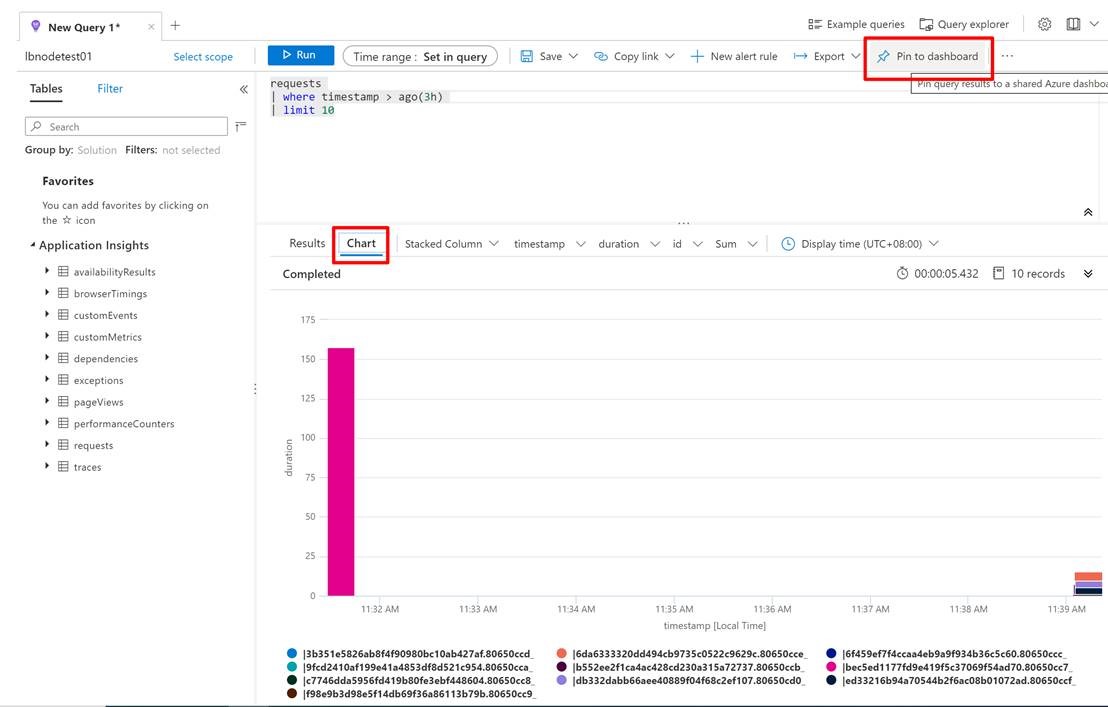
Application Insights提供了非常简单的办法来完成制作图表的步骤,只需要在Logs页面中,按照上面的类SQL语句写好后,点击右上角的固定到仪表盘(Pin To Dashboard)即可。
参考资料:
创建诊断设置以在 Azure 中收集资源日志和指标:https://docs.azure.cn/zh-cn/azure-monitor/platform/diagnostic-settings
【应用程序见解 Application Insights】在Application Insights中通过自定义查询结果定义指标并显示在Dashboard中的更多相关文章
- Java连接MySQL数据库。编写一个应用程序,在主类Test_4类中,通过JDBC访问stu数据库,显示t_student表中的内容(表结构见表1),显示效果自己设计。
题目2:编写一个应用程序,在主类Test_4类中,通过JDBC访问stu数据库,显示t_student表中的内容(表结构见表1),显示效果自己设计.之后,可根据显示的内容进行某条记录的删除(以id为条 ...
- 【应用程序见解 Application Insights】Application Insights 使用 Application Maps 构建请求链路视图
Applicaotn Insigths 使用 Application Maps 构建请求链路视图 构建系统时,请求的逻辑操作大多数情况下都需要在不同的服务,或接口中完成整个请求链路.一个请求可以经历 ...
- 【Azure 应用程序见解】Application Insights Java Agent 3.1.0的使用实验,通过修改单个URL的采样率来减少请求及依赖项的数据采集
问题描述 近日好消息,如果是一个Java Spring Cloud的项目,想使用Azure Applicaiton Insights来收集日志及一些应用程序见解.但是有不愿意集成SDK来修改代码或者配 ...
- 【转】VS2012编译出来的程序,在XP上运行,出现“.exe 不是有效的 win32 应用程序” “not a valid win32 application”
原文网址:http://www.cnblogs.com/Dageking/archive/2013/05/15/3079394.html VS2012编译出来的程序,在XP上运行,出现“.exe 不是 ...
- Android清单文件具体解释(三)----应用程序的根节点<application>
<application>节点是AndroidManifest.xml文件里必须持有的一个节点,它包括在<manifest>节点下.通过<application>节 ...
- 【IOS6.0 自学瞎折腾】(五)应用程序的启动过程和Application生命周期
一 :main函数入口 看下项目资源结构,其实程序的入口也是在main.m里面. #import <UIKit/UIKit.h> #import "BvinAppDelegate ...
- ios 程序发布使用xcode工具Application Loader 正在通过ITUNES STORE进行鉴定错误
ios 程序发布使用xcode工具Application Loader 正在通过ITUNES STORE进行鉴定错误 一:此错误会导致上传程序,一直停留在验证阶段,而没有一点上传进度:结果会苦等半天, ...
- 错误: 在类 Main 中找不到 main 方法, 请将 main 方法定义为: public static void main(String[] args) 否则 JavaFX 应用程序类必须扩展javafx.application.Application
错误: 在类 Main 中找不到 main 方法, 请将 main 方法定义为: public static void main(String[] args)否则 JavaFX 应用程序类必须扩展ja ...
- 关于C++程序运行程序是出现的this application has requested the runtime to terminate it in an unusual way. 异常分析
今天运行程序是出现了this application has requested the runtime to terminate it in an unusual way. 的异常报告,以前也经常 ...
随机推荐
- 预科班D2
2020.09.08星期二 预科班D2 学习内容: 一.复习 1.平台: 平台=操作系统+计算机硬件 2.跨平台性 3.文件 文件是指操作系统提供给上层使用者操作硬盘的一种功能.
- CentOS 7安装SeaweedFS
1.从GitHub下载编译好的SeaweedFS 地址:https://github.com/chrislusf/seaweedfs/releases 选择linux_amd64.tar.gz的压缩包 ...
- 最全总结 | 聊聊 Python 数据处理全家桶(Sqlite篇)
1. 前言 上篇文章 聊到 Python 处理 Mysql 数据库最常见的两种方式,本篇文章继续说另外一种比较常用的数据库:Sqlite Sqlite 是一种 嵌入式数据库,数据库就是一个文件,体积很 ...
- python的多种魔术方法
目录 new str & repr iter getitem.setitem.delitem getattr.setattr.delattr call slots 定制类和魔法方法 new s ...
- 安装Angular CLI开发工具
目前,无论你使用什么前端框架,都必然要用到NodeJS工具,Angular也不例外,与其他框架不同的是,Angular一开始就使用"全家桶"式的设计思路,因此@angular/cl ...
- 普转提Day2
T1 给定一个区间,求这个区间中只有一个数字与其他数组不相同的数的个数. 给出的区间范围较大,但是要求的数比较少.所以我的想法是这样的:因为这些数只有一个数字和每个数字都相同的数不同,所以考虑将所有数 ...
- sql 注入初探
Sql注入:就是将恶意的sql语句插入到用户输入的参数当中并带入数据库中查询并在浏览器返回不该显示的信息 寻找sql注入点: 1.要有参数值的传递(url当中GET型的.注册用户名的页面.登录框.留言 ...
- Java之再初识二
本篇博客将继续介绍Java基础知识 1.Java包含哪些数据类型 2.Java基本数据类型转换包含哪两类 3.为什么需要包装类 4.int与integer有什么区别,它们之间如何相互转化的 5.逻辑运 ...
- Python-IndentationError: expected an indented block
Error: IndentationError: expected an indented block Where? Python代码执行时候报这个错误 Why? Python代码具有严格缩进规范,默 ...
- 为啥你用@JsonFormat注解时,LocalDateTime会反序列化失败?
写在前面 最近,有个小伙伴问我:我在SpringBoot项目中,使用@JsonFormat注解标注LocalDateTime类型的字段时,LocalDateTime反序列化失败,这个我该怎么处理呢?别 ...