
【原创】bootstrap框架的学习 第八课 -[bootstrap表单]
Bootstrap 提供了下列类型的表单布局:
- 垂直表单(默认)
- 内联表单
- 水平表单
吹着表单或基本表单
- 向父 <form> 元素添加 role="form"。
- 把标签和控件放在一个带有 class .form-group 的 <div> 中。这是获取最佳间距所必需的。
- 向所有的文本元素 <input>、<textarea> 和 <select> 添加 class .form-control。
例子:
<!DOCTYPE html>
<html>
<head>
<title>Bootstrap 实例 - 内联表单</title>
<link href="http://libs.baidu.com/bootstrap/3.0.3/css/bootstrap.min.css" rel="stylesheet">
<script src="http://libs.baidu.com/jquery/2.0.0/jquery.min.js"></script>
<script src="http://libs.baidu.com/bootstrap/3.0.3/js/bootstrap.min.js"></script>
</head>
<body>
<form class="form-inline" role="form">

   <div class="form-group">

      <label class="sr-only" for="name">名称</label>

      <input type="text" class="form-control" id="name"

         placeholder="请输入名称">

   </div>

   <div class="form-group">

      <label class="sr-only" for="inputfile">文件输入</label>

      <input type="file" id="inputfile">

   </div>

   <div class="checkbox">

      <label>

      <input type="checkbox"> 请打勾

      </label>

   </div>

   <button type="submit" class="btn btn-default">提交</button>

</form>
</body>
</html>
效果图:

内联表单
如果需要创建一个表单,它的所有元素是内联的,向左对齐的,标签是并排的,请向 <form> 标签添加 class .form-inline。
<form class="form-inline" role="form">
<div class="form-group">
<label class="sr-only" for="name">名称</label>
<input type="text" class="form-control" id="name"
placeholder="请输入名称">
</div>
<div class="form-group">
<label class="sr-only" for="inputfile">文件输入</label>
<input type="file" id="inputfile">
</div>
<div class="checkbox">
<label>
<input type="checkbox"> 请打勾
</label>
</div>
<button type="submit" class="btn btn-default">提交</button>
</form>
- 默认情况下,Bootstrap 中的 input、select 和 textarea 有 100% 宽度。在使用内联表单时,您需要在表单控件上设置一个宽度。
- 使用 class .sr-only,您可以隐藏内联表单的标签。
效果图:
水平表单
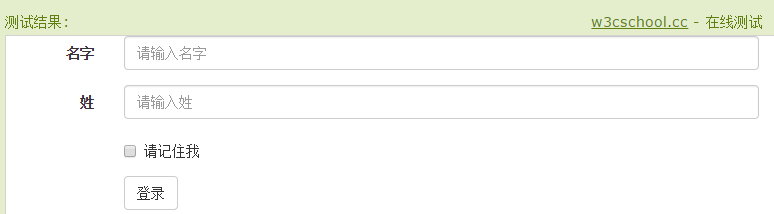
水平表单与其他表单不仅标记的数量上不同,而且表单的呈现形式也不同。如需创建一个水平布局的表单,请按下面的几个步骤进行:
- 向父 <form> 元素添加 class .form-horizontal。
- 把标签和控件放在一个带有 class .form-group 的 <div> 中。
- 向标签添加 class .control-label。
<form class="form-horizontal" role="form">

   <div class="form-group">

      <label for="firstname" class="col-sm-2 control-label">名字</label>

      <div class="col-sm-10">

         <input type="text" class="form-control" id="firstname"

            placeholder="请输入名字">

      </div>

   </div>

   <div class="form-group">

      <label for="lastname" class="col-sm-2 control-label">姓</label>

      <div class="col-sm-10">

         <input type="text" class="form-control" id="lastname"

            placeholder="请输入姓">

      </div>

   </div>

   <div class="form-group">

      <div class="col-sm-offset-2 col-sm-10">

         <div class="checkbox">

            <label>

               <input type="checkbox"> 请记住我

            </label>

         </div>

      </div>

   </div>

   <div class="form-group">

      <div class="col-sm-offset-2 col-sm-10">

         <button type="submit" class="btn btn-default">登录</button>

      </div>

   </div>

</form>

效果图:
输入框(Input)
<form role="form">

  <div class="form-group">

    <label for="name">标签</label>

    <input type="text" class="form-control" placeholder="文本输入">

  </div>

 </form>

文本框(Textarea)
<form role="form">

  <div class="form-group">

    <label for="name">文本框</label>

    <textarea class="form-control" rows="3"></textarea>

  </div>

</form>
复选框((Checkbox)和单选框(Radio)
<label for="name">默认的复选框和单选按钮的实例</label>

<div class="checkbox">

   <label><input type="checkbox" value="">选项 1</label>

</div>

<div class="checkbox">

   <label><input type="checkbox" value="">选项 2</label>

</div>

<div class="radio">

   <label>

      <input type="radio" name="optionsRadios" id="optionsRadios1"

         value="option1" checked> 选项 1

   </label>

</div>

<div class="radio">

   <label>

      <input type="radio" name="optionsRadios" id="optionsRadios2"

         value="option2">

         选项 2 - 选择它将会取消选择选项 1

   </label>

</div>

<label for="name">内联的复选框和单选按钮的实例</label>

<div>

   <label class="checkbox-inline">

      <input type="checkbox" id="inlineCheckbox1" value="option1"> 选项 1

   </label>

   <label class="checkbox-inline">

      <input type="checkbox" id="inlineCheckbox2" value="option2"> 选项 2

   </label>

   <label class="checkbox-inline">

      <input type="checkbox" id="inlineCheckbox3" value="option3"> 选项 3

   </label>

   <label class="checkbox-inline">

      <input type="radio" name="optionsRadiosinline" id="optionsRadios3"

         value="option1" checked> 选项 1

   </label>

   <label class="checkbox-inline">

      <input type="radio" name="optionsRadiosinline" id="optionsRadios4"

         value="option2"> 选项 2

   </label>

</div>
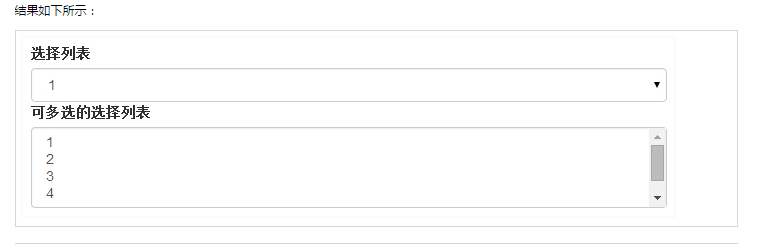
选择框(Select)
- 使用 multiple="multiple" 允许用户选择多个选项。
<form role="form">

   <div class="form-group">

      <label for="name">选择列表</label>

      <select class="form-control">

         <option>1</option>

         <option>2</option>

         <option>3</option>

         <option>4</option>

         <option>5</option>

      </select>

      <label for="name">可多选的选择列表</label>

      <select multiple class="form-control">

         <option>1</option>

         <option>2</option>

         <option>3</option>

         <option>4</option>

         <option>5</option>

      </select>

   </div>

</form>
静态控件
当您需要在一个水平表单内的表单标签后放置纯文本时,请在 <p> 上使用 class .form-control-static。
<form class="form-horizontal" role="form">

  <div class="form-group">

    <label class="col-sm-2 control-label">Email</label>

    <div class="col-sm-10">

      <p class="form-control-static">email@example.com</p>

    </div>

  </div>

  <div class="form-group">

    <label for="inputPassword" class="col-sm-2 control-label">密码</label>

    <div class="col-sm-10">

      <input type="password" class="form-control" id="inputPassword"

         placeholder="请输入密码">

    </div>

  </div>

</form>

表单控件状态
除了 :focus 状态(即,用户点击 input 或使用 tab 键聚焦到 input 上),Bootstrap 还为禁用的输入框定义了样式,并提供了表单验证的 class。
输入框焦点
当输入框 input 接收到 :focus 时,输入框的轮廓会被移除,同时应用 box-shadow。
禁用的输入框 input
如果您想要禁用一个输入框 input,只需要简单地添加 disabled 属性,这不仅会禁用输入框,还会改变输入框的样式以及当鼠标的指针悬停在元素上时鼠标指针的样式。
禁用的字段集 fieldset
对 <fieldset> 添加 disabled 属性来禁用 <fieldset> 内的所有控件。
验证状态
Bootstrap 包含了错误、警告和成功消息的验证样式。只需要对父元素简单地添加适当的 class(.has-warning、 .has-error 或 .has-success)即可使用验证状态。
<form class="form-horizontal" role="form">
<div class="form-group">
<label class="col-sm-2 control-label">聚焦</label>
<div class="col-sm-9">
<input class="form-control" id="focusedInput" type="text"
value="该输入框获得焦点...">
</div>
</div>
<div class="form-group">
<label for="inputPassword" class="col-sm-2 control-label">
禁用
</label>
<div class="col-sm-9">
<input class="form-control" id="disabledInput" type="text"
placeholder="该输入框禁止输入..." disabled>
</div>
</div>
<fieldset disabled>
<div class="form-group">
<label for="disabledTextInput" class="col-sm-2 control-label">
禁用输入(Fieldset disabled)
</label>
<div class="col-sm-10">
<input type="text" id="disabledTextInput" class="form-control"
placeholder="禁止输入">
</div>
</div>
<div class="form-group">
<label for="disabledSelect" class="col-sm-2 control-label">
禁用选择菜单(Fieldset disabled)
</label>
<div class="col-sm-10">
<select id="disabledSelect" class="form-control">
<option>禁止选择</option>
</select>
</div>
</div>
</fieldset>
<div class="form-group has-success">
<label class="col-sm-2 control-label" for="inputSuccess">
输入成功
</label>
<div class="col-sm-10">
<input type="text" class="form-control" id="inputSuccess">
</div>
</div>
<div class="form-group has-warning">
<label class="col-sm-2 control-label" for="inputWarning">
输入警告
</label>
<div class="col-sm-10">
<input type="text" class="form-control" id="inputWarning">
</div>
</div>
<div class="form-group has-error">
<label class="col-sm-2 control-label" for="inputError">
输入错误
</label>
<div class="col-sm-10">
<input type="text" class="form-control" id="inputError">
</div>
</div>
</form>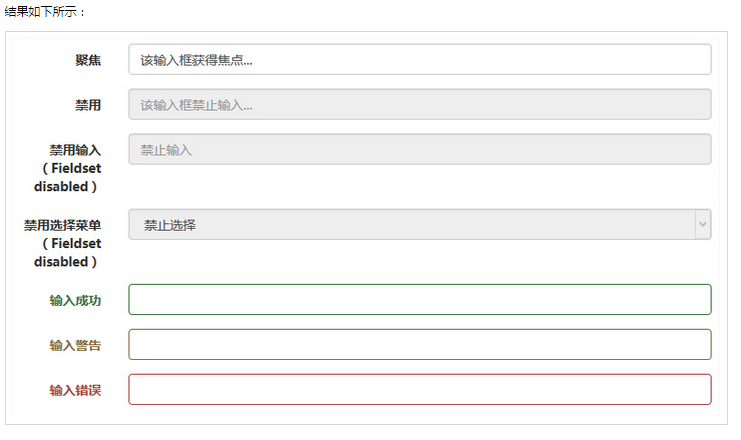
表单控件大小
您可以分别使用 class .input-lg 和 .col-lg-* 来设置表单的高度和宽度。
<form role="form">
<div class="form-group">
<input class="form-control input-lg" type="text"
placeholder=".input-lg">
</div>
<div class="form-group">
<input class="form-control" type="text" placeholder="默认输入">
</div>
<div class="form-group">
<input class="form-control input-sm" type="text"
placeholder=".input-sm">
</div>
<div class="form-group">
</div>
<div class="form-group">
<select class="form-control input-lg">
<option value="">.input-lg</option>
</select>
</div>
<div class="form-group">
<select class="form-control">
<option value="">默认选择</option>
</select>
</div>
<div class="form-group">
<select class="form-control input-sm">
<option value="">.input-sm</option>
</select>
</div>
<div class="row">
<div class="col-lg-5">
<input type="text" class="form-control" placeholder=".col-lg-2">
</div>
<div class="col-lg-3">
<input type="text" class="form-control" placeholder=".col-lg-3">
</div>
<div class="col-lg-4">
<input type="text" class="form-control" placeholder=".col-lg-4">
</div>
</div>
</form>
【原创】bootstrap框架的学习 第八课 -[bootstrap表单]的更多相关文章
- 【原创】bootstrap框架的学习 第七课 -[bootstrap表格]
Bootstrap 表格 标签 描述 <table> 为表格添加基础样式. <thead> 表格标题行的容器元素(<tr>),用来标识表格列. <tbody& ...
- 【原创】bootstrap框架的学习 第六课[bootstrap代码]
Bootstrap 允许您以两种方式显示代码: 第一种是 <code> 标签.如果您想要内联显示代码,那么您应该使用 <code> 标签. 第二种是 <pre> 标 ...
- Asp.net MVC4高级编程学习笔记-模型学习第五课MVC表单和HTML辅助方法20171101
MVC表单和HTML辅助方法 一.表单的使用. 表单中的action与method特性.Action表示表单要提交往那里,因此这里就有一个URL.这个URL可以是相对或绝对地址.表单默认的method ...
- 【原创】bootstrap框架的学习 第五课
一.Bootstrap 中定义了所有的 HTML 标题(h1 到 h6)的样式. <!DOCTYPE html> <html> <head> <title&g ...
- Elasticsearch7.X 入门学习第八课笔记-----索引模板和动态模板
原文:Elasticsearch7.X 入门学习第八课笔记-----索引模板和动态模板 版权声明:本文为博主原创文章,遵循CC 4.0 BY-SA版权协议,转载请附上原文出处链接和本声明. 本文链接: ...
- go微服务框架kratos学习笔记八 (kratos的依赖注入)
目录 go微服务框架kratos学习笔记八(kratos的依赖注入) 什么是依赖注入 google wire kratos中的wire Providers injector(注入器) Binding ...
- ng2 学习笔记(二)表单及表单验证
在上一篇文章中提到了表单,只说了表单的数据绑定,这一篇文章主要讲一下表单验证,为什么把表单单独拿出来学习,主要是因为,表单是商业应用的支柱,我们用它来执行登录.求助.下单.预订机票.安排会议,以及不计 ...
- Django学习笔记(五)—— 表单
疯狂的暑假学习之 Django学习笔记(五)-- 表单 參考:<The Django Book> 第7章 1. HttpRequest对象的信息 request.path ...
- Bootstrap历练实例:响应式导航(带有表单)
<!DOCTYPE html><html><head><meta http-equiv="Content-Type" content=&q ...
随机推荐
- iOS性能之HTTP2.0
在移动互联网领域蓬勃发展的今天,APP的性能也成为各大公司重点关注的方向,该系列文章主要针对iOS的性能的几个方面做一些研究. 什么是HTTP2.0? 网上很容易搜到关于HTTP2.0的概念的文章,这 ...
- java解析上传的excel
file是一个File,是一个excel文件 得到文件流:InputStream in = file.getInputStream() 需要引入的类 import jxl.Cell;import j ...
- Centos 7 上安装使用 vscode
#系统信息 Linux localhost.localdomain 3.10.0-327.el7.x86_64 x86_64 x86_64 x86_64 GNU/Linux 进入 vscode 下载 ...
- @Autowired 注释对在哪里和如何完成自动连接提供了更多的细微的控制。
1.@Autowired 可以用在多个地方,在 setter 方法上,属性上 或者 带有多个参数的任意方法上. Setter 方法中的 @Autowired. 当 Spring遇到一个在 setter ...
- linux CentOS6.5 安装SVN & 可视化管理工具iF.SVNAdmin
转:http://tanghenxin.lofter.com/post/1cc667b3_5ac50dc 实际系统环境: CentOS 6.5 x64 一.安装Apache 通常系统都已经装好了,但我 ...
- 解决HTML textarea 标签出现大量空格
就是什么内容也不写,然后前面却有一堆空格 原因是 textarea标签换行了 <textarea cols=" id="serve_content" name=&q ...
- JavaScript 方法调用模式和函数调用模式
这两天在读<JavaScript语言精粹>关于第4章函数调用的几种模式琢磨了半天. 这里就说一下方法调用模式跟函数调用模式. 方法调用模式: 当一个函数被保存为对象的一个属性时,我们称它为 ...
- Tcl与Design Compiler (三)——DC综合的流程
本文属于原创手打(有参考文献),如果有错,欢迎留言更正:此外,转载请标明出处 http://www.cnblogs.com/IClearner/ ,作者:IC_learner 1.基本流程概述 首先 ...
- python3编码问题终结者--还搞不懂你来找我
python unicode bytes str 编码 首先需要说明一下,该篇文章是以python3为基础的,python2是否适合没有验证过.由于python编码问题确实比较多,文章篇幅可能较长,请 ...
- 在线阅读PDF文件js插件——pdf.js
最近接到一个需求大致是这样的,要求在移动端和pc端能够在线阅读pdf文件,类似百度文库的功能. 首先想到的就是插件,github(全球最大的男性交友网站- -恩)上一大堆啊,首先找到一个PDFobje ...