
简易RPC框架-代理
*:first-child {
margin-top: 0 !important;
}
body>*:last-child {
margin-bottom: 0 !important;
}
/* BLOCKS
=============================================================================*/
p, blockquote, ul, ol, dl, table, pre {
margin: 15px 0;
}
/* HEADERS
=============================================================================*/
h1, h2, h3, h4, h5, h6 {
margin: 20px 0 10px;
padding: 0;
font-weight: bold;
-webkit-font-smoothing: antialiased;
}
h1 tt, h1 code, h2 tt, h2 code, h3 tt, h3 code, h4 tt, h4 code, h5 tt, h5 code, h6 tt, h6 code {
font-size: inherit;
}
h1 {
font-size: 28px;
color: #000;
}
h2 {
font-size: 24px;
border-bottom: 1px solid #ccc;
color: #000;
}
h3 {
font-size: 18px;
}
h4 {
font-size: 16px;
}
h5 {
font-size: 14px;
}
h6 {
color: #777;
font-size: 14px;
}
body>h2:first-child, body>h1:first-child, body>h1:first-child+h2, body>h3:first-child, body>h4:first-child, body>h5:first-child, body>h6:first-child {
margin-top: 0;
padding-top: 0;
}
a:first-child h1, a:first-child h2, a:first-child h3, a:first-child h4, a:first-child h5, a:first-child h6 {
margin-top: 0;
padding-top: 0;
}
h1+p, h2+p, h3+p, h4+p, h5+p, h6+p {
margin-top: 10px;
}
/* LINKS
=============================================================================*/
a {
color: #4183C4;
text-decoration: none;
}
a:hover {
text-decoration: underline;
}
/* LISTS
=============================================================================*/
ul, ol {
padding-left: 30px;
}
ul li > :first-child,
ol li > :first-child,
ul li ul:first-of-type,
ol li ol:first-of-type,
ul li ol:first-of-type,
ol li ul:first-of-type {
margin-top: 0px;
}
ul ul, ul ol, ol ol, ol ul {
margin-bottom: 0;
}
dl {
padding: 0;
}
dl dt {
font-size: 14px;
font-weight: bold;
font-style: italic;
padding: 0;
margin: 15px 0 5px;
}
dl dt:first-child {
padding: 0;
}
dl dt>:first-child {
margin-top: 0px;
}
dl dt>:last-child {
margin-bottom: 0px;
}
dl dd {
margin: 0 0 15px;
padding: 0 15px;
}
dl dd>:first-child {
margin-top: 0px;
}
dl dd>:last-child {
margin-bottom: 0px;
}
/* CODE
=============================================================================*/
pre, code, tt {
font-size: 12px;
font-family: Consolas, "Liberation Mono", Courier, monospace;
}
code, tt {
margin: 0 0px;
padding: 0px 0px;
white-space: nowrap;
border: 1px solid #eaeaea;
background-color: #f8f8f8;
border-radius: 3px;
}
pre>code {
margin: 0;
padding: 0;
white-space: pre;
border: none;
background: transparent;
}
pre {
background-color: #f8f8f8;
border: 1px solid #ccc;
font-size: 13px;
line-height: 19px;
overflow: auto;
padding: 6px 10px;
border-radius: 3px;
}
pre code, pre tt {
background-color: transparent;
border: none;
}
kbd {
-moz-border-bottom-colors: none;
-moz-border-left-colors: none;
-moz-border-right-colors: none;
-moz-border-top-colors: none;
background-color: #DDDDDD;
background-image: linear-gradient(#F1F1F1, #DDDDDD);
background-repeat: repeat-x;
border-color: #DDDDDD #CCCCCC #CCCCCC #DDDDDD;
border-image: none;
border-radius: 2px 2px 2px 2px;
border-style: solid;
border-width: 1px;
font-family: "Helvetica Neue",Helvetica,Arial,sans-serif;
line-height: 10px;
padding: 1px 4px;
}
/* QUOTES
=============================================================================*/
blockquote {
border-left: 4px solid #DDD;
padding: 0 15px;
color: #777;
}
blockquote>:first-child {
margin-top: 0px;
}
blockquote>:last-child {
margin-bottom: 0px;
}
/* HORIZONTAL RULES
=============================================================================*/
hr {
clear: both;
margin: 15px 0;
height: 0px;
overflow: hidden;
border: none;
background: transparent;
border-bottom: 4px solid #ddd;
padding: 0;
}
/* TABLES
=============================================================================*/
/* IMAGES
=============================================================================*/
img {
max-width: 100%
}
-->
代理
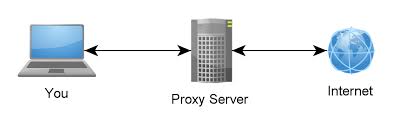
代理的意思就是请求者不直接与终端交互,而是通过一个中间者来做请求转发,举几个生活中的代理案例:
- 翻墙上网
国外有很多网站在国内不能访问,所以就需要利用一个代理中转发请求,达到瞒天过海的目的。
- 用户炒股
要想投资股票,你只能通过在证券商那开通账户然后,通过在证券商那提供的功能才能实现在上海证券交易所交易股票。

- 经济人
下面的看图就明白了,不需要多做解释。

RPC
RPC的意思是远程过程调用,使客户端调用远程方法像调用本地方法一样简单,而不需要去关心如何与远程服务器通信相关问题:
- 具体的通信协议选择
比如是TCP通信还是基于HTTP通信,像dubbo默认是基于TCP的,当当在此基础上扩展了劫持HTTP通信的扩展,spring cloud也是基于HTTP。
- 具体的编码方式
计算机之间通信时最需要按一定格式的数据进行传输,比如TCP通信时就需要将JAVA对象通过编码转换成字节流,比如这两对象:
MessageToByteEncoder与ByteToMessageDecoder
- 具体数据传输
比如TCP传输时,各类问题:半包,粘包,延迟,超时,重连等处理。
- ......
为了不在客户端调用服务端时处理上述逻辑,就需要有一个专门处理上述问题的框架来协助,这里可以利用JAVA提供的动态代理业完成。将请求委托给一个代理,这个代理去专门解决通信问题。
动态代理基础
InvocationHandler
要想写一个代理实现类,最简单的方法就是实现InvocationHandler接口,它只包含一个接口方法:
Object invoke(Object proxy, Method method, Object[] args)
包含三个参数:
- proxy
是指被代理的真实对象
- method
是指我们需要执行的真实对象的方法
- args
是指我们需要执行的真实对象的方法所需要的参数
此类需要配合下面的Proxy类来创建动态代理,自身只是一个代理类的实现。
Proxy
这个类是用来创建真实对象代理类的,我这里应用Proxy.newProxyInstance构建Rpc客户端代理,它也有三个参数:
- ClassLoader loader
是指由哪一个类加载器来加载生成的代理对象,一般我们就用真实对象所用的加载器即可。
- Class<?>[] interfaces
是指真实对象都实现了哪些接口,接口确认之后才能调用其中的方法。
- InvocationHandler h
是指产生的代理类在执行方法时所关联的一个代理对象,即我们第一步提到的实现了InvocationHandler接口的实例,代理对象在执行方法时委托给这个关联的handle去处理。
RPC客户端代理实现
RpcProxy
编写一个代理类RpcProxy,它用来处理TCP通信相关的问题,主要流程如下:
- 组装参数
从method以及args参数中获取相应的值,填充到私有协议栈所需要的数据对象中(RpcRequest)。
- 找一个可用的连接进行数据通信
从连接管理器(RpcClientInvokerManager)中获取可用连接,构建处理请求链最后调用执行方法。
- 返回结果
根据客户端请求的方式,如果是需要返回值则返回一个Future对象供异步回调,如果不关心返回值则直接返回空。
@Override

    public Object invoke(Object proxy, Method method, Object[] args) throws Throwable {

        RpcRequest request = new RpcRequest();

        request.setRequestId(UUID.randomUUID().toString());

        request.setClassName(method.getDeclaringClass().getName());

        request.setMethodName(method.getName());

        request.setParameterTypes(method.getParameterTypes());

        request.setParameters(args);

        if (this.reference != null) {

            request.setMaxExecutesCount(this.reference.maxExecutesCount());

        }

        request.setContextParameters(RpcContext.getContext().getContextParameters());

        RpcClientInvoker invoker = RpcClientInvokerManager.getInstance(this.referenceConfig).getInvoker();

        invoker.setRpcRequest(request);

        RpcInvoker rpcInvoker=invoker.buildInvokerChain(invoker);

        ResponseFuture response=(ResponseFuture) rpcInvoker.invoke(invoker.buildRpcInvocation(request));

        if(isSync){

            return response.get();

        }

        else {

            RpcContext.getContext().setResponseFuture(response);

            return null;

        }

    }
RPC客户端初始化远程接口
- 在RpcClient类中封装一个创建代理的方法:
public <T> T createProxy(Class<T> interfaceClass,RpcReference reference) {

    return (T) Proxy.newProxyInstance(

            interfaceClass.getClassLoader(),

            new Class<?>[]{interfaceClass},

            new RpcProxy<T>(interfaceClass,this.referenceConfig,reference)

    );

}
通过上面代码产后的代理,是在JVM运行时产生的,它即不是我们上面所提到的代理对象RpcProxy也不是我们的真实对象,它的主要作用就是在调用接口时,将invoke方法的执行委托给我们的代理对象RpcProxy,起到一个转发的效果。
- 通过注解自动生成代理
要想实现调用远程接口与调用本地接口一样简单,思路就是在系统初始化时,扫描特殊注解的变量从而为变量创建代理对象。这里可以借助于BeanPostProcessor对象,它有一个初始化的方法:
public Object postProcessBeforeInitialization(Object bean, String beanName)
我们可以在这个函数中为特殊的变量调用RpcClient.createProxy生成代理,比如下面的代码会遍历所有的字段,如果字段上标记了RpcReference注解,说明这是一个远程接口,所以调用RpcClient调用createProxy生成代理对象。
public Object initRpcReferenceBean(Object bean, String beanName){

    Class<?> clazz = bean.getClass();

    if(isProxyBean(bean)){

        clazz = AopUtils.getTargetClass(bean);

    }

    Field[] fields = clazz.getDeclaredFields();

    for (Field field : fields) {

        try {

            if (! field.isAccessible()) {

                field.setAccessible(true);

            }

            RpcReference reference = field.getAnnotation(RpcReference.class);

            if (reference != null) {

                Object value=this.rpcClient.createProxy(field.getType(),reference);

                if (value != null) {

                    field.set(bean, value);

                }

            }

        } catch (Exception e) {

            throw new BeanInitializationException("Failed to init remote service reference at filed " + field.getName() + " in class " + bean.getClass().getName(), e);

        }

    }

    return bean;

}
RPC客户端引用远程接口
以下代码是一个服务中依赖的变量,增加上@rpcreference之后说明接口是一个远程接口。
@RpcReference(isSync = false)

private ProductService productServiceAsync;
方法中调用远程接口:
public Product getById(Long productId){

   return this.productService.getById(productId);

}
业务代码中,直接调用productServiceAsync中包含的方法即可,不需要去写任何写通信相关的代码,实现了典型的远程过程调用。
本文源码
https://github.com/jiangmin168168/jim-framework
文中代码是依赖上述项目的,如果有不明白的可下载源码
简易RPC框架-代理的更多相关文章
- 简易RPC框架-客户端限流配置
*:first-child { margin-top: 0 !important; } body>*:last-child { margin-bottom: 0 !important; } /* ...
- 简易RPC框架-心跳与重连机制
*:first-child { margin-top: 0 !important; } body > *:last-child { margin-bottom: 0 !important; } ...
- 简易RPC框架-SPI
*:first-child { margin-top: 0 !important; } body > *:last-child { margin-bottom: 0 !important; } ...
- 自行实现一个简易RPC框架
10分钟写一个RPC框架 1.RpcFramework package com.alibaba.study.rpc.framework; import java.io.ObjectInputStrea ...
- 简易RPC框架-学习使用
*:first-child { margin-top: 0 !important; } body>*:last-child { margin-bottom: 0 !important; } /* ...
- 简易RPC框架-上下文
*:first-child { margin-top: 0 !important; } body>*:last-child { margin-bottom: 0 !important; } /* ...
- 简易RPC框架-过滤器机制
*:first-child { margin-top: 0 !important; } body > *:last-child { margin-bottom: 0 !important; } ...
- Java通过Socket和动态代理实现简易RPC框架
本文转自Dubbo作者梁飞大神的CSDN(https://javatar.iteye.com/blog/1123915),代码简洁,五脏俱全. 1.首先实现RpcFramework,实现服务的暴露与引 ...
- 简易RPC框架-熔断降级机制
*:first-child { margin-top: 0 !important; } body > *:last-child { margin-bottom: 0 !important; } ...
随机推荐
- 关于form表单或者Ajax向后台发送数据时,数据格式的探究
最近在做一个资产管理系统项目,其中有一个部分是客户端向服务端发送采集到的数据的,服务端是Django写的,客户端需要用rrequests模块模拟发送请求 假设发送的数据是这样的: data = {'s ...
- 集 降噪 美颜 虚化 增强 为一体的极速图像润色算法 附Demo程序
在2015年8月份的时候,决心学习图像算法. 几乎把当时市面上的图像算法相关书籍都看了一遍, 资金有限,采取淘宝买二手书,长期驻留深圳图书馆的做法, 进度总是很慢,学习算法不得其法. 虽然把手上所有书 ...
- Django进阶篇【2】
在学习之前,我们补充一个知识点(static用法) 创建APP 配置: setting.py STATICFILES_DIRS = ( os.path.join(BASE_DIR,'static') ...
- 通过js修改网页内容
js可以通过文本所在标签的id获取该标签对象,然后修改其内容,如: document.getElementById('标签id').innerHTML = '要修改的文本内容'; 该方法可以在要修改的 ...
- Hudson + SVN + Maven 持续集成实现自动化编译、打包、部署(over SSH 和 Deploy war/ear to a container 两种部署方式)
下载hudson ,安装部署http://hudson-ci.org/ 将下载的hudson-3.3.3.war放到tomcat的webapps目录下并启动tomcat,输入地址访问 点击Instal ...
- 提纲挈领webrtc之NS(noise suppression)模块
Noise suppression,就是大家说的降噪.这种降噪是把人声和非人声区分开来,把非人声当成噪声. 一段包含人声和噪声的音频经过该模块处理,从理论上讲,只剩下人声了. webrtc的NS在业内 ...
- JAVA提高五:注解Annotation
今天我们学习JDK5.0中一个非常重要的特性,叫做注解.是现在非常流行的一种方式,可以说因为配置XML 比较麻烦或者比容易查找出错误,现在越来越多的框架开始支持注解方式,比如注明的Spring 框架, ...
- Linux系列教程(一)——Linux系统简介
本系列教程将完整的讲解整个Linux相关的知识,这是楼主学完之后重新对Linux知识体系的整理.从最基础的知识开始,对于一个完全不懂Linux系统的人,相信在看完整个系列教程之后,都能对Linux有一 ...
- javaScript 设计模式系列之四:组合模式
介绍 组合模式(Composite Pattern):组合多个对象形成树形结构以表示具有"整体-部分"关系的层次结构.组合模式对单个对象(即叶子对象)和组合对象(即容器对象)的使用 ...
- WiFi万能钥匙4.1.32接口
做Key4WiFi时提取的接口 部分代码来自于 http://zke1ev3n.me/2016/04/06/WiFi%E4%B8%87%E8%83%BD%E9%92%A5%E5%8C%99%E6%8E ...