
Using NHibernate with SQLite
The most convenient method to add NHibernate and SQLite for C# project is using NuGet. You can check that in [1]. But I prefer a more free way to do it with NAnt. Let's do it.
Step 1, download all packages from official websites.
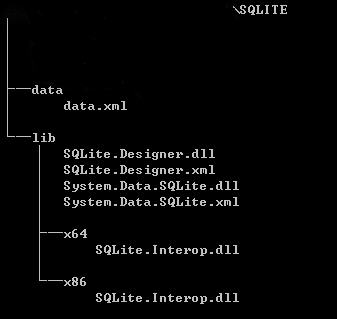
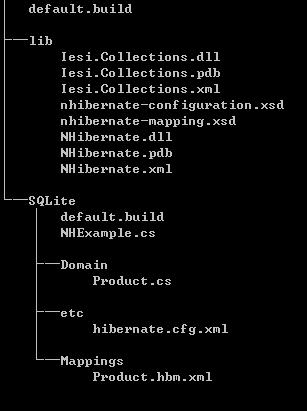
Step 2, set up the directory structure
For SQLite files:
For NHibernate files:
Step 3, create your domain entity class.
// Product.cs
namespace NHExample.Domain

{

    public class Product

    {

        public virtual Guid Id { get; set; }

        public virtual string Name { get; set; }

        public virtual string Category { get; set; }

        public virtual int Price { get; set; }

    }

}
Step 4, create the mapping file Product.hbm.xml.
<?xml version="1.0" encoding="utf-8" ?>

<hibernate-mapping xmlns="urn:nhibernate-mapping-2.2"

                   assembly="NHExample"

                   namespace="NHExample.Domain">

  <class name="Product" table="products">

    <id name="Id">

      <generator class="guid" />

    </id>

    <property name="Name" />

    <property name="Category" />

    <property name="Price" />

  </class>

</hibernate-mapping>
Step 5, create NHibernate configuration file hibernate.cfg.xml.
<?xml version="1.0" encoding="utf-8" ?>

<hibernate-configuration xmlns="urn:nhibernate-configuration-2.2">

  <session-factory name="NHibernate.Test">

    <property name="connection.driver_class">NHibernate.Driver.SQLite20Driver</property>

    <property name="connection.connection_string">Data Source=nhibernate.db;Version=3</property>

    <property name="dialect">NHibernate.Dialect.SQLiteDialect</property>

    <property name="query.substitutions">true=1;false=0</property>

    <property name="show_sql">true</property>

  </session-factory>

</hibernate-configuration>
Step 6, create a driver for it
// NHExample.cs

using System;

using System.Linq;

using NHibernate;

using NHibernate.Cfg;

using NHibernate.Tool.hbm2ddl;

namespace NHExample

{

	class NHExample

	{

		static void Main(string[] args)

		{

			// Initialize NHibernate

			var cfg = new Configuration();

			cfg.Configure();

			cfg.AddAssembly(typeof(Domain.Product).Assembly);

			// Get ourselves an NHibernate Session

			var sessions = cfg.BuildSessionFactory();

			var sess = sessions.OpenSession();

			// Create the database schema

			new SchemaExport(cfg).Create(true, true);

			// Create a Product...

			var product = new Domain.Product

			{

				Name = "Some C# Book",

				Price = 500,

				Category = "Books"

			};

			// And save it to the database

			sess.Save(product);

			sess.Flush();

			// Note that we do not use the table name specified

			// in the mapping, but the class name, which is a nice

			// abstraction that comes with NHibernate

			IQuery q = sess.CreateQuery("FROM Product");

			var list = q.List<Domain.Product>();

			// List all the entries' names

			list.ToList().ForEach( p => Console.WriteLine( p.Name ));

		}

	}

}
Step 7, create a NAnt script.
<?xml version="1.0"?>

<project name="SQLite with NHibernate" default="run">

    <property name="debug" value="true" />

	<property name="outdir" value="bin" />

	<property name="libdir" value="../lib" />

	<property name="sqlite_libdir" value="../../sqlite/lib" />

    <target name="clean" description="remove all generated files">

		<delete dir="${outdir}" />

    </target>

    <target name="build" description="compiles the source code">

		<mkdir dir="${outdir}" />

		<csc debug="${debug}" output="${outdir}/NHExample.exe" target="exe">

			<references basedir="${libdir}">

				<include name="NHibernate.dll" />

			</references>

			<sources>

				<include name="Domain/Product.cs" />

				<include name="NHExample.cs" />

			</sources>

			<resources dynamicprefix="true" prefix="NHExample.Domain">

				<include name="Mappings/*.hbm.xml" />

			</resources>

		</csc>

		<copy todir="${outdir}">

            <fileset basedir="${libdir}">

              <include name="NHibernate.dll" />

              <include name="NHibernate.xml" />

              <include name="Iesi.Collections.dll" />

              <include name="Iesi.Collections.xml" />

            </fileset>

        </copy>

		<copy todir="${outdir}">

		    <fileset basedir="etc">

              <include name="hibernate.cfg.xml" />

			</fileset>

		</copy>

		<copy todir="${outdir}">

            <fileset basedir="${sqlite_libdir}">

              <include name="System.Data.SQLite.dll" />

              <include name="System.Data.SQLite.xml" />

            </fileset>

        </copy>

		<copy todir="${outdir}/x64">

            <fileset basedir="${sqlite_libdir}/x64">

              <include name="SQLite.Interop.dll" />

            </fileset>

        </copy>

		<copy todir="${outdir}/x86">

            <fileset basedir="${sqlite_libdir}/x86">

              <include name="SQLite.Interop.dll" />

            </fileset>

        </copy>

	</target>

	<target name="run" depends="build">

		<exec program="${outdir}/NHExample.exe" workingdir="${outdir}"/>

	</target>

</project>
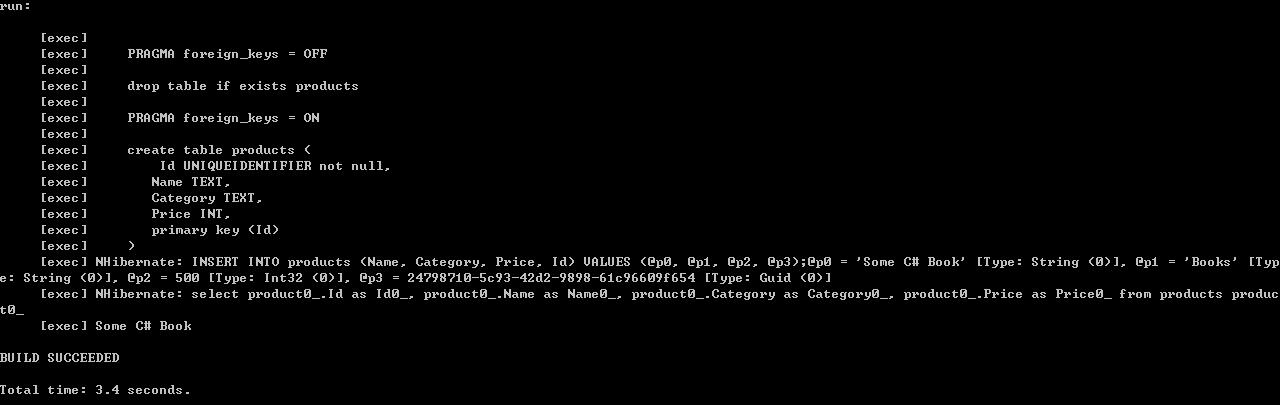
Step 8, build and run it
Links:
NHibernate: http://nhforge.org/
SQLite.NET: http://system.data.sqlite.org/index.html/doc/trunk/www/index.wiki
References:
[1] http://coding-journal.com/setting-up-nhibernate-with-sqlite-using-visual-studio-2010-and-nuget/
Using NHibernate with SQLite的更多相关文章
- Could not create the driver from NHibernate.Driver.SQLite20Driver
使用NHibernate连接Sqlite语句,版本为.net3.5. 升级.net 4.0出现异常,提示”Could not create the driver from NHibernate.Dri ...
- USING NHIBERNATE WITH MySQL
In previous USING NHIBERNATE WITH SQLITE, we connect SQLITE with ORM framework NHibernate. One of th ...
- lync项目总结
概述 9月份,由于公司人事变动,摆在自己面前也有两条路可选择,一是选择lync,二是选择sharepoint,由于之前,部门老大已经让我看了大概一个月的有关lync方面的资料(文档,代码,项目实施等) ...
- [Nhibernate]sqlite数据库基本使用
目录 写在前面 操作步骤 总结 写在前面 昨天有朋友问我在nhibernate中如何使用sqlite数据库,当时实在忙的不可开交,下周要去山西出差,实在没空,按我的说法使用sqlite跟使用sqlse ...
- Fluent NHibernate and Mysql,SQLite,PostgreSQL
http://codeofrob.com/entries/sqlite-csharp-and-nhibernate.html https://code.google.com/archive/p/csh ...
- 启用SQLite的Data Provider 运行WECOMPANYSITE时遇到ERROR CREATING CONTEXT 'SPRING.ROOT': ERROR THROWN BY A DEPENDENCY OF OBJECT 'SYSTEM.DATA.SQLITE'
从网上下载的源码WeCompanySite,运行时报错 Error creating context 'spring.root': Error thrown by a dependency of ob ...
- 耗时两月,NHibernate系列出炉
写在前面 这篇总结本来是昨天要写的,可昨天大学班长来视察工作,多喝了点,回来就倒头就睡了,也就把这篇总结的文章拖到了今天. nhibernate系列从开始着手写,到现在前后耗费大概两个月的时间,通过总 ...
- 【翻译】Fluent NHibernate介绍和入门指南
英文原文地址:https://github.com/jagregory/fluent-nhibernate/wiki/Getting-started 翻译原文地址:http://www.cnblogs ...
- 【翻译】首个基于NHibernate的应用程序
首个基于NHibernate的应用程序 Your first NHibernate based application 英文原文地址:http://www.nhforge.org/wikis/how ...
随机推荐
- JDK7新特性try-with-resources语句
try-with-resources语句是一种声明了一种或多种资源的try语句.资源是指在程序用完了之后必须要关闭的对象.try-with-resources语句保证了每个声明了的资源在语句结束的时候 ...
- BZOJ2728 HNOI2012与非(并查集+数位dp)
容易发现x nand x=not x.并且使用这个性质有x and y=not(x nand y)=(x nand y)nand(x nand y).也就是说nand运算可以作为not和and运算使用 ...
- WEB入门之十二 jquery简介
学习内容 jQuery简介 搭建jQuery开发环境 jQuery基本选择器 能力目标 熟悉jQuery开发环境 能编写简单的jQuery代码 本章简介 在前面两章,我们学习了JavaScript面向 ...
- Spring MVC测试框架
原文链接:http://jinnianshilongnian.iteye.com/blog/2004660 Spring MVC测试框架详解——服务端测试 博客分类: springmvc杂谈 spri ...
- HDU 2255 KM算法 二分图最大权值匹配
奔小康赚大钱 Time Limit: 1000/1000 MS (Java/Others) Memory Limit: 32768/32768 K (Java/Others)Total Subm ...
- adb logcat介绍
logcat命令语法: [adb] logcat [<option>] ... [<filter-spec>] ... adb logcat -c 清除所有以前的日志 adb ...
- Java基础-爬虫实战之爬去校花网网站内容
Java基础-爬虫实战之爬去校花网网站内容 作者:尹正杰 版权声明:原创作品,谢绝转载!否则将追究法律责任. 爬虫这个实现点我压根就没有把它当做重点,也没打算做网络爬虫工程师,说起爬虫我更喜欢用Pyt ...
- Java基础-JAVA中常见的数据结构介绍
Java基础-JAVA中常见的数据结构介绍 作者:尹正杰 版权声明:原创作品,谢绝转载!否则将追究法律责任. 一.什么是数据结构 答:数据结构是指数据存储的组织方式.大致上分为线性表.栈(Stack) ...
- angular模块
深入浅析AngularJS中的模块 模块是AngularJS应用程序的一个组成部分,模块可以是一个Controller.Service服务.Filter过滤器.directive指令,这些都属于模块. ...
- bzoj千题计划237:bzoj1492: [NOI2007]货币兑换Cash
http://www.lydsy.com/JudgeOnline/problem.php?id=1492 dp[i] 表示 第i天卖完的最大收益 朴素的dp: 枚举从哪一天买来的在第i天卖掉,或者是不 ...