
sql的时间格式
sql中的时间格式转换主要有:date_format函数,str_to_date函数
1. 首先选择一个数据库
use db_name;
2. 显示当前时区的时间:
SELECT NOW();
3. 按照格式显示,使用 date_format 函数:
select date_format(NOW(),'%W-%Y-%m-%d') as column_name;

select date_format(NOW(),'%W-%Y-%m-%d') column_name;

4. 格式化代码
%a |
Short weekday name in current locale (Variable lc_time_names). |
%b |
Short form month name in current locale. For locale en_US this is one of: Jan,Feb,Mar,Apr,May,Jun,Jul,Aug,Sep,Oct,Nov or Dec. |
%c |
Month with 1 or 2 digits. |
%D |
Day with English suffix 'th', 'nd', 'st' or 'rd''. (1st, 2nd, 3rd...). |
%d |
Day with 2 digits. |
%e |
Day with 1 or 2 digits. |
%f |
Sub seconds 6 digits. |
%H |
Hour with 2 digits between 00-23. |
%h |
Hour with 2 digits between 01-12. |
%I |
Hour with 2 digits between 01-12. |
%i |
Minute with 2 digits. |
%j |
Day of the year (001-366) |
%k |
Hour with 1 digits between 0-23. |
%l |
Hour with 1 digits between 1-12. |
%M |
Full month name in current locale (Variable lc_time_names). |
%m |
Month with 2 digits. |
%p |
AM/PM according to current locale (Variable lc_time_names). |
%r |
Time in 12 hour format, followed by AM/PM. Short for '%I:%i:%S %p'. |
%S |
Seconds with 2 digits. |
%s |
Seconds with 2 digits. |
%T |
Time in 24 hour format. Short for '%H:%i:%S'. |
%U |
Week number (00-53), when first day of the week is Sunday. |
%u |
Week number (00-53), when first day of the week is Monday. |
%V |
Week number (01-53), when first day of the week is Sunday. Used with %X. |
%v |
Week number (01-53), when first day of the week is Monday. Used with %x. |
%W |
Full weekday name in current locale (Variable lc_time_names). |
%w |
Day of the week. 0 = Sunday, 6 = Saturday. |
%X |
Year with 4 digits when first day of the week is Sunday. Used with %V. |
%x |
Year with 4 digits when first day of the week is Monday. Used with %v. |
%Y |
Year with 4 digits. |
%y |
Year with 2 digits. |
%# |
For str_to_date(), skip all numbers. |
%. |
For str_to_date(), skip all punctation characters. |
%@ |
For str_to_date(), skip all alpha characters. |
%% |
A literal % character. |
5. 显示当前区域编码,因为时间与当地时间(区域有关)
SELECT @@lc_time_names loc_name; #loc_name为显示的列名

SET lc_time_names = 'zh_CN'; #设置区域编码
6. 先显示表格 felix_test
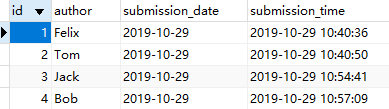
CREATE TABLE IF NOT EXISTS felix_test(

   id INT UNSIGNED AUTO_INCREMENT,

   author VARCHAR(40) NOT NULL,

   submission_date DATE,

     submission_time DATETIME,

   PRIMARY KEY(id)

)ENGINE=InnoDB DEFAULT CHARSET=utf8;
7. 获取从0年(0000-00-00)开始的天数 —— to_days(),常用于获取昨天、前几天、一周内、一月内等的数据
select TO_DAYS(submission_time) from felix_test;

select TO_DAYS(submission_date) from felix_test;
以下四种形式的数据得到的to_days结果一致
select TO_DAYS(20200325);

select TO_DAYS(200325);

select TO_DAYS('2020-03-25')

select TO_DAYS('20-03-25')
求刚好是一周前的数据和大于一周的数据:
select * from felix_test where (TO_DAYS(now())-TO_DAYS(submission_time))=7;

select * from felix_test where (TO_DAYS(now())-TO_DAYS(submission_time))>7;
8. 相应的,获取从0年开始的秒数 —— to_seconds()
select TO_SECONDS(submission_time) from felix_test;

select TO_SECONDS(submission_date) from felix_test;
9. 分别获取时间的年、月、日、时、分、秒 —— year(),month(),day(),hour(),minute(),second()
select year(submission_time) from felix_test;

select month(submission_time) from felix_test;

select day(submission_time) from felix_test;

select hour(submission_time) from felix_test;

select minute(submission_time) from felix_test;

select second(submission_time) from felix_test;
10. 日期转时间戳 —— hive与mysql的 unix_timestamp 使用一致
select unix_timestamp(submission_time) from felix_test; #日期时间转时间戳,此函数hive与此一致
11. 时间戳转日期(mysql)
select from_unixtime(1572316836 ,'%Y/%m/%d %H:%i:%s');  #时间戳转日期

select from_unixtime(1572316836,'%Y/%m/%d %H:%i:%s') from felix_test;  #时间戳转日期,其中的时间戳可以换成值为时间戳的列名
12. 时间戳转日期(hive)
select from_unixtime(cast(1572316836 as bigint),'yyyy/MM/dd HH:mm:ss')

select from_unixtime(cast(createtime/1000 as bigint),'yyyy/MM/dd HH:mm:ss') from db_name.tb_name limit 10

# create/1000 表示时间戳此时单位是毫秒,如果是秒,就不用了除以1000
参考:
https://www.cnblogs.com/wjm956/p/7297942.html
https://blog.csdn.net/shenliang1985/article/details/90142010
sql的时间格式的更多相关文章
- Sql日期时间格式转换;取年 月 日,函数:DateName()、DATEPART()
一.sql server2000中使用convert来取得datetime数据类型样式(全) 日期数据格式的处理,两个示例: CONVERT(varchar(16), 时间一, 20) 结果:2007 ...
- sql 日期时间格式转换
Sql日期时间格式转换 sql server2000中使用convert来取得datetime数据类型样式(全) 日期数据格式的处理,两个示例: CONVERT(varchar(16), 时间一, ...
- sql server 时间格式转换
sql server2000中使用convert来取得datetime数据类型样式(全) 日期数据格式的处理,两个示例: CONVERT(varchar(16), 时间一, 20) 结果:2007-0 ...
- Sql server 时间格式转化
--.SQL时间格式转化 --日期转换参数 ) --2009-03-15 15:10:02 ),'-',''),' ',''),':','') ) , ) --2009/03/15 ) , ) ) , ...
- (转)Sql日期时间格式转换
sql server2000中使用convert来取得datetime数据类型样式(全) 日期数据格式的处理,两个示例: CONVERT(varchar(16), 时间一, 20) 结果:2007-0 ...
- Sql日期时间格式转换
sql server2000中使用convert来取得datetime数据类型样式(全) 日期数据格式的处理,两个示例: CONVERT(varchar(16), 时间一, 20) 结果:2007-0 ...
- Sql日期时间格式转换(转)
原文出自:http://www.cnblogs.com/Gavinzhao/archive/2009/11/10/1599690.html sql server2000中使用convert来取得dat ...
- Sql Server 时间格式
问题引出: Sql Server 里 dateTime 数据类型,会精确到毫秒.如果我们 在插入一条数据的时候,使用 GetDate() 记录 这个记录插入的时间,则会插入当前时间,精确到毫秒.在查询 ...
- Sql日期时间格式转换 备用
sql server2000中使用convert来取得datetime数据类型样式(全) 日期数据格式的处理,两个示例: CONVERT(varchar(16), 时间一, 20) 结果:2007-0 ...
随机推荐
- 基于C#在WPF中使用斑马打印机进行打印【转】——不支持XPS的打印机
https://www.cnblogs.com/zhaobl/p/4666002.html
- 【Leetcode_easy】1046. Last Stone Weight
problem 1046. Last Stone Weight 参考 1. Leetcode_easy_1046. Last Stone Weight; 完
- Charles 抓包配置
本文参考:charles 抓包配置 proxy setting (代理设置) 设置的主界面如下: 动态端口 启用动态端口选项来监听动态端口,每次查询启动时选择.这样可以避免与计算机上可能运行的其他网络 ...
- Git常用命令及方法
https://blog.csdn.net/web_csdn_share/article/details/79243308 Git常用命令及方法大全 下面是我整理的常用 Git 命令清单.几个专用名词 ...
- xadmin自定义菜单、增加功能、富文本编辑器
xadmin功能:https://www.cnblogs.com/derek1184405959/p/8682250.html#blogTitle7
- Generative Adversarial Network (GAN) - Pytorch版
import os import torch import torchvision import torch.nn as nn from torchvision import transforms f ...
- 023 Android 自定义Toast控件
1.Toast自定义控件工具类 package com.example.administrator.test62360safeguard.Utils; import android.content.C ...
- Spring之2:HierarchicalBeanFactory接口
HierarchicalBeanFactory:HierarchicalBeanFactory继承BeanFactory并扩展使其支持层级结构.getParentBeanFactory()方法或者父级 ...
- Zuul【基础配置】
概述:zuul底层是基于servlet,是由一系列的filter链构成. 1.路由配置 a.单例serverId映射 zuul: routes: client-a: path: /client/** ...
- svn: E230001: Server SSL certificate verification failed: certificate issued
svn: E230001: Server SSL certificate verification failed: certificate issued 今天在使用svn时候发现出现这个问题,这个是因 ...