
.NET Core 创建Windows服务
.NET Core 创建Windows服务
写在前面
使用 TopShelf+Autofac+AutoMapper+Quartz+NLog 完成现有项目定时调度任务
1.相关NetGet包
- 依赖注入 Alexinea.Autofac.Extensions.DependencyInjection
- 对象映射 AutoMapper.Extensions.Microsoft.DependencyInjection
- 调度 Autofac.Extras.Quartz
- Topshelf注入 Topshelf.Autofac
- Topshelf日志 Topshelf.NLog/Topshelf.Log4Net
2.添加Autofac自动映射服务
- 引入 Alexinea.Autofac.Extensions.DependencyInjection
3.添加AutoMapper自动映射类
- 引入 AutoMapper.Extensions.Microsoft.DependencyInjection
- 添加测试类 User、UserDto
- 添加服务类 IUserRepository、UserRepository、IUserService、UserService,获取配置文件中的User信息并转换为业务模型UserDto
- 添加映射配置文件 MapperProfiles
- 添加Autofac扩展 AutoMapperExtensions
public static class AutoMapperExtensions

{

    public static ContainerBuilder ConfigureAutoMapper(this ContainerBuilder builder)

    {

        builder.RegisterAssemblyTypes(AppDomain.CurrentDomain.GetAssemblies())

            .AsClosedTypesOf(typeof(ITypeConverter<,>))

            .AsImplementedInterfaces();

        builder.RegisterAssemblyTypes(typeof(AutoMapperExtensions).Assembly)

            .AssignableTo<Profile>().As<Profile>();

        builder.Register(c => {

            var profiles = c.Resolve<IEnumerable<Profile>>();

            var context = c.Resolve<IComponentContext>();

            return new MapperConfiguration(x => {

                foreach (var profile in profiles) x.AddProfile(profile);

                x.ConstructServicesUsing(context.Resolve);

            });

        }).SingleInstance().AsSelf();

        builder.Register(c => {

            var context = c.Resolve<IComponentContext>();

            var config = context.Resolve<MapperConfiguration>();

            return config.CreateMapper();

        }).As<IMapper>();

        return builder;

    }

}
- 添加自定义服务扩展 ServicesExtensions
public static class ServicesExtensions

{

    public static ContainerBuilder ConfigureSelf(this ContainerBuilder builder)

    {

        var services = new ServiceCollection();

        // register appsettings.json

        services.Configure<User>("UserConfig", Settings.Instance.Configuration.GetSection("User"));

        builder.Populate(services);

        // register services repositories

        builder.RegisterAssemblyTypes(typeof(UserRepository).Assembly)

                .Where(t => t.Name.EndsWith("Repository"))

                .AsImplementedInterfaces();

        builder.RegisterAssemblyTypes(typeof(UserService).Assembly)

                .Where(t => t.Name.EndsWith("Service"))

                .AsImplementedInterfaces();

        return builder;

    }

}
4.添加Quartz调度任务
- 引入 Autofac.Extras.Quartz
- 添加调度任务类 MyJob1
- 添加Autofac扩展 QuartzExtensions
public static ContainerBuilder ConfigureQuartz(this ContainerBuilder builder)

{

    // 1) Register IScheduler

    builder.RegisterModule(new QuartzAutofacFactoryModule());

    // 2) Register jobs

    builder.RegisterModule(new QuartzAutofacJobsModule(typeof(MyJob1).Assembly));

    return builder;

}
5.添加日志
- 引入 NLog.Extensions.Logging
6.创建TopShelf服务
- 引入 Topshelf.NLog
- 引入 Topshelf.Autofac
7.发布并添加Windows服务
- 发布为独立文件
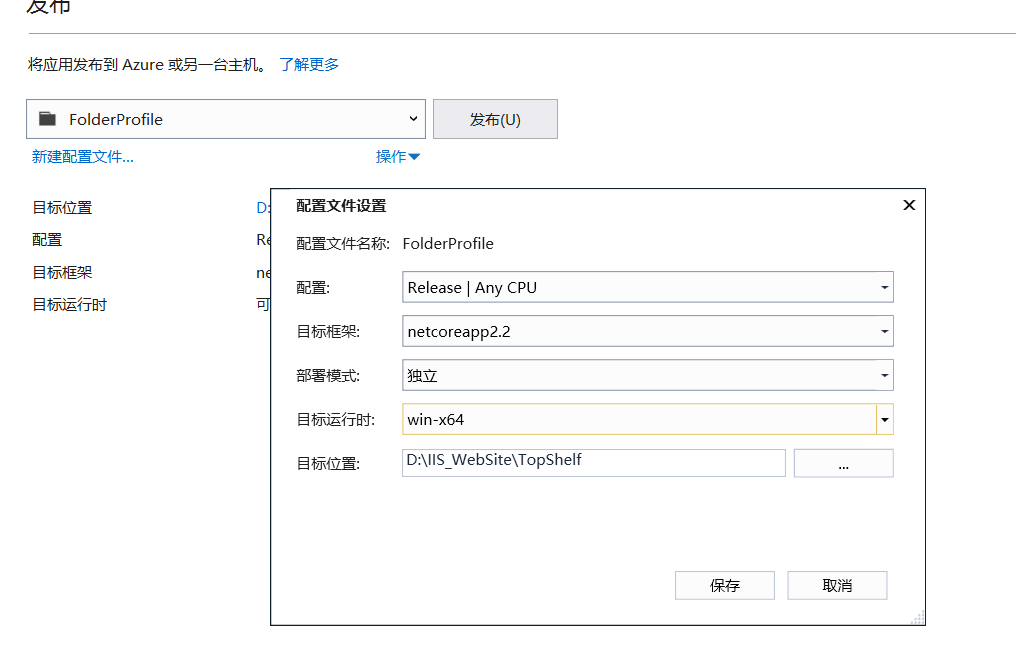
- 添加安装(install.bat)和卸载文件(uninstall.bat)
cd /d %~dp0

Sample.Topshelf.exe install

pause
cd /d %~dp0

Sample.Topshelf.exe uninstall

pause
源码
参考资料
.NET Core 创建Windows服务的更多相关文章
- 使用.NET Core创建Windows服务(二) - 使用Topshelf方式
原文:Creating Windows Services In .NET Core – Part 2 – The "Topshelf" Way 作者:Dotnet Core Tut ...
- 使用.NET Core创建Windows服务 - 使用.NET Core工作器方式
原文:Creating Windows Services In .NET Core – Part 3 – The ".NET Core Worker" Way 作者:Dotnet ...
- 使用.NET Core创建Windows服务(一) - 使用官方推荐方式
原文:使用.NET Core创建Windows服务(一) - 使用官方推荐方式 原文:Creating Windows Services In .NET Core – Part 1 – The &qu ...
- 使用.NET Core创建Windows服务详细步骤
目录 #创建步骤 1.使用Visual Studio创建 2.使用命令行创建 #项目结构说明 #将应用转换成Window服务 1.引入Microsoft.Extensions.Hosting.Wind ...
- 使用.NET Core中创建Windows服务(一) - 使用官方推荐方式
原文:Creating Windows Services In .NET Core – Part 1 – The "Microsoft" Way 作者:Dotnet Core Tu ...
- 使用.Net Core 2.2创建windows服务
使用.Net Core 2.2创建windows服务 我的环境 win 10 home Visual Studio 2019 v16.1.3 安装有.net core 2.2 创建项目 编辑项目文件 ...
- C#/.NET基于Topshelf创建Windows服务的守护程序作为服务启动的客户端桌面程序不显示UI界面的问题分析和解决方案
本文首发于:码友网--一个专注.NET/.NET Core开发的编程爱好者社区. 文章目录 C#/.NET基于Topshelf创建Windows服务的系列文章目录: C#/.NET基于Topshelf ...
- 用C#创建Windows服务(Windows Services)
用C#创建Windows服务(Windows Services) 学习: 第一步:创建服务框架 创建一个新的 Windows 服务项目,可以从Visual C# 工程中选取 Windows 服务(W ...
- 玩转Windows服务系列——创建Windows服务
创建Windows服务的项目 新建项目->C++语言->ATL->ATL项目->服务(EXE) 这样就创建了一个Windows服务项目. 生成的解决方案包含两个项目:Servi ...
随机推荐
- nginx - nginx下配置thinkphp5
首先tp5的访问目录指向到webroot/public文件夹中.thinkphp的url访问:http://serverName/index.php(或者其它应用入口文件)/模块/控制器/操作/[参数 ...
- mac下更新node版本
node有一个专门管理node.js版本的包叫作:n: 查看当前 node版本:node -v 安装n工具包:sudo npm i -g n 安装最新版node.js:sudo n stable 安装 ...
- Windows 7开发:UAC数据重定向 - Win32 Native
Windows 7开发:UAC数据重定向 - Win32 Native 目标 本动手实验中,您将会学习如何: • 故障排除一个文件重定向 问题 • 使用Process Monitor查找引起问题的根本 ...
- java dom4j 解析xml使用实践
参考:https://dom4j.github.io/ http://www.cnblogs.com/liuling/archive/2013/02/05/dom4jxml.html 常用api: 1 ...
- ubuntu Tensorflow object detection API 开发环境搭建
https://blog.csdn.net/dy_guox/article/details/79111949 luo@luo-All-Series:~$ luo@luo-All-Series:~$ s ...
- 搭建无人值守安装服务器(CentOS)
使用PXE+DHCP+TFTP+Kickstart+FTP搭建无人值守安装服务器.一般只有频繁安装系统才会搭建无人值守安装服务器. 虚拟机环境:youxi1,CentOS7系统双网卡,一个网卡桥接模式 ...
- windows下gitee WEBHOOK的坑...
折腾到凌晨五点,依然没有实现 windows下 分支 push之后服务器自动部署 主要是因为GIT的helper的配置上的问题.最后果断放弃了,最后祭出大招,用 WINDONS命令行自动循环..60 ...
- 深入理解 iptables 和 netfilter 架构
[译] 深入理解 iptables 和 netfilter 架构 Published at 2019-02-18 | Last Update 译者序 本文翻译自 2015 年的一篇英文博客 A Dee ...
- SSD总结
SSD: Single Shot MultiBox Detector 1. Introduction 改进点: 以前的方法都是先搞bounding box,再对box里面做分类.特点:精度高,速度慢. ...
- swift 第六课 scrollview xib 的使用
现在 xib,stroyBoard 这种图形话的编辑写代码,越来越简单.以前scrollview 这样的控件不会用xib ,网上查了 好多的资料.现在把步骤逐渐的写出来, 这里顺便写个Demo ,是一 ...