
Android商城开发系列(五)—— 商城首页回到顶部和搜索框布局实现
今天我们来开发商城的首页【输入搜索框】布局和点击右下角图片回到顶部的效果
搜索功能在App中很常见,尤其是在商城类的项目当中,一般都会提供很强大的搜索功能,App的搜索布局一般都是在App的顶部,如下图所示:
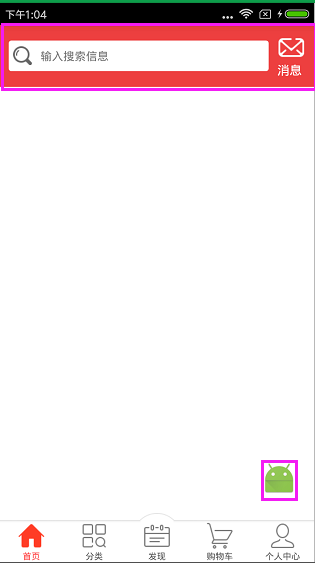
下面我们来看看如何实现这个布局效果:
先来看看HomeFragment类,代码如下所示:
 package com.nyl.shoppingmall.home.fragment;

 import android.support.v7.widget.RecyclerView;

 import android.util.Log;

 import android.view.View;

 import android.widget.ImageView;

 import android.widget.TextView;

 import android.widget.Toast;

 import com.nyl.shoppingmall.R;

 import com.nyl.shoppingmall.base.BaseFragment;

 /**

  * 首页Fragment

  */

 public class HomeFragment extends BaseFragment implements View.OnClickListener {

     private final static String TAG = HomeFragment.class.getSimpleName();

     private TextView tv_search_home;

     private TextView tv_message_home;

     private RecyclerView rv_home;

     private ImageView ib_top;

     @Override

     public View initView() {

         Log.e(TAG,"主页面的Fragment的UI被初始化了");

         View view = View.inflate(mContext,R.layout.fragment_home,null);

         //初始化布局控件

         tv_search_home = (TextView) view.findViewById(R.id.tv_search_home);

         tv_message_home = (TextView) view.findViewById(R.id.tv_message_home);

         rv_home = (RecyclerView) view.findViewById(R.id.rv_home);

         ib_top = (ImageView) view.findViewById(R.id.ib_top);

         //设置点击事件

         ib_top.setOnClickListener(this);

         tv_search_home.setOnClickListener(this);

         tv_message_home.setOnClickListener(this);

         return view;

     }

     @Override

     public void initData() {

         super.initData();

         Log.e(TAG,"主页面的Fragment的数据被初始化了");

     }

     @Override

     public void onClick(View view) {

         switch (view.getId()){

             case R.id.ib_top: //置顶的监听

                 rv_home.scrollToPosition(0);

                 break;

             case R.id.tv_search_home:  //搜索的监听

                 Toast.makeText(mContext,"搜索",Toast.LENGTH_SHORT).show();

                 break;

             case R.id.tv_message_home: //消息监听

                 Toast.makeText(mContext,"进入消息中心",Toast.LENGTH_SHORT).show();

                 break;

         }

     }

 }
HomeFragment类加载的是fragment_home.xml的布局,代码如下所示:
 <?xml version="1.0" encoding="utf-8"?>

 <RelativeLayout

     xmlns:android="http://schemas.android.com/apk/res/android"

     android:layout_width="match_parent"

     android:layout_height="match_parent">

     <include

         android:id="@+id/titlebar"

         layout="@layout/titlebar"/>

     <android.support.v7.widget.RecyclerView

         android:id="@+id/rv_home"

         android:layout_width="match_parent"

         android:layout_height="match_parent"

         android:layout_below="@id/titlebar" />

     <ImageButton

         android:id="@+id/ib_top"

         android:layout_width="40dp"

         android:layout_height="40dp"

         android:layout_alignParentBottom="true"

         android:layout_alignParentRight="true"

         android:layout_marginBottom="20dp"

         android:layout_marginRight="20dp"

         android:background="@mipmap/ic_launcher"

         android:visibility="visible" />

 </RelativeLayout>
最外层是相对布局:顶部是线性布局,里面有两个TextView; 中间是使用分类型的 RecyclerView 当滑动底部的时候显示跳转到顶部的按钮,两个TextView是使用<include layout="@layout/titlebar"/>把布局包进来的,titlebar布局的代码如下所示:
 <?xml version="1.0" encoding="utf-8"?>

 <LinearLayout

     xmlns:android="http://schemas.android.com/apk/res/android"

     android:orientation="horizontal"

     android:layout_width="match_parent"

     android:layout_height="wrap_content"

     android:background="#ed3f3f">

     <TextView

         android:id="@+id/tv_search_home"

         android:layout_width="wrap_content"

         android:layout_height="35dp"

         android:layout_gravity="center_vertical"

         android:layout_marginLeft="10dp"

         android:layout_weight="1"

         android:background="@drawable/search_home_shape"

         android:drawableLeft="@mipmap/home_search_icon"

         android:drawablePadding="10dp"

         android:gravity="center_vertical"

         android:padding="5dp"

         android:text="输入搜索信息"

         android:textSize="13sp" />

     <TextView

         android:id="@+id/tv_message_home"

         android:layout_width="wrap_content"

         android:layout_height="wrap_content"

         android:layout_margin="10dp"

         android:drawableTop="@mipmap/new_message_icon"

         android:text="消息"

         android:textColor="#fff"/>

 </LinearLayout>
输入搜索信息框的背景颜色在drawable下实现,代码如下所示:
<?xml version="1.0" encoding="utf-8"?>

<shape xmlns:android="http://schemas.android.com/apk/res/android"

    android:shape="rectangle">

    <solid android:color="#fff" />

    <corners android:radius="3dp" />

</shape>
这样就完成了吗?当去运行程序会报错,我们还少了最重要一步,别忘了我们在fragment_home.xml的布局中用到了RecyclerView,要把RecyclerView的包加载进来,如下图所示:
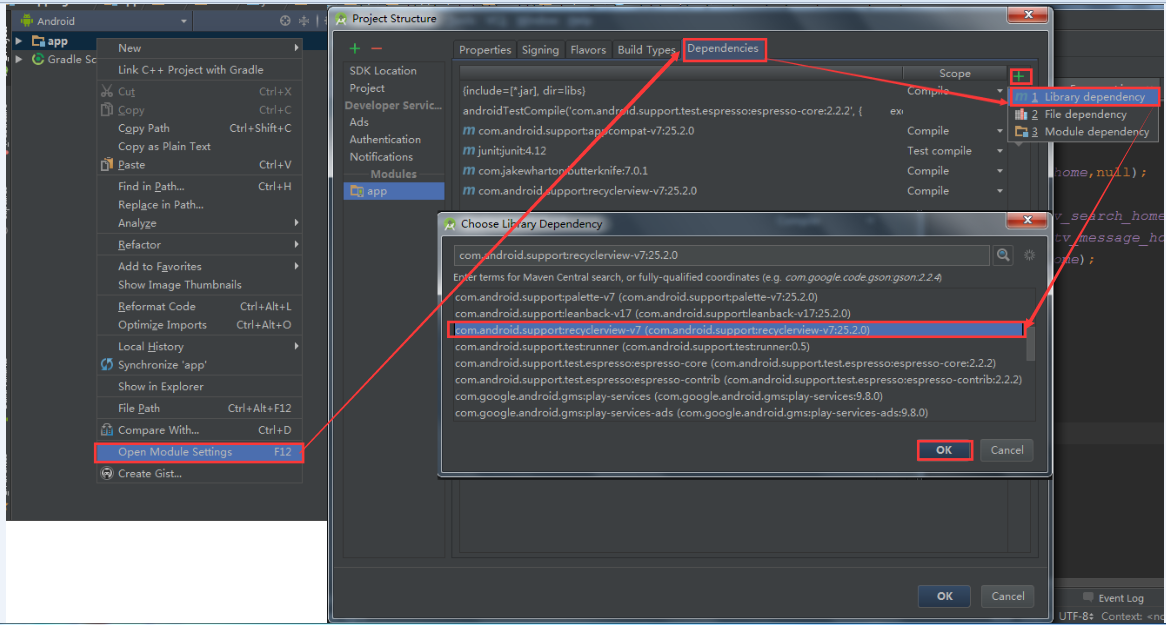
最后一步要检查RecyclerView的包加载进来是否成功,打开Module:app,如下图所示:

    上面都是讲关于搜索框布局的实现,还有一个地方没有讲到,就是点击右下角图片回到顶部的效果,那么这个功能是怎么实现的呢?

    HomeFragment类中的onclick方法中rv_home.scrollToPosition(0);如下图所示:
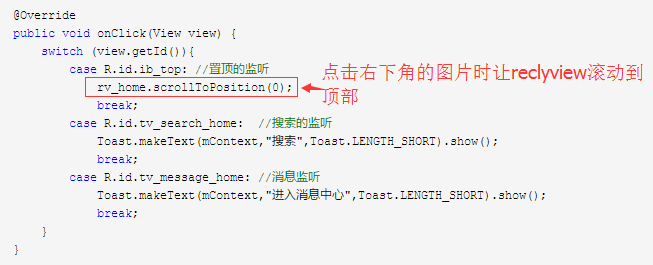
其实就是这一句代码就可以实现回到顶部的效果了。
好了,我们这节先完善到这里,下节继续。
Android商城开发系列(五)—— 商城首页回到顶部和搜索框布局实现的更多相关文章
- Android商城开发系列(七)—— 使用RecyclerView展示首页数据
前面我们讲到了使用OkHttp请求网络和FastJson解析数据了,接下来我们就开始把获取到的数据通过数据适配器展示在页面上了.Adapter是用来帮助填充数据的中间桥梁,简单点说就是:将各种数据以合 ...
- Android商城开发系列(四)——butterknife的使用
在上一篇博客:Android商城开发系列(三)——使用Fragment+RadioButton实现商城底部导航栏实现商城的底部导航栏时,里面用到了butterknife,今天来讲解一下的butterk ...
- Android 快速开发系列 打造万能的ListView GridView 适配器
转载请标明出处:http://blog.csdn.net/lmj623565791/article/details/38902805 ,本文出自[张鸿洋的博客] 1.概述 相信做Android开发的写 ...
- Android Camera开发系列(下)——自定义Camera实现拍照查看图片等功能
Android Camera开发系列(下)--自定义Camera实现拍照查看图片等功能 Android Camera开发系列(上)--Camera的基本调用与实现拍照功能以及获取拍照图片加载大图片 上 ...
- Android Camera开发系列(上)——Camera的基本调用与实现拍照功能以及获取拍照图片加载大图片
Android Camera开发系列(上)--Camera的基本调用与实现拍照功能以及获取拍照图片加载大图片 最近也是在搞个破相机,兼容性那叫一个不忍直视啊,于是自己翻阅了一些基本的资料,自己实现了一 ...
- Android GIS开发系列-- 入门季(14)FeatureLayer之范围查询
Android GIS开发系列-- 入门季(5),这篇文章中,我们知道如何去查找要素.现在有一个需求,查找某点5000米范围的要素,那如何来做呢?首先我们需要在地图上画个5000米半径的圆,然后根据Q ...
- Android商城开发系列(一)——开篇
最近在看尚硅谷的硅谷商城视频,想系统学习一下Android的商城开发流程,打算跟着视频的一步步做出一个商城,然后写博客总结记录一下整个商城的开发过程以及使用到的技术知识点,这个商城的最终效果如下图所示 ...
- Android商城开发系列(三)——使用Fragment+RadioButton实现商城底部导航栏
在商城第一篇的开篇当中,我们看到商城的效果图里面有一个底部导航栏效果,如下图所示: 今天我们就来实现商城底部导航栏,最终效果图如下所示: 那么这种效果是如何实现,实现的方式有很多种,最常见的就是使 ...
- 【Qt编程】基于Qt的词典开发系列<五>--无边框窗口的拖动
在上一篇文章中,我们讲述了如何进行无边框窗口的缩放与拖动,而在一些情况下,我们的窗口只需要进行拖动也不需要改变其大小,比如:QQ的登录窗口.本来在上一篇文章中已经讲述了如何进行窗口的拖动,但是却与窗口 ...
随机推荐
- Permutacja
题意: 要求动态求问是否有一个 1~n 的排列,使得满足 $p_i \leq a_i$,给定 $a_i$ 初始值,接下来 m次单个位置修改,每次求问是否可以构造出来. 解法: 构造一序列使得 $cnt ...
- iview之select选择框选中内容后有空格的问题
导致原因: option组件格式化造成的.此处</Option>在另一行,只要和输出内容一行,就不会有空格了. <Select :label-in-value="true& ...
- matlab新手入门(三)(翻译)
数组索引 MATLAB®中的每个变量都是一个可以容纳多个数字的数组.当您要访问阵列的选定元素时,请使用索引.例如,考虑4乘4A: A = magic(4) A = 16 2 3 13 5 ...
- SQL Server(五)——常用函数 转
1.数学函数:操作一个数据,返回一个结果 --取上限ceiling select code,name,ceiling(price) from car ; --取下限 floor select floo ...
- Unity 5.6中的混合光照(上)
https://mp.weixin.qq.com/s/AbWM21sihHw5pFdMzENDPg 在Unity 5中,光照得到了很大的改进.现在,创建高度逼真的游戏已成为可能.但是,出于对性能的考虑 ...
- 计蒜课/UCloud 的安全秘钥(hash)
题目链接:https://nanti.jisuanke.com/t/15768 题意:中文题诶- 思路:直接hash就好了,当时zz了没想到... 代码: #include <iostream& ...
- hdu1175 连连看
连连看 HDU - 1175 “连连看”相信很多人都玩过.没玩过也没关系,下面我给大家介绍一下游戏规则:在一个棋盘中,放了很多的棋子.如果某两个相同的棋子,可以通过一条线连起来(这条线不能经过其它棋子 ...
- 洛谷P1074 靶形数独(跳舞链)
传送门 坑着,等联赛之后再填(联赛挂了就不填了233) //minamoto #include<iostream> #include<cstdio> #include<c ...
- 通俗理解 React 高阶函数
定义:高阶组件就是一个函数,且该函数接受一个组件作为参数,并返回一个新的组件. A higher-order component is a function that takes a componen ...
- vuex初使用(写的当然是最简单的应用啦)
关于vuex的简图 vuex文档:https://vuex.vuejs.org/zh-cn/installation.html 一:npm安装 npm install vuex --save 在mai ...