
Spring Boot(二)
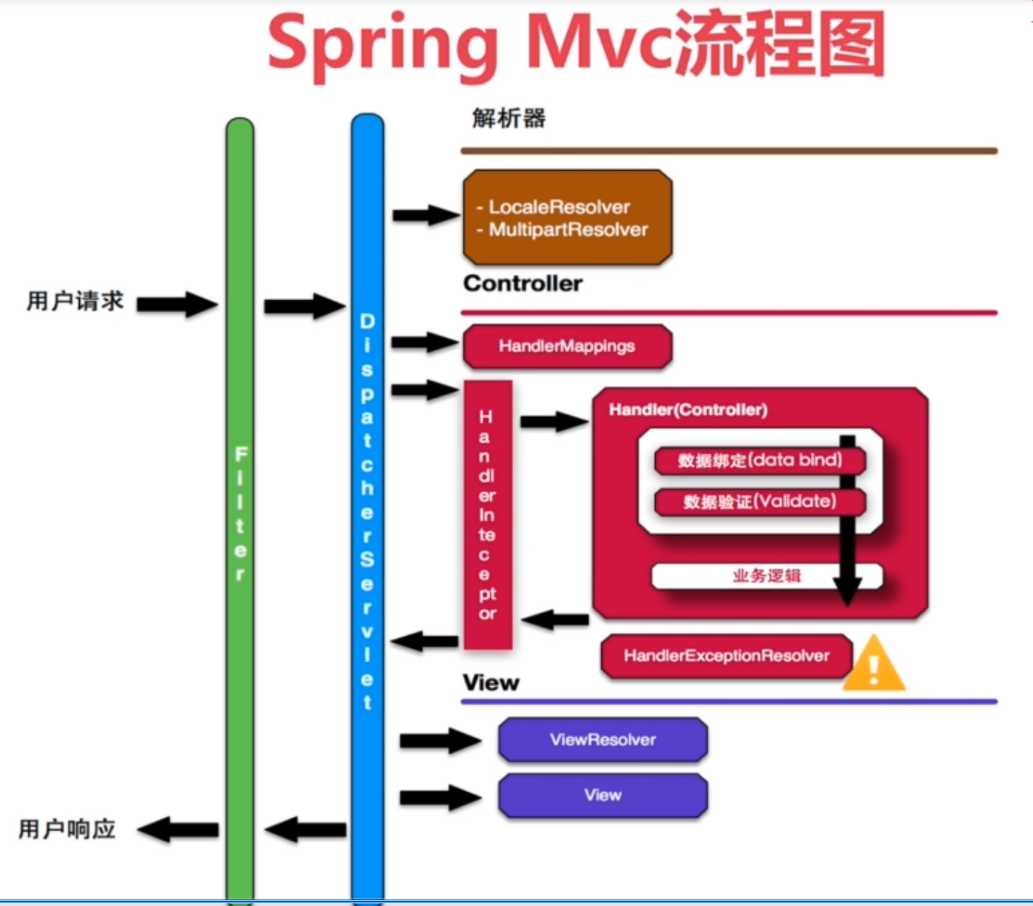
Spring MVC流程图
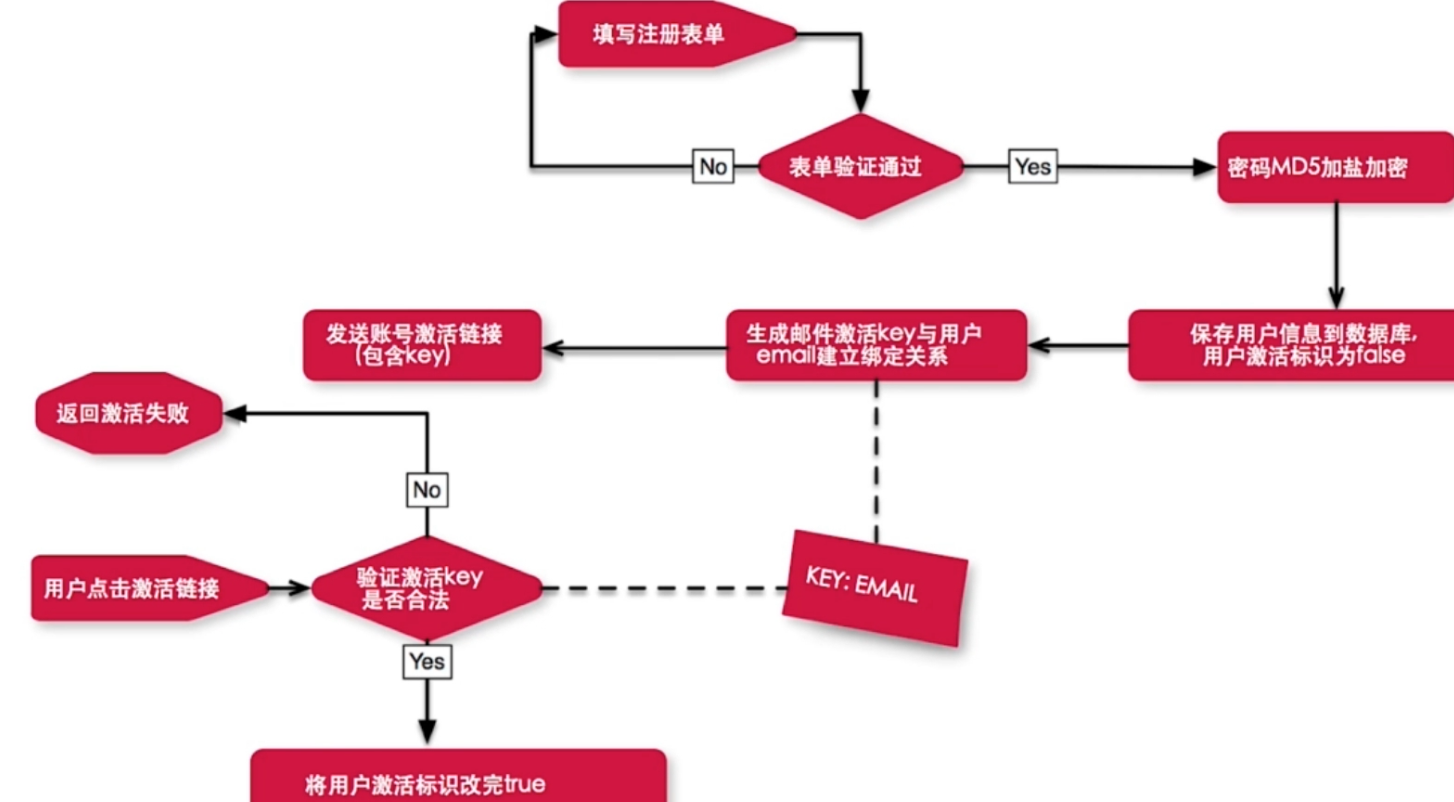
注册流程图:
result代码:
import java.io.UnsupportedEncodingException;

import java.net.URLEncoder;

import java.util.Map;

import com.google.common.base.Joiner;

import com.google.common.collect.Maps;

public class ResultMsg {

	public static final String errorMsgKey = "errorMsg";

	public static final String successMsgKey = "successMsg";

	private String errorMsg;

	private String successMsg;

	public boolean isSuccess(){

		return errorMsg == null;

	}

	public String getErrorMsg() {

		return errorMsg;

	}

	public void setErrorMsg(String errorMsg) {

		this.errorMsg = errorMsg;

	}

	public String getSuccessMsg() {

		return successMsg;

	}

	public void setSuccessMsg(String successMsg) {

		this.successMsg = successMsg;

	}

	public static ResultMsg errorMsg(String msg){

		ResultMsg resultMsg = new ResultMsg();

		resultMsg.setErrorMsg(msg);

		return resultMsg;

	}

	public static ResultMsg successMsg(String msg){

		ResultMsg resultMsg = new ResultMsg();

		resultMsg.setSuccessMsg(msg);

		return resultMsg;

	}

	public Map<String, String> asMap(){

		Map<String, String> map = Maps.newHashMap();

		map.put(successMsgKey, successMsg);

		map.put(errorMsgKey, errorMsg);

		return map;

	}

	//拼接URL

	public String asUrlParams(){

		Map<String, String> map = asMap();

		Map<String, String> newMap = Maps.newHashMap();

		map.forEach((k,v) -> {if(v!=null)

			try {

				newMap.put(k, URLEncoder.encode(v,"utf-8"));

			} catch (UnsupportedEncodingException e) {

			}});

		return Joiner.on("&").useForNull("").withKeyValueSeparator("=").join(newMap);

	}

}
密码加盐:
import com.google.common.hash.HashCode;

import com.google.common.hash.HashFunction;

import com.google.common.hash.Hashing;

public class HashUtils {

	private static final HashFunction FUNCTION = Hashing.md5();

	private static final String SALT = "sunliyuan";

	public static String encryPassword(String password){

	   HashCode hashCode =	FUNCTION.hashString(password+SALT, Charset.forName("UTF-8"));

	   return hashCode.toString();

	}

}
上传文件:
import java.io.File;

import java.io.IOException;

import java.time.Instant;

import java.util.List;

import com.google.common.collect.Multimap;

import org.apache.commons.lang3.StringUtils;

import org.springframework.beans.factory.annotation.Value;

import org.springframework.stereotype.Service;

import org.springframework.web.multipart.MultipartFile;

import com.google.common.base.Strings;

import com.google.common.collect.Lists;

import com.google.common.io.Files;

import sun.util.resources.cldr.fil.LocaleNames_fil;

@Service

public class FileService {

	@Value("${file.path:}")

	private String filePath;

	public List<String> getImgPaths(List<MultipartFile> files) {

	    if (Strings.isNullOrEmpty(filePath)) {

            filePath = getResourcePath();

        }

		List<String> paths = Lists.newArrayList();

		files.forEach(file -> {

			File localFile = null;

			if (!file.isEmpty()) {

				try {

					localFile =  saveToLocal(file, filePath);

					String path = StringUtils.substringAfterLast(localFile.getAbsolutePath(), filePath);

					paths.add(path);

				} catch (IOException e) {

					throw new IllegalArgumentException(e);

				}

			}

		});

		return paths;

	}

	public static String getResourcePath(){

	  File file = new File(".");

	  String absolutePath = file.getAbsolutePath();

	  return absolutePath;

	}

	private File saveToLocal(MultipartFile file, String filePath2) throws IOException {

	 File newFile = new File(filePath + "/" + Instant.now().getEpochSecond() +"/"+file.getOriginalFilename());

	 if (!newFile.exists()) {

		 newFile.getParentFile().mkdirs();//创建上级目录

		 newFile.createNewFile(); //创建临时文件

	 }

	 Files.write(file.getBytes(), newFile);

     return newFile;

	}

}
插入数据转换:
import java.beans.PropertyDescriptor;

import java.lang.reflect.InvocationTargetException;

import java.util.Date;

import org.apache.commons.beanutils.BeanUtils;

import org.apache.commons.beanutils.PropertyUtils;

public class BeanHelper {

  private static final String updateTimeKey  = "updateTime";

  private static final String createTimeKey  = "createTime";

  public static <T> void setDefaultProp(T target,Class<T> clazz) {

    PropertyDescriptor[] descriptors = PropertyUtils.getPropertyDescriptors(clazz);

    for (PropertyDescriptor propertyDescriptor : descriptors) {

      String fieldName = propertyDescriptor.getName();

      Object value;

      try {

        value = PropertyUtils.getProperty(target,fieldName );

      } catch (IllegalAccessException | InvocationTargetException | NoSuchMethodException e) {

        throw new RuntimeException("can not set property  when get for "+ target +" and clazz "+clazz +" field "+ fieldName);

      }

      if (String.class.isAssignableFrom(propertyDescriptor.getPropertyType()) && value == null) {

        try {

          PropertyUtils.setProperty(target, fieldName, "");

        } catch (IllegalAccessException | InvocationTargetException | NoSuchMethodException e) {

          throw new RuntimeException("can not set property when set for "+ target +" and clazz "+clazz + " field "+ fieldName);

        }

      }else if (Number.class.isAssignableFrom(propertyDescriptor.getPropertyType()) && value == null) {

          try {

            BeanUtils.setProperty(target, fieldName, "0");

          } catch (Exception e) {

            throw new RuntimeException("can not set property when set for "+ target +" and clazz "+clazz + " field "+ fieldName);

          }

      }

    }

  }

  public static <T> void onUpdate(T target){

    try {

      PropertyUtils.setProperty(target, updateTimeKey, System.currentTimeMillis());

    } catch (IllegalAccessException | InvocationTargetException | NoSuchMethodException e) {

      return;

    }

  }

  private static <T> void innerDefault(T target, Class<?> clazz, PropertyDescriptor[] descriptors) {

	    for (PropertyDescriptor propertyDescriptor : descriptors) {

	      String fieldName = propertyDescriptor.getName();

	      Object value;

	      try {

	        value = PropertyUtils.getProperty(target,fieldName );

	      } catch (IllegalAccessException | InvocationTargetException | NoSuchMethodException e) {

	        throw new RuntimeException("can not set property  when get for "+ target +" and clazz "+clazz +" field "+ fieldName);

	      }

	      if (String.class.isAssignableFrom(propertyDescriptor.getPropertyType()) && value == null) {

	        try {

	          PropertyUtils.setProperty(target, fieldName, "");

	        } catch (IllegalAccessException | InvocationTargetException | NoSuchMethodException e) {

	          throw new RuntimeException("can not set property when set for "+ target +" and clazz "+clazz + " field "+ fieldName);

	        }

	      }else if (Number.class.isAssignableFrom(propertyDescriptor.getPropertyType()) && value == null) {

	          try {

	            BeanUtils.setProperty(target, fieldName, "0");

	          } catch (Exception e) {

	            throw new RuntimeException("can not set property when set for "+ target +" and clazz "+clazz + " field "+ fieldName);

	          }

	      }else if (Date.class.isAssignableFrom(propertyDescriptor.getPropertyType()) && value == null) {

	          try {

	             BeanUtils.setProperty(target, fieldName, new Date(0));

	          } catch (Exception e) {

	             throw new RuntimeException("can not set property when set for "+ target +" and clazz "+clazz + " field "+ fieldName);

	          }

	      }

	    }

	  }

  public static <T> void onInsert(T target){

	Class<?> clazz = target.getClass();

	PropertyDescriptor[] descriptors = PropertyUtils.getPropertyDescriptors(clazz);

	innerDefault(target, clazz, descriptors);

    long time = System.currentTimeMillis();

    Date date = new Date(time);

    try {

      PropertyUtils.setProperty(target, updateTimeKey, date);

    } catch (IllegalAccessException | InvocationTargetException | NoSuchMethodException e) {

    }

    try {

      PropertyUtils.setProperty(target, createTimeKey, date);

    } catch (IllegalAccessException | InvocationTargetException | NoSuchMethodException e) {

    }

  }

}
pom
<dependency>

		 <groupId>commons-beanutils</groupId>

		 <artifactId>commons-beanutils</artifactId>

	</dependency>
Spring Boot(二)的更多相关文章
- Spring Boot(二十):使用spring-boot-admin对spring-boot服务进行监控
Spring Boot(二十):使用spring-boot-admin对spring-boot服务进行监控 Spring Boot Actuator提供了对单个Spring Boot的监控,信息包含: ...
- Spring Boot 二十个注解
Spring Boot 二十个注解 占据无力拥有的东西是一种悲哀. Cold on the outside passionate on the insede. 背景:Spring Boot 注解的强大 ...
- spring boot(二):启动原理解析
我们开发任何一个Spring Boot项目,都会用到如下的启动类 @SpringBootApplication public class Application { public static voi ...
- Spring Boot(二):数据库操作
本文主要讲解如何通过spring boot来访问数据库,本文会演示三种方式来访问数据库,第一种是JdbcTemplate,第二种是JPA,第三种是Mybatis.之前已经提到过,本系列会以一个博客系统 ...
- spring boot(二十)使用spring-boot-admin对服务进行监控
上一篇文章<springboot(十九):使用Spring Boot Actuator监控应用>介绍了Spring Boot Actuator的使用,Spring Boot Actuato ...
- Spring Boot(二) 配置文件
文章导航-readme 一.配置Spring Boot热部署 技术的发展总是因为人们想偷懒的心理,如果我们不想每次修改了代码,都必须重启一下服务器,并重新运行代码.那么可以配置一下热部署.有了 ...
- spring boot(二):web综合开发
上篇文章介绍了Spring boot初级教程:spring boot(一):入门篇,方便大家快速入门.了解实践Spring boot特性:本篇文章接着上篇内容继续为大家介绍spring boot的其它 ...
- (转)Spring Boot(二十):使用 spring-boot-admin 对 Spring Boot 服务进行监控
http://www.ityouknow.com/springboot/2018/02/11/spring-boot-admin.html 上一篇文章<Spring Boot(十九):使用 Sp ...
- (转)Spring Boot(二):Web 综合开发
http://www.ityouknow.com/springboot/2016/02/03/spring-boot-web.html 上篇文章介绍了 Spring Boot 初级教程:Spring ...
- spring boot(二): spring boot+jdbctemplate+sql server
前言 小项目或者做demo时可以使用jdbc+sql server解决即可,这篇就基于spring boot环境使用jdbc连接sql server数据库,和spring mvc系列保持一致. 在sp ...
随机推荐
- 数据结构---公交线路提示系统05(内附读取表格+迪杰斯特拉算法Java代码)
今天做的最多的事情就是纠错了,通过添加输出语句判断错误来源: 找到错误来源: wb = new XSSFWorkbook(input);//语句创建错误 网上查询发现是jar包的问题: 下图为poi的 ...
- html苹方字体
苹方提供了六个字重,font-family 定义如下: 苹方-简 常规体 font-family: PingFangSC-Regular, sans-serif; 苹方-简 极细体 font-fami ...
- 【转】Android ROM分析(1):刷机原理及方法
一.刷机原理 android系统启动的时候,首先会进行一些诸如硬件自检之类的操作,这些操作完成以后(至少它应该知道当前的机器有没有电),会检查一下当前手机按键的状态(接下来就是所谓刷机模式切换了,不同 ...
- python简单的游戏场景代码
模拟英雄联盟游戏场景的简单场景 最后计算出英雄的战斗力 class Hero: def __init__(self, na, gen, age, fig): self.name = na self.g ...
- Maven在jar中生成重复的pom.xml和pom.properties文件
eclispe maven打包的时候总是出现"生成的jar的META-INF中,重复的pom.xml和pom.properties文件.",maven命令直接打包则没有这个问题. ...
- Ubuntu18.04 Server安装Nginx+Git服务和独立的svn服务
安装Nginx+Git 需要安装的包有 nginx, fcgiwrap, git. 其中git在Ubuntu18.04 Server安装时已经默认安装了. 需要安装的是前两个 而fcgiwrap是在 ...
- Android ADB常用命令使用
Android SDK: adb shell 命令的使用(am.pm.wm.screencap.monkey等) https://blog.csdn.net/xietansheng/article/d ...
- 001-脚手架发展,基础代码结构+mybatis代码生成
一.概述 脚手架是为了保证各施工过程顺利进行而搭设的工作平台. 编程领域中的“脚手架(Scaffolding)”指的是能够快速搭建项目“骨架”的一类工具. java变成中,架构师搭建的代码结构你到处拷 ...
- 用浏览器控制台抓取shodan、搜索引擎、zone-h的结果
0x00 前言 大部分内容来自参考连接的内容,只是一种爬取内容的思路. 在很久以前自己会有爬取zone-h做目标测试的需求,但是总是有各种反爬限制.而且个别网址还有前端自动生成内容的功能,使用Java ...
- linux查看磁盘是否SSD盘
命令: cat /sys/block/sda/queue/rotational 注意: 命令中的sba是你的磁盘名称,可以通过df命令查看磁盘,然后修改成你要的 结果: 返回0:SSD盘 返回1:SA ...