
springboot多环境下maven打包
前言:
最近在项目中使用springboot时发现,采用在pom中定义不同的profile,并且maven打包时
采用-P参数并不能替换我application.properties文件中指定占位符的问题。
配置文件布局:

在application.properties中定义整个项目中不同环境下共通的配置属性,并采用springboot针对配置文件的特性 - spring.profiles.active=dev或者test
来自动加载合并application-dev/test.properties中特有的配置的功能,开发,测试,生产环境配置文件命名方面需要遵守springboot的约束即可。
Maven pom 配置:


备注:实际上使用springboot,上述的<resources>标签,以及<outputDirectory>都是不需要的,其都已经定义过了。在这里写出来只是为了讲述maven打包的原理。
执行打包命令:
进入项目pom文件所在目录,执行
mvn clean package -P test
命令解释:
1:执行后会根据pom中定义的profiles标签寻找对应的profile id为test的,将其properties下的子标签获取到,拿到key = boot.profile,value = test。放入map中
2:根据 build中定义的resources标签,开始打包对应的资源文件,由于指定了filtering为true,故会将上一步中得到的map中的key拿去替换resource中指定的资源文件中的占位符${key},为value值。
遇到的问题:
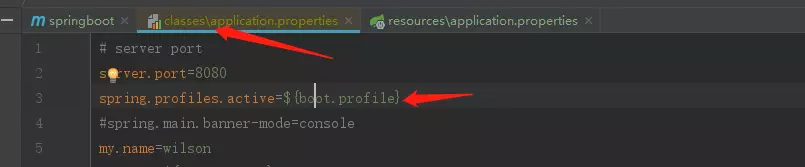
执行后查看classes文件下的资源文件,发现并没有替换掉
原因:
发现最终是因为springboot导致的,查看其pom继承,

进入后发现,springboot默认指定资源文件中的占位符为@@,并不是maven默认的 ${}
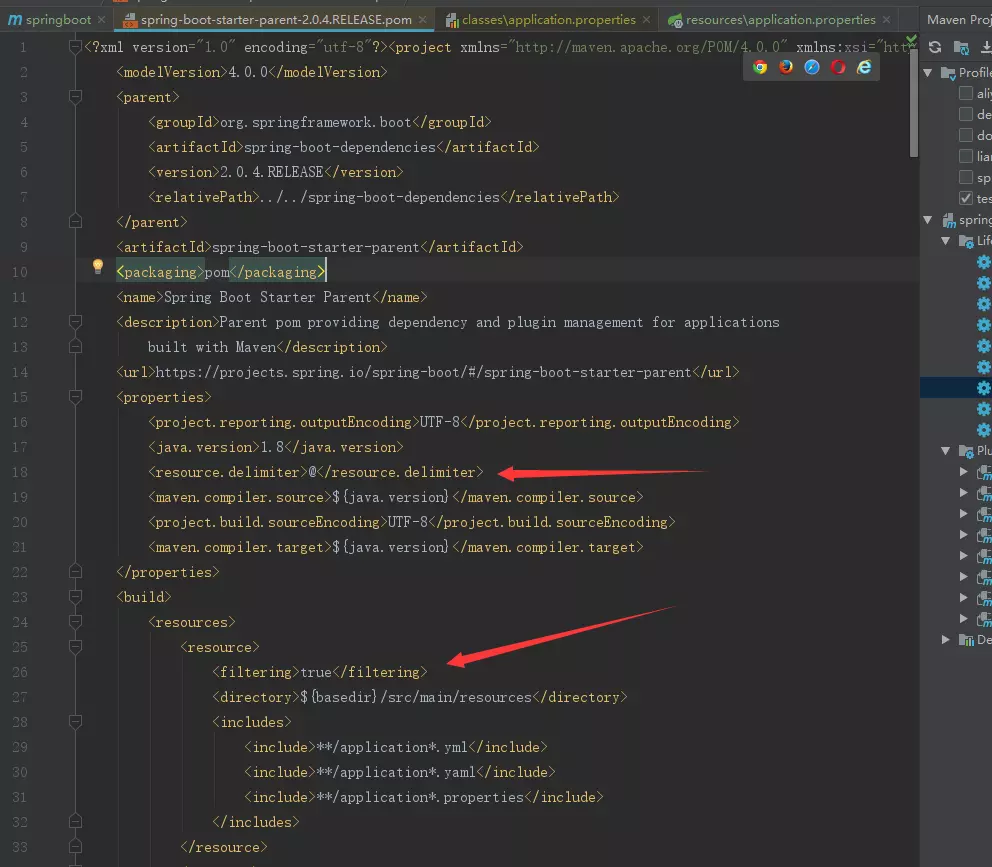

解决方案:
1:将application.properties中的占位符由${key} -> @key@
2:覆盖springboot的默认规则
     <build>

         <finalName>${project.artifactId}</finalName>

         <resources>

             <resource>

                 <filtering>true</filtering>

                 <directory>${basedir}/src/main/resources</directory>

                 <includes>

                     <include>**/application*.yml</include>

                     <include>**/application*.yaml</include>

                     <include>**/*.properties</include>

                 </includes>

             </resource>

             <resource>

                 <directory>${basedir}/src/main/resources</directory>

                 <excludes>

                     <exclude>**/application*.yml</exclude>

                     <exclude>**/application*.yaml</exclude>

                     <exclude>**/*.properties</exclude>

                 </excludes>

             </resource>

         </resources>

         <plugins>

             <plugin>

                 <groupId>org.springframework.boot</groupId>

                 <artifactId>spring-boot-maven-plugin</artifactId>

             </plugin>

             <plugin>

                 <artifactId>maven-resources-plugin</artifactId>

                 <configuration>

                     <encoding>utf-8</encoding>

                     <useDefaultDelimiters>true</useDefaultDelimiters>

                 </configuration>

             </plugin>

         </plugins>

     </build>
3:测试了再自己的pom中不增加resource配置,只是增加

也是可以的哦
建议:
既然已经使用了springboot,就不要再用回之前的写法了,平白增加配置。
附:pom的profile导入.properties
方法1:
   <profiles>

     <!--开发环境-->

     <profile>

       <id>dev</id>

       <activation>

         <activeByDefault>true</activeByDefault>

       </activation>

       <properties>

         <spring.profiles.active>dev</spring.profiles.active>

       </properties>

       <build>

         <filters>

           <filter>${basedir}/src/main/resources/application-dev.properties</filter>

         </filters>

       </build>

     </profile>

     <!--预发环境-->

     <profile>

       <id>pre</id>

       <activation>

         <activeByDefault>true</activeByDefault>

       </activation>

       <properties>

         <spring.profiles.active>pre</spring.profiles.active>

       </properties>

       <build>

         <filters>

           <filter>${basedir}/src/main/resources/application-pre.properties</filter>

         </filters>

       </build>

     </profile>

   </profiles>
方法2:
   <profiles>

     <!--开发环境-->

     <profile>

       <id>dev</id>

       <activation>

         <activeByDefault>true</activeByDefault>

       </activation>

       <properties>

         <spring.profiles.active>dev</spring.profiles.active>

       </properties>

     </profile>

     <!--预发环境-->

     <profile>

       <id>pre</id>

       <activation>

         <activeByDefault>true</activeByDefault>

       </activation>

       <properties>

         <spring.profiles.active>pre</spring.profiles.active>

       </properties>

     </profile>

   </profiles>

   <build>

     <filters>

          <filter>

 ${basedir}/src/main/resources/application-${spring.profiles.active}.properties

          </filter>

     </filters>

   </build>
springboot多环境下maven打包的更多相关文章
- eclipse使用profile完成不同环境的maven打包功能
原文:https://blog.csdn.net/duan9421/article/details/79086335 我们在日常开发工作中通常会根据不同的项目运行环境,添加不同的配置文件,例如 开发环 ...
- Windows环境下maven 安装与环境变量配置
Maven是一个项目管理的Java 工具,在JavaEE中,我们可以使用Maven方便地管理团队合作的项目,现在我们在学习JavaEE框架,使用Maven可以管理类库,有效方便地供团队中的其他人员使用 ...
- windows 环境下Maven私服搭建
使用Nexus.3.11在Windows环境上搭建1.下载nexus.3.11.zip包https://www.sonatype.com/download-oss-sonatype 下载下来之后,进行 ...
- linux环境下maven的安装配置
1.到官网下载maven,上传到服务器上 https://maven.apache.org/download.cgi 2.将压缩包上传服务器对应路径解压: tar -zxvf apache-maven ...
- Linux环境下Maven的.m2文件夹
aven中的.m2文件夹 安装完maven是没有.m2文件夹的.在linux中以.开头的文件夹都是隐藏的.当使用maven命令的时候,maven自动会创建.m2文件夹. 运行命令mvn help:sy ...
- windows下maven打包eclipse工程
打包过程中,可能出现的2个问题: ①.[WARNING] File encoding has not been set, using platform encoding GBK, i.e. build ...
- Video.js + HLS 在production环境下webpack打包后出错的解决方案
Video.js是一个非常强大的视频播放库,能在微信下完美提供inline小窗口播放模式,但当涉及到hls格式视频播放时就比较麻烦,出现的数种现象都不好解决. 错误现象: 1. PC Chrome ...
- win10环境下pyinstaller打包pytorch遇到的问题及解决方案
pytorch-python源码生成windows的应用程序(.exe),报错OSError: could not get source code Failed to execute script h ...
- maven插件 按配置加载不同环境配置文件进行打包(maven-war-plugin)
1.配置多种不同环境 如(本地local,开发dev,测试test 环境等) <profiles> <profile> <id>local</id> & ...
随机推荐
- Sql中substr的使用
pandas和SQL数据分析实战 https://study.163.com/course/courseMain.htm?courseId=1006383008&share=2&sha ...
- [转]js对象中取属性值(.)和[ ]的区别
原文地址:https://www.jianshu.com/p/6a76530e4f8f 今天在写js的过程中遇到这么一个问题,取一个对象的属性值,通过obj.keys怎么都取不出来,但是用obj[ke ...
- pytesseract.pytesseract.TesseractNotFoundError: tesseract is not installed or it's not in your path
使用pytesseract识别验证码中遇到异常如下: pytesseract.pytesseract.TesseractNotFoundError: tesseract is not installe ...
- LeetCode_461. Hamming Distance
461. Hamming Distance Easy The Hamming distance between two integers is the number of positions at w ...
- windows下ffmpeg批量转码
以mp4转mp3为例 for %%i in (*.mp4) do ffmpeg -i "%%i" "%%i.mp3" 将当前文件夹下的mp4文件全部转码为mp3
- 将.cer证书导入java密钥库?
导入.cer从浏览器下载的证书文件(打开网址并挖掘详细信息)到cacerts keystore中java_home\jre\lib\security为我工作,而不是尝试生成和使用我自己的密钥库. 去你 ...
- IIS6远程代码执行漏洞复现CVE-2017-7269
简述 CVE-2017-7269是IIS 6.0中存在的一个栈溢出漏洞,在IIS6.0处理PROPFIND指令的时候,由于对url的长度没有进行有效的长度控制和检查,导致执行memcpy对虚拟路径进行 ...
- 将博客转成pdf
前些天无意间看到了“birdben”的博客,写的比较详细,但是最新的文章更新时间是“2017-05-07”,时间很是久远,本打算有时间认真学习一下博主所写的文章,但是担心网站会因为某些原因停止服务,于 ...
- mysql 安装为服务 ,mysql.zip 安装为服务,mysql搬移迁移服务器安装为服务
从服务器A打包到服务器B后,在服务器B中运行安装服务命令,可自定义服务名,一台服务器上可装N个MySql实例 mysqld --install MySQL_0001 --defaults-file=D ...
- layui 自定义模块
新建模块目录modules 新建common.js layui.define(['jquery'], function (exports) { var $ = layui.jquery; var ob ...