
[MySQL优化1]centos中MySQL列出所有表
步骤1 - 连接到MySQL数据库服务器:
[root@host]# mysql -u root -p
Enter password:******
提示登陆成功
Welcome to the MySQL monitor. Commands end with ; or \g.
Your MySQL connection id is 215827
Server version: 5.7.25-log Source distribution
Copyright (c) 2000, 2019, Oracle and/or its affiliates. All rights reserved.
Oracle is a registered trademark of Oracle Corporation and/or its
affiliates. Other names may be trademarks of their respective
owners.
Type 'help;' or '\h' for help. Type '\c' to clear the current input statement.

退出数据库
mysql> exit
步骤2 -切换到ytkah数据库(进入到具体的数据库):
mysql> USE ytkah;
Database changed
表示进入到ytkah这个数据库

步骤3 - 显示ytkah数据库中的所有表:
mysql> SHOW TABLES;
+---------------------------+
| Tables_in_ytkah |
+---------------------------+
| wp_commentmeta |
| wp_comments |
| wp_links |
| wp_options |
| wp_postmeta |
| wp_posts |
| wp_term_relationships |
| wp_term_taxonomy |
| wp_termmeta |
| wp_terms |
| wp_usermeta |
| wp_users |
+---------------------------+
14 rows in set (0.00 sec)
显示ytkah数据库中包含字符的所有表:
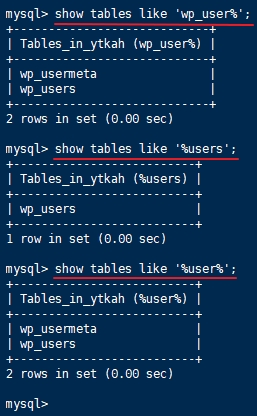
①显示数据库中以wp_user开头的所有表
mysql> show tables like 'wp_user%';
+--------------------------------------+
| Tables_in_ytkah (wp_user%) |
+--------------------------------------+
| wp_usermeta |
| wp_users |
+--------------------------------------+
2 rows in set (0.00 sec)
②显示数据库中以users结尾的所有表
mysql> show tables like '%users';
+------------------------------------+
| Tables_in_ytkah (%users) |
+------------------------------------+
| wp_users |
+------------------------------------+
1 row in set (0.00 sec)
③显示数据库中包含user的所有表
mysql> show tables like '%user%';
+------------------------------------+
| Tables_in_ytkah (%user%) |
+------------------------------------+
| wp_usermeta |
| wp_users |
+------------------------------------+
2 rows in set (0.00 sec)
[MySQL优化1]centos中MySQL列出所有表的更多相关文章
- 阿里云centos中mysql的安装及一些常识知识
------------------------------------------------------------------- 阿里云centos中mysql的安装 工具WinSCP v ...
- CentOS中Mysql常用操作
安装mysqlyum -y install mysql-server 修改mysql配置vi /etc/my.cnf 这里会有很多需要注意的配置项,后面会有专门的笔记暂时修改一下编码(添加在密码下方) ...
- centos中MySQL,VmTools安装,使用及异常
Linux(CentOS)中常用软件安装,使用及异常--MySQL,VmTools 本文主要是为了记录在工作中遇到的常用软件的安装过程,方便以后遇到相同情形时可以快速的查阅.主要讲述了MySQL, V ...
- 【转】centOS中mysql一些常用操作
安装mysql yum -y install mysql-server 修改mysql配置vi /etc/my.cnf 这里会有很多需要注意的配置项,后面会有专门的笔记暂时修改一下编码(添加在密码下方 ...
- centOS中mysql一些常用操作
安装mysqlyum -y install mysql-server 修改mysql配置vi /etc/my.cnf 这里会有很多需要注意的配置项,后面会有专门的笔记暂时修改一下编码(添加在密码下 ...
- centos中 mysql 5.7安装
以免授权模式启动 编辑 /etc/my.cnf,添加以下内容: linux环境中:vi /etc/my.cnf 在[MySQL(和PHP搭配之最佳组合)d]配置段添加如下两行: user=mysql ...
- centos中mysql 安装以及配置,建库
1.检测系统内部有没有安装其他的mysql数据库 rpm -qa | grep mysql 然后如果有的话删除这些mysql yum remove 查出来的所有名字 2.彻底删除系统中mysql的目录 ...
- CentOs中mysql服务器重置root密码方法
1. 停止mysql: service mysqld stop 2. 编辑/etc/my.cnf,在[mysqld]这行后面加上skip-grant-tables ,并保存 3. 启动mysql: s ...
- MySQL优化技巧之五(mysql查询性能优化)
对于高性能数据库操作,只靠设计最优的库表结构.建立最好的索引是不够的,还需要合理的设计查询.如果查询写得很糟糕,即使库表结构再合理.索引再合适,也无法实现高性能.查询优化.索引优化.库表结构优化需要齐 ...
随机推荐
- ubuntu安装anaconda后,终端输入conda,出现未找到命令
解决办法: 终端输入:vim ~/.bashrc 键盘大写“G”,在最末端输入:export PATH=~/anaconda2/bin:$PATH 使其生效:source ~/.bashrc 打印 ...
- Failed to read schema document 'http://code.alibabatech.com/schema/dubbo/dubbo.xsd'问题解决方法
Failed to read schema document 'http://code.alibabatech.com/schema/dubbo/dubbo.xsd'问题解决方法 关于dubbo服务的 ...
- 使用 GCD 实现倒计时效果
效果如下: ViewController.h #import <UIKit/UIKit.h> @interface ViewController : UIViewController @p ...
- [PGM] Variable elimination and Belief propagation
内容范围如题.Lec 08-11的内容:https://www.youtube.com/watch?v=Qa04kw1gKHk&index=36&list=PLQiVpyxVlLkbp ...
- [Unity3D] 05 - Access to DB or AWS
可以选择连接本地服务器,或者云服务器. 参考源代码 : https://www.cnblogs.com/wuzhang/p/wuzhang20141202.html (1) 功能:点击一下按键,然后访 ...
- swagger netframework webapi
参考:https://blog.csdn.net/wjk343977868/article/details/47086137
- 【代码审计】YUNUCMS_v1.0.6 后台代码执行漏洞分析
0x00 环境准备 QYKCMS官网:http://www.yunucms.com 网站源码版本:YUNUCMSv1.0.6 程序源码下载:http://www.yunucms.com/Downl ...
- VS Release模式调试
c++ -> 常规 -〉调试信息格式 选 程序数据库(/Zi)或(/ZI) c++ -> 优化 -〉优化 选 禁止(/Od) 连接器 -〉调试 -〉生成调试信息 选 是 (/DEBUG)
- php 公历阴历互相转换
<?php /** * Created by PhpStorm. * User: timeless * Date: 17-3-9 * Time: 上午9:32 */ class Lunar { ...
- error: style attribute '@android:attr/windowEnterAnimation' not found.
在Project/gradle.properties中添加 android.enableAapt2=false