
FirstGradle
一、导入依赖

二、build.gradle
- 整合SpringBoot
plugins {

    id 'java'

}

group 'com.qiang'

version '1.0.0-SNAPSHOT'

sourceCompatibility = 1.8

repositories {

    mavenCentral()

}

dependencies {

    testCompile group: 'junit', name: 'junit', version: '4.12'

    compile group: 'org.springframework.boot', name: 'spring-boot-starter-web', version: '2.1.4.RELEASE'

}
三、Application
package com.qiang;

import org.springframework.boot.SpringApplication;

import org.springframework.boot.autoconfigure.SpringBootApplication;

/**

 * @author 小强崽

 * @ClassName: Application

 * @Description: Gradle整合SpringBoot

 * @date 2019/9/16 1:17

 */

@SpringBootApplication

public class Application {

    public static void main(String[] args) {

        SpringApplication.run(Application.class, args);

    }

}
- 启动项目
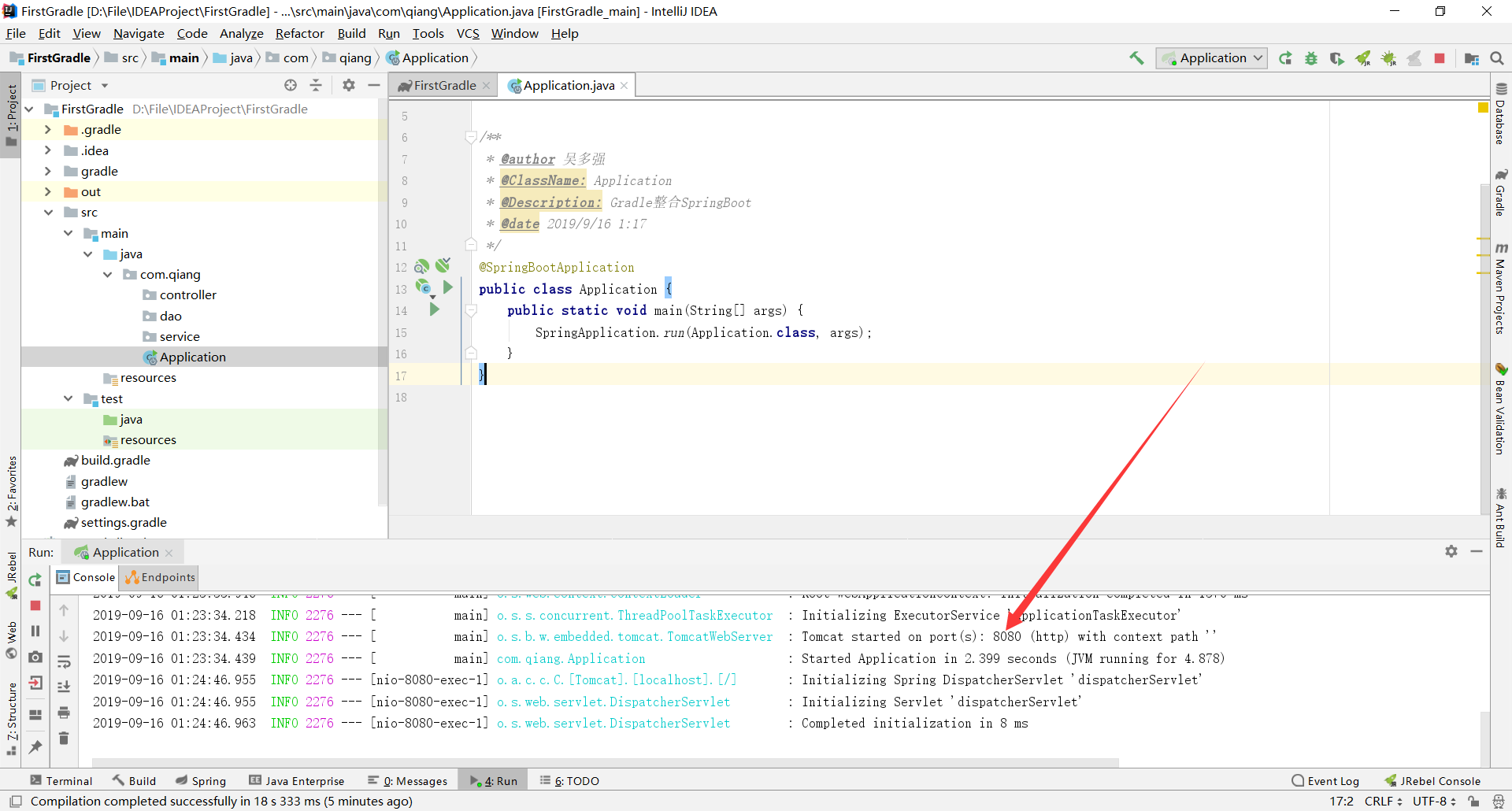
- 启动成功

四、整合Mabatis
- 导入依赖
compile group: 'mysql', name: 'mysql-connector-java', version: '8.0.15'

compile group: 'com.alibaba', name: 'druid', version: '1.1.18'

compile group: 'org.mybatis.spring.boot', name: 'mybatis-spring-boot-starter', version: '2.0.1'
- 设置资源文件夹
sourceSets {

    main {

        resources {

            srcDirs("src/main/java", "src/main/resources")

        }

    }

}
- 在主函数上加上注解
@MapperScan({"com.qiang.mapper"})
五、application.yml
server:

  port: 8080

spring:

  application:

    name: FirstGradle

  datasource:

    driver-class-name: com.mysql.cj.jdbc.Driver

    url: jdbc:mysql://127.0.0.1:3306/test?useUnicode=true&characterEncoding=UTF-8&useSSL=false&serverTimezone=CTT

    username: root

    password: root

    type: com.alibaba.druid.pool.DruidDataSource
六、整合PageHelper
- 导入依赖
compile group: 'com.github.pagehelper', name: 'pagehelper', version: '4.1.6'
- 配置PageHelper
package com.qiang.config;

import com.github.pagehelper.PageHelper;

import org.springframework.context.annotation.Bean;

import org.springframework.context.annotation.Configuration;

import java.util.Properties;

/**

 * @author 小强崽

 * @ClassName: MybatisConfig

 * @Description: PageHelper配置

 * @date 2019/9/16 16:37

 */

@Configuration

public class MybatisConfig {

    /**

     * 配置Mybatis的分页插件

     */

    @Bean

    public PageHelper pageHelper() {

        PageHelper pageHelper = new PageHelper();

        Properties properties = new Properties();

        properties.setProperty("offsetAsPageNum", "true");

        properties.setProperty("rowBoundsWithCount", "true");

        properties.setProperty("reasonable", "true");

        properties.setProperty("dialect", "mysql");

        pageHelper.setProperties(properties);

        return pageHelper;

    }

}
- 使用
package com.qiang.controller;

import com.github.pagehelper.Page;

import com.github.pagehelper.PageHelper;

import com.qiang.service.UserService;

import org.slf4j.Logger;

import org.slf4j.LoggerFactory;

import org.springframework.web.bind.annotation.RequestMapping;

import org.springframework.web.bind.annotation.RestController;

import javax.annotation.Resource;

/**

 * @author 小强崽

 * @ClassName: UserController

 * @Description: 用户控制器

 * @date 2019/9/16 1:51

 */

@RestController

public class UserController {

    private static final Logger logger = LoggerFactory.getLogger(UserController.class);

    @Resource

    private UserService userService;

    @RequestMapping("/user")

    public Object getAllUser() {

        Page<Object> page = PageHelper.startPage(0, 1);

        logger.info(page.toString());

        return userService.selectAll();

    }

}
七、整合Redis
- 导入依赖
compile('org.springframework.boot:spring-boot-starter-data-redis:2.1.3.RELEASE') {

        exclude group: 'redis.clients', module: 'jedis'

        exclude group: 'io.lettuce', module: 'lettuce-core'

    }

    compile group: 'redis.clients', name: 'jedis', version: '2.9.0'
- Redis配置
package com.qiang.config;

import com.fasterxml.jackson.annotation.JsonAutoDetect;

import com.fasterxml.jackson.annotation.PropertyAccessor;

import com.fasterxml.jackson.databind.ObjectMapper;

import org.springframework.context.annotation.Bean;

import org.springframework.context.annotation.Configuration;

import org.springframework.data.redis.connection.RedisConnectionFactory;

import org.springframework.data.redis.connection.RedisStandaloneConfiguration;

import org.springframework.data.redis.connection.jedis.JedisClientConfiguration;

import org.springframework.data.redis.connection.jedis.JedisConnectionFactory;

import org.springframework.data.redis.core.RedisTemplate;

import org.springframework.data.redis.serializer.Jackson2JsonRedisSerializer;

import org.springframework.data.redis.serializer.StringRedisSerializer;

import redis.clients.jedis.JedisPoolConfig;

/**

 * @author 小强崽

 * @ClassName: RedisConfig

 * @Description: Redis配置

 * @date 2019/9/16 16:49

 */

@Configuration

public class RedisConfig {

    /**

     * Redis服务器地址

     */

    private String host = "127.0.0.1";

    /**

     * Redis服务器连接端口

     */

    private int port = 6379;

    /**

     * Redis数据库索引(默认为0)

     */

    private int database = 15;

    /**

     * 连接池中的最大空闲连接

     */

    private int maxIdle = 8;

    /**

     * 连接池最大阻塞等待时间(使用负值表示没有限制)

     */

    private long maxWaitMillis = -1;

    /**

     * 连接池最大连接数(使用负值表示没有限制)

     */

    private int maxActive = 8;

    /**

     * 初始化

     */

    @Bean

    public JedisPoolConfig jedisPoolConfig() {

        JedisPoolConfig jedisPoolConfig = new JedisPoolConfig();

        jedisPoolConfig.setMaxTotal(maxActive);

        jedisPoolConfig.setMaxWaitMillis(maxWaitMillis);

        jedisPoolConfig.setMaxIdle(maxIdle);

        return jedisPoolConfig;

    }

    /**

     * 注入RedisConnectionFactory

     */

    @Bean

    public RedisConnectionFactory redisConnectionFactory(JedisPoolConfig jedisPoolConfig) {

        RedisStandaloneConfiguration redisStandaloneConfiguration = new RedisStandaloneConfiguration();

        redisStandaloneConfiguration.setHostName(host);

        redisStandaloneConfiguration.setPort(port);

        redisStandaloneConfiguration.setDatabase(database);

        JedisClientConfiguration.JedisPoolingClientConfigurationBuilder jedisPoolConfigBuilder =

                (JedisClientConfiguration.JedisPoolingClientConfigurationBuilder) JedisClientConfiguration.builder();

        jedisPoolConfigBuilder.poolConfig(jedisPoolConfig);

        return new JedisConnectionFactory(redisStandaloneConfiguration);

    }

    @Bean

    public RedisTemplate<String, Object> redisTemplate(RedisConnectionFactory redisConnectionFactory) {

        RedisTemplate redisTemplate = new RedisTemplate();

        redisTemplate.setConnectionFactory(redisConnectionFactory);

        Jackson2JsonRedisSerializer jackson2JsonRedisSerializer = new Jackson2JsonRedisSerializer(Object.class);

        ObjectMapper objectMapper = new ObjectMapper();

        // 设置任何字段可见

        objectMapper.setVisibility(PropertyAccessor.ALL, JsonAutoDetect.Visibility.ANY);

        // 设置不是final的属性可以转换

        objectMapper.enableDefaultTyping(ObjectMapper.DefaultTyping.NON_FINAL);

        jackson2JsonRedisSerializer.setObjectMapper(objectMapper);

        StringRedisSerializer stringRedisSerializer = new StringRedisSerializer();

        // key采用String的序列化方式

        redisTemplate.setKeySerializer(stringRedisSerializer);

        // hash的key采用String的序列化方式

        redisTemplate.setHashKeySerializer(stringRedisSerializer);

        // value序列化方式采用jackson序列化方式

        redisTemplate.setValueSerializer(jackson2JsonRedisSerializer);

        // hash的value序列化方式采用jackson序列化方式

        redisTemplate.setHashValueSerializer(jackson2JsonRedisSerializer);

        redisTemplate.afterPropertiesSet();

        redisTemplate.setEnableTransactionSupport(true);

        return redisTemplate;

    }

}
- RestTemplate配置
package com.qiang.config;

import org.springframework.boot.autoconfigure.condition.ConditionalOnMissingBean;

import org.springframework.context.annotation.Bean;

import org.springframework.context.annotation.Configuration;

import org.springframework.http.client.ClientHttpRequestFactory;

import org.springframework.http.client.SimpleClientHttpRequestFactory;

import org.springframework.web.client.RestTemplate;

/**

 * @author 小强崽

 * @ClassName: RestTemplateConfig

 * @Description: RestTemplate配置

 * @date 2019/9/16 17:25

 */

@Configuration

public class RestTemplateConfig {

    @Bean

    @ConditionalOnMissingBean({RestTemplate.class})

    public RestTemplate restTemplate(ClientHttpRequestFactory clientHttpRequestFactory) {

        return new RestTemplate(clientHttpRequestFactory);

    }

    @Bean

    @ConditionalOnMissingBean({ClientHttpRequestFactory.class})

    public ClientHttpRequestFactory clientHttpRequestFactory() {

        SimpleClientHttpRequestFactory factory = new SimpleClientHttpRequestFactory();

        factory.setReadTimeout(15000);

        factory.setConnectTimeout(15000);

        return factory;

    }

}
- 使用
package com.qiang.controller;

import org.springframework.beans.factory.annotation.Autowired;

import org.springframework.data.redis.core.RedisTemplate;

import org.springframework.web.bind.annotation.RequestMapping;

import org.springframework.web.bind.annotation.RestController;

/**

 * @author 小强崽

 * @ClassName: RedisController

 * @Description:

 * @date 2019/9/16 18:01

 */

@RestController

public class RedisController {

    @Autowired

    private RedisTemplate redisTemplate;

    @RequestMapping("/redis")

    public Object getRedisValues(){

        redisTemplate.opsForValue().set("a","b");

        return redisTemplate.opsForValue().get("a");

    }

}
八、项目结构

九、源代码
作者(Author):小强崽
来源(Source):https://www.wuduoqiang.com/archives/FirstGradle
协议(License):署名-非商业性使用-相同方式共享 4.0 国际 (CC BY-NC-SA 4.0)
版权(Copyright):商业转载请联系作者获得授权,非商业转载请注明出处。 For commercial use, please contact the author for authorization. For non-commercial use, please indicate the source.
FirstGradle的更多相关文章
随机推荐
- U149791 正多边形变换
原博客网页--洛谷博客 题目地址 如果您对群论有所了解,那么本题就是对二面体群 \(D_{2n}\) 的简单实现,您可以直接跳到代码部分.下面的解题思路只是对二面体群 \(D_{2n}\) 的构造思路 ...
- Java | 标识符 & 关键字
标识符是什么? 标识符 标识符是指在程序中,我们自己定义的内容.比如类的名字.方法的名字和变量的名字等等,都是标识符.在我们写的第一个程序当中,我们给类起名叫做Hello 也叫做标识符. 命名规则 标 ...
- 如何热更新长缓存的 HTTP 资源
前言 HTTP 缓存时间一直让开发者头疼.时间太短,性能不够好:时间太长,更新不及时.当遇到严重问题需紧急修复时,尽管后端文件可快速替换,但前端文件仍从本地缓存加载,导致更新长时间无法生效. 对于这个 ...
- shell脚本(5)-shell变量
一.变量介绍 将一些数据需要临时存放在内存中,以待后续使用时快速读出. 二.变量分类 1.本地变量: 用户私有变量,只有本用户可以使用,保存在家目录下的.bash_profile..bashrc文件中 ...
- 测试笔记01-Git
Git工具 Git 一个分布式版本管理工具, 学习资料: https://www.liaoxuefeng.com/wiki/896043488029600/1317161920364578 其中:解决 ...
- CSAPP:bomblab
BOMBLAB实验总结 CSAPP实验BOMB,很头疼,看不懂,勉强做完了. 答案是这样的: Border relations with Canada have never been better. ...
- NestJS WebSocket 开始使用
使用NestJs提供WebSocket服务. 本文会在新建项目的基础上增加2个类 Gateway 实现业务逻辑的地方 WebSocketAdapter WebSocket适配器 新建项目 新建一个项目 ...
- 极致简洁的微前端框架-京东MicroApp开源了
前言 MicroApp是一款基于类WebComponent进行渲染的微前端框架,不同于目前流行的开源框架,它从组件化的思维实现微前端,旨在降低上手难度.提升工作效率.它是目前市面上接入微前端成本最低的 ...
- IPV6改造?华为云如此简单
现在很多企业都在搞这个IPV6改造,说实话这个IPV6改造我这边也不是特别精通,也是通过查阅各种资料来了解IPV6这个东西,下面是我查的一些资料大家可以借鉴一下. IPv6改造三步曲--Vecloud ...
- javascript里面的document.getElementById
一.getElementById:获取对 ID 标签属性为指定值的第一个对象的引用,它有 value 和 length 等属性 1.获取当前页面的值input标签值:var attr1=documen ...