
UE4使用Dll
Part1. 创建和编译Dll
VS中创建Visual C++ > Win32 Console Application 工程模板,选择Dll,并勾上”Empty Project”。


在SolutionExplorer里选中工程,右键Add>New Item,选择C++ File
在新建的文件里输入测试代码:
extern "C" __declspec(dllexport) float getCircleArea(float radius)
{
return 3.1416 * (radius*radius);
}
菜单Project>xxxProperties,Configuration Manager,把所有的关于位设置的都设置为x64
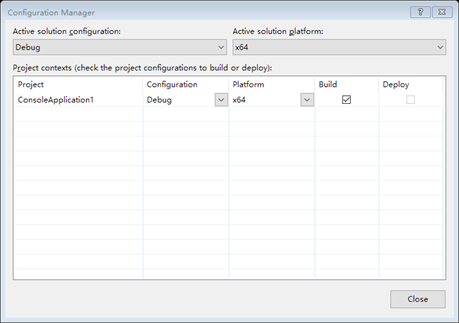
保存后Build Solution。
Part2 拷贝到引擎目录
在工程中找到x64文件夹下的dll. 复制到引擎Plugins目录,可以自己新建一个子文件夹放置自定义的插件。
这里放在D:\Program Files (x86)\Epic Games\4.13\Engine\Plugins\KenPlugins
Part3 UE4工程中加入Dll
创建一个C++ UE4工程
File>New C++ Class…
选择Blueprint Function Library作为父类
在生成的.h文件的类定义中加入如下定义:
public:

    // Blueprint accessible method.

    UFUNCTION(BlueprintCallable, Category = "Ken Libraries")

        static float getCircleArea(float radius);

在.cpp中加入以下代码

typedef float(*_getCircleArea)(float radius); // Declare the DLL function.

float UMyBlueprintFunctionLibrary::getCircleArea(float radius)

{

    FString filePath = FPaths::Combine(*FPaths::EnginePluginsDir(), TEXT("KenPlugins/"), TEXT("SampleDll.dll")); // Concatenate the plugins folder and the DLL file.

    if (FPaths::FileExists(filePath))

    {

        void *DLLHandle;

        DLLHandle = FPlatformProcess::GetDllHandle(*filePath); // Retrieve the DLL.

        if (DLLHandle != NULL)

        {

            _getCircleArea DLLgetCircleArea = NULL; // Local DLL function pointer.

            FString procName = "getCircleArea"; // The exact name of the DLL function.

            DLLgetCircleArea = (_getCircleArea)FPlatformProcess::GetDllExport(DLLHandle, *procName); // Export the DLL function.

            if (DLLgetCircleArea != NULL)

            {

                float out = DLLgetCircleArea(radius); // Call the DLL function, with arguments corresponding to the signature and return type of the function.

                return out; // return to UE

            }

        }

    }

    return 1.00f;

}
其中UMyBlueprintFunctionLibrary 是类的名称,*FPaths::EnginePluginsDir()是引擎的插件目录, TEXT("KenPlugins/")是自定义的文件夹, TEXT("SampleDll.dll")是dll名称
Part4 蓝图中调用dll
在蓝图的Ken Libraries分类中找到 get circle radius节点即可使用
UE4使用Dll的更多相关文章
- (UE4) 动态加载DLL
目前还没有实现,实在搞不懂为什么,大概代码如下: //------------------------------------------------------------------------- ...
- UE4 打包C++项目到win32平台报错 could not find mspdbcore.dll
解决方法: 将Visual Studio中相应系统(如32位对应x86.64位对应x64)下的 ms.*.dll 等一系列文件拷贝到 C:\Windows\System32\ 路径下.踩坑:不能只拷贝 ...
- win10环境下ue4使用游戏手柄输入
忙里偷闲,趁着源码编译需要好久的时间,把这篇博客补上,来说说怎么在win10环境中,ue4使用游戏手柄输入,也就是gamepad输入. 1.我用的手柄是rapoo v10 这款手柄,连接无线USB之后 ...
- ue4 模块的构建和加载
ue4的代码是模块的形式来组织 在源码层面,一个包含*.build.cs的目录就是一个模块 这个目录里的文件在编译后都会被链接在一起,比如一个静态库lib,或者一个动态库dll. 不管是哪种形式,都需 ...
- ue4 build configuration的解释
ue4的build系统,继承并发展了3代的一如既往的复杂.. 一.每个configuration由两部份组成:[(性能)模式]+[(内容)组成] 模式有:Debug,DebugGame,Develop ...
- UE4/Unity3D中同时捕获多高清摄像头的高效插件
本文主要讲实现过程的一些坑. 先说下要实现的目标,主要功能在UE4/Unity中都要用,能同时捕获多个摄像头,并且捕获的图片要达到1080p25桢上,并且需要经过复杂的图片处理后丢给UE4/Unity ...
- UE4游戏开发基础命令
在个人的Unrealengine账户中关联自己的GitHub账户成功之后,就可以访问UE4引擎的源码了. git clone -b release https://github.com/EpicGam ...
- dll加密工具
Virbox Protector Standalone 加壳工具可直接对dll文件进行加壳,防止代码反编译,更安全,更方便. 产品简介 Virbox Protector Standalone提供了强大 ...
- UE4杂记
一些学习UE4时的笔记,转载请注明出处. ☆ UE4逻辑 Actor 是由 AActor 类派生而来的类实例:能被放入游戏世界场景的所有游戏性对象的基础类.对象是继承自 UObject 类的类实例:虚 ...
随机推荐
- Java ——流(Stream)、文件(File)和IO
本节重点思维导图 示例:将指定的字符写到文件中 public static void main(String[] args) { try { //1.创建一个空的文件 File file = new ...
- Android安全测试(二)反编译检测
1.测试环境 SDK: Java JDK, Android SDK. 工具: 7zip, dex2jar, jd-gui 2.操作步骤 第一步:把apk改后缀名为zip 第二步:将zip文件解压,得到 ...
- layui基本使用(动态获取数据,并把需要的数据传到新打开的窗口)
<div class="xiaoxi">\n' + ' <div class="layui-row">\n' + ' <input ...
- 应用安全_WTS-WAF绕过
Access 检测: ?id=+AND+= ?id=+AND+=2 绕过: sqlmap.py -u http://www.xx.com/project.asp?id=29 --tables --ta ...
- 16 (H5*) JS第6天 日期、字符串、数组
目录 1:date 2:格式化日期 3:字符串 4:字符串的方法 5:字符串的案例 6:数组的方法 7:包装类型 复习 正文 1:日期:date <script> //创建实例对象 // ...
- The second curriculum design experiment report in spring 2019
2019年第二次课程设计实验报告 一.实验项目名称 贪吃蛇 二.实验项目功能描述 1.小蛇的移动 玩家可以通过 W A S D控制小蛇的上左下右移动,通过函数改变小蛇部位的位置 2.判断游戏失败 当小 ...
- SpringBoot(八) -- SpringBoot与Docker
一.Docker简介 Docker是一个开源的应用容器引擎,基于Go语言并遵从Apache2.0协议开源.Docker可以让开发者打包他们的应用以及依赖到一个轻量级,可移植的容器中,然后发布到任何流行 ...
- DB2创建库 数据恢复
例:数据库:PRODB2用户 :DB2ADMIN/DB2ADMIN备份库路径:D:/bank 一.恢复数据库1.启动数据库运行->db2cmd->db2Db2=>start db m ...
- Vue2+VueRouter2+webpack 构建项目实战(四)接通api,先渲染个列表
Vue2+VueRouter2+webpack 构建项目实战(四)接通api,先渲染个列表: Vue2+VueRouter2+Webpack+Axios 构建项目实战2017重制版(一)基础知识概述
- 生产者消费者模型(JoinableQueue)