
Hadoop 倒排索引
倒排索引是文档检索系统中最常用的数据结构,被广泛地应用于全文搜索引擎。它主要是用来存储某个单词(或词组)在一个文档或一组文档中存储位置的映射,即提供了一种根据内容来查找文档的方式。由于不是根据文档来确定文档所包含的内容,而是进行相反的操作,因而称为倒排索引(Inverted Index)。
一、实例描述
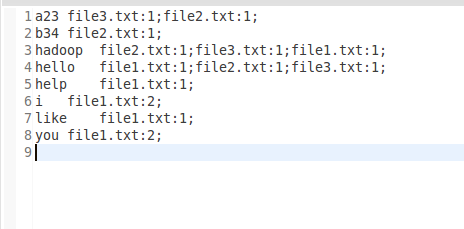
倒排索引简单地就是,根据单词,返回它在哪个文件中出现过,而且频率是多少的结果。这就像百度里的搜索,你输入一个关键字,那么百度引擎就迅速的在它的服务器里找到有该关键字的文件,并根据频率和其他的一些策略(如页面点击投票率)等来给你返回结果。这个过程中,倒排索引就起到很关键的作用。
样例输入:

样例输出:
二、设计思路
倒排索引涉及几个过程:Map过程,Combine过程,Reduce过程。
Map过程:
当你把需要处理的文档上传到hdfs时,首先默认的TextInputFormat类对输入的文件进行处理,得到文件中每一行的偏移量和这一行内容的键值对<偏移量,内容>做为map的输入。在改写map函数的时候,我们就需要考虑,怎么设计key和value的值来适合MapReduce框架,从而得到正确的结果。由于我们要得到单词,所属的文档URL,词频,而<key,value>只有两个值,那么就必须得合并其中得两个信息了。这里我们设计key=单词+URL,value=词频。即map得输出为<单词+URL,词频>,之所以将单词+URL做为key,时利用MapReduce框架自带得Map端进行排序。
Combine过程:
Combine过程将key值相同得value值累加,得到一个单词在文档上得词频。但是为了把相同得key交给同一个reduce处理,我们需要设计为key=单词,value=URL+词频。
Reduce过程:
Reduce过程其实就是一个合并的过程了,只需将相同的key值的value值合并成倒排索引需要的格式即可。
三、程序代码
程序代码如下:
 import java.io.IOException;

 import java.util.StringTokenizer;

 import org.apache.hadoop.conf.Configuration;

 import org.apache.hadoop.fs.Path;

 import org.apache.hadoop.io.LongWritable;

 import org.apache.hadoop.io.Text;

 import org.apache.hadoop.mapreduce.Job;

 import org.apache.hadoop.mapreduce.Mapper;

 import org.apache.hadoop.mapreduce.Reducer;

 import org.apache.hadoop.mapreduce.lib.input.FileInputFormat;

 import org.apache.hadoop.mapreduce.lib.input.FileSplit;

 import org.apache.hadoop.mapreduce.lib.output.FileOutputFormat;

 import org.apache.hadoop.util.GenericOptionsParser;

 public class InvertedIndex {

     public static class Map extends Mapper<LongWritable, Text, Text, Text>{

         private static Text word = new Text();

         private static Text one = new Text();

         @Override

         protected void map(LongWritable key, Text value,Mapper<LongWritable, Text, Text, Text>.Context context)

                 throws IOException, InterruptedException {

             //  super.map(key, value, context);

             String fileName = ((FileSplit)context.getInputSplit()).getPath().getName();

             StringTokenizer st = new StringTokenizer(value.toString());

             while (st.hasMoreTokens()) {

                 word.set(st.nextToken()+"\t"+fileName);

                 context.write(word, one);

             }

         }

     }

     public static class Combine extends Reducer<Text, Text, Text, Text>{

         private static Text word = new Text();

         private static Text index = new Text();

         @Override

         protected void reduce(Text key, Iterable<Text> values,Reducer<Text, Text, Text, Text>.Context context)

                 throws IOException, InterruptedException {

             //  super.reduce(arg0, arg1, arg2);

             String[] splits = key.toString().split("\t");

             if (splits.length != 2) {

                 return ;

             }

             long count = 0;

             for(Text v:values){

                 count++;

             }

             word.set(splits[0]);

             index.set(splits[1]+":"+count);

             context.write(word, index);

         }

     }

     public static class Reduce extends Reducer<Text, Text, Text, Text>{

         private static StringBuilder sub = new StringBuilder(256);

         private static Text index = new Text();

         @Override

         protected void reduce(Text word, Iterable<Text> values,Reducer<Text, Text, Text, Text>.Context context)

                 throws IOException, InterruptedException {

             // super.reduce(arg0, arg1, arg2);

             for(Text v:values){

                 sub.append(v.toString()).append(";");

             }

             index.set(sub.toString());

             context.write(word, index);

             sub.delete(0, sub.length());

         }

     }

     public static void main(String[] args) throws IOException, ClassNotFoundException, InterruptedException {

         Configuration conf = new Configuration();

         String[] otherArgs = new GenericOptionsParser(conf,args).getRemainingArgs();

         if(otherArgs.length!=2){

             System.out.println("Usage:wordcount <in> <out>");

             System.exit(2);

         }

         Job job = new Job(conf,"Invert Index ");

         job.setJarByClass(InvertedIndex.class);

         job.setMapperClass(Map.class);

         job.setCombinerClass(Combine.class);

         job.setReducerClass(Reduce.class);

         job.setMapOutputKeyClass(Text.class);

         job.setMapOutputValueClass(Text.class);

         job.setOutputKeyClass(Text.class);

         job.setOutputValueClass(Text.class);

         FileInputFormat.addInputPath(job,new Path(args[0]));

         FileOutputFormat.setOutputPath(job, new Path(args[1]));

         System.exit(job.waitForCompletion(true)?0:1);

     }

 }
Hadoop 倒排索引的更多相关文章
- hadoop倒排索引
1.前言 学习hadoop的童鞋,倒排索引这个算法还是挺重要的.这是以后展开工作的基础.首先,我们来认识下什么是倒拍索引: 倒排索引简单地就是:根据单词,返回它在哪个文件中出现过,而且频率是多少的结果 ...
- Hadoop之倒排索引
前言: 从IT跨度到DT,如今的数据每天都在海量的增长.面对如此巨大的数据,如何能让搜索引擎更好的工作呢?本文作为Hadoop系列的第二篇,将介绍分布式情况下搜索引擎的基础实现,即“倒排索引”. 1. ...
- hadoop学习笔记之倒排索引
开发工具:eclipse 目标:对下面文档phone_numbers进行倒排索引: 13599999999 1008613899999999 12013944444444 13800138000137 ...
- hadoop实现倒排索引
hadoop实现倒排索引 本文用hadoop实现倒排索引算法,用基本的分两步完成,不使用combine 第一步 读入文档,统计文档中各个单词的个数,与word count类似,但这里把word-fil ...
- Hadoop学习笔记(8) ——实战 做个倒排索引
Hadoop学习笔记(8) ——实战 做个倒排索引 倒排索引是文档检索系统中最常用数据结构.根据单词反过来查在文档中出现的频率,而不是根据文档来,所以称倒排索引(Inverted Index).结构如 ...
- Hadoop案例(四)倒排索引(多job串联)与全局计数器
一. 倒排索引(多job串联) 1. 需求分析 有大量的文本(文档.网页),需要建立搜索索引 xyg pingping xyg ss xyg ss a.txt xyg pingping xyg pin ...
- hadoop学习第三天-MapReduce介绍&&WordCount示例&&倒排索引示例
一.MapReduce介绍 (最好以下面的两个示例来理解原理) 1. MapReduce的基本思想 Map-reduce的思想就是“分而治之” Map Mapper负责“分”,即把复杂的任务分解为若干 ...
- Hadoop实战-MapReduce之倒排索引(八)
倒排索引 (就是key和Value对调的显示结果) 一.需求:下面是用户播放音乐记录,统计歌曲被哪些用户播放过 tom LittleApple jack YesterdayO ...
- Hadoop MapReduce编程 API入门系列之倒排索引(二十四)
不多说,直接上代码. 2016-12-12 21:54:04,509 INFO [org.apache.hadoop.metrics.jvm.JvmMetrics] - Initializing JV ...
随机推荐
- [leetcode]432. All O`one Data Structure全O(1)数据结构
Implement a data structure supporting the following operations: Inc(Key) - Inserts a new key with va ...
- centos7 安装部署gitlab
Gitlab官网地址:https://about.gitlab.com/downloads/ Linux系统环境: Centos7 gitlab服务安装之前需要安装一些依赖包:yum install ...
- python 将mysql数据库中的int类型修改为NULL 报1366错误,解决办法
gt.run_sql()是用pymysql 封装的类 distribution_sort_id type: int目的:将此字段值全部修改为NULL g=2gt.run_sql("updat ...
- 配置GitHub的SSH key
配置GitHub的SSH key 生成密钥对 打开git bash工具(Windows环境),Linux则直接打开命令行,执行下面的命令生成密钥文件 ssh-Keygen -t rsa -C &quo ...
- go的语法
概述 有接触go语言,工作中用的比较少,偶尔做个小项目,最近看到的一个项目也从go迁移到java. 但是对go还是恋恋不忘,它语法比较简洁,库也比较多,编译速度快,等等优点,让我忘不了. 对go的语法 ...
- centos 下使用vscode 调试egg.js 注意事项
这两天在centos下,直接用vscode运行egg.js的例子.遇到个问题就是当安装了vscode-egg插件,会遇到一个现象.就是同样的代码,Windows下调试可以顺利进行,但是centos有时 ...
- testXSS <img src="aa" onerror="javascript:alert('XSS');"/>
adsa </p><img src="aa" onerror="javascript:alert('XSS');"/><p> ...
- 利用idea解决git代码冲突问题
问题描述:在开发过程中,如果你开发的代码与其他人造成冲突,在不处理的情况下会无法拉取,并且提交容易造成代码丢失: 解决方法: [此方法是同事郭富城的分享] 1,由于冲突,我们每次拉取都会失败,这时我们 ...
- 第一章 odoo的配置(centos7 版)
一: 简述 (1) odoo是python开发的一款erp软件,目前的最新版本为odoo 11, 支持Python2和Python3, 但odoo 11目测是一个过渡版本,为了稳定,我们还是上odoo ...
- Chrome自定义滚动条
/*定义滚动条高宽及背景 高宽分别对应横竖滚动条的尺寸*/ ::-webkit-scrollbar { width: 16px; height: 16px; background-color: #F5 ...