
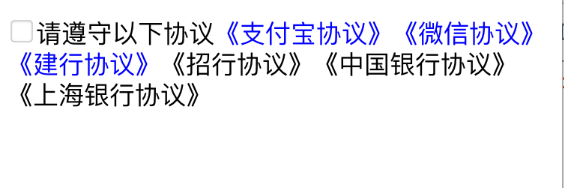
富文本 文字图片点击,(TextView)
textview上的富文本支持 文字,图片的点击事件
- (void)protocolIsSelect:(BOOL)select {

    NSMutableAttributedString *attributedString = [[NSMutableAttributedString alloc] initWithString:@"请遵守以下协议《支付宝协议》《微信协议》《建行协议》《招行协议》《中国银行协议》《上海银行协议》"];

    [attributedString addAttribute:NSLinkAttributeName

                             value:@"zhifubao://"

                             range:[[attributedString string] rangeOfString:@"《支付宝协议》"]];

    [attributedString addAttribute:NSLinkAttributeName

                             value:@"weixin://"

                             range:[[attributedString string] rangeOfString:@"《微信协议》"]];

    [attributedString addAttribute:NSLinkAttributeName

                             value:@"jianhang://"

                             range:[[attributedString string] rangeOfString:@"《建行协议》"]];

    UIImage *image = [UIImage imageNamed:select == YES ? @"new_feature_share_true" : @"new_feature_share_false"];

    CGSize size = CGSizeMake(font + , font + );

    UIGraphicsBeginImageContextWithOptions(size, false, );

    [image drawInRect:CGRectMake(, , size.width, size.height)];

    UIImage *resizeImage = UIGraphicsGetImageFromCurrentImageContext();

    UIGraphicsEndImageContext();

    NSTextAttachment *textAttachment = [[NSTextAttachment alloc] init];

    textAttachment.image = resizeImage;

    NSMutableAttributedString *imageString = [NSMutableAttributedString attributedStringWithAttachment:textAttachment];

    [imageString addAttribute:NSLinkAttributeName

                        value:@"checkbox://"

                        range:NSMakeRange(, imageString.length)];

    [attributedString insertAttributedString:imageString atIndex:];

    [attributedString addAttribute:NSFontAttributeName value:[UIFont systemFontOfSize:font] range:NSMakeRange(, attributedString.length)];

    _textview.attributedText = attributedString;

    _textview.linkTextAttributes = @{NSForegroundColorAttributeName: [UIColor blueColor],

                                     NSUnderlineColorAttributeName: [UIColor lightGrayColor],

                                     NSUnderlineStyleAttributeName: @(NSUnderlinePatternSolid)};

    _textview.delegate = self;

    _textview.editable = NO;        //必须禁止输入,否则点击将弹出输入键盘

    _textview.scrollEnabled = NO;

}

- (BOOL)textView:(UITextView *)textView shouldInteractWithURL:(NSURL *)URL inRange:(NSRange)characterRange {

    if ([[URL scheme] isEqualToString:@"jianhang"]) {

        NSLog(@"建行支付---------------");

        return NO;

    } else if ([[URL scheme] isEqualToString:@"zhifubao"]) {

        NSLog(@"支付宝支付---------------");

        return NO;

    } else if ([[URL scheme] isEqualToString:@"weixin"]) {

        NSLog(@"微信支付---------------");

        return NO;

    } else if ([[URL scheme] isEqualToString:@"checkbox"]) {

        self.isSelect = !self.isSelect;

        [self protocolIsSelect:self.isSelect];

        return NO;

    }

    return YES;

}
在简书看到的,来源于:http://www.jianshu.com/p/480db0cc7380
富文本 文字图片点击,(TextView)的更多相关文章
- iOS开发富文本制作 图片和文字/NSMutableParagraphStyle/NSMutableAttributedString
/NSMutableParagraphStyle/NSMutableAttributedString 组合使 NSString * titlestr=@"日产GT-R"; NSMu ...
- YYLabel 自动布局 富文本文字点击事件
YYLabel显示多行除了需要设置numberOfLines = 0以外,还需要设置preferredMaxLayoutWidth最大的宽度值才可以生效多行效果 YYLabel中的NSMutableA ...
- wxParse解析富文本内容使点击图片可以选中并实现放大缩小
wxParse解析富文本内容不多说,之前写过步骤介绍,主要是在使用过程中发现解析的富文本内容里有图片时有的可以点击放大缩小,有的点击却报错,找不到imgUrls. 经过排查发现:循环解析的富文本内容正 ...
- react-quill 富文本编辑器 ---- 图片处理
import React,{Component} from 'react'; import ReactQuill,{ Quill } from 'react-quill'; import 'react ...
- 使用vue-quill-editor富文本 实现图片上传
1. 下载并引入 import { quillEditor, Quill } from "vue-quill-editor"; import { container, ImageE ...
- kindeditor 富文本粘贴 图片
<script type="text/javascript" src="../../Scripts/Plugins/kindeditor/kindeditor.js ...
- 使用KindEditor富文本编辑器,点击批量上传按钮没有选择图片按钮
问题:批量上传没有选择图片按钮
- Kindeditor JS 富文本编辑器图片上传指定路径
js //================== KindEditor.ready(function (K) { var hotelid = $("#hotelid").val(); ...
- php将富文本内容图片上传到oss并替换
/** * php 提取html中图片并替换 */ //要替换的内容 //提取图片路径的src的正则表达式 $match_str = '/(<img([^>]*)\s*src=(\'|\& ...
随机推荐
- hive表多种存储格式的文件大小差异,无重复数据
-- 重点,目标表无重复数据 -- dbName.num_result 无重复记录 -- 插入数据 CREATE TABLE dbName.test_textfile( `key` string, ` ...
- 12-----BBS论坛
BBS论坛(十二) 12.1.图形验证码生成 (1)utils/captcha/init.py import random import string # Image:一个画布 # ImageDraw ...
- 5-----Scrapy框架中Spiders用法
Spider类定义了如何爬去某个网站,包括爬取的动作以及如何从网页内容中提取结构化的数据,总的来说spider就是定义爬取的动作以及分析某个网页 工作流程分析 1.以初始的URL初始化Request, ...
- Object类中有哪些方法
equals().hashCode().wait().notify().notifyAll().toString().clone().getClass().finalize()
- 安装、使用eclipse+CDT编译C++程序
我想安装.使用eclipse+CDT的初衷在看live555的源码,需要方便管理源码的工具: 使用eclipse编译和管理live555源码 http://blog.csdn.net/nkmnkm/a ...
- 闲里偷忙的CPU-某个kwoker进程忙
https://zhuanlan.zhihu.com/p/34311472 有一类比较特殊的CPU使用率问题,这类问题的特点是,系统平均CPU使用率很低,但是个别CPU的使用率非常高.今天借助这个真实 ...
- Kudu的Using Apache Kudu with Apache Impala(官网推荐的步骤)
不多说,直接上干货! http://kudu.apache.org/docs/kudu_impala_integration.html http://blog.csdn.net/lovebyz/art ...
- NPOI 操作EXCEL 小计
由于需要做一个生成下载Excel的功能,查了一下 常用的操作有 NPOI Spire DOCX,于是便下载了NPOI试了一下,发现确实好用,但是还是有几个比较坑的地方 1.不能直接删除列 虽然提供了 ...
- 如何解读IL代码
如何解读IL代码 关于IL代码,我有将从三个方面去揭开它神秘的面纱.IL代码是什么?我们为什么要去读懂IL代码?我们如何去读懂IL代码?这三个问题的解答,将是我解读IL代码的整体思路. IL代码是什么 ...
- 处理IIS 255错误,和相关信息
不知不觉已经注册博客一年多了,当初看见博客园的大神,自己也想像他们一样多写一些有用的,结果,,,不言而喻.在这里又感慨了一下,进入正题了.. 最近在公司服务器接触的比较多, 遇到了一个255 的问题 ...