
spring属性注入
1,set方法注入
(1)对于值类型的属性:
在对象中一定要有set方法
package com.songyan.demo1;

import com.songyan.injection.Car;

/**

 * 要创建的对象类

 * @author sy

 *

 */

public class User {

private String name;

private int age ;/**

 * 重写toString方法在输出对象时将属性值输出

 */

@Override

    public String toString() {

        return "name:"+this.name+",age:"+this.age;

    }

public String getName() {

    return name;

}

public void setName(String name) {

    this.name = name;

}

public int getAge() {

    return age;

}

public void setAge(int age) {

    this.age = age;

}

}
在配置文件中进行配置
<!--在user对象中为属性名为name的属性赋值为“tom”  -->

<property name="name" value="tom"></property>

<property name="age" value="18"></property>

</bean>
测试
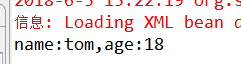
ApplicationContext applicationContext=new ClassPathXmlApplicationContext("com/songyan/injection/beans5.xml");

    User user=(User)applicationContext.getBean("user");

    System.out.println(user);
(2)对于引用类型的属性
package com.songyan.injection;

public class Car {

    private String name;

    private String color;

    @Override

    public String toString() {

        return "【carname:"+this.name+",carcolor:"+this.color+"】";

    }

    public String getName() {

        return name;

    }

    public void setName(String name) {

        this.name = name;

    }

    public String getColor() {

        return color;

    }

    public void setColor(String color) {

        this.color = color;

    }

}
package com.songyan.demo1;

import com.songyan.injection.Car;

/**

 * 要创建的对象类

 * @author sy

 *

 */

public class User {

private String name;

private int age ;

private Car car;

public Car getCar() {

    return car;

}

public void setCar(Car car) {

    this.car = car;

}

/**

 * 重写toString方法在输出对象时将属性值输出

 */

@Override

    public String toString() {

        return "name:"+this.name+",age:"+this.age+",car:"+this.car;

    }

public String getName() {

    return name;

}

public void setName(String name) {

    this.name = name;

}

public int getAge() {

    return age;

}

public void setAge(int age) {

    this.age = age;

}

}
package com.songyan.injection;

import org.springframework.context.ApplicationContext;

import org.springframework.context.support.ClassPathXmlApplicationContext;

import com.songyan.demo1.User;

public class Client {

public static void main(String[] args) {

    ApplicationContext applicationContext=new ClassPathXmlApplicationContext("com/songyan/injection/beans5.xml");

    User user=(User)applicationContext.getBean("user");

    System.out.println(user);

}

}
<?xml version="1.0" encoding="UTF-8"?>

<beans xmlns:xsi="http://www.w3.org/2001/XMLSchema-instance"

    xmlns="http://www.springframework.org/schema/beans"

    xsi:schemaLocation="http://www.springframework.org/schema/beans http://www.springframework.org/schema/beans/spring-beans-4.2.xsd ">

    <!-- 引用类型的属性注入需要先将属性配置 -->

    <bean name="car" class="com.songyan.injection.Car">

        <property name="name" value="宝马"></property>

        <property name="color" value="red"></property>

    </bean>

    <!--set 方法注入值类型 -->

    <bean name="user" class="com.songyan.demo1.User">

        <!--在user对象中为属性名为name的属性赋值为“tom” -->

        <property name="name" value="tom"></property>

        <property name="age" value="18"></property>

        <!--引用类型的赋值使用ref属性 -->

        <property name="car" ref="car"></property>

    </bean>

</beans>
2,构造方法注入
package com.songyan.injection;

public class Car {

    private String name;

    private String color;

    // 通过构造函数对属性赋值

    public Car(String name, String color) {

        super();

        this.name = name;

        this.color = color;

    }

    public Car() {

    }

    @Override

    public String toString() {

        return "【carname:" + this.name + ",carcolor:" + this.color + "】";

    }

}
package com.songyan.demo1;

import com.songyan.injection.Car;

/**

 * 要创建的对象类

 * @author sy

 *

 */

public class User {

private String name;

private int age ;

private Car car;

/**

 * 通过构造函数对属性赋值

 * @param name

 * @param age

 * @param car

 */

public User(String name, int age, Car car) {

    super();

    this.name = name;

    this.age = age;

    this.car = car;

}

public User()

{

}

/**

 * 重写toString方法在输出对象时将属性值输出

 */

@Override

    public String toString() {

        return "name:"+this.name+",age:"+this.age+",car:"+this.car;

    }

}
<?xml version="1.0" encoding="UTF-8"?>

<beans xmlns:xsi="http://www.w3.org/2001/XMLSchema-instance"

    xmlns="http://www.springframework.org/schema/beans"

    xsi:schemaLocation="http://www.springframework.org/schema/beans http://www.springframework.org/schema/beans/spring-beans-4.2.xsd ">

    <!-- 引用类型的属性注入需要先将属性配置 -->

    <bean name="car" class="com.songyan.injection.Car">

        <constructor-arg name="name" value="baoma"></constructor-arg>

        <constructor-arg name="color" value="red"></constructor-arg>

    </bean>

    <!--构造方法注入值类型 -->

    <bean name="user" class="com.songyan.demo1.User">

        <!--在user对象中为属性名为name的属性赋值为“tom” -->

        <constructor-arg name="name" value="tom"></constructor-arg>

        <constructor-arg name="age" value="18"></constructor-arg>

        <constructor-arg name="car" ref="car"></constructor-arg>

    </bean>

</beans>
package com.songyan.injection;

import org.springframework.context.ApplicationContext;

import org.springframework.context.support.ClassPathXmlApplicationContext;

import com.songyan.demo1.User;

public class Client {

public static void main(String[] args) {

    ApplicationContext applicationContext=new ClassPathXmlApplicationContext("com/songyan/injection/beans5.xml");

    User user=(User)applicationContext.getBean("user");

    System.out.println(user);

}

}
3,p名称空间注入
4,spel注入
5,复杂类型注入
package com.songyan.injection;

public class Car {

    private String name;

    private String color;

    // 通过构造函数对属性赋值

    public Car(String name, String color) {

        super();

        this.name = name;

        this.color = color;

    }

    public Car() {

    }

    @Override

    public String toString() {

        return "【carname:" + this.name + ",carcolor:" + this.color + "】";

    }

}
package com.songyan.complex;

import java.util.Arrays;

import java.util.List;

import java.util.Map;

import java.util.Properties;

public class Complex {

    private Object[] obj;//数组类型注入

    private List list;//list类型注入

    private Map map;//map类型注入

    private Properties properties;//文件类型注入

    @Override

    public String toString() {

        return "array:"+Arrays.toString(obj)+"    \nlist:"+this.list+"  \nproperties:"+this.properties+"\nmap:"+this.map;

    }

    public Object[] getObj() {

        return obj;

    }

    public void setObj(Object[] obj) {

        this.obj = obj;

    }

    public List getList() {

        return list;

    }

    public void setList(List list) {

        this.list = list;

    }

    public Map getMap() {

        return map;

    }

    public void setMap(Map map) {

        this.map = map;

    }

    public Properties getProperties() {

        return properties;

    }

    public void setProperties(Properties properties) {

        this.properties = properties;

    }

}
<?xml version="1.0" encoding="UTF-8"?>

<beans xmlns:xsi="http://www.w3.org/2001/XMLSchema-instance"

    xmlns="http://www.springframework.org/schema/beans"

    xsi:schemaLocation="http://www.springframework.org/schema/beans http://www.springframework.org/schema/beans/spring-beans-4.2.xsd ">

    <!-- 引用类型的属性注入需要先将属性配置 -->

    <bean name="car" class="com.songyan.injection.Car">

        <constructor-arg name="name" value="baoma"></constructor-arg>

        <constructor-arg name="color" value="red"></constructor-arg>

    </bean>

    <bean name="complex" class="com.songyan.complex.Complex">

    <!--数组类型-->

        <!--数组中只有一个值类型  -->

        <!-- <property name="obj" value="tom"></property> -->

        <!--数组中只有一个引用类型  -->

        <!-- <property name="obj" ref="car"></property> -->

        <!--数组中有多个值  -->

         <property name="obj" >

             <array>

                 <value>tom</value>

                 <value>jack</value>

                 <ref bean="car" />

             </array>

         </property>

    <!--map类型  -->

    <property name="map">

        <map>

            <entry key="name" value="zhangsan"></entry>

            <entry key="car" value-ref="car"></entry>

        </map>

    </property>

    <!--list类型  -->

        <!--一个值  -->

        <!-- <property name="list" value="jack"></property> -->

        <!--多个值  -->

        <property name="list">

            <list>

                <value>jack1</value>

                <value>jack2</value>

                <ref bean="car"/>

            </list>

        </property>

    <!--properties  -->

    <property name="properties">

        <props>

            <prop key="name">user</prop>

            <prop key="pass">123</prop>

            <prop key="id">192.168.1.1</prop>

        </props>

    </property>

    </bean>

</beans>
package com.songyan.complex;

import org.springframework.context.ApplicationContext;

import org.springframework.context.support.ClassPathXmlApplicationContext;

import com.songyan.demo1.User;

public class Cliect {

public static void main(String[] args) {

    ApplicationContext applicationContext=new ClassPathXmlApplicationContext("com/songyan/complex/beans.xml");

    Complex complex=(Complex)applicationContext.getBean("complex");

    System.out.println(complex);

}

}
spring属性注入的更多相关文章
- Spring 属性注入(一)JavaBean 内省机制在 BeanWrapper 中的应用
Spring 属性注入(一)JavaBean 内省机制在 BeanWrapper 中的应用 Spring 系列目录(https://www.cnblogs.com/binarylei/p/101174 ...
- Spring 属性注入(二)BeanWrapper 结构
Spring 属性注入(二)BeanWrapper 结构 Spring 系列目录(https://www.cnblogs.com/binarylei/p/10117436.html) BeanWrap ...
- Spring 属性注入(三)AbstractNestablePropertyAccessor
Spring 属性注入(三)AbstractNestablePropertyAccessor Spring 系列目录(https://www.cnblogs.com/binarylei/p/10117 ...
- Spring 属性注入(四)属性键值对 - PropertyValue
Spring 属性注入(四)属性键值对 - PropertyValue Spring 系列目录(https://www.cnblogs.com/binarylei/p/10117436.html) P ...
- spring 属性注入
Spring的核心技术室依赖注入,下面是依赖注入之属性注入的实现过程,牛刀小试,请看效果. 1.首先添加Spring.Web引用.本例中是使用分层思想来演示的,下面是项目的结构和UserModel类的 ...
- Spring属性注入、构造方法注入、工厂注入以及注入参数(转)
Spring 是一个开源框架. Spring 为简化企业级应用开发而生(对比EJB2.0来说). 使用 Spring 可以使简单的 JavaBean 实现以前只有 EJB 才能实现的功能.Spring ...
- 六 Spring属性注入的四种方式:set方法、构造方法、P名称空间、SPEL表达式
Spring的属性注入: 构造方法的属性注入 set方法的属性注入
- java spring属性注入
一.创建对象时候,向类里面属性设置值:一般有三个方式 1) .有参构造, 2). set**** 3).接口注入 二. 在spring框架里面,支持前面两种方式: 1).有参构造方法 用constr ...
- spring属性注入DI
spring setter方式注入: 注入对象属性: 前提: 在bean对应实体中有对应的setter方法. 基础代码: 在bean中有另一个bean属性的setter方法. package cn.i ...
随机推荐
- sqlserver 列出表字段和字段说明
--表描述SELECT tbs.name 表名,ds.value 描述 FROM sys.extended_properties dsLEFT JOIN sysobjects tbs ON ds.ma ...
- RAID介绍和实现
RAID的全称是廉价磁盘冗余阵列(Redundant Array of Inexpensive Disks),于1987年由美国Berkeley 大学的两名工程师提出的. RAID出现的,最初目的是将 ...
- [ecmanget][常用标签]bookmark
Bookmarks Bookmarks 书签栏 redis Try RedisRedisRedis应用2-Redis实现开发者头条页面点赞功能 - noaman_wgs的博客 - CSDN博客wind ...
- Android详细目录结构
Android 2.1 |-- Makefile |-- bionic (bionic C库) |-- bootable (启动引导相关代码) |-- build (存放系统编译规则及generic等 ...
- atan与atan2的区别
相比较ATan,ATan2究竟有什么不同?本篇介绍一下ATan2的用法及使用条件. 对于tan(θ) = y / x: θ = ATan(y / x)求出的θ取值范围是[-PI/2, PI/2]. θ ...
- nyoj 题目36 最长公共子序列
最长公共子序列 时间限制:3000 ms | 内存限制:65535 KB 难度:3 描述 咱们就不拐弯抹角了,如题,需要你做的就是写一个程序,得出最长公共子序列.tip:最长公共子序列也称作最 ...
- InputStream 、 InputStreamReader 、 BufferedReader
1.InputStream.OutputStream 处理字节流的抽象类 InputStream 是字节输入流的所有类的超类,一般我们使用它的子类,如FileInputStream等. OutputS ...
- [CF999E]Reachability from the Capital
题目大意:有一个$n$个点$m$条边的有向图,起点$S$,要求你添加最少的边使得$S$可以到达所有点 题解:缩点,答案就是没有入边的强连通分量个数,注意,如果起点$S$所在的强连通块没有入边则不计入答 ...
- BZOJ2535 [Noi2010]Plane 航空管制 【贪心 + 堆】
题目链接 BZOJ2535 题解 航班之间的关系形成了一个拓扑图 而且航班若要合法,应尽量早出发 所以我们逆拓扑序选点,能在后面出发的尽量后面出发,不会使其它点变得更劣,容易知是正确的 第二问只需枚举 ...
- HDU 1159 最长公共子序列(n*m)
Common Subsequence Time Limit: 2000/1000 MS (Java/Others) Memory Limit: 65536/32768 K (Java/Other ...