
t-io 集群解决方案以及源码解析
t-io 集群解决方案以及源码解析
0x01 概要说明
本博客是基于老谭t-io showcase中的tio-websocket-showcase 示例来实现集群。看showcase 入门还是挺容易的,入坑(入门)请看老谭写的用t-io来写一个网页聊天室或客服是个怎样的体验。 要深入理解具体实现原理后续的业务扩展,把t-io玩6起来还需要耐心看看源码,看了之后我相信你一定会有收获的,祝你好运。
其实t-io 在2.4的版本中已加入的集群实现的逻辑代码,只是官方没有写文档以及完整的示例而已,在此不得不说t-io 是一个比较良心的开源项目,很多业务场景都有考虑到。你们有需求也可以去t-io提issues。
0x02 已有的集群解决方案
实现思路就是基于redis来做一个发布/订阅的方式达到多节点协作的目的,t-io内置的集群也是使用的此解决方案。下面就来聊聊如何使用t-io的内置集群。
0x03 t-io的内置集群
在 t-io中是否开启集群是通过org.tio.core.GroupContext中的tioClusterConfig 是否为空来判断的。
好了,闲话少说直接上菜(代码)
判断是否开启集群(org.tio.core.GroupContext)
/**

 * 是否是集群

 * @return true: 是集群

 * @author: tanyaowu

 */

public boolean isCluster() {

	return tioClusterConfig != null;

}
tio-websocket-showcase中增加集群解决方案
//实例化t-io集群配置

TioClusterConfig tioClusterConfig = TioClusterConfig.newInstance("Javen", RedissonTemplate.me().getRedissonClient());

//开启群组集群-默认不集群

tioClusterConfig.setCluster4group(true);

//配置t-io集群

serverGroupContext.setTioClusterConfig(tioClusterConfig);
- TioClusterConfig 中为我们封装了各种场景下是否开启集群的参数配置、消息的发布与订阅以及添加消息监听
- RedissonTemplate 是使用
J-IM中的部分代码,目的是来实例化RedissonClient
RedissonTemplate 代码如下慢慢品读
package org.jim.common.cache.redis;

import java.io.Serializable;

import org.redisson.Redisson;

import org.redisson.api.RedissonClient;

import org.redisson.config.Config;

import org.redisson.config.SingleServerConfig;

import org.slf4j.Logger;

import org.slf4j.LoggerFactory;

/**

 * @author WChao

 * @date 2018年5月18日 下午2:46:55

 */

public class RedissonTemplate implements Serializable{

	private static final long serialVersionUID = -4528751601700736437L;

	private static final Logger logger = LoggerFactory.getLogger(RedissonTemplate.class);

	private static RedissonTemplate instance = null;

	private static RedisConfiguration redisConfig = null;

	private static final String REDIS = "redis";

	private static RedissonClient redissonClient = null;

	private RedissonTemplate(){};

	public static RedissonTemplate me() throws Exception{

		 if (instance == null) {

	        	synchronized (RedissonTemplate.class) {

					if(instance == null){

						redisConfig = RedisConfigurationFactory.parseConfiguration();

						init();

						instance = new RedissonTemplate();

					}

				}

	     }

		 return instance;

	}

	private static final void init() throws Exception {

			String host = redisConfig.getHost();

			if(host == null) {

				logger.error("the server ip of redis  must be not null!");

				throw new Exception("the server ip of redis  must be not null!");

			}

			int port = redisConfig.getPort();

			String password = redisConfig.getAuth();

			Config redissonConfig = new Config();

			SingleServerConfig singleServerConfig = redissonConfig.useSingleServer();

			singleServerConfig.setAddress(REDIS+"://"+host+":"+port).setPassword(password).setTimeout(redisConfig.getTimeout()).setRetryAttempts(redisConfig.getRetryNum());

			try {

			   redissonClient = Redisson.create(redissonConfig);

			} catch (Exception e) {

				logger.error("cann't create RedissonClient for server"+redisConfig.getHost());

				throw new Exception("cann't create RedissonClient for server"+redisConfig.getHost());

			}

	}

	/**

	 * 获取RedissonClient客户端;

	 * @return

	 */

	public final RedissonClient getRedissonClient(){

		return redissonClient;

	}

}
看到这里有人可能要问,在什么地方发布消息以及处理订阅消息!!!
什么地方发布消息
当然是发送消息的时候,调用
Tio.sendXxx()系列方法的时候。在tio-websocket-showcase中主要实现的是群聊,调用的是Tio.sendToGroup(),具体实现代码如下:/**
* 发消息到组
* @param groupContext
* @param group
* @param packet
* @param channelContextFilter
* @author tanyaowu
*/
private static Boolean sendToGroup(GroupContext groupContext, String group, Packet packet, ChannelContextFilter channelContextFilter, boolean isBlock) {
try {
SetWithLock<ChannelContext> setWithLock = groupContext.groups.clients(groupContext, group);
if (setWithLock == null) {
log.debug("{}, 组[{}]不存在", groupContext.getName(), group);
return false;
}
Boolean ret = sendToSet(groupContext, setWithLock, packet, channelContextFilter, isBlock);
return ret;
} finally {
//判断是否集群以及是不是集群通过topic转过来的消息包
if (groupContext.isCluster() && !packet.isFromCluster()) {
TioClusterConfig tioClusterConfig = groupContext.getTioClusterConfig();
//判断是否开启了群组集群
if (tioClusterConfig.isCluster4group()) {
// TioClusterVo tioClusterVo = new TioClusterVo(packet);
// tioClusterVo.setGroup(group);
// tioClusterConfig.publishAsyn(tioClusterVo);
//在集群环境下,把群组消息通知到集群中的其它机器
notifyClusterForGroup(groupContext, group, packet);
}
}
}
}
/**

	 * 在集群环境下,把群组消息通知到集群中的其它机器

	 * @param groupContext

	 * @param group

	 * @param packet

	 */

	public static void notifyClusterForGroup(GroupContext groupContext, String group, Packet packet) {

		TioClusterConfig tioClusterConfig = groupContext.getTioClusterConfig();

		TioClusterVo tioClusterVo = new TioClusterVo(packet);

		tioClusterVo.setGroup(group);

		tioClusterConfig.publishAsyn(tioClusterVo);

	}
处理订阅消息
其实在t-io中有默认实现,具体的代码如下
public void setTioClusterConfig(TioClusterConfig tioClusterConfig) {

	this.tioClusterConfig = tioClusterConfig;

	if (this.tioClusterConfig != null) {

		this.tioClusterConfig.addMessageListener(new DefaultMessageListener(this));

	}

}
org.tio.core.cluster.DefaultMessageListener 有详细的注释慢慢品读
package org.tio.core.cluster;

import org.apache.commons.lang3.StringUtils;

import org.redisson.api.listener.MessageListener;

import org.slf4j.Logger;

import org.slf4j.LoggerFactory;

import org.tio.core.Tio;

import org.tio.core.GroupContext;

import org.tio.core.intf.Packet;

import org.tio.utils.json.Json;

import java.util.Objects;

import java.util.concurrent.atomic.AtomicLong;

/**

 * 默认的集群消息监听类

 * 作者: 陈磊(Cooppor)

 * 日期: 2018-05-28 15:08

 */

public class DefaultMessageListener implements MessageListener<TioClusterVo> {

    private static Logger log = LoggerFactory.getLogger(DefaultMessageListener.class);

    /**

     * 收到了多少次topic

     */

    private static final AtomicLong RECEIVED_TOPIC_COUNT = new AtomicLong();

    private GroupContext groupContext;

    public DefaultMessageListener(GroupContext groupContext) {

        this.groupContext = groupContext;

    }

    @Override

    public void onMessage(String channel, TioClusterVo tioClusterVo) {

		log.info("收到topic:{}, count:{}, tioClusterVo:{}", channel, RECEIVED_TOPIC_COUNT.incrementAndGet(), Json.toJson(tioClusterVo));

		String clientid = tioClusterVo.getClientId();

		if (StringUtils.isBlank(clientid)) {

			log.error("clientid is null");

			return;

		}

		if (Objects.equals(TioClusterVo.CLIENTID, clientid)) {

			log.info("自己发布的消息,忽略掉,{}", clientid);

			return;

		}

		Packet packet = tioClusterVo.getPacket();

		if (packet == null) {

			log.error("packet is null");

			return;

		}

		packet.setFromCluster(true);

		//发送给所有

		boolean isToAll = tioClusterVo.isToAll();

		if (isToAll) {

			Tio.sendToAll(groupContext, packet);

		}

		//发送给指定组

		String group = tioClusterVo.getGroup();

		if (StringUtils.isNotBlank(group)) {

			Tio.sendToGroup(groupContext, group, packet);

		}

		//发送给指定用户

		String userid = tioClusterVo.getUserid();

		if (StringUtils.isNotBlank(userid)) {

			Tio.sendToUser(groupContext, userid, packet);

		}

		//发送给指定token

		String token = tioClusterVo.getToken();

		if (StringUtils.isNotBlank(token)) {

			Tio.sendToToken(groupContext, token, packet);

		}

		//发送给指定ip

		String ip = tioClusterVo.getIp();

		if (StringUtils.isNotBlank(ip)) {

			Tio.sendToIp(groupContext, ip, packet);

		}

		//发送给指定channelId

		String channelId = tioClusterVo.getChannelId();

		if (StringUtils.isNotBlank(channelId)) {

			Tio.sendToId(groupContext, channelId, packet);

		}

	}

}
0x05 配置redis
哥们,测试时别忘了配置Redis。
/tio-websocket-showcase/src/main/resources/redis.properties
#连接池连接不够用时,重试获取连接次数

retrynum = 100

#可用连接实例的最大数目,默认值为8;

maxactive = -1

#控制一个pool最多有多少个状态为idle(空闲的)的jedis实例,默认值也是8。

maxidle = 20

#等待可用连接的最大时间,单位毫秒,默认值为-1,表示永不超时。

maxwait = 5000

timeout = 2000

#redis所在机器ip

host = 127.0.0.1

#redis端口号

port = 6379

#redis密码

auth =
开启两个端口测试
9326以及9327
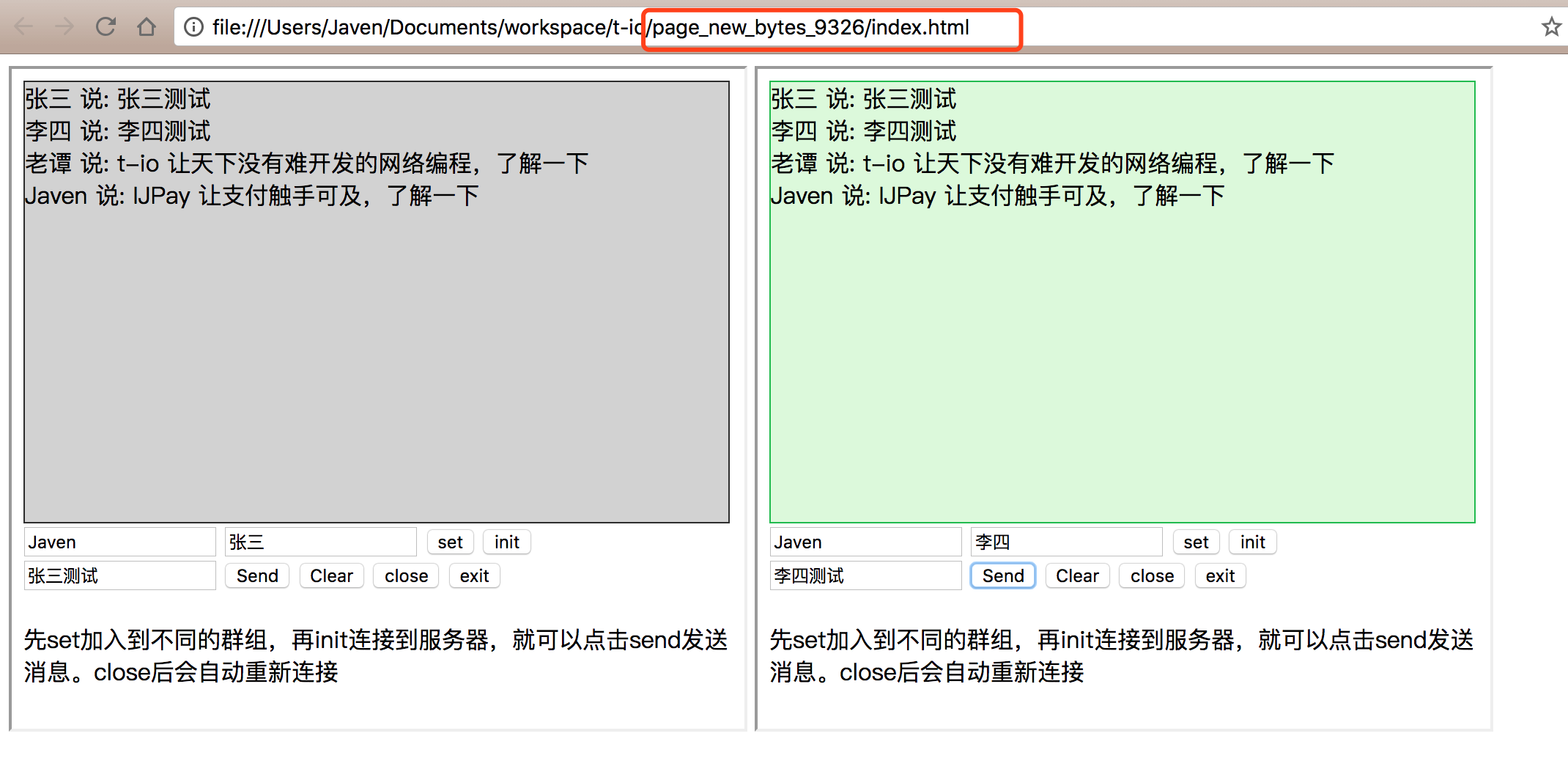
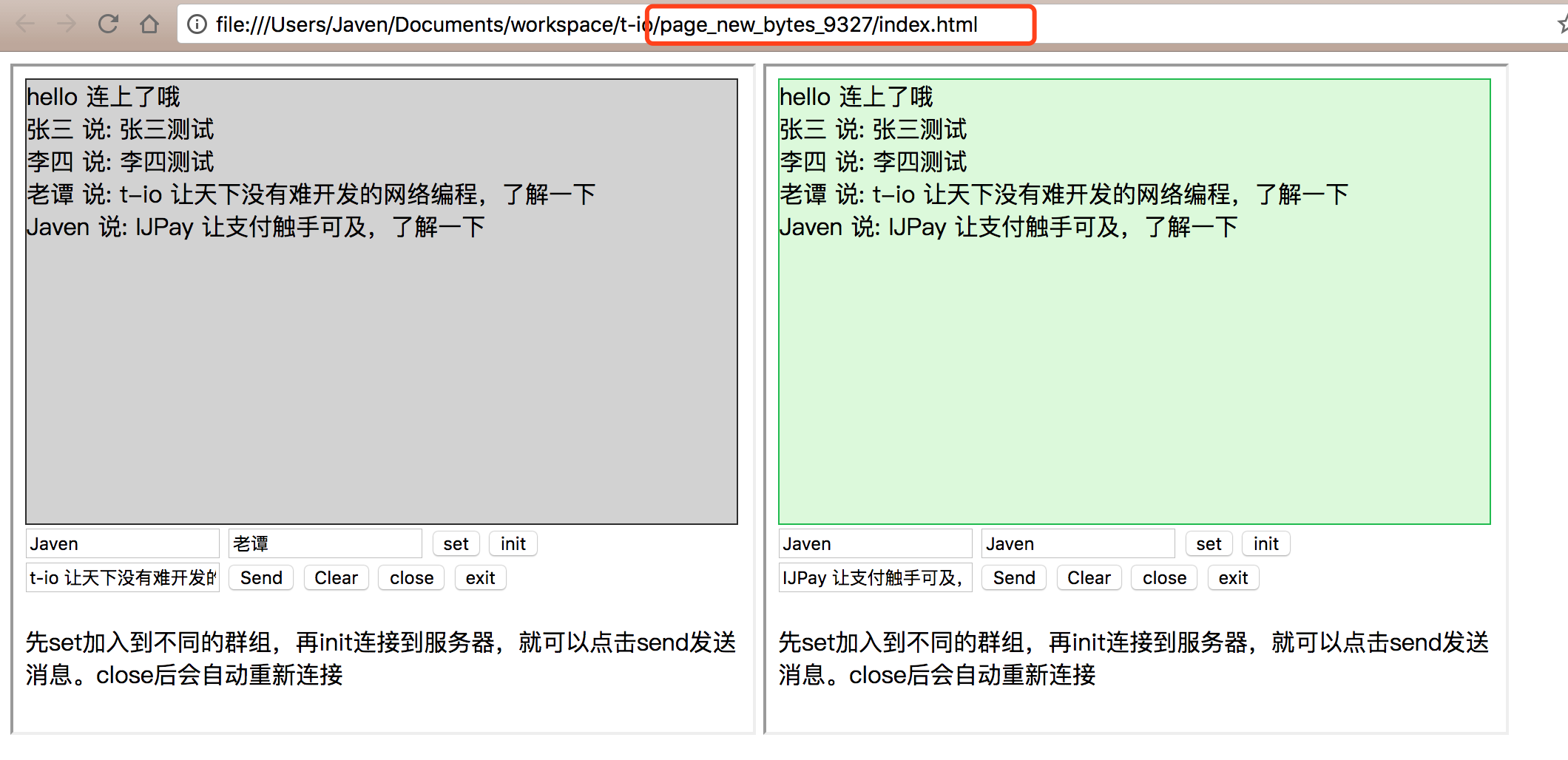
到这里在t-io 中借助Redis来实现集群部署实现步骤就介绍完了,个人能力有限如有错误欢迎指正。你有更好的解决方案或者建议欢迎一起交流讨论,如有疑问欢迎留言。
Fork的源码地址 https://gitee.com/javen205/tio-websocket-showcase
0x06 广而告之
- IJPay 让支付触手可及,封装了微信支付、支付宝支付、银联支付常用的支付方式以及各种常用的接口。不依赖任何第三方 mvc 框架,仅仅作为工具使用简单快速完成支付模块的开发,可轻松嵌入到任何系统里。
- t-io 让天下没有难开发的网络编程
- J-IM 是用JAVA语言,基于t-io开发的轻量、高性能、单机支持几十万至百万在线用户IM,主要目标降低即时通讯门槛,快速打造低成本接入在线IM系统。
t-io 集群解决方案以及源码解析的更多相关文章
- Eureka应用注册与集群数据同步源码解析
在之前的EurekaClient自动装配及启动流程解析一文中我们提到过,在构造DiscoveryClient类时,会把自身注册到服务端,本文就来分析一下这个注册流程 客户端发起注册 boolean r ...
- Redis集群生产环境源码安装
安装redis集群 根据各人单位生产环境用户搭建一.安装环境 操作系统:centos7.6 关闭防火墙.关闭selinux redis1:192.168.26.128 redis2:192.1 ...
- Nacos配置中心集群原理及源码分析
Nacos作为配置中心,必然需要保证服务节点的高可用性,那么Nacos是如何实现集群的呢? 下面这个图,表示Nacos集群的部署图. Nacos集群工作原理 Nacos作为配置中心的集群结构中,是一种 ...
- dubbo源码解析五 --- 集群容错架构设计与原理分析
欢迎来我的 Star Followers 后期后继续更新Dubbo别的文章 Dubbo 源码分析系列之一环境搭建 博客园 Dubbo 入门之二 --- 项目结构解析 博客园 Dubbo 源码分析系列之 ...
- Eureka源码解析系列文章汇总
先看一张图 0 这个图是Eureka官方提供的架构图,整张图基本上把整个Eureka的核心功能给列出来了,当你要阅读Eureka的源码时可以参考着这个图和下方这些文章 EurekaServer Eur ...
- flink on yarn部分源码解析
转发请注明原创地址:https://www.cnblogs.com/dongxiao-yang/p/9403427.html flink任务的deploy形式有很多种选择,常见的有standalone ...
- zookeeper集群搭建及Leader选举算法源码解析
第一章.zookeeper概述 一.zookeeper 简介 zookeeper 是一个开源的分布式应用程序协调服务器,是 Hadoop 的重要组件. zooKeeper 是一个分布式的,开放源码的分 ...
- 高可用性、负载均衡的mysql集群解决方案
高可用性.负载均衡的mysql集群解决方案 一.mysql的市场占有率 二.mysql为什么受到如此的欢迎 三.mysql数据库系统的优缺点 四.网络服务器的需求 五.什么是mysql的集群 六.什么 ...
- zookeeper、solrcloud、rediscluster集群解决方案
集群解决方案 课程目标 目标1:说出什么是集群以及与分布式的区别 目标2:能够搭建Zookeeper集群 目标3:能够搭建SolrCloud集群 目标4:能够搭建RedisCluster集群 ...
随机推荐
- php通过CURL模拟post提交请求
<?php header("Content-type:text/html;charset=utf-8"); class Test{ public function reque ...
- 【转】Java开发必须要知道的知识体系
Java Java是一门超高人气编程语言,拥有跨平台.面向对象.泛型编程等特性.在TIOBE编程语言排行榜中,连续夺得第一宝座,而且国内各大知名互联网公司,后端开发首选语言:非Java莫属.今天只是梳 ...
- jOOR
--摘自<android插件化开发指南> 1.jOOR库就一个Reflect.java类很重要 2.Reflect.java包括6个核心方法 1)on:包裹一个类或者对象,表示在这个类或对 ...
- 常见素数筛选方法原理和Python实现
1. 普通筛选(常用于求解单个素数问题) 自然数中,除了1和它本身以外不再有其他因数. import math def func_get_prime(n): func = lambda x: not ...
- LoRaWAN 1.1 网络协议规范 - 5 MAC指令
LoRaWAN 1.1 网络协议规范 LoRaWAN 1.1 版本封稿很久了也没有完整啃过一遍,最近边啃边翻译,趁着这个机会把它码下来. 如果觉得哪里有问题,欢迎留言斧正. 翻译不易,转载请申明出处和 ...
- hibernate log4j 输出sql
applicationContext.xml <bean id="sessionFactory" class="org.springframework ...
- 10个非常有趣的Linux命令【转载】
Linux当中有很多比较有趣的命令,可以动手看看,很简单的. 1.rev命令 一行接一行地颠倒所输入的字符串. 运行: $rev 如输入:shiyanlou shiyanlou rev.jpg 2.a ...
- 66. 二叉树的前序遍历.md
描述 给出一棵二叉树,返回其节点值的前序遍历. 您在真实的面试中是否遇到过这个题? 样例 给出一棵二叉树 {1,#,2,3}, 1 \ 2 / 3 返回 [1,2,3]. Binary Tree Pr ...
- Nagios安装与配置
安装包获取 Nagios https://sourceforge.net/projects/nagios/files/ Nagios Plugins https://www.nagios.org/do ...
- 使用openCV打开USB摄像头(UVC 小米micro接口)
之前在AndroidStudio上就用了别人用写的库成功地打开了USB摄像头. 于是我之后又在PC上尝试了一下,首先去淘宝买了个MICRO母转USB公的转接口,然后在Qt上配置了一下OPENCV后开始 ...