
OpenResty入门
写一个小例子--输出随机字符串
编写nginx配置文件
        location /random {

            content_by_lua_file /usr/local/openresty/nginx/conf/lua/random.lua;

        }
编写random.lua文件
local args = ngx.req.get_uri_args()

local salt = args.salt

if not salt then

    ngx.exit(ngx.HTTP_BAD_REQUEST)

end

local string = ngx.md5(ngx.time() .. salt)

ngx.say(string)
检查语法
./nginx -t -c /usr/local/openresty/nginx/conf/nginx.conf
重启nginx
./nginx -s reload -c /usr/local/openresty/nginx/conf/nginx.conf
测试一下
curl 127.0.0.1/random?salt=123
成功输出了随机字符串
ea14f7a36e29925f3e9e318128f989f7
ngx lua API--post请求获取并输出userAgent
1. 编写userAgent.lua文件
local json = require "cjson"

ngx.req.read_body()

local args = ngx.req.get_post_args()

if not args or not args.info then

        ngx.exit(ngx_HTTP_BAD_REQUEST)

end

local client_ip = ngx.var.remote_addr

local user_agent = ngx.req.get_headers()['user-agent'] or ''

local info = ngx.decode_base64(args.info)

local response = {}

response.info = info

response.ip = client_ip

response.user_agent = user_agent

ngx.say(json.encode(response))
2. 修改nginx配置文件
location /agent {

    content_by_lua_file /usr/local/openresty/nginx/conf/lua/userAgent.lua;

}
3. 检查配置语法并重启nginx
[root@VM_0_10_centos sbin]# ./nginx -t -c /usr/local/openresty/nginx/conf/nginx.conf

nginx: the configuration file /usr/local/openresty/nginx/conf/nginx.conf syntax is ok

nginx: configuration file /usr/local/openresty/nginx/conf/nginx.conf test is successful

[root@VM_0_10_centos sbin]# ./nginx -s reload -c /usr/local/openresty/nginx/conf/nginx.conf
4. 使用curl进行测试
[root@VM_0_10_centos sbin]# curl -i --data 'info=addgfdgjkljdfgjkl65632dsgds' 127.0.0.1/agent

HTTP/1.1  OK

Server: openresty/1.13.6.1

Date: Sun,  Sep  :: GMT

Content-Type: application/octet-stream

Transfer-Encoding: chunked

Connection: keep-alive

{"info":"i#\b䗮zip":"127.0.0.1","user_agent":"curl\/7.61.0"}
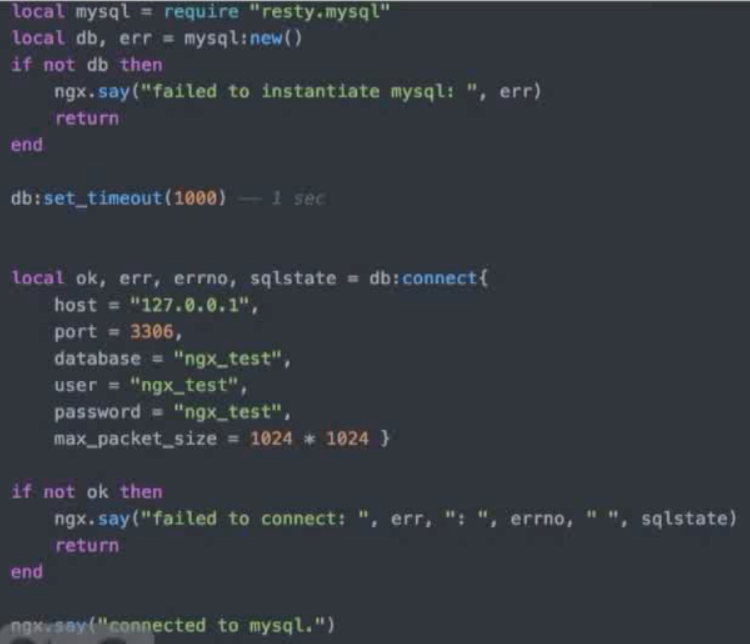
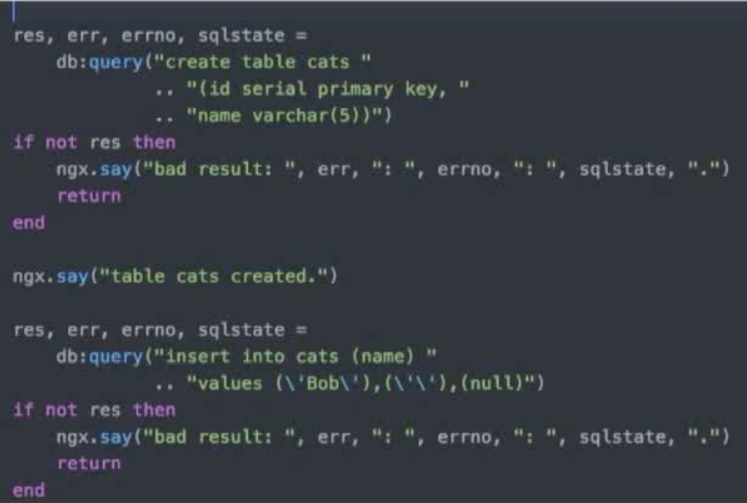
连接数据库--操作MySQL
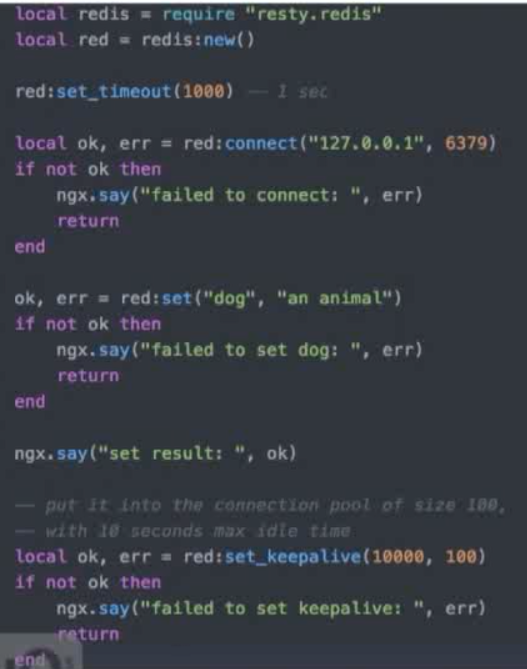
操作Redis
OpenResty入门的更多相关文章
- openresty入门文章(笔者自用)
推荐好的openresty入门介绍文章:https://www.cnblogs.com/digdeep/p/4859575.html
- openresty入门12 openresty php 整合
利用 openresty 的 drizzle-nginx-module模块 读取数据 传递到 php后端 利用到 openresty 的并发,无阻塞,mysql连接池,memcache|redis ...
- OpenResty入门之使用Lua扩展Nginx
记住一点:nginx配置文件很多坑来源自你的空格少了或多了. 1.Centos下载安装 如果你的系统是 Centos 或 RedHat 可以使用以下命令: yum install readline-d ...
- OpenResty入门之使用Lua开发Nginx插件
记住一点:nginx配置文件很多坑来源自你的空格少了或多了. OpenResty OpenResty 是一个基于 Nginx 与 Lua 的高性能 Web 平台,其内部集成了大量精良的 Lua 库.第 ...
- 《用OpenResty搭建高性能服务端》笔记
概要 <用OpenResty搭建高性能服务端>是OpenResty系列课程中的入门课程,主讲人:温铭老师.课程分为10个章节,侧重于OpenResty的基本概念和主要特点的介绍,包括它的指 ...
- Lua脚本语言快速入门手册
学了两天Lua语言,感叹其短小精悍,上手极快,语法还很舒服,不错!整理下学习过程中经常用到的基础知识,共勉! Lua用法简述 Lua语言是在1993年由巴西一个大学研究小组发明,其设计目标是作为嵌入式 ...
- OpenResty 社区王院生:APISIX 的高性能实践
2019 年 7 月 6 日,OpenResty 社区联合又拍云,举办 OpenResty × Open Talk 全国巡回沙龙·上海站,OpenResty 软件基金会联合创始人王院生在活动上做了&l ...
- OpenResty学习指南(一)
我的博客: https://www.luozhiyun.com/archives/217 想要学好 OpenResty,你必须理解下面 8 个重点: 同步非阻塞的编程模式: 不同阶段的作用: LuaJ ...
- OpenResty搭建高性能服务端
OpenResty搭建高性能服务端 Socket编程 Linux Socket编程领域为了处理大量连接请求场景,需要使用非阻塞I/O和复用,select.poll.epoll是Linux API提 ...
随机推荐
- hibernate课程 初探单表映射1-6 hibernate项目建立以及导入jar包
hibernate 项目建立 1 new ==>java project hibernate 导入jar包 1 windows==>prerence==>java ==>bui ...
- 【收藏】这么多WEB组件(CSS),攒一个网站够了吧?
简言 总是喜欢简单又精致的东西,美的不繁复也不张扬.这是闷骚程序员的癖好么?闲来无事,把收集到的部分WEB组件整理汇总一下,攒一个逼格高一点的网站够了吧? 1 表单(form)相关 1.1 输入框(i ...
- Python之简易计算器
思路:学会运用正则表达式把需要先进行计算的匹配出来,然后再一步步的去算,把先算出来的值替换原来的值,再进一步的把++,--等号变成我们正常的数学上的符号,然后再进行一步步的替换,最终把带括号的都计算出 ...
- 在LINUX系统中MySQL数据库区分表名的大小写--解决办法
因为linux下mysql默认是要区分表名大小写的.mysql是否区分大小写设置是由参数lower_case_table_names决定的, 其中:1)lower_case_table_names = ...
- 私有npm下载资源
私有npm库下载资源需要用户名和密码,这个需要创建npm库的人提供. 使用方法: npm login --registry=仓库地址 Username: 用户名 Password: 密码 Email: ...
- 基于python3.6的如何爬取百度地图
先前参考了其他的代码,大多数是python2.7写的,而3.6用的类库以及规则有了很大的变动,所以自己写了一个这样的代码,供给大家参考. def get_station(i): station=[] ...
- 事件(Application Event)
Spring的事件(Appllcation Event)为Bean与Bean之间的消息通信提供了支持.当一个Bean处理完一个任务后,希望另一个Bean知道并能做相应的处理,这种情况可以让另一个Bea ...
- 【作业留存】根据IATF框架,设计的一种中小型企业安全拓扑
- jQuery_3_过滤选择器
过滤选择器(过滤器)类似于CSS3里的伪类,包含 1. 基本过滤器 2. 内容过滤器 3. 可见性过滤器 4. 子元素过滤器 5. 其他方法 一. 基本过滤器 过滤器名 jQuery语法 注释 :f ...
- IOS NSBundle使用(访问文件夹)
NSBundle的相关信息 1.一个NSBundle代表一个文件夹,利用NSBundle能访问对应的文件夹 2.利用mainBundle就可以访问软件资源包中的任何资源 3.模拟器应用程序的安装路径: ...