
CSS——制作天天生鲜登陆页面
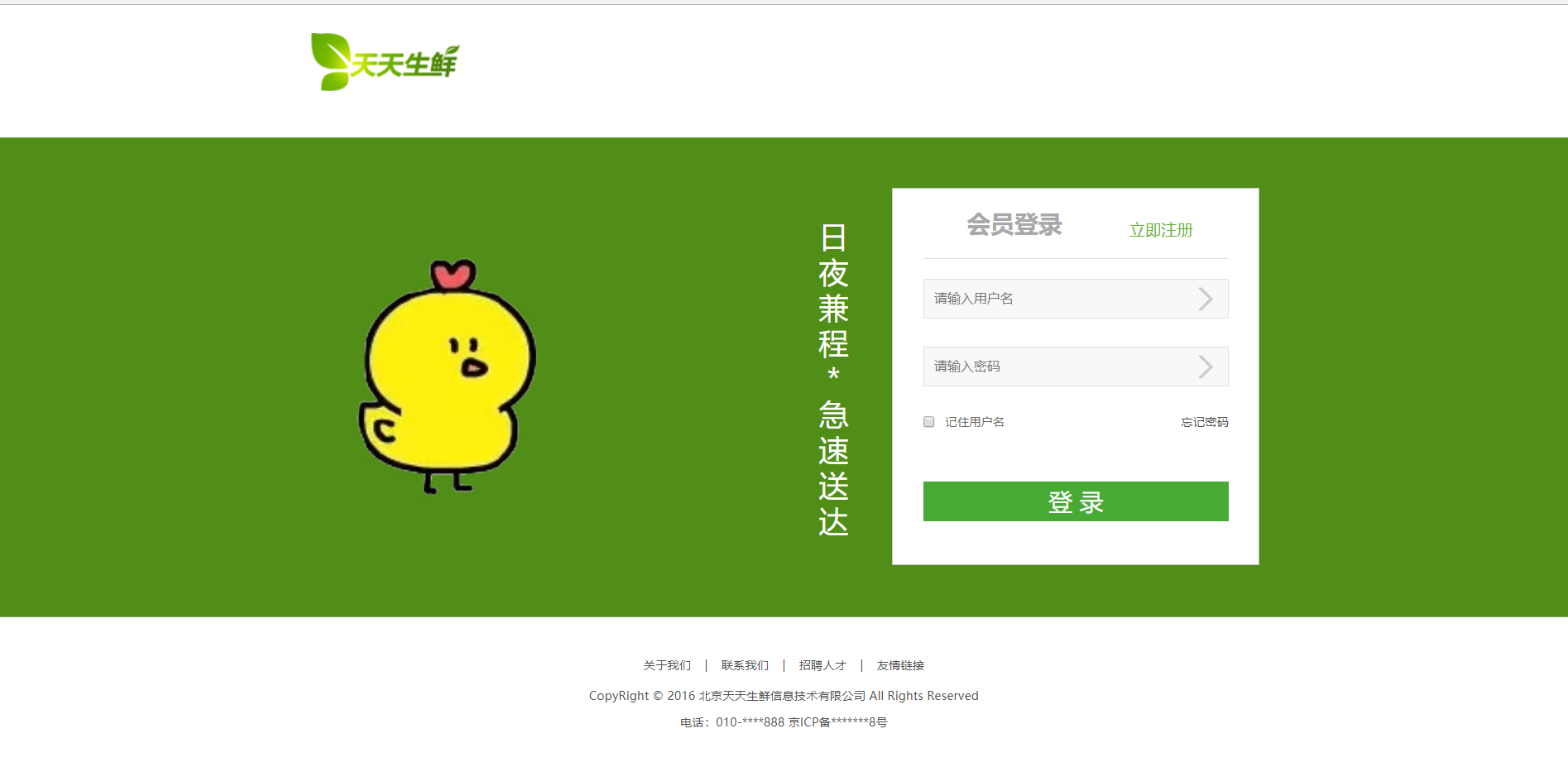
这个登陆页面主要是有一个form表单,其他的和首页差不多的。
login.html:
<!DOCTYPE html>

<html lang="en">

<head>

    <meta charset="UTF-8">

    <title>天天生鲜-登录页</title>

    <link rel="stylesheet" type="text/css" href="css/reset.css">

    <link rel="stylesheet" type="text/css" href="css/main.css">

</head>

<body>

    <div class="login_header clearfix">

         <a href="index.html"><img src="data:images/logo.png" alt="logo"></a>

    </div>

    <div class="login_form_con">

        <div class="login_form">

            <img src="data:images/login.jpg" class="login_banner">

            <p class="slogan fl">日夜兼程*急速送达</p>

            <div class="form_input_con fr">

                <div class="form_title">

                    <h1 class="fl">会员登录</h1>

                    <a href="#" class="fr">立即注册</a>

                </div>

                <!--表单提交用form标签-->

                <form>

                    <div class="form_group">

                        <input type="text" name="username" class="input_txt"

                        placeholder="请输入用户名">

                        <span class="error">文字提示</span>

                    </div>

                    <div class="form_group">

                        <input type="password" name="pwd" class="input_pwd"

                        placeholder="请输入密码">

                        <span class="error">文字提示</span>

                    </div>

                    <div class="form_group">

                        <input type="checkbox" name="remember" id="remember"

                               class="input_check fl">

                        <!--for="remember" 这可以使用户在点击“记住用户名”时也可以选中该属性-->

                        <label for="remember" class="fl">记住用户名</label>

                        <a href="#" class="find_pass fr">忘记密码</a>

                    </div>

                    <input type="submit" name="" value="登 录" class="input_sub">

                </form>

            </div>

        </div>

    </div>

    <div class="footer login_footer">

        <div class="links">

            <a href="">关于我们</a>

            <span>|</span>

            <a href="">联系我们</a>

            <span>|</span>

            <a href="">招聘人才</a>

            <span>|</span>

            <a href="">友情链接</a>

        </div>

        <p>CopyRight © 2016 北京天天生鲜信息技术有限公司 All Rights Reserved<br />

    电话:010-****888 京ICP备*******8号</p>

    </div>

</body>

</html>
main.html:(里面有登录页的样式,所以有点长)
body{

    font-family: 'Microsoft YaHei';

    color:#666;

    font-size:12px;

}

/*首页样式*/

/*顶部状态条*/

.header_con{

    height:29px;

    background-color: #f7f7f7;

    border-bottom:1px solid #ddd;

}

.header{

    width:1200px;

    height:29px;

    margin:0 auto;

}

.welcome{

    font:12px/29px 'Microsoft YaHei UI';

}

.user_login_link,.user_welcome, .user_shopping{

    height:29px;

    line-height:29px;

}

.user_login_link a, .user_shopping a{

    color:#666;

}

.user_login_link a:hover,.user_shopping a:hover{

    color:#f80;

}

.user_login_link span, .user_shopping span{

    margin:0 15px;

    color:#cecece;

}

/*把这个块藏起来*/

.user_welcome{

    display:none;

}

.user_welcome em{

    color:#f80;

}

/*左侧菜单样式*/

.logo_bar{

    width:1200px;

    height:115px;

    margin:0 auto;

}

.logo{

    width:151px;

    height:59px;

    margin:29px 0 0 17px;

}

.search{

    width:616px;

    height:38px;

    border:1px solid #37ab40;

    margin:34px 0 0 123px;

    /*雪碧图的放大镜作背景图*/

    background:url(../images/icons.png) 10px -335px no-repeat;

}

.search .input_text{

    width:470px;

    height:37px;

    border:0px;

    margin-left:37px;

    outline:none;

}

.search .input_btn{

    width:100px;

    height:38px;

    background-color: #37ab40;

    border:;

    font:14px/38px 'Microsoft YaHei UI';

    color:#fff;

    /*鼠标变成手*/

    cursor:pointer;

}

.chart{

    width:200px;

    height:40px;

    margin-top:34px;

}

.chart a{

    width:158px;

    height:38px;

    border:1px solid #ddd;

    font:14px/38px 'Microsoft YaHei UI';

    color:#37ab40;

    text-indent:56px;

    background:url(../images/icons.png) 10px -300px no-repeat #f7f7f7;

}

.chart span{

    width: 40px;

    height:40px;

    background-color:#f80;

    font:bold 18px/40px 'Microsoft YaHei UI';

    text-align:center;

    color:#fff;

}

.sub_menu_con{

    height:40px;

    border-bottom:2px solid #37ab30

}

.sub_menu{

    width:1200px;

    height:40px;

    margin:0 auto;

}

.sub_menu h1{

    width:200px;

    height:40px;

    background-color: #37ab40;

    font:14px/40px 'Microsoft YaHei UI';

    text-align:center;

    color:#fff;

}

.sub_menu ul{

    overflow:hidden;

}

.sub_menu li{

    float:left;

    height:14px;

    padding:0 25px;

    border-left:1px solid #666;

    margin-left:-2px;

    margin-top:13px;

}

.sub_menu li a{

    font:14px/14px 'Microsoft YaHei UI'

    color:#666;

}

.sub_menu li a:hover{

    color:#f80;

}

.center_con{

    width:1200px;

    height:270px;

    margin:0 auto;

}

.center_con .main_menu{

    width:200px;

    height:270px;

    overflow:hidden;

}

.center_con .main_menu li{

    width:198px;

    height:44px;

    border:1px solid #eee;

    margin-top:-1px;

    background:url(../images/icons.png) 166px -260px no-repeat;

}

.center_con .main_menu li a{

    display:block;

    width:198px;

    height:44px;

    text-indent:71px;

    font:14px/44px 'Microsoft YaHei UI';

    color:#333;

    background:url(../images/icons.png) 33px -260px no-repeat;

}

.center_con .main_menu li .fruit{

    background-position: 30px 0px;

}

.center_con .main_menu li .seafood{

    background-position: 30px -41px;

}

.center_con .main_menu li .meat{

    background-position: 30px -87px;

}

.center_con .main_menu li .egg{

    background-position: 30px -132px;

}

.center_con .main_menu li .vegetable{

    background-position: 30px -174px;

}

.center_con .main_menu li .ice{

    background-position: 30px -220px;

}

/*幻灯片样式*/

.slide_con{

    width:760px;

    height:270px;

    position:relative

}

.prev{

    width:15px;

    height:23px;

    /*绝对定位*/

    position: absolute;

    left:11px;

    top:122px;

    background:url(../images/icons.png) -2px -388px no-repeat;

    cursor: pointer;

}

.next{

    width:15px;

    height:23px;

    /*绝对定位,叠加图片*/

    position: absolute;

    left:732px;

    top:122px;

    background:url(../images/icons.png) -2px -428px no-repeat;

    cursor: pointer;

}

.points{

    position: absolute;

    width:100%;

    height:11px;

    left:;

    bottom:9px;

    text-align:center;

    font-size:0px;

}

.points li{

    width:11px;

    height:11px;

    display:inline-block;

    background-color: #9f9f9f;

    margin:0 5px;

    /*设置圆角,半径为高度的一半*/

    border-radius:50%;

}

.points .active{

    background-color: #cecece;

}

.adv{

    width:240px;

    height:270px;

}

.adv a{

    float:left;

    width:240px;

    height:135px;

}

/*解决图片下方3像素白边的情况*/

.adv a img{

    display:block;

}

.common_model{

    width:1200px;

    height:340px;

    margin:18px auto 0;

}

.common_title{

    height:38px;

    border-bottom: 2px solid #42ad46;

}

.common_model h3{

    font:bold 16px/38px 'Microsoft YaHei UI';

    color:#37ab40;

}

.common_model .common_title ul{

    height:12px;

    margin:13px 0 0  20px;

}

.common_model .common_title li{

    float:left;

    margin:0 10px;

}

.common_model .common_title li a{

    /*微软雅黑默认有行高*/

    color:#666;

}

.common_model .common_title li a:hover{

    color:#f80;

}

.common_model .common_title .more{

    height:38px;

    line-height:38px;

    color:#666;

}

.common_model .common_title .more:hover{

    color:#f80;

}

.common_model .common_goods_list{

    height:300px;

    width:1200px;

}

.common_model .common_goods_list .goods_banner{

    width:200px;

    height:300px;

}

.common_model .common_goods_list .good_list{

    width:1000px;

    height:300px;

}

.common_model .common_goods_list .good_list li{

    width:249px;

    height:299px;

    border-right:1px solid #ededed;

    border-bottom:1px solid #ededed;

    float:left;

}

.common_goods_list .good_list li:hover{

    width:248px;

    height:298px;

    border:1px solid #ff0;

}

.common_goods_list .good_list li h4{

    height:52px;

    font:14px/52px 'Microsoft YaHei UI';

    color:#666;

    text-align:center;

}

.common_goods_list .good_list li a{

    display:block;

    height:180px;

    width:180px;

    margin:0 auto;

}

.common_goods_list .good_list li p{

    height:52px;

    font:bold 20px/52px 'Microsoft YaHei UI';

    color:#c40000;

    text-align: center;

}

.footer{

    height:145px;

    border-top:2px solid #4ab14e;

    margin-top:30px;

}

.footer .links{

    text-align:center;

    /*有边框就没有margin-top塌陷了*/

    margin-top:40px;

}

.footer .links a{

    color:#4e4e4e;

}

.footer .links a:hover{

    color:#f80;

}

.footer .links span{

    color:#4e4e4e;

    margin:0 10px;

}

.footer p{

    text-align: center;

    line-height:27px;

    color:#4e4e4e;

    margin-top:10px;

}

/*登录页样式*/

.login_header{

    width:953px;

    height:133px;

    margin:0 auto;

}

.login_header a{

    width:193px;

    height:76px;

    display:block;

    margin-top:28px;

}

.login_form_con{

    border-top:1px solid #79a652;

    border-bottom:1px solid #79a652;

    height:482px;

    background-color: #518e17;

}

.login_form{

    width:958px;

    height:482px;

    margin:0 auto;

}

.login_form .login_banner{

    float:left;

    margin:92px 0 0 15px;

}

.login_form .slogan{

    width:30px;

    height:300px;

    color:#fff;

    font-size:30px;

    text-align: center;

    line-height:36px;

    margin:80px 0 0 250px;

}

.form_input_con{

    width:368px;

    height:378px;

    background-color:#fff;

    border:1px solid #c6c6c5;

    margin-top:50px;

}

.login_footer{

    margin-top:;

    border-top:;

}

.form_title{

    width:308px;

    height:70px;

    border-bottom: 1px solid #e0e0e0;

    margin:0 auto

}

.form_title h1{

    height:70px;

    font:bold 24px/70px 'Microsoft YaHei UI';

    color:#a8a8a8;

    margin-left:44px;

}

.form_title a{

    width:100px;

    height:16px;

    color:#5fb42a;

    font:16px/16px 'Microsoft YaHei UI';

    margin:33px 0 0 36px;

}

.form_title a:hover{

    color:#f80;

}

.form_input_con form{

    width:308px;

    height:211px;

    margin:20px auto 0;

}

.form_input_con form .form_group{

    width:308px;

    height:68px;

}

.form_group .input_txt, .form_group .input_pwd{

    width:306px;

    height:38px;

    border:1px solid #e0e0e0;

    /*默认鼠标放到输入框会有一个虚框,none取消这个虚框*/

    outline:none;

    background:url(../images/icons.png) 275px -420px no-repeat #f8f8f8;

    text-indent: 10px;

}

.form_group .error{

    font:12px/28px 'Microsoft YaHei UI';

    color:#ff5400;

    /*这个文字默认是藏起来的*/

    display:none;

}

.form_group .input_check{

    margin:2px 10px 0 0;

}

.form_group .find_pass{

    color:#4b4b4b;

}

.form_group .find_pass:hover{

    color:#f80;

}

.input_sub{

    width:308px;

    height:40px;

    background-color: #47aa34;

    border:;

    font:24px/40px 'Microsoft YaHei UI';

    color:#fff;

    /*鼠标变手*/

    cursor: pointer;

}
reset.css:和登录页的是一样的,我就不粘了。
有些图片没去找,直接随便找一张改了尺寸和背景色,最后效果图是这样的:
CSS——制作天天生鲜登陆页面的更多相关文章
- CSS——制作天天生鲜主页
终于做好了! index.html: <!DOCTYPE html> <html lang="en"> <head> <meta char ...
- Easyui登陆页面制作
一.登陆页面HTML <%@ Page Language="C#" AutoEventWireup="true" CodeBehind="Web ...
- 天天生鲜 - App设计
天天生鲜-思路数据库设计 天天生鲜-各个App 全文检索 天天生鲜-静态文件 一.项目目录 daily_fresh_demo - daily_fresh_demo - df_cart # 购物车功能 ...
- 【Bootstrap】一个PC、平板、手机同一时候使用并且美观的登陆页面
Bootstrap如同前台框架,它已经布置好不少的CSS.前端开发的使用须要则直接调用就可以.其站点的网址就是http://www.bootcss.com.使用Bootstrap能降低前端开发时候在C ...
- 前端开发css实战:使用css制作网页中的多级菜单
前端开发css实战:使用css制作网页中的多级菜单 在日常工作中,大家都会遇到一些显示隐藏类菜单,比如页头导航.二维码显示隐藏.文本提示等等......而这些效果都是可以使用纯css实现的(而且非常简 ...
- MUI APP防止登陆页面出现白屏
最近在用MUI开发APP,总体效果,在IOS上,是完美的,但是在低端的Android手机上,就会出现性能问题,我个人觉得最严重的是,就是首页,就是APP打开的第一个页面,在iOS上,由于性能高,所以, ...
- js实现登陆页面的拖拽功能
<!DOCTYPE html><html> <head> <meta charset="UTF-8"> <title>登 ...
- iOS 本地加载html登陆页面
Html的代码 <!DOCTYPE html> <html lang="en"> <head> <meta charset="U ...
- 利用DIV+CSS制作网页过程中常用的基本概念及标签使
CSS主要用于对HTML文件功能的补充及扩展,其作用就是对HTML文件中各种排版进行设置,达到对网页中字体.颜色.背景.图片等的控制,使网页能够完全依照设计者的想法来显示. CSS可以控制网页的显示, ...
随机推荐
- Centos7配置https,及多个https配置
Centos7.2配置https,及多个https配置 1.单个https配置 检查相关依赖,如果没有就yum安装 yum install mod_ssl openssl rpm -qa| grep ...
- 关系逻辑运算符---------&&和||
1.&&符号 常规用法没什么好说的,我们来说说其不同于java的特殊之处 (1)&&符号究竟返回什么 我们知道,0,null,defined,null,NaN等都可以转 ...
- 蓝桥杯训练 2n皇后问题
给定一个n*n的棋盘,棋盘中有一些位置不能放皇后.现在要向棋盘中放入n个黑皇后和n个白皇后,使任意的两个黑皇后都不在同一行.同一列或同一条对角线上,任意的两个白皇后都不在同一行.同一列或同一条对角线上 ...
- AtCoder Grand Contest 002 F:Leftmost Ball
题目传送门:https://agc002.contest.atcoder.jp/tasks/agc002_f 题目翻译 你有\(n*k\)个球,这些球一共有\(n\)种颜色,每种颜色有\(k\)个,然 ...
- zk 01之 ZooKeeper概述
Zookeeper产生的背景 ZooKeeper---译名为“动物园管理员”.动物园里当然有好多的动物,游客可以根据动物园提供的向导图到不同的场馆观赏各种类型的动物,而不是像走在原始丛林里,心惊胆颤的 ...
- IP简介2
本笔记介绍java net IP A 类 主要是大型的交换机 1-126 B类 128-191 分配给各个国家的典型的服务器 每个网段支持255*255个设备 每一个B类都可以分配444416个C ...
- [hdu4812]D Tree(点分治)
题意:问有多少条路径,符合路径上所有节点的权值乘积模1000003等于k. 解题关键:预处理阶乘逆元,然后通过hash和树形dp$O(1)$的判定乘积存在问题,注意此道题是如何处理路径保证不重复的,具 ...
- Al-Qaeda affiliate in&…
By Greg Miller, Updated: Friday, February 1, 4:13 AM New intelligence on al-Qaeda's affiliate in Nor ...
- day1 java基础回顾-泛型
2.泛型(Generic) 当集合中存储的对象类型不同时,那么会导致程序在运行的时候的转型异常 1 import java.util.ArrayList; 2 import java.util.Ite ...
- SQL Server(二)——语句 转
表的创建: 1.创建列(字段):列名+类型 2.设置主键列(primary key):能够唯一标识一条数据 3.设置唯一(unique):内容不能重复 4.外键关系:一张表(从表)其中的某列引用自另外 ...