
docker安装gitlab并部署CICD
摘要
本文主要实现了在docker下安装gitlab,将gitlab绑定在宿主机的180端口,将gitlab的clone的URL添加指定端口号;部署了CI/CD,并公布了测试项目。
安装docker[1]
- 删除旧版本的docker(如果未安装则忽略)
sudo apt-get remove docker docker-engine docker.io containerd runc
安装依赖
sudo apt-get update

sudo apt-get install \

    apt-transport-https \

    ca-certificates \

    curl \

    gnupg-agent \

    software-properties-common
Add Docker’s official GPG key
curl -fsSL https://download.docker.com/linux/ubuntu/gpg | sudo apt-key add -
添加仓库
# x86_64

sudo add-apt-repository \

   "deb [arch=amd64] https://download.docker.com/linux/ubuntu \

   $(lsb_release -cs) \

   stable"

# armf

sudo add-apt-repository \

   "deb [arch=armhf] https://download.docker.com/linux/ubuntu \

   $(lsb_release -cs) \

   stable"

# arm64

sudo add-apt-repository \

   "deb [arch=arm64] https://download.docker.com/linux/ubuntu \

   $(lsb_release -cs) \

   stable"
安装
sudo apt-get update

sudo apt-get install docker-ce docker-ce-cli containerd.io
docker换源
注册阿里云账号
选择容器镜像服务
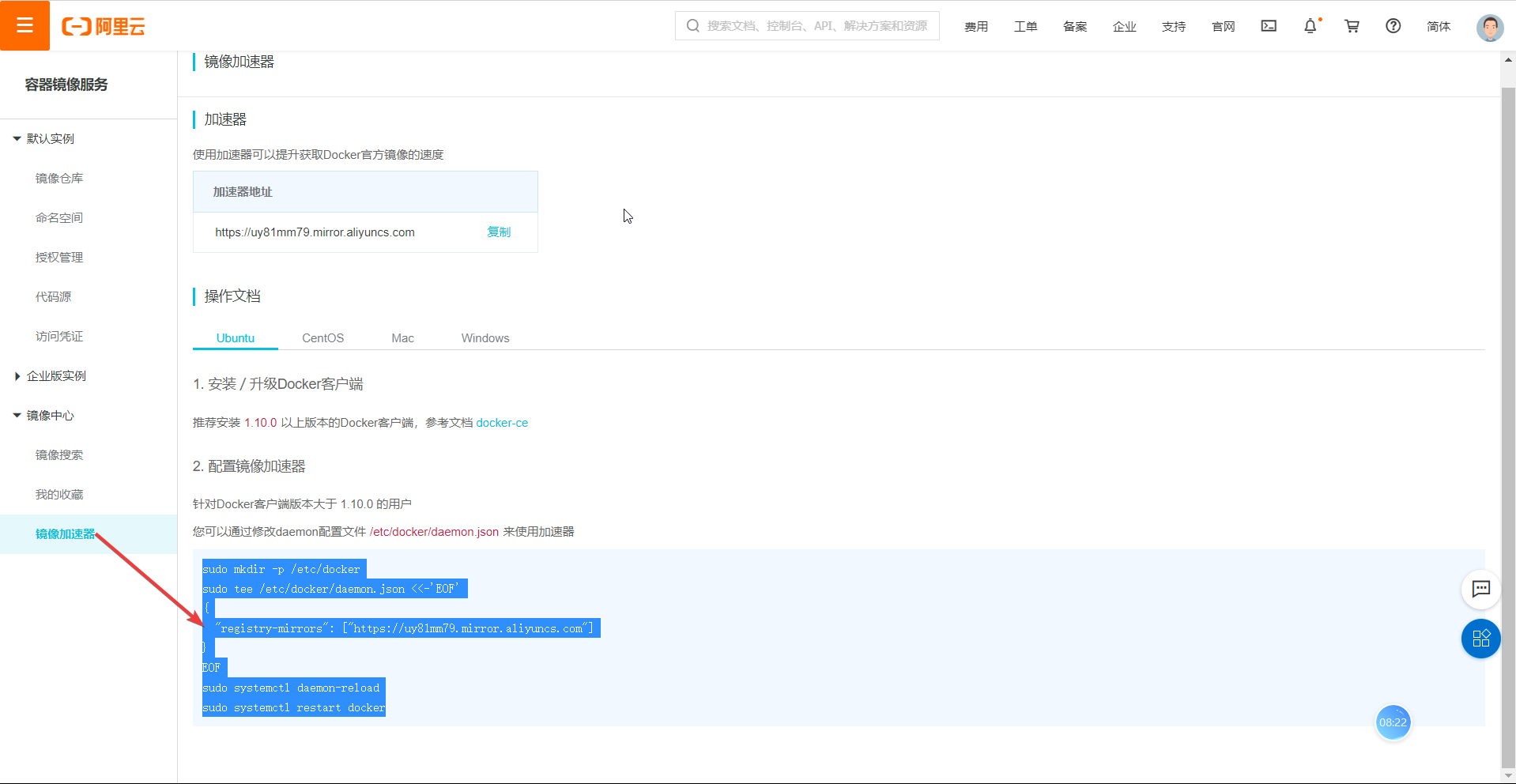
执行命令
sudo mkdir -p /etc/docker

sudo tee /etc/docker/daemon.json <<-'EOF'

{

  "registry-mirrors": ["https://uy81mm79.mirror.aliyuncs.com"]

}

EOF

sudo systemctl daemon-reload

sudo systemctl restart docker
docker安装gitlab[2] [3]
创建运行目录
sudo mkdir /opt/gitlab_docker

cd /opt/gitlab_docker
安装docker-compose
sudo apt install docker-compose
编写docker-compose.yml
version: '3.1'

services:

 gitlab:

  image: 'gitlab/gitlab-ce'

  container_name: "gitlab"

  restart: always

  privileged: true

  hostname: 'gitlab'

  environment:

   TZ: 'Asia/Shanghai'

   GITLAB_OMNIBUS_CONFIG: |

    external_url 'http://192.168.196.1'

    gitlab_rails['time_zone'] = 'Asia/Shanghai'

    gitlab_rails['smtp_enable'] = true

    gitlab_rails['gitlab_shell_ssh_port'] = 22

  ports:

   - '181:80'

   - '180:180'

   - '1443:443'

   - '22:22'

  volumes:

   - /opt/gitlab_docker/config:/etc/gitlab

   - /opt/gitlab_docker/data:/var/opt/gitlab

   - /opt/gitlab_docker/logs:/var/log/gitlab
安装gitlab镜像
sudo docker-compose up -d
修改文件配置
sudo vim /opt/gitlab_docker/config/gitlab.rb
修改
nginx['listen_port']nginx['listen_port'] = 180
修改
external_urlexternal_url 'http://192.168.196.1:180'
重新启动
sudo docker exec -it $CONTINER_ID gitlab-ctl restart
CI/CD依赖
使用docker安装gitlab-runner也是可以的,但是感觉有bug,可能会不成功,这里介绍了我成功的方法。
安装gitlab-runner
找到对应包下载安装。下载地址https://gitlab-runner-downloads.s3.amazonaws.com/latest/index.html.
sudo dpkg -i gitlab-runner_amd64.deb
启动运行gitlab-runner
# 允许开机自启动

systemctl enable gitlab-runner

# 启动服务

systemctl start gitlab-runner
项目测试
创建项目
新建项目,项目文件如下:
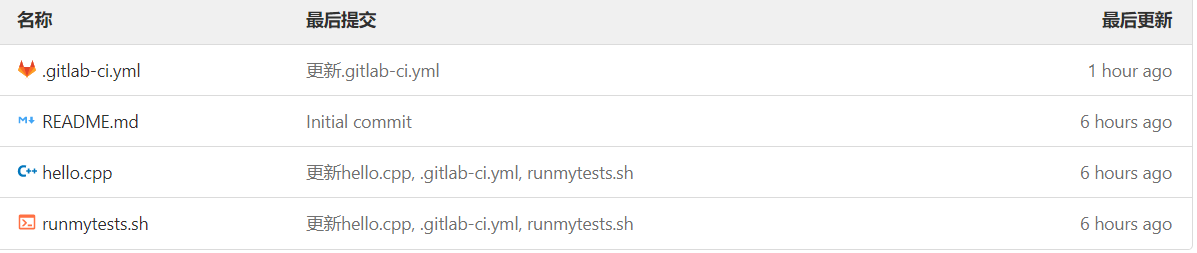
.gitlab-ci.yml
# This file is a template, and might need editing before it works on your project.

# use the official gcc image, based on debian

# can use verions as well, like gcc:5.2

# see https://hub.docker.com/_/gcc/

image: ubuntu:bionic

build:

  stage: build

  # instead of calling g++ directly you can also use some build toolkit like make

  # install the necessary build tools when needed

  # before_script:

  #   - apt update && apt -y install make autoconf

  script:

    - g++ hello.cpp -o mybinary

  artifacts:

    paths:

      - mybinary

      # depending on your build setup it's most likely a good idea to cache outputs to reduce the build time

      # cache:

      #   paths:

      #     - "*.o"

# run tests using the binary built before

test:

  stage: test

  script:

    - chmod +x runmytests.sh

    - ./runmytests.sh
hello.cpp
#include <iostream>

using namespace std;

int main()

{

    cout << "hello world" << endl;

    return 0;

}
runmytests.sh
./mybinary
项目文件说明
.gitlab-ci.yml就是自动化测试的配置文件,相关内容可参见[4],建议大家仔细阅读该配置文件即可理解该项目。
gitlab-runner注册
查找api
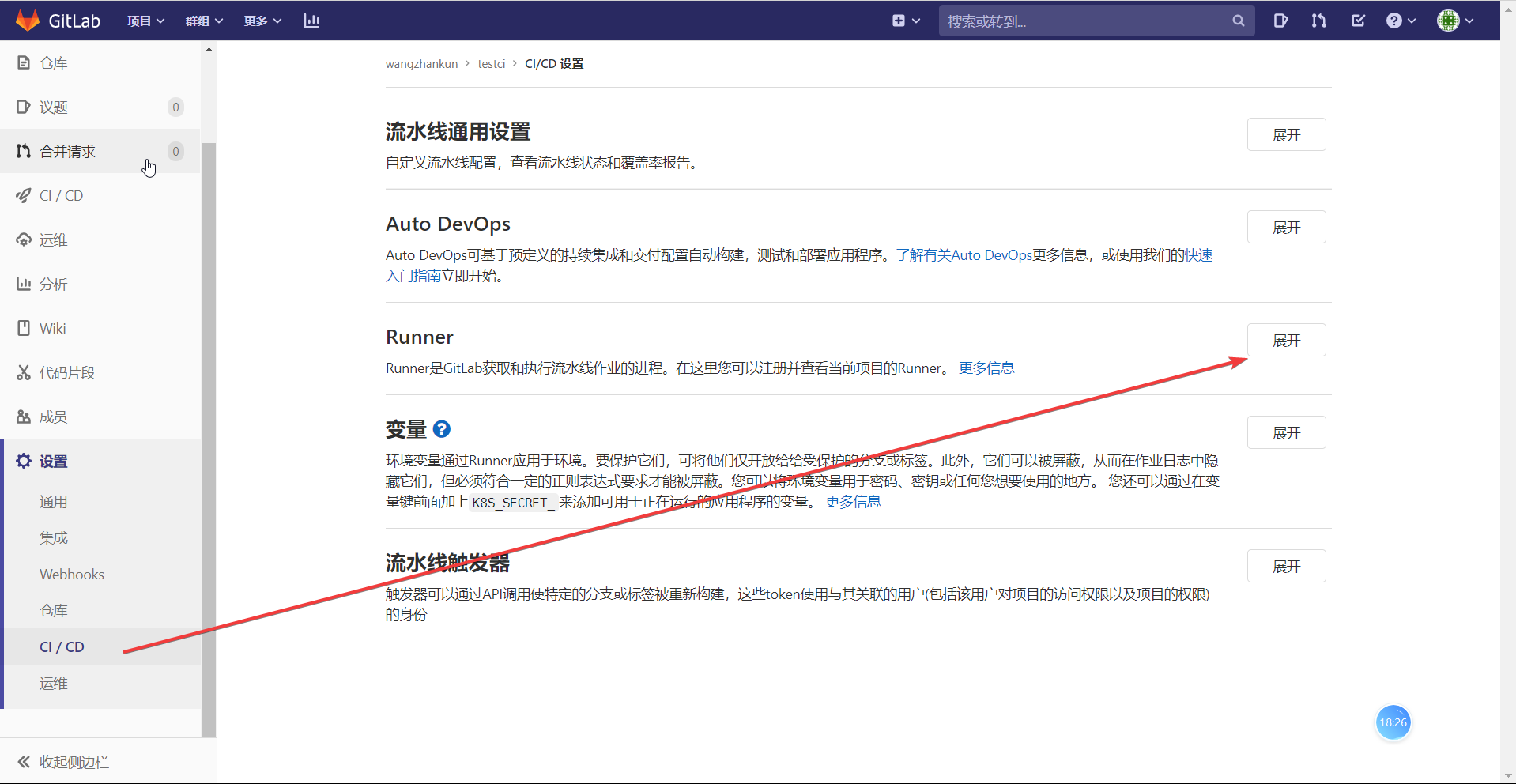
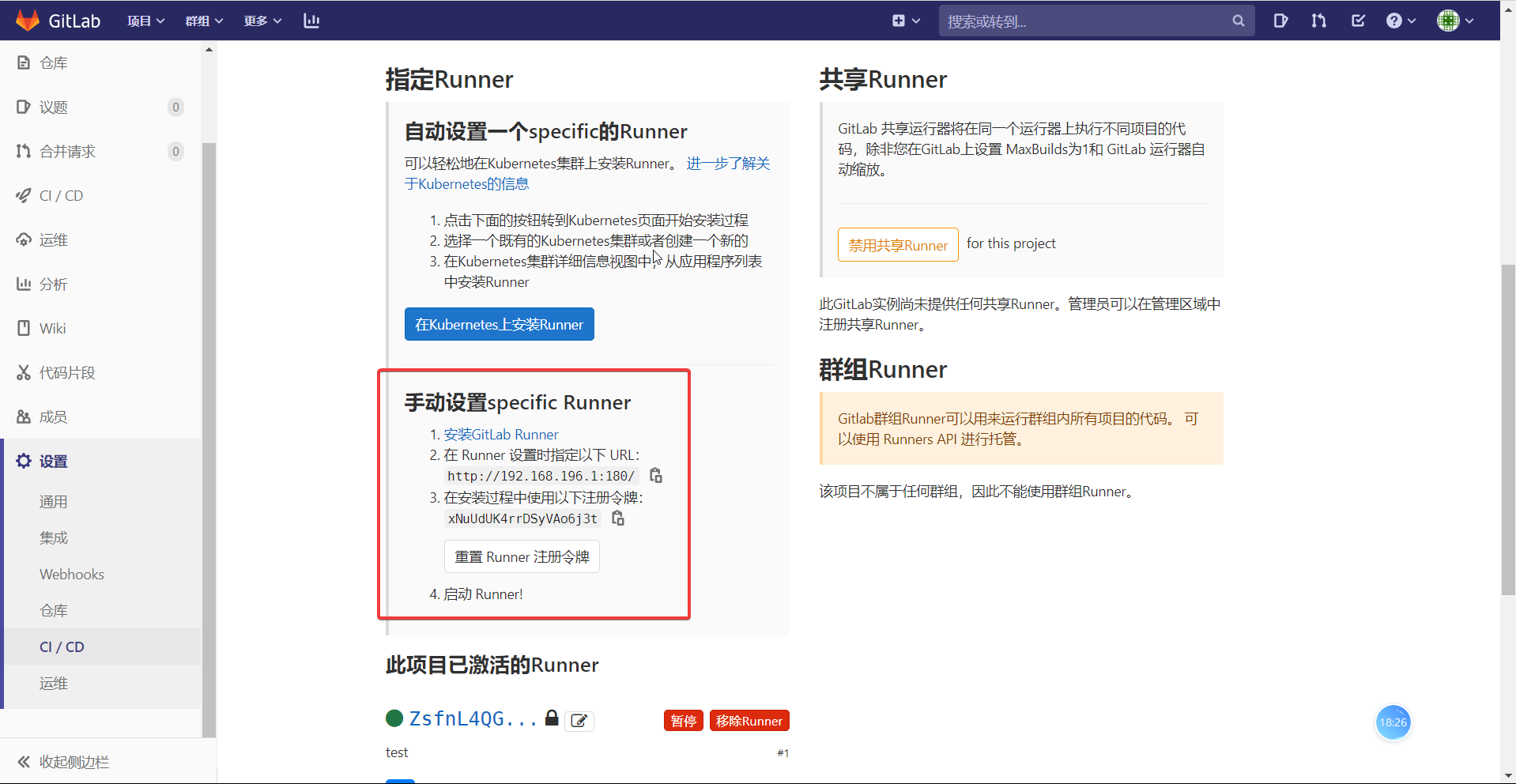
注册
执行命令:
sudo gitlab-runner register
输入相关参数,下面内容引用自[2:1]
# 输入 GitLab 地址

Please enter the gitlab-ci coordinator URL (e.g. https://gitlab.com/):

http://192.168.199.109/

# 输入 GitLab Token

Please enter the gitlab-ci token for this runner:

1Lxq_f1NRfCfeNbE5WRh

# 输入 Runner 的说明

Please enter the gitlab-ci description for this runner:

可以为空

# 设置 Tag,可以用于指定在构建规定的 tag 时触发 ci

Please enter the gitlab-ci tags for this runner (comma separated):

deploy

# 这里选择 true ,可以用于代码上传后直接执行(根据版本,也会没有此选项)

Whether to run untagged builds [true/false]:

true

# 这里选择 false,可以直接回车,默认为 false(根据版本,也会没有此选项)

Whether to lock Runner to current project [true/false]:

false

# 选择 runner 执行器,这里我们选择的是 shell

Please enter the executor: virtualbox, docker+machine, parallels, shell, ssh, docker-ssh+machine, kubernetes, docker, docker-ssh:

shell
重启gitlab-runner
systemctl restart gitlab-runner
自动测试
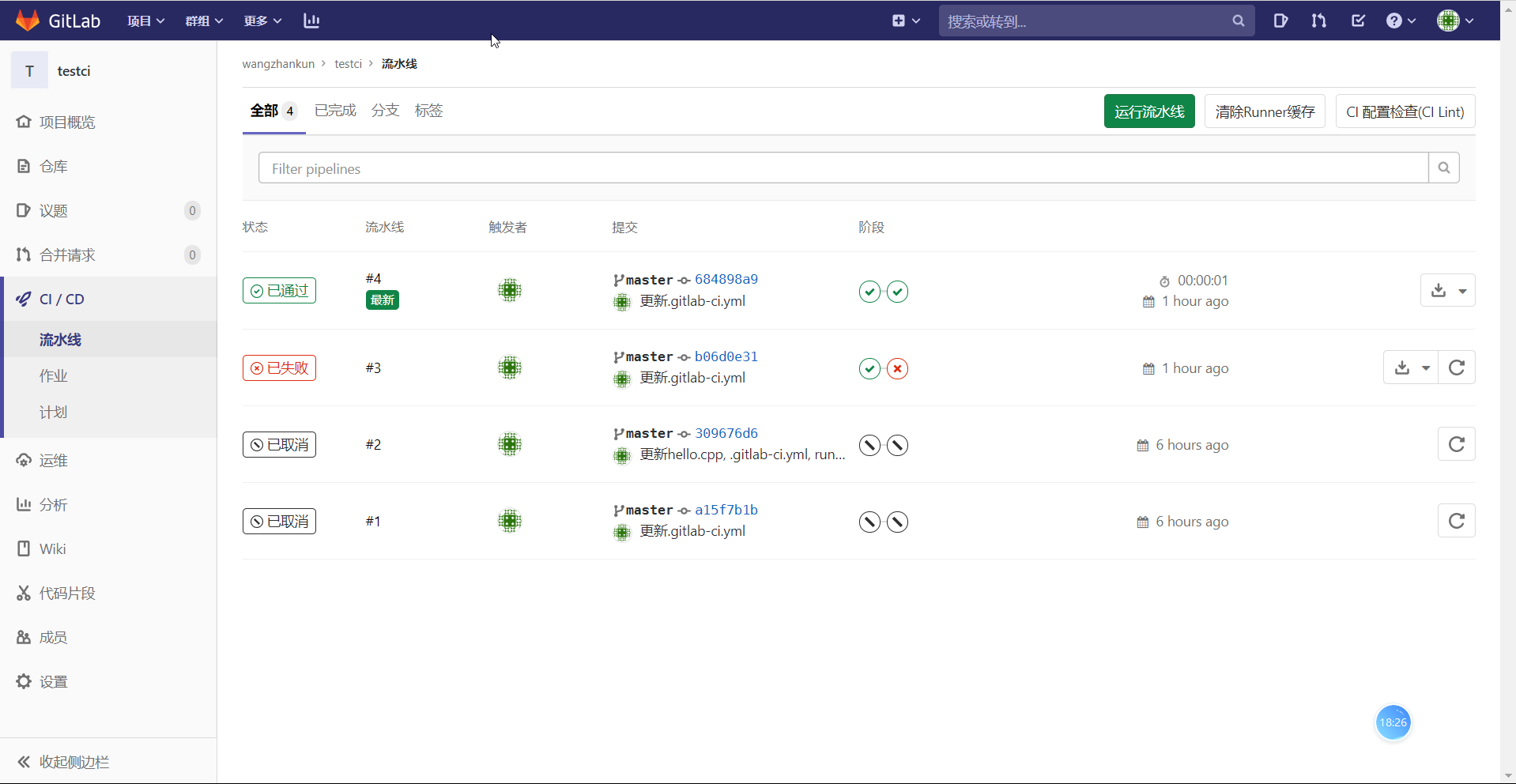
此时,应该是已经自动进行了测试了:
参考文献
注意:[2:2]是[3:1]的视频笔记,因此需要配合[3:2]使用。
docker安装gitlab并部署CICD的更多相关文章
- 解决 Windows Docker 安装 Gitlab Volume 权限问题
本文首发于我的个人博客,解决 Windows Docker 安装 Gitlab Volume 权限问题 ,欢迎访问! 记录一下 Windows10 下 Docker 安装 Gitlab 的步骤. Ca ...
- Docker安装Gitlab
一.Ubuntu16.4上Docker安装Gitlab 1.安装docker 参见:https://docs.docker.com/engine/installation/linux/ubuntuli ...
- 利用docker安装gitlab
安装docker 安装 virtualbox 下载 dockertoolbox并安装 官网的服务器一直连不上, 幸亏还有这个 https://get.daocloud.io/toolbox/ 比 ht ...
- docker 安装gitlab
# docker 安装gitlab # 一.安装镜像(官网文档) export GITLAB_HOME=/srv/gitlab # 必须先设置它,它就是你存储代码仓库的位置.以后要移植的时候直接把这个 ...
- Docker安装GitLab与Runner(网关),常规设置,自动化用到k8s+token
[转]图文详解k8s自动化持续集成之GitLab CI/CD Windows里面使用Debian命令行工具完成 和Docker网络相关的命令 查看某一个容器的网络 docker inspect 容器I ...
- centos7下使用docker安装gitlab
环境背景: Docker化已经成为一种热门,记录一下使用docker引擎安装gitlab的过程. 测试环境: 系统 软件 依赖 CentOS 7.4 GitLab(latest) docker-ce ...
- Debian9 使用 Docker 安装 gitlab完整过程
一. 安装Docker CE (参考 官网指南) 1. 卸载老版本 sudo apt-get remove docker docker-engine docker.io 2. Update the ...
- docker安装Tomcat软件,部署项目
1 搜索tomcat镜像 $ sudo docker search tomcat NAME DESCRIPTION STARS OFFICIAL AUTOMATED tomcat Apache Tom ...
- Centos7 docker安装GitLab
*先决条件系统已安装Docker 1.查询GitLab镜像 docker search gitlab 2.现在GitLab镜像 3.创建文件夹 mkdir -p /software/gitlab/co ...
随机推荐
- 数据可视化之DAX篇(二)Power BI中的度量值和计算列,你搞清楚了吗?
https://zhuanlan.zhihu.com/p/75462046 对于初学者,总是会把度量值和计算列搞混,我也经常碰到这样的问题,有些星友用文章中的代码总是报错,发给我一看,才知道TA把本来 ...
- Python之协程、异步IO、redis缓存、rabbitMQ队列
本节内容 Gevent协程 Select\Poll\Epoll异步IO与事件驱动 Python连接Mysql数据库操作 RabbitMQ队列 Redis\Memcached缓存 Paramiko SS ...
- 开源|如何开发一个高性能的redis cluster proxy?
文|曹佳俊 网易智慧企业资深服务端开发工程师 背 景 redis cluster简介 Redis cluster是redis官方提供集群方案,设计上采用非中心化的架构,节点之间通过gossip协 ...
- mysql中常见约束
#常见约束 /* 含义:一种限制,用于限制表中的数据,为了保证表中的数据的准确和可靠性 分类:六大约束 NOT NULL:非空,用于保证该字段的值不能为空 比如姓名.学号等 DEFAULT:默认,用于 ...
- OSCP Learning Notes - Enumeration(4)
DNS Enumeration 1. Host Tool host is a simple utility for performing DNS lookups. It is normally use ...
- ES6语法——Promise对象
一.概念 Promise是异步编程的一种解决方案(解决回调地狱的问题),是一个能够获取异步操作信息的对象.Promise的内部保存着某个未来才会结束的事件(通常是一个异步操作) 二.特点 1.Prom ...
- vue : 使用stylus less (包括sublime插件支持)
版本: vue 2.5.2 webpack 3.6.0 先说stylus. 用npm装个包. npm install stylus stylus-loader --save-dev 然后在.vue文件 ...
- 处理字符getchar()-------Puzzle
题目链接:https://vjudge.net/problem/UVA-227#author=0 题解:这个题不难但需要注意很多点 1.需要输入空格,而cin不读取空格,所以需要getchar,而ge ...
- PHP入门之类型与运算符(一)
前言 PHP对于大部分人来说,是比较容易入门的.笔者也是刚学习不久,所以就把自己学习的基础知识进行总结和整理.第一部分是类型与运算符.如果你想学习PHP,可以参考PHP学习手册学习,任何一本教学资料也 ...
- R 基础绘图体系-基础篇
1.高水平绘图函数 生成数据 #模拟100位同学学号及三科成绩 num = seq(12340001,12340100) # 形成学号 x1 = round(runif(100,min = 80,ma ...