
DB2版本升级(V9.7升级到V11.1)
1.V11.1版本升级路线
DB2 11.1
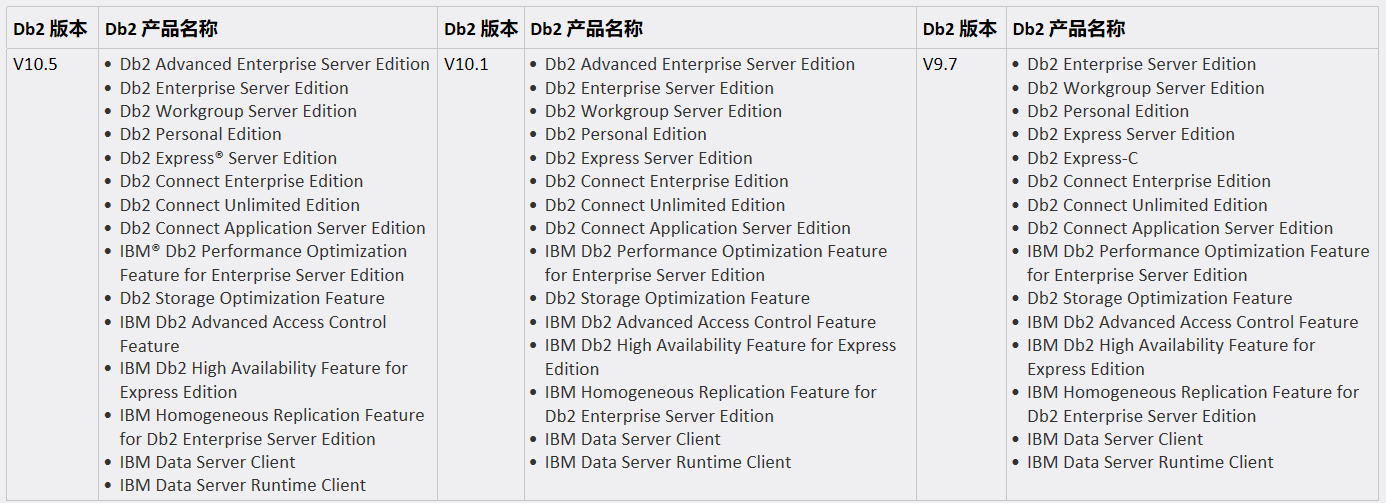
可以将现有的 Db2 V9.7、Db2 V10.1 或 Db2 V10.5 实例和数据库直接升级到 Db2 V11.1。
如果 Db2 服务器正在 Db2 V9.7 之前的发行版上运行,请先将它们升级到 Db2 V9.7、Db2 V10.1 或 Db2 V10.5,然后升级到 Db2 V11.1。建议升级到 Db2 V9.7 的最新修订包。
2.升级前准备
2.1检查当前主机的文件系统
检查/opt与/home/以及/db2data是否充足
/opt是DB2实例软件默认安装路径(可更改)
/home/db2inst1 是实例目录(可更改)
/db2data 是用于数据库安装路径
如果空间足够,建议归档日志,备份目录单独划分。
[root@ecdb2 ~]# df -h

Filesystem            Size  Used Avail Use% Mounted on

/dev/mapper/vg_ecdb2-LogVol02

                       31G  9.5G   20G  33% /

tmpfs                 1.9G   76K  1.9G   1% /dev/shm

/dev/sda1             190M   40M  141M  22% /boot

/dev/mapper/vg_ecdb2-LogVol00

                       15G  1.1G   13G   8% /home

/dev/mapper/vg_data-lv_data

                      9.5G  431M  8.6G   5% /db2data
2.2备份当前实例下的数据库
在升级之前必须备份数据库,避免版本升级失败导致数据库无法使用的问题,建议做离线全备。
[db2inst1@ecdb2 ~]$ db2 list db directory

 System Database Directory

 Number of entries in the directory = 1

Database 1 entry:

 Database alias                       = SAMPLE

 Database name                        = SAMPLE

 Local database directory             = /home/db2inst1

 Database release level               = 14.00

 Comment                              =

 Directory entry type                 = Indirect

 Catalog database partition number    = 0

 Alternate server hostname            =

 Alternate server port number         =

[db2inst1@ecdb2 ~]$ ^C

[db2inst1@ecdb2 ~]$ db2 backup db sample to /db2data

Backup successful. The timestamp for this backup image is : 20190422184606

[db2inst1@ecdb2 ~]$ cd /db2data

[db2inst1@ecdb2 db2data]$ ls -lrt

total 446004

drwx------ 2 db2inst1 db2iadm     16384 Mar 27 21:34 lost+found

-rwxrwxr-x 1 db2inst1 db2iadm 200781824 Mar 27 21:59 SAMPLE.0.db2inst2.DBPART000.20190327215905.001

-rw-r--r-- 1 db2inst1 db2iadm      8083 Mar 27 23:22 redirect_sample.sql

-rw-r--r-- 1 db2inst1 db2iadm      1875 Mar 27 23:23 SAMPLE_NODE0000.out

drwxrwxr-x 2 db2inst1 db2iadm      4096 Mar 28 10:28 db2inst2

drwxrwxr-x 3 db2inst1 db2iadm      4096 Apr 18 11:52 db2inst1

-rw------- 1 db2inst1 db2iadm 255889408 Apr 22 18:46 SAMPLE.0.db2inst1.DBPART000.20190422184606.001

[db2inst1@ecdb2 db2data]$
2.3检查当前的实例版本
检查现有实例版本,首先是根据升级路线看是否能够升级
[db2inst1@ecdb2 ~]$ db2level

DB21085I  This instance or install (instance name, where applicable:

"db2inst1") uses "64" bits and DB2 code release "SQL0907B" with level

identifier "080C0107".

Informational tokens are "DB2 v9.7.0.11", "s150922", "IP23944", and Fix Pack

"11".

Product is installed at "/opt/ibm/db2/V9.7".
当前实例版本为9.7,根据升级路线,是可以进行升级的
2.4上传压缩包解压
[root@ecdb2 ~]# ls -lrt

total 3459620

drwxr-xr-x  4 root root       4096 Sep 25  2015 server

-rw-r--r--. 1 root root 1913293693 Jan  6 16:43 v10.5fp10_linuxx64_server_t.tar.gz

-rw-r--r--  1 root root  799372868 Mar 16 19:14 v9.7fp11_linuxx64_server.tar.gz

-rw-r--r--. 1 root root      10259 Mar 27 10:08 install.log.syslog

-rw-r--r--. 1 root root      52264 Mar 27 10:10 install.log

-rw-------. 1 root root       1552 Mar 27 10:10 anaconda-ks.cfg

drwxr-xr-x. 2 root root       4096 Mar 27 10:13 Videos

drwxr-xr-x. 2 root root       4096 Mar 27 10:13 Templates

drwxr-xr-x. 2 root root       4096 Mar 27 10:13 Public

drwxr-xr-x. 2 root root       4096 Mar 27 10:13 Pictures

drwxr-xr-x. 2 root root       4096 Mar 27 10:13 Music

drwxr-xr-x. 2 root root       4096 Mar 27 10:13 Downloads

drwxr-xr-x. 2 root root       4096 Mar 27 10:13 Documents

drwxr-xr-x. 2 root root       4096 Mar 27 10:13 Desktop

drwxr-xr-x  2 root root       4096 Mar 27 19:26 isus

-rw-r--r--  1 root root  829849600 Apr 15 19:58 v9.5fp5_linuxx64_server.tar

drwxr-xr-x  2 root root       4096 Apr 22 16:53 V11

[root@ecdb2 ~]# cd V11

[root@ecdb2 V11]# pwd

/root/V11

[root@ecdb2 V11]# ls -lrt

total 1935492

-rw-r--r-- 1 root root 1981938797 Apr 16 12:03 v11.1.4fp4a_linuxx64_server_t.tar.gz

解压使用tar -zxvf v11.1.4fp4a_linuxx64_server_t.tar.gz

如果是aix的,需要gzip -d v11.1.4fp4a_linuxx64_server_t.tar.gz变成tar包

tar -xvf v11.1.4fp4a_linuxx64_server_t.tar
3.实例软件安装
3.1预安装检查
[root@ecdb2 server_t]# ./db2prereqcheck

Validating "/lib/libpam.so*" ...

   Requirement matched.

Requirement not matched for DB2 database "Server" with pureScale feature . Version: "9.8.0.2".

Summary of prerequisites that are not met on the current system:

DBT3514W  The db2prereqcheck utility failed to find the following 32-bit library file: "libstdc++.so.5".

DBT3613E  The db2prereqcheck utility failed to verify the prerequisites for TSA. Ensure your machine meets all the TSA installation prerequisites.
可以看到,预安装检查是有报错的,这个报错官方是说明的。这个是因为32位libstdc++没有装
官方的回应如下:
DBT3514W db2prereqcheck 实用程序找不到以下 32 位库文件:库文件名。
说明
您可以使用 db2prereqcheck 实用程序来验证安装先决条件。
当 db2prereqcheck 实用程序找不到 32 位版本的必需库文件时,将返回此消息。如果缺少指定的文件,那么 32 位数据库应用程序可能无法正常运行。
用户响应
请以下列其中一种方式响应此消息:
如果您不打算将 32 位应用程序与 DB2 数据库配合使用,那么无需进行响应。
如果您打算将 32 位应用程序与 DB2 数据库配合使用,请先确保指定的 32 位库文件存在于系统上,然后再安装 DB2 数据库。
如果需要安装32位的应用程序,下面这个是解决方案:
    1.DBT3514W The db2prereqcheck utility failed to find the following 32-bit library file: "libstdc++.so.5".

    解决方案:yum -y install libstdc++.so.6

    2.DBT3514W  The db2prereqcheck utility failed to find the following 32-bit library file: "/lib/libpam.so*"

    解决方案:yum -y install pam-devel.i686 pam.i686

    3.DBT3507E  The db2prereqcheck utility failed to find the following package or file: "sg3_utils".

    解决方案:yum -y install sg3_utils-*

    4. Required minimum version for "ksh": "20100621"

    解决方案:yum -y install ksh*
安装完成后重新检查
[root@ecdb2 server_t]# ./db2prereqcheck

Validating "32 bit version of "libstdc++.so.5" " ...

   Found the 32 bit "/usr/lib/libstdc++.so.6" in the following directory "/usr/lib".

   Requirement matched.

Validating "libaio.so version " ...

DBT3553I  The db2prereqcheck utility successfully loaded the libaio.so.1 file.

   Requirement matched.

Validating "libnuma.so version " ...

DBT3610I  The db2prereqcheck utility successfully loaded the libnuma.so.1 file.

   Requirement matched.

Validating "/lib/libpam.so*" ...

   Requirement matched.

DBT3533I  The db2prereqcheck utility has confirmed that all installation prerequisites were met.
这个表示预安装检查通过了。
3.2实例软件安装
[root@ecdb2 server_t]# ls -lrt

total 120

-r-xr-xr-x  1 bin bin  5111 Feb 27 17:31 db2prereqcheck

-r-xr-xr-x  1 bin bin  5259 Feb 27 17:31 db2_deinstall

-r-xr-xr-x  1 bin bin  5111 Feb 27 17:32 db2setup

-r-xr-xr-x  1 bin bin  5093 Feb 27 17:32 db2ls

-r--r--r--  1 bin bin 47346 Feb 27 17:32 db2checkCOL.tar.gz

-r--r--r--  1 bin bin  4987 Feb 27 17:32 db2checkCOL_readme.txt

-r-xr-xr-x  1 bin bin  5306 Feb 27 17:32 db2ckupgrade

-r-xr-xr-x  1 bin bin  5129 Feb 27 17:32 db2_install

drwxr-xr-x 10 bin bin  4096 Feb 27 17:32 ibm_im

-r-xr-xr-x  1 bin bin  5147 Feb 27 17:32 installFixPack

drwxr-xr-x  6 bin bin  4096 Feb 27 17:32 db2

[root@ecdb2 server_t]# ./db2_install

Read the license agreement file in the db2/license directory.

***********************************************************

To accept those terms, enter "yes". Otherwise, enter "no" to cancel the install process. [yes/no]

yes

Default directory for installation of products - /opt/ibm/db2/V11.1

***********************************************************

Install into default directory (/opt/ibm/db2/V11.1) ? [yes/no]

yes

Specify one of the following keywords to install DB2 products.

  SERVER

  CONSV

  CLIENT

  RTCL

Enter "help" to redisplay product names.

Enter "quit" to exit.

***********************************************************

SERVER

***********************************************************

Do you want to install the DB2 pureScale Feature? [yes/no]

no

DB2 installation is being initialized.

Total number of tasks to be performed: 58

Total estimated time for all tasks to be performed: 2613 second(s)

中间安装步骤就省略了

Task #59 start

Description: Updating global profile registry

Estimated time 3 second(s)

Task #59 end

The execution completed successfully.

For more information see the DB2 installation log at

"/tmp/db2_install.log.55688".
在最后会产生一个The execution completed successfully.如果失败会有报错。
3.3检查实例软件安装日志
在安装实例软件后会在/tmp下面有生成相关的日志,比如:/tmp/db2_install.log.55688
这里面记录了安装的版本,安装的步骤,安装了哪些东西。
Installing or updating DB2 HA scripts for IBM Tivoli System Automation for Multiplatforms (Tivoli SA MP) :..

.....Success

Executing control tasks :.......Success

Updating global registry :.......Success

Starting DB2 Fault Monitor :.......Success

Updating the db2ls and db2greg link :.......Success

Registering DB2 licenses :.......Success

Setting default global profile registry variables :.......Success

Initializing instance list :.......Success

Registering DB2 Update Service :.......Success

Updating global profile registry :.......Success
如果这些都是Success ,表示实例软件安装成功。
4.升级实例
升级之前,必须停止现有实例,否则升级的时候会出现报错
[root@ecdb2 instance]# pwd

/opt/ibm/db2/V11.1/instance

[root@ecdb2 instance]# ./db2iupgrade -u db2fenc1 db2inst1

DBI1446I  The db2iupgrade command is running.

DB2 installation is being initialized.

The DB2 installer detects that one or more DB2 instances "db2inst1" are still

active. Stop the active instances and rerun the command again.

A major error occurred during the execution that caused this program to

terminate prematurely. If the problem persists, contact your technical service

representative.

For more information see the DB2 installation log at

"/tmp/db2iupgrade.log.99362".

DBI1264E  This program failed. Errors encountered during execution were

      written to the installation log file. Program name:

      db2iupgrade. Log file name: /tmp/db2iupgrade.log.99362.

Explanation:

This message is returned when some processes and operations have failed.

Detailed information about the error was written to the log file.

User response:

Contact IBM support to get assistance in resolving this issue. Keep the

log file intact as this file is an important reference for IBM support.

   Related information:

   Contacting IBM Software Support
检查相关的日志
[root@ecdb2 instance]# more /tmp/db2iupgrade.log.99362

DB2 Setup log file started at:  Mon Apr 22 06:03:56 PM 2019 CST

============================================================

Operating system information: Linux 2.6.32-642.el6.x86_64.#1 SMP Wed Apr 13 00:51:26 EDT 2016 x86_64

ERROR: The DB2 installer detects that one or more DB2 instances "db2inst1" are still

active. Stop the active instances and rerun the command again.

ERROR: The "db2iupgrade" command failed. Ensure that errors reported in the log

file are fixed, then rerun the command.

Post-installation instructions

-------------------------------

Required steps:

There were some errors detected during DB2 installation. To collect the information files from the system, run the "db2support -install" command with the proper options before reporting the problem to IBM service. For information re

garding the usage of the db2support tool, check the DB2 Information Center.

DB2 Setup log file finished at:  Mon Apr 22 06:03:58 PM 2019 CST

============================================================
4.1升级预检查
升级预检查可以使用db2ckupgrade去进行检查
[db2inst1@ecdb2 instance]$ ./db2ckupgrade sample -l /home/db2inst1/db2ckupgrade.log -u db2inst1 -p enmodb2

db2upgrade was successful. Database(s) can be upgraded
4.2停止现有实例
[root@ecdb2 instance]# su - db2inst1

[db2inst1@ecdb2 ~]$ db2stop force

04/22/2019 18:11:22     0   0   SQL1064N  DB2STOP processing was successful.

SQL1064N  DB2STOP processing was successful.

[db2inst1@ecdb2 ~]$ exit
这一步必须在应用或者甲方同意的情况下进行,如果存在应用,应用同意可以杀可以使用以下命令:
db2 force applications all

db2 terminate
执行完成之后去停止实例,如果停止不了,需要应用人员停止相关的应用。
4.3升级实例
[root@ecdb2 instance]# ls -lrt |grep db2iupgrade

-r-xr--r-- 1 root root  94819 Feb 27 16:50 db2iupgrade_local

-r-xr--r-- 1 root root  76962 Apr 22 17:41 db2iupgrade

[root@ecdb2 instance]# ./db2iupgrade -u db2fenc1 db2inst1

DBI1446I  The db2iupgrade command is running.

DB2 installation is being initialized.

Total number of tasks to be performed: 4

Total estimated time for all tasks to be performed: 309 second(s)

Task #1 start

Description: Setting default global profile registry variables

Estimated time 1 second(s)

Task #1 end

Task #2 start

Description: Initializing instance list

Estimated time 5 second(s)

Task #2 end

Task #3 start

Description: Configuring DB2 instances

Estimated time 300 second(s)

Task #3 end

Task #4 start

Description: Updating global profile registry

Estimated time 3 second(s)

Task #4 end

The execution completed successfully.

For more information see the DB2 installation log at

"/tmp/db2iupgrade.log.100946".

DBI1070I  Program db2iupgrade completed successfully.
升级后会显示升级完成,并且会在/tmp下面生成一个upgrade的日志
检查相关的升级日志,看升级日志中是否存在报错(/tmp/db2iupgrade.log.100946)
Existing instances to configure:

    Instance name:                              db2inst1

        Instance user information:

            User name:                          db2inst1

        Fenced user information:

            User name:                          db2fenc1

Setting default global profile registry variables :.......Success

Initializing instance list :.......Success

The instance "db2inst1" has been upgraded successfully.

Configuring DB2 instances :.......Success

Updating global profile registry :.......Success
4.4检查升级后实例版本
[root@ecdb2 instance]# su - db2inst1

[db2inst1@ecdb2 ~]$ db2level

DB21085I  This instance or install (instance name, where applicable:

"db2inst1") uses "64" bits and DB2 code release "SQL11014" with level

identifier "0205010F".

Informational tokens are "DB2 v11.1.4.4", "s1902261400", "DYN1902261400AMD64",

and Fix Pack "4a".

Product is installed at "/opt/ibm/db2/V11.1".
可以看到实例已经升级到11.1.0.4了。
5.升级数据库
5.1启动实例连接数据库
[db2inst1@ecdb2 ~]$ db2start

SQL8007W  There are "90" day(s) left in the evaluation period for the product

"DB2 Advanced Enterprise Server Edition". For evaluation license terms and

conditions, refer to the License Agreement document located in the license

directory in the installation path of this product. If you have licensed this

product, ensure the license key is properly registered. You can register the

license by using the db2licm command line utility. The license key can be

obtained from your licensed product CD.

04/22/2019 18:20:37     0   0   SQL1063N  DB2START processing was successful.

SQL1063N  DB2START processing was successful.

[db2inst1@ecdb2 ~]$ db2 connect to sample

SQL5035N  The connection failed because the database product has been updated

and the database needs to be upgraded  SQLSTATE=55001
这里因为我没有许可证,试用天数为90天,如果是生产数据库,建议把lisence也打上。
[db2inst1@ecdb2 ~]$ db2licm -l

Product name:                     "DB2 Advanced Enterprise Server Edition"

License type:                     "Trial"

Expiry date:                      "07/20/2019"

Product identifier:               "db2aese"

Version information:              "11.1"
可以看到,到了V11,默认安装都是AESE(高级企业版)了。
从刚刚的连接数据库来看,存在报错
SQL5035N The connection failed because the database product has been updated

and the database needs to be upgraded??SQLSTATE=55001
这个报错是因为我们暂时只是升级了实例,但是数据库还没有进行版本升级。
5.2 数据库升级
[db2inst1@ecdb2 ~]$ db2 upgrade db sample

DB20000I  The UPGRADE DATABASE command completed successfully.

[db2inst1@ecdb2 ~]$ db2 connect to sample

   Database Connection Information

Database server        = DB2/LINUXX8664 11.1.4.4

SQL authorization ID   = DB2INST1

Local database alias   = SAMPLE
注意事项:
1.升级前必须将数据库做离线全备。
2.升级过程中不能中断,否则只有重装。
3.版本升级从数据库命令层面没有回退方案,只能通过备份恢复,如果升级出现问题,可以删掉实例,重建实例,恢复数据库。
4.升级完成之后需要绑定相关的package
5.升级完成后如果事件监视器,需要删除后重建
注意事项中第三条,也是为什么在准备过程中就需要对数据库进行全备的,如果是生产还需要考虑,应用停机等。DB2 的版本升级分享到此结束,祝好运。
DB2版本升级(V9.7升级到V11.1)的更多相关文章
- Taurus.MVC 微服务框架 入门开发教程:项目部署:3、微服务应用程序版本升级:全站升级和局部模块升级。
系列目录: 本系列分为项目集成.项目部署.架构演进三个方向,后续会根据情况调整文章目录. 本系列第一篇:Taurus.MVC V3.0.3 微服务开源框架发布:让.NET 架构在大并发的演进过程更简单 ...
- 关于DB2版本、补丁升级和回退的总结[转载]
首先介绍几个概念 RELEASE的升级就是版本升级,例如9.1→9.5→9.7→10.1,可以跳版本升级,例如9.1→10.1 FIX PACK简称FP,就是打补丁,例如9.7.1→9.7.2,每个版 ...
- WordPress 版本升级、主题升级记录
版本升级 升级很简单,但是以防万一,先备份数据. 一.备份数据库 mysqldump -u root -p --database myblog > myblog.sql 若需要还原可执行如下操作 ...
- ES跨版本升级?——难道升级集群发生shard allocation是因为要分配replica节点???
Full cluster restart upgrade Elasticsearch requires a full cluster restart when upgrading across maj ...
- python版本升级流程,升级2.7跟3.x版本流程一样
前言: 目前python2.6版本很多库已经不支持,在安装库的时候总会遇到很多装不上的事故,特别烦恼,所以以后不纠结,直接升级python版本后再使用,避免多次采坑:当然,未来趋势还是python3. ...
- Ubuntu 8.04下安装DB2方法
參考文献: How-to: Ubuntu 7.10 Server x86 32-bit and DB2 Express-C v9.5 DB2 v9.7 Infomation Center 场景:在IB ...
- db2部署
下载地址: wget ftp://public.dhe.ibm.com/software/hk/cobra/db2exc_970_LNX_x86_64.tar.gz 上传压缩包到/opt,再解压d ...
- 升级owncloud到7.0.2
owncloud很久没有提示升级了,官网已经升级到7.0.2,访问Update Center依旧显示是最新.估计是有什么问题导致不能自动更新.想着干脆手动升级试试.找到了两个手动升级的文档: 大版本升 ...
- 关于linux下DB2创建数据库报错问题
公司业务需要,把服务搭在中标下,在中标下装了DB2 Express-C v9.7.1,之前用着没有问题,隔了一段时间没用,最近又需要用到它,出了一些菜鸟问题,记录下来以免有人和我犯同样的错误...进入 ...
随机推荐
- PHP比较数组、对象是否为空
PHP简单对比对象.数组是不是为空: 1 <?php 2 /*简单的比较对象和数组是不是为空*/ 3 4 #定义空类EmptyClass 5 class EmptyClass{} 6 7 $em ...
- 从0开始快速入门学Java----基本篇
由于是0基础入门java,所以花了比较多的时间学习了基本语法知识,阶段性梳理下知识: 1. Java的介绍+JDK安装及环境变量配置+第一个程序HelloWorld的编写 这部分开始遇到的问题比较多, ...
- java中邮件通知
// 客户信息 Tkhxx tkhxx = new Tkhxx(); try { String msg = tkhxx.toString(); MailUtil.simpleMailSend(Mail ...
- 手摸手带你用Hexo撸博客(一)
原文地址 手摸手带你用Hexo撸博客(一) 环境搭建 安装 node 狂点下一步 命令行输入此条命令 如果能看到版本号则安装成功 node -v 安装Git (同上) 实在不会的小伙伴百度一下,教程很 ...
- [LeetCode]9. Palindrome Number判断回文数字
/* 查看网上的思路有两种: 1.每次取两边的数,然后进行比较 2.取数的倒置数,进行比较 */ public boolean isPalindrome1(int x) { if (x<0) r ...
- 【超级经典】程序员装B指南(转)
一.准备工作 "工欲善其事必先利其器." 1.电脑不一定要配置高,但是双屏是必须的,越大越好,能一个横屏一个竖屏更好.一个用来查资料,一个用来写代码.总之要显得信息量很大,效率 ...
- Js HTML DOM动画
基础页面 为了演示如何通过 JavaScript 来创建 html 动画,我们将使用一张简单的网页: 实例 我的第一部 JavaScript 动画 我的动画在这里. 创建动画容器 所有动画都应该与容器 ...
- python之scrapy篇(一)
一.首先创建工程(cmd中进行) scrapy startproject xxx 二.编写Item文件 添加要字段 # -*- coding: utf-8 -*- # Define here the ...
- Turtlebot3新手教程-应用-跟随
本文针对如何利用Turtlebot3可实现的各种应用进行讲解 具体步骤如下: [Remote PC]安装应用包 cd ~/catkin_ws/src git clone https://github. ...
- 为什么Java中lambda表达式不能改变外部变量的值,也不能定义自己的同名的本地变量呢?
作者:blindpirate链接:https://www.zhihu.com/question/361639494/answer/948286842来源:知乎著作权归作者所有.商业转载请联系作者获得授 ...